Choosing the right PC for CAD and rendering comes down to more than raw specs. You need the right balance of CPU speed, GPU capability, memory, and storage for the software you use every day.
Below, we focus on five well-matched systems for different budgets and workloads, from serious workstation builds to capable value picks for design and 3D rendering.
Best 5 PC for Cad and Rendering Picks for 2026
Best AI-Ready Workstation
Lenovo ThinkStation P2 Tower with Core Ultra 7

- NPU-accelerated Core Ultra 7 for AI-assisted CAD workflows
- 32GB DDR5 RAM and 1TB SSD for smooth multitasking
- RTX 5000 Ada-ready workstation platform with multi-display support
Best For: Engineers and designers who want a dependable entry-level workstation with upgrade headroom.
Best Midrange AI Value
Acer Nitro V 16S AI Gaming Laptop

- RTX 5060 Laptop GPU for accelerated CAD and rendering tasks
- 32GB DDR5 RAM and 1TB Gen 4 SSD for smooth multitasking
- Portable 16-inch chassis with a 180Hz WUXGA display
Best For: Students, freelancers, and creators needing a portable CAD-and-rendering laptop with strong value.
Best for Heavy 3D Work
CPU Solutions VidCore Core Ultra 9
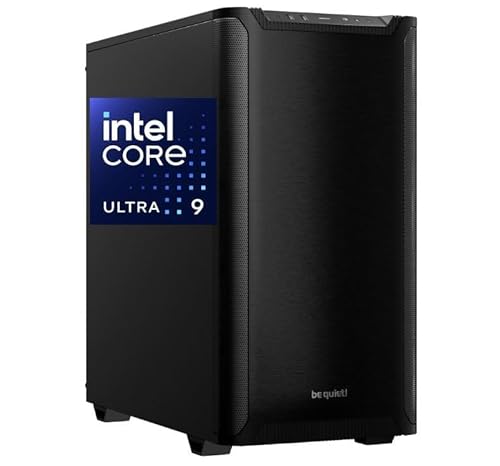
- Core Ultra 9 285K with 64GB RAM
- Quadro RTX 2000 ADA for pro apps
- 2TB NVMe SSD and liquid cooling
Best For: CAD users, 3D modelers, and editors who need a prebuilt workstation with pro graphics.
Best Value Refurbished CAD Workstation
Dell Precision 3431 Quadro P620

- Quadro P620 helps with CAD and pro-visual workflows.
- 16GB RAM and 1TB SSD balance speed and storage.
- Windows 11 Pro plus WiFi 6 suits office or home setups.
Best For: Engineers, designers, and budget-minded buyers who need a dependable refurbished CAD workstation.
Best AI-Ready Workstation – Lenovo ThinkStation P2 Tower with Core Ultra 7
If you want a practical pc for cad and rendering that emphasizes modern CPU performance, fast memory, and workstation expandability, the Lenovo ThinkStation P2 Tower is a strong fit. It pairs an Intel Core Ultra 7 265K with an integrated NPU, 32GB of DDR5 RAM, and a 1TB SSD for responsive modeling, simulation, and project loading.
Best For: Engineers, designers, and creators who need a dependable tower for entry-level CAD, 3D work, and AI-assisted workflows.
Pros:
- Core Ultra 7 processor with NPU support for faster AI-assisted design and automation tasks
- 32GB DDR5 memory and 1TB SSD help keep large projects responsive
- Workstation-ready expansion supports up to NVIDIA RTX 5000 Ada graphics
- Useful multi-display connectivity for a productive CAD setup
Cons:
- Does not include a dedicated GPU, so serious 3D rendering will require an upgrade
- More tower than desk-friendly compact system
For buyers comparing a pc for cad and rendering, this ThinkStation stands out for its balanced platform and room to grow. It is a smart starting point if you want a reliable workstation now and plan to add stronger graphics later.
Best Midrange AI Value – Acer Nitro V 16S AI Gaming Laptop
The Acer Nitro V 16S AI is a strong pc for cad and rendering if you want modern GPU acceleration, plenty of memory, and a portable 16-inch chassis without jumping to workstation pricing. Its Ryzen 7 260, RTX 5060 Laptop GPU, 32GB of DDR5, and 1TB Gen 4 SSD give it the core specs needed for lighter-to-medium CAD work, 3D modeling, and fast project loading.
Best For: Students, freelancers, and creators who need a capable, portable pc for cad and rendering with good all-around speed.
Pros:
- RTX 5060 Laptop GPU supports CUDA-accelerated workloads and modern rendering features
- 32GB DDR5 and 1TB Gen 4 SSD are solid for multitasking and large project files
- 16" WUXGA 180Hz display offers sharp, smooth visuals for design and review work
- Slim, portable build with quad-intake cooling for working on the move
Cons:
- Not a true mobile workstation, so it may lack pro-level certification for some CAD apps
- The 1920 x 1200 panel is good, but not as detailed as higher-resolution creator displays
- Powerful for its class, but heavy rendering jobs will still be slower than desktop replacements
This is a practical buy for a pc for cad and rendering when you care more about balanced performance and portability than workstation branding. It should handle everyday drafting, 3D viewport work, and entry-level rendering well, while the GPU and 32GB of RAM help it stay responsive as projects get more complex.
Best for Heavy 3D Work – CPU Solutions VidCore Core Ultra 9
If you need a pc for cad and rendering that leans toward workstation-class responsiveness, this CPU Solutions VidCore build brings a Core Ultra 9 285K, 64GB of RAM, and a Quadro RTX 2000 ADA GPU into one ready-to-use tower. It is aimed at creators who want strong multitasking, reliable thermals, and pro-oriented graphics support without piecing together a custom system.
Best For: CAD users, 3D modelers, and editors who want a prebuilt workstation with strong CPU performance, professional GPU drivers, and plenty of memory.
Pros:
- Core Ultra 9 285K and 64GB RAM handle complex project multitasking well
- Quadro RTX 2000 ADA is a better fit for pro apps than typical gaming GPUs
- 2TB NVMe SSD helps with fast file loads and large project storage
- Liquid cooling and Windows 11 Pro make it ready for long work sessions
Cons:
- 650W power supply may limit major future GPU upgrades
- Priced more like a workstation than a general-purpose desktop
For buyers comparing a pc for cad and rendering, this machine stands out for its professional GPU, high RAM capacity, and strong all-around specs in a prebuilt package. It makes the most sense if you value stability and productivity over gaming-focused features.
Best Value RTX 4060 Pick – CyberPowerPC Gamer Xtreme VR i5-13400F
If you want a practical pc for cad and rendering without jumping to a much pricier workstation, this CyberPowerPC build lands in a useful middle ground. The Intel Core i5-13400F, 16GB of DDR5 memory, and RTX 4060 graphics are a solid mix for entry to mid-level 3D work, viewport performance, and lighter rendering jobs.
Best For: CAD users, architecture students, and creators who need an affordable desktop that can handle modeling and moderate rendering workloads.
Pros:
- RTX 4060 8GB helps with GPU-accelerated workflows and smoother 3D viewports
- 1TB PCIe Gen4 SSD gives you fast load times and plenty of room for project files
- 16GB DDR5 and the i5-13400F offer a balanced starting point for design software
- Includes WiFi, Bluetooth, Windows 11, and peripherals for an easier setup
Cons:
- 16GB RAM may feel tight for large scenes or heavier multitasking
- The RTX 4060 is capable, but not ideal for very demanding rendering pipelines
- No workstation-class parts or expanded memory shown in the base configuration
Overall, this is a sensible pc for cad and rendering if you care more about value and everyday responsiveness than workstation-grade power. It should serve well for learning, production drafting, and moderate creative workloads, but serious render-heavy users will likely want more memory and a stronger GPU.
Best Value Refurbished CAD Workstation – Dell Precision 3431 Quadro P620
If you want a practical pc for cad and rendering without paying new-workstation prices, the Dell Precision 3431 is a sensible pick. Its 9th Gen Core i5, Quadro P620 graphics, 16GB RAM, and 1TB SSD give you the core specs needed for light to moderate CAD, 3D work, and everyday design productivity.
Best For: Engineers, designers, and small studios that need a reliable refurbished workstation for CAD drafting, multi-display work, and general office productivity.
Pros:
- Quadro P620 GPU is better suited to CAD and professional apps than typical consumer graphics.
- 16GB RAM and a 1TB SSD provide smooth multitasking and fast file access.
- Windows 11 Pro, WiFi 6, and Bluetooth make it ready for office or home use.
- Includes keyboard and mouse for a plug-and-play setup.
Cons:
- Quadro P620 is entry-level for rendering and won’t match higher-end workstations for heavy 3D scenes.
- As a renewed system, cosmetic wear may vary.
Overall, this Dell Precision is a strong value choice if your pc for cad and rendering needs prioritize stability, professional GPU support, and fast everyday responsiveness over top-end graphics power. It’s a smart buy for budget-conscious users who want workstation features in a refurbished package.
How We Picked the Best PC for Cad and Rendering
We prioritized systems that make sense for real design workloads: strong single-core performance for CAD responsiveness, enough multi-core power for rendering, modern GPUs for viewport acceleration, and at least 16GB of memory with fast SSD storage. We also considered upgradeability, workstation-focused features, and overall value for professionals and advanced users.
Quick Comparison
For a PC for Cad and Rendering, the best choice depends on the job. A workstation-class tower is usually the safest bet for reliability and upgrades, while a newer gaming laptop can work well for mobile drafting and moderate 3D work. Value desktops with RTX graphics are often the sweet spot for students, freelancers, and small studios that need strong performance without paying workstation pricing.
Key Buying Factors for a PC for Cad and Rendering
CPU Performance
CAD programs often benefit from high clock speeds and strong single-threaded performance, while rendering and exporting scale better with more cores. If you work in both 2D drafting and 3D visualization, look for a modern CPU with a strong balance of both.
GPU Capability
A dedicated GPU matters for smooth viewport navigation, 3D modeling, real-time shading, and GPU-accelerated rendering. Entry-level professional GPUs can be fine for lighter design work, but higher-end RTX-class cards are better for complex assemblies, large scenes, and animation.
Memory and Storage
16GB RAM is the practical minimum, but 32GB is a better starting point for serious CAD and rendering. Large projects, textures, and simulation data can quickly eat memory. A fast NVMe SSD improves project loading, application launches, and cache performance.
Workstation Features and Upgradability
For a long-term PC for Cad and Rendering, consider how easy it is to add more RAM, storage, or a better GPU later. Workstation models may also offer more stability and business-oriented support, which can matter if downtime is costly.
Who Should Buy Which PC for Cad and Rendering?
If you want dependable office or engineering use, a workstation tower is the safest route. If you need mobility for site visits, client meetings, or school, a powerful laptop is the more practical choice. If your main goal is maximum performance per dollar for 3D work, a gaming-oriented desktop with a strong GPU can be an excellent alternative. For light CAD, drafting, and general design tasks, even an older workstation can still be a sensible value pick.
In short, match the machine to your workload: prioritize CPU speed for drafting, GPU strength for 3D acceleration, and more memory if your scenes, assemblies, or renders are growing larger each year.