The right workstation depends on what your software asks of the GPU. CAD and design users may benefit from professional RTX hardware and application certifications, while video editors and 3D creators may get better value from a newer GeForce system.
These 10 desktops span compact workstations, modern tower PCs, and older budget options. Here’s how to weigh GPU class, memory, storage, and upgrade potential before you buy.
Best 10 Workstation PC with Nvidia GPU Picks for 2026
Versatile Creator Tower
Dell Ultra 7 Desktop with RTX 5060

- 20-core Core Ultra 7 and RTX 5060
- 32GB DDR5 and 2TB NVMe SSD
- Windows 11 Pro with peripherals
Best For: Creative and business multitasking with ample local storage
Compact Pro Workstation
Lenovo ThinkStation P3 Ultra Gen 2

- RTX 4000 SFF Ada with 20GB GDDR6
- 128GB DDR5 and 2TB Gen 5 SSD
- Compact chassis and Windows 11 Pro
Best For: Memory-heavy professional graphics work in tight spaces
High-Power GeForce Option
CyberPowerPC Ryzen 9 with RTX 5070
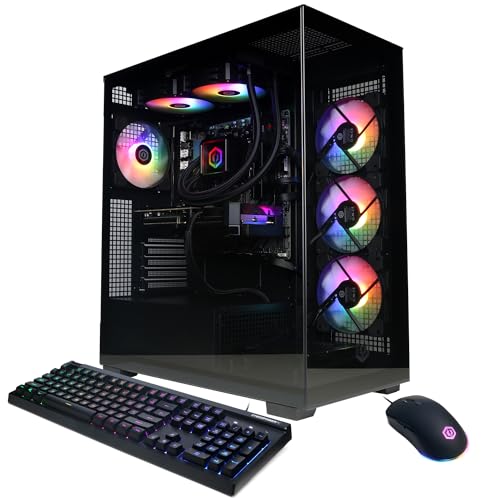
- 12-core Ryzen 9 9900X
- RTX 5070 with 12GB graphics memory
- 32GB DDR5 and 1TB NVMe SSD
Best For: Gaming and creative work on one GeForce-equipped tower
Renewed Office Workstation
Dell Precision 3431 with Quadro P620

- Quadro P620 with 2GB VRAM
- 16GB DDR4 and 1TB SSD
- Renewed unit with 30-day warranty
Best For: Office productivity and lighter professional graphics tasks
Balanced Creative Tower

- Core Ultra 7 265F and RTX 5060 8GB
- 32GB DDR5 memory and 1TB NVMe SSD
- Windows 11 Pro with Wi-Fi 6
Best For: Mixed productivity, editing, and entertainment
Complete Dual-Monitor Bundle

- Quadro P620 2GB dedicated GPU
- Two 24-inch 1080p monitors included
- 32GB RAM plus 500GB NVMe and 1TB SSD
Best For: A bundled dual-display office or design desk
High-Capacity Performance Pick
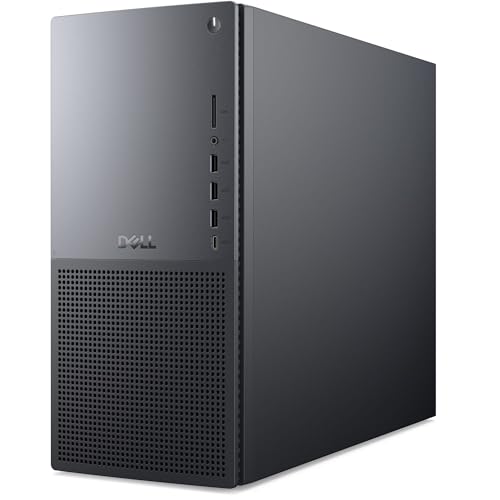
- Core Ultra 9 285K and RTX 5070 12GB
- 64GB DDR5 memory and 2TB NVMe SSD
- Windows 11 Pro and Wi-Fi 7
Best For: Memory-heavy multitasking and creative projects
Complete Office Bundle
Dell Precision 3431 with Quadro P620
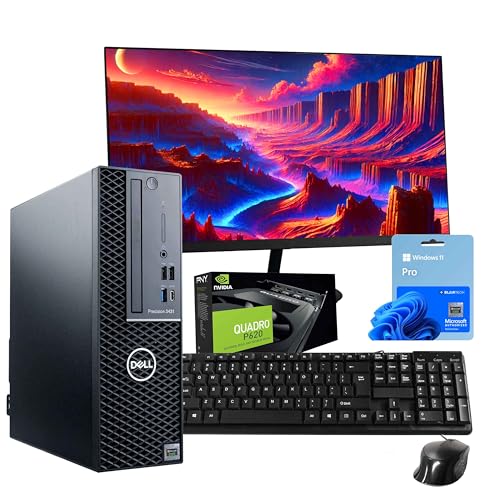
- New 24-inch 1080p monitor included
- Six-core i5, 16GB RAM, 1TB SSD
- Quadro P620 2GB; Windows 11 Pro
Best For: A ready-to-use office and light design setup
Modern RTX Option
Dell Tower ECT1250 with RTX 4060

- GeForce RTX 4060 with 8GB GDDR6
- 20-core Core Ultra 7 and 32GB DDR5
- Verify Windows edition before purchase
Best For: RTX-based content creation and multitasking
Storage-Heavy Creative Pick
HP Workstation with Quadro K1200

- 1TB SSD plus 4TB HDD
- 32GB RAM and Quadro K1200 4GB
- Confirm whether a monitor is included
Best For: Creative projects needing ample local storage
Versatile Creator Tower – Dell Ultra 7 Desktop with RTX 5060
If you want a workstation pc with nvidia gpu for creative work and everyday business tasks, this Dell tower pairs a 20-core Intel Core Ultra 7 265F with GeForce RTX 5060 graphics. Its 32GB of DDR5 memory and 2TB NVMe SSD leave room for multitasking and sizable project files.
Best For: Creators and professionals who want a Windows 11 Pro tower with dedicated graphics and generous storage.
Pros:
- RTX 5060 graphics support GPU-accelerated visual work.
- 32GB DDR5 RAM and a 2TB SSD suit busy workflows.
- Includes Wi-Fi 6, Windows 11 Pro, keyboard, and mouse.
Cons:
- The listed RTX 5060 is a GeForce card, not a professional RTX workstation model.
- The supplied notes do not specify the GPU’s memory capacity.
This is a practical choice when storage and an out-of-box setup matter more than a professional-class GPU designation. Confirm the display connections you need before ordering, since the port descriptions are not fully consistent.
For buyers seeking a workstation pc with nvidia gpu without a full-size tower, the ThinkStation P3 Ultra Gen 2 packs an Intel Core Ultra 9 285 vPro and NVIDIA RTX 4000 SFF Ada graphics with 20GB of GDDR6 into a compact chassis. Its 128GB DDR5 memory and 2TB PCIe Gen 5 SSD are suited to memory-heavy professional projects.
Best For: Professionals running demanding 3D, BIM, content-creation, or AI-inference workflows in limited desk space.
Pros:
- Professional RTX 4000 SFF Ada GPU has 20GB of graphics memory.
- 128GB RAM and a 2TB PCIe Gen 5 SSD support large workloads.
- Compact, MIL-STD-810H–certified design runs Windows 11 Pro.
Cons:
- Maximum listed RAM is 128GB, so this configuration has no stated memory headroom.
- Front USB-C ports are specified for data transfer only.
This is the strongest fit here for buyers who specifically need professional NVIDIA graphics and substantial RAM in a small footprint. Check your monitor and peripheral connections against the full port layout before purchase.
If your search for a workstation pc with nvidia gpu includes a gaming-oriented tower for creative tasks, this CyberPowerPC combines a 12-core Ryzen 9 9900X with a GeForce RTX 5070 12GB. It also includes 32GB DDR5 RAM, a 1TB PCIe 4.0 NVMe SSD, and liquid CPU cooling.
Best For: Buyers who want a powerful GeForce-equipped desktop for gaming alongside GPU-accelerated creative work.
Pros:
- RTX 5070 offers 12GB of dedicated graphics memory.
- Ryzen 9 9900X and 32GB RAM provide a capable multitasking foundation.
- Three DisplayPort outputs plus HDMI offer multiple display connections.
Cons:
- Windows 11 Home lacks the Pro edition supplied with the business-focused options here.
- The 1TB SSD provides less included storage than the 2TB models in this roundup.
Choose this tower when GeForce graphics and CPU performance take priority. It is sold as a gaming PC rather than a professional workstation, so check any software-specific GPU requirements before buying.
This renewed Dell Precision 3431 is a workstation pc with nvidia gpu aimed at buyers with modest visual-workload needs. It pairs a six-core Intel Core i5-9500 with a Quadro P620 2GB, 16GB DDR4 RAM, a 1TB SSD, and Windows 11 Pro.
Best For: Office users needing a renewed professional desktop for everyday productivity and lighter design work.
Pros:
- Quadro P620 provides dedicated professional graphics.
- 1TB SSD and 16GB RAM cover common office workflows.
- Includes Wi-Fi 6, Bluetooth, keyboard, and mouse.
Cons:
- The older i5-9500 and 2GB GPU memory limit its appeal for demanding modern 3D work.
- It is renewed and lists a 30-day warranty.
This Precision makes the most sense when business features and a dedicated Quadro card matter more than high-end rendering speed. Treat its graphics capabilities as an entry point and verify your software’s requirements.
Balanced Creative Tower – Dell Tower with RTX 5060
If you want a workstation pc with nvidia gpu capability for editing and everyday business tasks, this Dell tower pairs a 20-core Intel Core Ultra 7 265F with a GeForce RTX 5060. Its 32GB of DDR5 memory and 1TB NVMe SSD give you room to multitask and keep active projects close at hand.
Best For: Buyers who want a versatile desktop for productivity, photo or video editing, and entertainment.
Pros:
- RTX 5060 with 8GB of dedicated GDDR7 memory accelerates supported graphics-intensive apps.
- 32GB DDR5 memory and a 1TB NVMe SSD support multitasking and fast file access.
- Windows 11 Pro, Wi-Fi 6, Bluetooth 5.4, and HDMI and DisplayPort outputs suit a flexible desk setup.
Cons:
- The listed 1TB SSD may feel limiting if you keep large video projects locally.
- This configuration has 32GB installed RAM, not its listed 64GB maximum.
Choose this model if you want a balanced RTX-equipped tower rather than the larger memory and storage configuration of the Tower Plus.
For a workstation pc with nvidia gpu hardware that also comes with a ready-made desk setup, this renewed Dell Precision 3431 includes a Quadro P620 2GB card and two new 24-inch 1080p LCD monitors. A six-core Intel Core i5-9500, 32GB DDR4 memory, and separate 500GB NVMe and 1TB SSD drives round out the package.
Best For: Buyers prioritizing an included dual-monitor setup for office work, design tasks, and multitasking.
Pros:
- Includes two 24-inch monitors, a webcam, speakers, and a wireless keyboard and mouse.
- 32GB RAM and two SSDs provide practical capacity for multiple applications and files.
- Quadro P620 offers dedicated graphics and multi-monitor support.
Cons:
- The Quadro P620 has 2GB of graphics memory.
- It is a renewed system with a listed 30-day warranty.
The appeal is the complete workspace, not the newest components. Check that the older CPU and 2GB GPU fit your intended software before choosing it for heavier visual work.
If your search for a workstation pc with nvidia gpu performance calls for more memory and storage, the Dell Tower Plus EBT2250 combines an Intel Core Ultra 9 285K 24-core processor, GeForce RTX 5070 12GB graphics, 64GB DDR5 RAM, and a 2TB NVMe SSD. It is a strong fit for buyers balancing demanding multitasking with creative and gaming use.
Best For: Users who want a high-spec tower for large projects, creative applications, and graphics-heavy entertainment.
Pros:
- RTX 5070 supplies 12GB of dedicated GDDR7 graphics memory.
- 64GB DDR5 RAM and a 2TB NVMe SSD offer generous working capacity.
- Includes Windows 11 Pro, Wi-Fi 7, Bluetooth, and a wired keyboard and mouse.
Cons:
- No monitor is listed among the included accessories.
- The listed one-year warranty is provided by HV Supply; check coverage details before buying.
Pick this tower when the extra GPU memory, 64GB RAM, and 2TB drive matter more than getting a bundled display setup.
Complete Office Bundle – Dell Precision 3431 with Quadro P620
If you need a workstation pc with nvidia gpu and a monitor in one purchase, this renewed Dell Precision 3431 includes a new 24-inch 1080p LCD, wired keyboard, and mouse. Its six-core Intel Core i5-9500, 16GB RAM, and 1TB SSD suit everyday business and design work.
Best For: Office users who want a ready-to-use desktop setup for productivity and lighter visual workloads.
Pros:
- Includes a new 24-inch monitor, keyboard, and mouse.
- Quadro P620 2GB provides dedicated graphics for visual work and multi-display setups.
- Windows 11 Pro, Wi-Fi 6, Bluetooth, and a 1TB SSD cover practical office needs.
Cons:
- 16GB RAM and 2GB graphics memory may constrain larger design projects.
- Renewed PC carries a listed 30-day warranty.
Choose this bundle for its complete desk setup rather than maximum graphics capacity; check that its video outputs match any additional displays you plan to use.
Modern RTX Option – Dell Tower ECT1250 with RTX 4060
For buyers searching for a workstation pc with nvidia gpu but prioritizing current-generation graphics, the Dell Tower ECT1250 pairs a GeForce RTX 4060 8GB with a 20-core Intel Core Ultra 7-265F. Its 32GB DDR5 RAM and 1TB NVMe SSD make it a capable choice for content creation and multitasking.
Best For: Creators who want an RTX-equipped desktop for content creation alongside everyday computing and gaming.
Pros:
- RTX 4060 offers 8GB GDDR6 graphics memory.
- 32GB DDR5 RAM and a 1TB NVMe SSD provide a strong memory-and-storage starting point.
- Eight USB ports, Wi-Fi 6, and three PCIe expansion slots add flexibility.
Cons:
- GeForce graphics are not presented as a Quadro-class professional GPU.
- The supplied information conflicts on Windows edition: the title says Pro, while the bullets and details say Home.
This is the strongest listed option here for buyers who specifically want an RTX 4060. Confirm the installed Windows edition with the seller if Pro features are essential.
Storage-Heavy Creative Pick – HP Workstation with Quadro K1200
This renewed HP desktop is a workstation pc with nvidia gpu aimed at creative users who keep substantial project files locally. It combines an eighth-generation six-core Intel Core i5, 32GB DDR4 RAM, Quadro K1200 4GB graphics, a 1TB SSD, and a separate 4TB hard drive.
Best For: Design and editing users who value generous local storage and a range of display and peripheral ports.
Pros:
- 1TB SSD plus 4TB HDD separates active work from bulk file storage.
- 32GB RAM and dedicated Quadro K1200 4GB graphics support creative workflows.
- Includes USB-C, DisplayPort, VGA, Ethernet, Wi-Fi, and Bluetooth connectivity.
Cons:
- Renewed system uses an older eighth-generation CPU and Quadro K1200.
- Product notes conflict on whether a monitor is included; confirm bundle contents before ordering.
Its main advantage is room for projects and archives. Verify the exact included accessories and display connections before committing to a workstation setup.
How We Picked the Best Workstation PC with Nvidia GPU
We compared the listed CPU, NVIDIA GPU, memory, storage, form factor, and operating system for each of the 10 selected configurations. We also considered whether the hardware makes sense for common CAD, editing, rendering, and office-design tasks. Specifications alone cannot establish real-world speed, noise, reliability, or application certification, so confirm the exact seller configuration and your software vendor’s requirements before ordering.
Quick Comparison: Which Type Fits Your Work?
Professional workstation: The Lenovo ThinkStation P3 Ultra Gen 2 pairs an RTX 4000 SFF Ada with 128GB of RAM. It is the clearest fit here for buyers who need a compact system with a professional GPU; verify certifications for your specific applications.
Modern creator tower: The CyberPowerPC with an RTX 5070 and the Dell towers listed with RTX 5060 or RTX 4060 graphics are worth considering for GPU-accelerated editing, rendering, and general creative work. The Dell Tower Plus listing names a Core Ultra 9, 64GB of RAM, and 2TB of storage, but does not specify its NVIDIA GPU model; check that detail before comparing it on graphics performance.
Entry-level or legacy option: The Dell Precision systems with a Quadro P620 and the HP system with a Quadro K1200 may suit lighter workloads or older software. Do not assume their professional branding makes them faster than newer GeForce desktops.
Key Buying Factors for a Workstation PC with Nvidia GPU
Match the GPU to Your Applications
Start with your software vendor’s recommended hardware and certified-driver list. A professional RTX card can matter when certified drivers and support are requirements. For workflows without those requirements, a recent GeForce GPU may offer a more useful balance of cost and acceleration. Check GPU memory as well as model name, particularly for large scenes, complex timelines, and AI workloads.
Balance CPU, RAM, and Storage
CPU-heavy modeling and simulation need an appropriate processor, while large projects benefit from more memory. The listed systems range from 16GB to 128GB of RAM; 32GB is a practical starting point for many creator tasks, but demanding projects may need 64GB or more. An SSD helps with applications and active files. If a listing includes an HDD, treat it primarily as capacity for archives rather than a substitute for fast project storage.
Check the Practical Details
Confirm available display outputs, monitor compatibility, chassis dimensions, cooling, power supply, expansion slots, and upgrade access. For older or refurbished systems, check component condition, Windows 11 support, warranty terms, and whether peripherals shown in the listing are included.
Who Should Buy Which Workstation PC with Nvidia GPU?
Choose the ThinkStation if compact size and a professional GPU are priorities. Consider a newer GeForce tower if your editing or rendering software supports it and certification is not essential. Look at the P620-equipped Precisions or K1200-equipped HP only for modest workloads when their price and warranty justify older hardware. Before checkout, confirm the exact GPU and memory configuration against your most demanding application.