Two RTX 5090 GPUs can give demanding AI and rendering workflows substantial compute capacity, but the rest of the workstation matters just as much. CPU performance, memory, cooling, and power delivery all affect how well a dual-GPU system fits your work.
These three configurations pair dual GeForce RTX 5090 GPUs with 256GB of RAM and a listed 8TB NVMe setup. The clearest differences are their Ryzen CPU choices and the configuration details worth confirming before you order.
Best 3 Workstation PC with Dual Rtx 5090 Picks for 2026
Connectivity Pick
APC ES620 Dual RTX 5090 Workstation

- Dual RTX 5090 GPUs; 256GB DDR5
- 8TB NVMe listed as two 4TB drives in RAID
- Wi-Fi 7, 5Gb Ethernet, 15 USB ports
Best For: Connectivity-heavy dual-GPU setups
16-Core Pick
MES2X Ryzen 9 9950X3D2 Dual RTX 5090
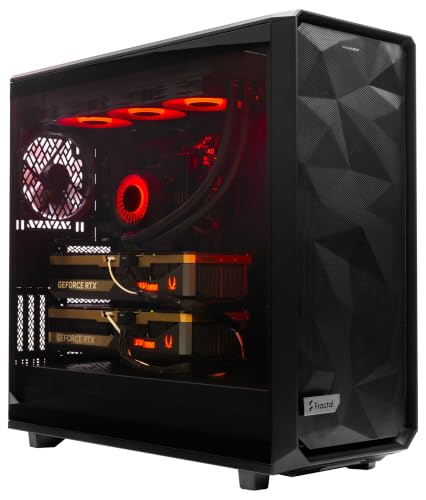
- Listed 16-core Ryzen 9 CPU
- Dual RTX 5090 GPUs; 8TB NVMe
- Verify conflicting RAM capacity specs
Best For: Buyers prioritizing the listed 16-core CPU
12-Core MES2X Pick
MES2X Ryzen 9 9900X Dual RTX 5090
- 12-core Ryzen 9 9900X
- Dual RTX 5090 GPUs; 8TB NVMe
- Verify conflicting RAM capacity specs
Best For: Buyers seeking the 12-core MES2X configuration
Connectivity Pick – APC ES620 Dual RTX 5090 Workstation
If you need a workstation pc with dual rtx 5090 cards and plenty of built-in connectivity, the APC ES620 pairs them with a 12-core Ryzen 9 9900X, 256GB DDR5 memory, and 8TB of NVMe storage listed as two 4TB drives in RAID.
Best For: Buyers who want a ready-to-use dual-GPU tower with Wi-Fi 7, 5Gb Ethernet, and numerous USB ports.
Pros:
- Two RTX 5090 GPUs with a listed 64GB of combined GDDR7 memory.
- 15 USB ports, Wi-Fi 7, Bluetooth 5.4, and 5Gb Ethernet.
- Windows 11 Pro for Workstations, a 1600W power supply, and a one-year parts-and-labor warranty.
Cons:
- At 60 pounds and 21 × 8 × 20 inches, this full tower needs substantial space.
- The listed 256GB of RAM is also its stated maximum, leaving no specified memory headroom.
Its networking and port selection distinguish it from the MES2X configurations below. Confirm the RAID setup meets your storage needs before ordering.
16-Core Pick – MES2X Ryzen 9 9950X3D2 Dual RTX 5090
For buyers comparing a workstation pc with dual rtx 5090 cards, this MES2X configuration stands out for its listed 16-core Ryzen 9 9950X3D2. It also includes 256GB DDR5 memory, 8TB of NVMe storage listed as two 4TB drives in RAID, and Windows 11 Pro.
Best For: Buyers who want the listed 16-core CPU alongside two RTX 5090 GPUs in a preconfigured tower.
Pros:
- 16-core processor and two RTX 5090 GPUs with a listed 64GB of combined GDDR7 memory.
- 256GB DDR5 memory and 8TB NVMe storage.
- 1600W power supply, 360mm CPU liquid cooler, and Windows 11 Pro preloaded with drivers.
Cons:
- The specifications list 256GB installed RAM but only 192GB as the maximum; verify this discrepancy with the seller.
- Its 60-pound tower requires a suitable location and a standard North American outlet.
Choose this over the 12-core MES2X if the listed CPU core count matters to your workload. Check the conflicting memory specifications before purchase rather than assuming an upgrade path.
12-Core MES2X Pick – MES2X Ryzen 9 9900X Dual RTX 5090
This MES2X is a workstation pc with dual rtx 5090 cards built around a 12-core Ryzen 9 9900X. Its listed configuration includes 256GB DDR5 memory, 8TB of NVMe storage across two 4TB drives in RAID, and Windows 11 Pro.
Best For: Buyers seeking a preconfigured dual-GPU MES2X tower who do not need the other MES2X model’s listed 16-core CPU.
Pros:
- Two RTX 5090 GPUs with a listed 64GB of combined GDDR7 memory.
- 256GB installed DDR5 memory and 8TB NVMe storage.
- 1600W power supply and 360mm CPU liquid cooler; Windows 11 Pro and drivers are preloaded.
Cons:
- The listing states both 256GB installed RAM and a 192GB maximum; confirm the memory specification.
- At 60 pounds, the 21 × 8 × 20-inch tower is not easy to move.
The main distinction from the other MES2X option is the listed 12-core rather than 16-core processor. Verify the conflicting RAM figures and the RAID configuration before committing.
How We Picked the Best Workstation PC with Dual Rtx 5090
We focused on the three listed configurations and compared specifications a buyer can check before ordering: processor, GPU count, system memory, storage, and stated power-supply details. All three list two GeForce RTX 5090 GPUs, 256GB of RAM, and 8TB of NVMe storage described as two 4TB drives in RAID. We did not assume that their cooling, motherboard layout, networking, warranty, or measured performance is identical; confirm those details with the seller.
Quick Comparison
- APC ES620, Ryzen 9 9900X: A 12-core option with the shared dual-GPU, 256GB memory, and 8TB storage specifications.
- MES2X, Ryzen 9 9950X3D2: Listed as a 16-core option. Confirm the exact processor model and specifications with the seller before comparing CPU performance or placing an order.
- MES2X, Ryzen 9 9900X: Another listed 12-core option; its product name also specifies a 1600W power supply. Check the complete power and cooling configuration, particularly under simultaneous GPU load.
Key Buying Factors for a Workstation PC with Dual Rtx 5090 GPUs
GPU Memory and Software Support
Two GPUs do not automatically give one task a single combined pool of VRAM. Whether a model or scene can use both cards depends on your software, workload partitioning, and inter-GPU communication. Check your application’s multi-GPU support and the memory required per GPU before buying.
CPU and System Memory
A 16-core processor may better suit heavily threaded preprocessing, compiling, or CPU rendering, while a 12-core chip can be sufficient when jobs spend most of their time on the GPUs. The listed 256GB of RAM is useful for large datasets and multitasking, but ask about memory speed, installed module layout, and upgrade capacity if those matter to your workflow.
Power, Cooling, and Physical Fit
Dual high-end GPUs require adequate power delivery, airflow, and space between cards. Only one listing explicitly names a 1600W power supply; do not infer the other systems’ wattage. Request the PSU model, cooling design, GPU spacing, power-cable arrangement, and sustained-load testing information. Also check circuit requirements, chassis dimensions, noise, and service access for your workspace.
Storage and Support
“2x4TB RAID” does not identify the RAID level. Ask whether the configuration prioritizes speed or redundancy, what usable capacity it provides, and how recovery works. RAID is not a backup. Confirm warranty terms and who handles GPU or system failures.
Who Should Buy Which Workstation PC with Dual Rtx 5090?
Choose between the two Ryzen 9 9900X listings based on verified chassis, PSU, cooling, support, and price rather than the shared headline specifications alone. Consider the listed 16-core MES2X if your workflow also benefits from more CPU cores, after confirming its exact processor. For any Workstation PC with Dual Rtx 5090 GPUs, get a written configuration that matches your software and power requirements before checkout.