When it comes to optimizing your PC’s performance, having a reliable hardware health monitor is essential. These devices track critical parameters, helping you maintain efficiency and prevent potential issues. With various options available, each offering unique features, it can be challenging to determine which one suits your needs best. Let’s explore the top contenders that can elevate your system’s performance and keep it running smoothly.
WOWNOVA 5″ Computer Temp Monitor (Black)

If you’re a gamer or a PC enthusiast who wants to keep a close eye on your system’s performance, the WOWNOVA 5″ Computer Temp Monitor is a fantastic choice. This sleek device features a vibrant ARGB sensor panel and an IPS Type-C USB mini screen, perfect for monitoring vital stats like CPU, GPU, RAM, and HDD usage. With its user-friendly design, you can customize dynamic themes and enjoy a 16GB flash card for DIY content. Plus, connecting via a single USB-C cable simplifies setup. It’s compact, energy-efficient, and offers continuous updates, ensuring your system stays healthy and optimized.
Best For: Gamers and PC enthusiasts who want to monitor their system’s performance in real-time with a customizable display.
Pros:
- Supports dynamic themes and customization, allowing users to personalize their experience.
- Compact and energy-efficient design with a single USB-C cable for easy connectivity.
- Continuous updates and dedicated customer service for ongoing support and improvements.
Cons:
- Limited resolution of 800*480 may not satisfy users looking for higher display quality.
- Requires a computer with a USB-C port for connection, which could be a limitation for some systems.
- The 16GB flash card for DIY content may not provide enough storage for extensive customization.
WOWNOVA 8.8″ Computer Temperature Monitor

The WOWNOVA 8.8″ Computer Temperature Monitor is an ideal choice for gamers and PC enthusiasts who want real-time performance insights without cluttering their workspace. With its upgraded 8.8-inch IPS panel and 1920×480 resolution, it effectively displays CPU, GPU, RAM, FPS, and HDD data. Installation is a breeze, requiring only a single USB-C or 9-pin cable. The monitor’s software is compatible with Windows 10/11, allowing for easy setup and customizable layouts. Dynamic video themes and a 32GB flash card enhance personalization, while energy-saving modes and excellent customer support round out this premium experience. Stay informed and stylish!
Best For: Gamers and PC enthusiasts seeking real-time performance monitoring without cluttering their workspace.
Pros:
- Easy installation with just one USB-C or 9-pin cable required.
- Customizable layouts and dynamic video themes for personalized user experience.
- Energy-saving modes and excellent customer support enhance overall satisfaction.
Cons:
- Limited compatibility as it only works with Windows 10/11.
- Size may not suit all setups, as some users might prefer a larger display.
- Dependent on software updates for dynamic content and features, which may vary in frequency.
Trofeo Vision LCD AIO Display Monitor (6.86”)
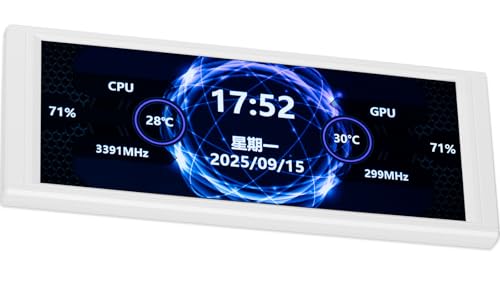
For PC enthusiasts who crave real-time insights into their system’s performance, the Trofeo Vision LCD AIO Display Monitor (6.86”) stands out with its vibrant 1280×480 resolution on a compact widescreen display. You can easily monitor CPU and GPU temperatures, fan speeds, and memory usage at a glance. Its plug-and-play USB-C interface guarantees quick compatibility with most Windows systems, so you won’t need to fuss with complex drivers. With built-in TRCC software, you can customize themes to match your setup. Plus, the magnetic attachment design makes integration into your chassis a breeze, whether inside or out.
Best For: PC enthusiasts seeking real-time performance monitoring and customization options in a compact display.
Pros:
- Vibrant 1280×480 resolution provides clear and detailed visuals for system monitoring.
- Plug-and-play USB-C interface ensures easy setup without the need for complex drivers.
- Customizable themes via built-in TRCC software allow users to personalize the display to match their style.
Cons:
- Limited screen size may not be suitable for users who prefer larger displays for monitoring.
- Compatibility primarily focused on Windows systems, which may exclude some users on different operating systems.
- Magnetic attachment design may not provide the most secure fit in all chassis configurations.
Thermalright Trofeo Vision LCD AIO Display Monitor
Gamers and PC enthusiasts seeking real-time insights into their system’s performance will find the Thermalright Trofeo Vision LCD AIO Display Monitor an invaluable tool. With its 6.86-inch screen and 1280×480 resolution, you can easily track CPU/GPU temperatures, fan speeds, and memory usage. The compact design fits seamlessly in your setup, and the stylish white finish adds aesthetic appeal. Thanks to the TRCC software, you can customize themes for a unique viewing experience. Plus, its plug-and-play USB Type-C interface guarantees quick compatibility with most Windows systems, making setup a breeze. Stay informed and keep your system running smoothly!
Best For: Gamers and PC enthusiasts looking for real-time system monitoring and customizable display options.
Pros:
- Real-Time Monitoring: Keeps track of CPU/GPU temperatures, fan speeds, and memory usage.
- Customization Options: TRCC software allows for personalized themes and interface designs.
- Easy Setup: Plug & play USB Type-C interface ensures quick compatibility with most Windows systems.
Cons:
- Average Customer Ratings: Currently rated 3.1 out of 5 stars based on customer reviews.
- Limited Resolution: The 1280×480 resolution may not meet the needs of all users.
- Weight and Size: Weighs 8 ounces, which may feel bulky for some compact setups.
HUANUO Single Monitor Mount (Adjustable Vesa Mount)

Elevate your workspace with the HUANUO Single Monitor Mount, an ideal solution for anyone seeking ergonomic comfort and enhanced viewing experiences. This adjustable VESA mount supports 13-32 inch monitors weighing up to 19.8 lbs, ensuring compatibility with common setups. You’ll enjoy full adjustability, allowing a tilt range of -50° to +85°, ±90° swivel, and 360° rotation. Plus, it raises your screen height by up to 39.6cm with just one hand. Installation is a breeze, taking only three minutes with included hardware. Choose between C-clamp or grommet mounts for secure attachment to your tabletop. Enjoy stability and durability for years to come!
Best For: Those seeking an ergonomic workspace solution to enhance comfort while using monitors between 13-32 inches.
Pros:
- Full adjustability: Tilt, swivel, and rotate your monitor for optimal viewing angles.
- Easy installation: Quick setup in just three minutes with included hardware.
- Sturdy and durable: Made with automotive-grade components, ensuring long-lasting performance.
Cons:
- Weight limit: Only supports monitors up to 19.8 lbs, which may not accommodate heavier models.
- Mounting requirements: Best suited for wooden tabletops with specific thickness requirements.
- Limited VESA compatibility: Only compatible with VESA patterns of 75x75mm and 100x100mm, which may exclude some monitors.
12.6 Inch FHD IPS Secondary Screen LCD Display

A compact 6-inch FHD IPS secondary screen is perfect for those who seek to maximize their workspace without sacrificing portability. With a resolution of 1920×515 and a 178° viewing angle, it provides sharp visuals for monitoring CPU and GPU health using Aida64. This monitor connects easily via HDMI and features a Plug and Play design, so you won’t need any drivers. Its four screw holes enable straightforward installation. Plus, with a 12-month warranty and responsive customer support, you can trust its quality. Enhance your setup and keep an eye on your system’s performance effortlessly!
Best For: This 12.6 Inch FHD IPS Secondary Screen is best for professionals and gamers looking to enhance their workspace and monitor system performance effectively.
Pros:
- Plug and Play design allows for easy setup without the need for drivers.
- High resolution of 1920×515 and a 178° viewing angle provide sharp and clear visuals.
- Compact size makes it portable and convenient for use with laptops and computers.
Cons:
- Non-touch screen functionality may limit interactive use compared to touch-enabled models.
- Requires an HDMI connection, which may not be available on all devices without adapters.
- May not be ideal for users seeking a larger display for multitasking.
Thermalright Trofeo Vision LCD AIO Display Monitor

For those who want to keep a close eye on their system’s performance, the Thermalright Trofeo Vision LCD AIO Display Monitor stands out with its impressive 6.86” wide LCD screen and vibrant 1280×480 resolution. Its compact dimensions (187.2 × 72.1 × 21 mm) fit perfectly in any PC case, enhancing your build’s aesthetic. You can track CPU and GPU temperatures, fan speeds, and memory usage in real-time for a complete system health overview. With TRCC software, you’ve got multiple preset themes and DIY options to design a unique interface. Plus, the plug-and-play USB Type-C connection makes setup a breeze.
Best For: Gaming PC enthusiasts and modders looking to enhance their system’s functionality and aesthetics.
Pros:
- Real-time monitoring of CPU/GPU temperatures, fan speeds, and memory usage.
- Customizable interface with multiple themes and DIY options via TRCC software.
- Easy plug-and-play USB Type-C connection for quick setup.
Cons:
- Limited to Windows compatibility, which may exclude some users.
- The compact size may not be suitable for all PC cases.
- The resolution may not be as high as some competing displays on the market.
BJLIFE 5 inch Computer Temperature Monitor
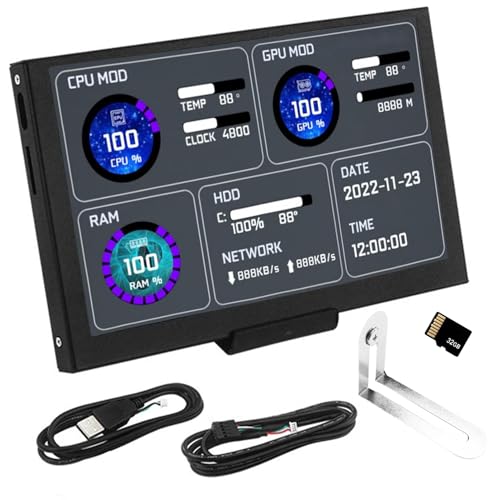
The BJLIFE 5 inch Computer Temperature Monitor stands out as an ideal choice for gamers and PC enthusiasts who want real-time insights into their system’s performance. With a vibrant 5” IPS display, it shows essential data like CPU, GPU, RAM, and HDD stats at a resolution of 800×480. Its adjustable brightness protects your eyes while you game. Plus, you can customize the dynamic video backgrounds stored on the included 32GB micro SD card. Designed with a sleek aluminum housing and a solid metal stand, this monitor connects easily via a single USB interface, ensuring it won’t interfere with your gaming mouse movement.
Best For: Gamers and PC enthusiasts seeking real-time performance monitoring of their system.
Pros:
- Provides real-time insights into CPU, GPU, RAM, and HDD performance.
- Customizable dynamic backgrounds enhance the visual appeal.
- Sleek design with minimal connectivity requirements ensures ease of use.
Cons:
- Limited resolution of 800×480 may not satisfy users requiring high-definition displays.
- The small screen size may not be suitable for multitasking.
- Powering on without a computer may limit functionality in some situations.
Single Monitor Stand Freestanding for 27-43 Inch Monitors
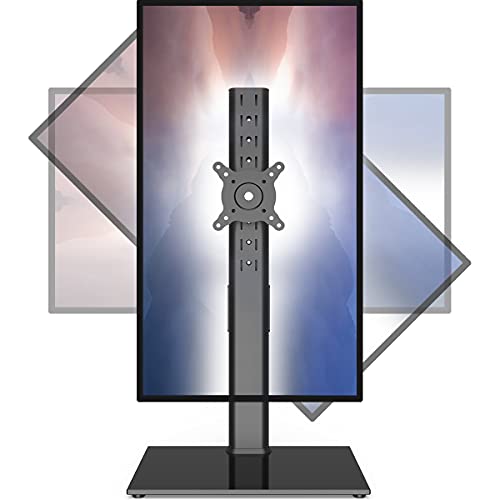
Looking to enhance your workspace with a versatile solution? The Single Monitor Stand Freestanding for 27-43 inch monitors, including curved screens, is perfect for you. With a sturdy tempered glass base and a weight capacity of 77lbs, it offers excellent stability. Its adjustable motion allows for tilt, swivel, and rotation, ensuring you find the best viewing angles for your comfort. This sleek black design not only looks good but also keeps your workspace tidy with concealed wiring. By positioning your monitor correctly, you can reduce neck and eye strain, improving your overall productivity and well-being.
Best For: Those seeking a stable and adjustable monitor stand to enhance their workspace ergonomics and aesthetics.
Pros:
- Sturdy Design: High-grade steel construction with a tempered glass base ensures excellent stability for monitors up to 77lbs.
- Versatile Adjustability: Full motion features including tilt, swivel, and rotation allow for customized viewing angles to reduce strain.
- Tidy Appearance: Concealed cable management keeps your workspace organized and maintains a clean, minimalist look.
Cons:
- Limited Size Range: Designed specifically for monitors between 27-43 inches, which may not accommodate larger screens.
- Freestanding Requirement: Requires sufficient desk space for the freestanding base, which may not work for smaller desks.
- Potential Assembly Complexity: Initial setup may require some time and effort, depending on familiarity with monitor stands.
Thermalright Trofeo Vision LCD AIO Display (TrofeoVision 9.16 Black)
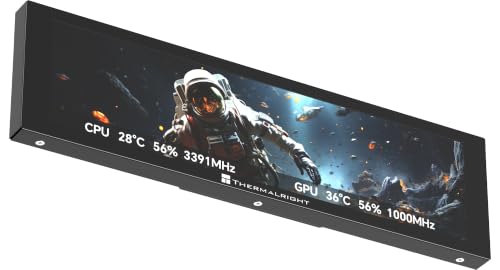
If you’re a PC enthusiast who values both aesthetics and functionality, the Thermalright Trofeo Vision LCD AIO Display (TrofeoVision 9.16 Black) is an ideal choice. This compact 9.16” LCD monitor boasts a sharp 1920×480 resolution, allowing you to monitor CPU/GPU temperatures, fan speeds, and memory usage in real time. With Thermalright’s TRCC software, you can easily customize the display with preset themes or your own designs. The plug-and-play USB Type-C connection guarantees a hassle-free setup, fitting seamlessly inside or outside your case, enhancing both your system’s performance and visual appeal. Enjoy complete control at a glance!
Best For: PC enthusiasts and modders looking for a stylish and functional way to monitor system performance.
Pros:
- High-resolution display: The 1920×480 resolution provides clear and detailed monitoring of system metrics.
- Customizable interface: TRCC software allows users to personalize the display with various themes and DIY options.
- Easy installation: The plug-and-play USB Type-C connection simplifies setup without the need for complicated drivers.
Cons:
- Limited screen size: At 9.16”, the display may not provide ample space for detailed information compared to larger monitors.
- Compatibility: Primarily designed for Windows systems, which may limit use for other operating systems.
- Potential clutter: Depending on the PC case design, the added display might create a cluttered appearance.
Factors to Consider When Choosing a PC Hardware Health Monitor
When choosing a PC hardware health monitor, you’ll want to contemplate several key factors. Think about display size and resolution, as well as the monitoring capabilities that best suit your needs. Customization options, connectivity, and overall design can also greatly impact your experience, so keep those in mind too.
Display Size and Resolution
Choosing the right display size and resolution for your PC hardware health monitor is essential for effective monitoring. Display sizes typically range from 5 to over 12 inches, impacting visibility and usability based on your preferences and workspace. A larger screen can enhance multitasking, letting you monitor multiple statistics without straining your eyes. Opt for higher resolutions, like 1920×480 or 1280×480, for clearer visuals compared to lower options like 800×480. The aspect ratio also plays a role; wider screens provide more horizontal space for side-by-side data display. Additionally, consider screen technology such as IPS panels, which improve color accuracy and viewing angles, making it easier to read data from different positions.
Monitoring Capabilities
Monitoring capabilities are essential for any PC hardware health monitor, as they determine how effectively you can assess your system’s performance. Look for monitors that track critical metrics like CPU and GPU temperatures, fan speeds, RAM usage, and overall system resource performance. These factors give you a thorough view of your system’s health. Additionally, consider the monitor’s resolution; higher resolutions provide sharper visuals, making it easier to read important metrics at a glance. A simplified installation process, like connecting via USB-C, can reduce cable clutter and enhance your setup. Finally, energy-saving features like auto-dimming and adjustable brightness not only help reduce eye strain during long sessions but also improve system efficiency. Choose wisely for peak performance!
Customization Options
Customization options play an essential role in enhancing your experience with a PC hardware health monitor, as they allow you to tailor the display to your personal preferences. Look for monitors that support customizable themes and dynamic video backgrounds, letting you personalize the look according to your style. Some models feature built-in software with a drag-and-drop interface, making DIY layout adjustments a breeze. Consider options that offer storage for custom themes, like flash cards, so you can easily upload and manage your own content. Many monitors also provide preset themes and regular updates from professional artists, adding variety to your display. Finally, verify the monitor allows for screen orientation adjustments, giving you flexibility in how information is presented.
Connectivity and Setup
When setting up a PC hardware health monitor, connectivity options can greatly influence your experience. Look for monitors that utilize a single USB-C connection, as this simplifies setup by eliminating extra power sources or HDMI cables. Verify the monitor is compatible with your operating system; some are tailored for Windows 10/11 and may need specific software for peak performance. Plug-and-play functionality is a huge plus, minimizing installation complexity and avoiding troublesome drivers. Additionally, assess the size and dimensions to guarantee it fits seamlessly into your workspace. Finally, evaluate customization options and software support, as they can enhance your user experience and allow you to tailor the display to your specific needs.
Design and Aesthetics
Choosing a PC hardware health monitor isn’t just about functionality; its design and aesthetics play an essential role in how well it fits into your workspace. Look for a monitor that integrates seamlessly with your current setup, enhancing the overall aesthetic of your environment. Compact dimensions are vital, allowing for flexible placement without cluttering your visual space. A sleek design can elevate the appeal of your gaming area, making the monitor a stylish focal point. Consider options with customizable themes and dynamic backgrounds, so you can tailor its appearance to reflect your personal style. Finally, pay attention to materials like aluminum or high-grade steel, as they contribute to durability and a premium look that complements your setup.