If you’re looking to enhance your MacBook’s connectivity, you’re in the right place. The right docking station can greatly improve your workspace, offering dual HDMI support for multiple displays and a range of additional features. With so many options available, it can be tough to sift through them all. Let’s explore the top choices that can elevate your setup and streamline your productivity.
Anker Laptop Docking Station Dual Monitor (8-in-1 USB C Hub)

If you’re a MacBook Pro user looking to expand your workspace, the Anker Laptop Docking Station Dual Monitor (8-in-1 USB C Hub) is an excellent choice. This hub offers 4K dual monitor support, allowing you to connect two displays via HDMI for enhanced productivity. With 85W power delivery, it keeps your devices charged while you work. You’ll appreciate the additional ports, including USB-A, Ethernet, and an SD card reader, all through a single USB-C connection. Plus, it’s compatible with various systems beyond macOS, making it a versatile addition to your setup. Trust in Anker’s reputation for reliability as you upgrade your workspace.
Best For: MacBook Pro users seeking to enhance their workspace with dual monitor support and additional connectivity options.
Pros:
- 4K dual monitor support allows for enhanced productivity with two displays.
- 85W power delivery keeps your devices charged while you work.
- Multiple ports (USB-A, Ethernet, SD card reader) offer extensive connectivity through a single USB-C connection.
Cons:
- Not compatible with Linux operating systems.
- macOS users may experience identical displays on both external monitors.
- Charger not included, which may require an additional purchase.
Selore Docking Station for MacBook Pro/Air
The Selore Docking Station for MacBook Pro/Air is the perfect solution for professionals and creatives needing a versatile hub to enhance their productivity. With dual HDMI outputs, you can easily set up dual 4K displays, though M1, M2, and M3 chip users should note that only one additional monitor may work simultaneously. This compact hub transforms two USB-C ports into eight, including USB A, PD charging, and SD/TF card readers, all while offering high-speed data transfers up to 5Gbps. Its portable design makes it ideal for on-the-go use, ensuring you stay connected anytime, anywhere.
Best For: Professionals and creatives using MacBook Pro or Air who need a versatile and portable docking solution to enhance their productivity.
Pros:
- Dual HDMI outputs support dual 4K displays, improving multitasking capabilities.
- Compact and portable design makes it easy to carry for on-the-go use.
- High-speed data transfer up to 5Gbps allows for quick file transfers and connectivity with multiple devices.
Cons:
- M1, M2, and M3 chip users can only utilize one additional monitor, limiting dual display functionality.
- Some ports may be less useful for older USB devices due to backward compatibility with lower speeds.
- Limited to two USB-C ports for expansion, which may not be sufficient for all users’ needs.
USB C Hub Docking Station for Laptop and MacBook
For tech-savvy professionals and creatives who need to maximize their workspace, the USB C Hub Docking Station with dual HDMI ports is an essential accessory. This 7-in-1 hub supports dual 4K@60Hz displays, allowing you to multitask seamlessly. With three USB 3.0 ports, a USB-C data port, and 100W Power Delivery charging, you can power your laptop while transferring files at 5Gbps. It’s compatible with MacBook Pro/Air (2016+), Dell XPS, HP Spectre, and other USB-C laptops. Just plug it in, and enjoy enhanced connectivity without hassle—perfect for boosting your productivity and streamlining your setup.
Best For: Tech-savvy professionals and creatives looking to enhance their workspace and productivity with seamless connectivity.
Pros:
- Supports dual 4K@60Hz displays, allowing for efficient multitasking with high-resolution visuals.
- 100W Power Delivery charging enables simultaneous laptop charging while using multiple ports.
- High-speed data transfer at 5Gbps through USB 3.0 and USB-C, making file transfers quick and efficient.
Cons:
- Charger not included, requiring users to purchase a compatible charger separately.
- Limited compatibility with older laptops that do not support USB-C with DP Alt Mode.
- May require additional setup for some users unfamiliar with docking stations or multi-monitor setups.
LIONWEI 13 in 1 USB C Docking Station

Looking for a versatile docking solution that can elevate your MacBook experience? The LIONWEI 13 in 1 USB C Docking Station has you covered. With compatibility across various brands, it offers two 4K HDMI ports, a DisplayPort, and multiple USB options, enabling seamless multitasking. You’ll enjoy 10Gbps data transfer and 100W power delivery, ensuring your devices stay charged. Its plug-and-play setup means no hassle, while the sturdy design guarantees a secure connection. Although some users report minor issues, this cost-effective dock remains a top choice for those needing reliable connectivity at home or during gaming sessions.
Best For: Users looking for a versatile and cost-effective docking solution that enhances connectivity for work-from-home setups or gaming.
Pros:
- Multiple display options with dual 4K HDMI and DisplayPort support for enhanced multitasking.
- High-speed data transfer capabilities with 10Gbps and efficient 100W power delivery for device charging.
- Sturdy design with plug-and-play setup for easy integration and a secure connection.
Cons:
- Some users report wireless mouse lag and issues with the short connection cable.
- Tight USB ports can make it difficult to connect multiple devices comfortably.
- Occasional problems with HDMI ports and Ethernet speed have been noted by certain users.
USB C Dual Monitor Docking Station for MacBook Pro

Designed specifically for MacBook Pro and Air users, the USB C Dual Monitor Docking Station by TobenONE offers seamless connectivity with dual HDMI ports, making it an ideal choice for anyone who needs to enhance their workspace with multiple displays. This compact dock supports two 4K monitors, enabling you to multitask efficiently. With multiple USB ports and gigabit Ethernet, you’ll enjoy fast data transfers and stable internet connections. Plus, its plug-and-play setup guarantees you can get started right away. Users appreciate its reliable performance and sleek design, making it a top recommendation for your MacBook dual-monitor needs.
Best For: Users of MacBook Pro/Air looking for a reliable dual-monitor setup with seamless connectivity and fast data transfer.
Pros:
- Supports dual 4K monitors for enhanced multitasking capabilities.
- Plug-and-play setup for easy installation without the need for drivers.
- Sleek design that complements MacBook aesthetics while reducing cable clutter.
Cons:
- Not compatible with Windows laptops or non-Pro/Max MacBooks.
- Some users reported initial setup issues that required customer support assistance.
- Limited to 87W charging for connected devices, which may not fully power all MacBook models during heavy use.
MacBook Pro Docking Station with Dual Monitor Support

The MacBook Pro Docking Station with dual monitor support is perfect for professionals who thrive in multitasking environments. This 15-in-2 USB C docking station connects two external displays via HDMI, supporting up to 4K@60Hz for a single monitor. It’s designed for 2021-2025 MacBook Pro models and delivers reliable performance with plug-and-play ease. With multiple USB ports, Gigabit Ethernet, and up to 100W power delivery, it simplifies your workspace and charging needs. While some users report minor issues with the headphone jack, its overall functionality makes it a solid choice for video editing, gaming, and streaming.
Best For: Professionals and creatives who require multitasking capabilities with dual monitor support for enhanced productivity.
Pros:
- Supports dual external displays with up to 4K resolution, ideal for video editing and gaming.
- Multiple connectivity options including 4 USB 3.0 ports, Gigabit Ethernet, and HDMI outputs for versatile use.
- Easy plug-and-play setup allows for seamless integration with MacBook Pro models.
Cons:
- Some users have reported issues with the 3.5mm headphone jack functionality.
- Lacks SD/Micro SD card slots, which may limit convenience for photographers and videographers.
- Dual HDMI support is limited for specific MacBook models, reducing versatility for some users.
Anker 7-in-1 USB-C Hub, Dual Monitor Docking Station
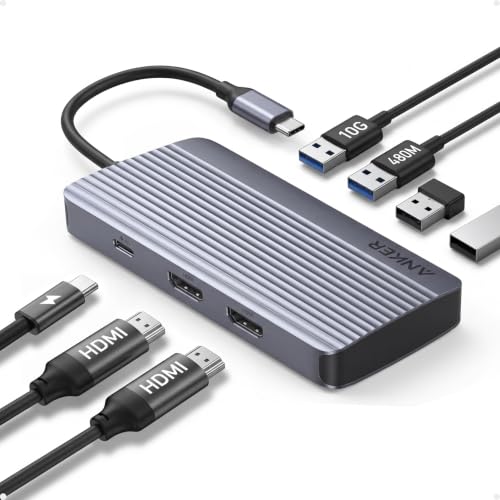
For multitaskers who need seamless data transfer and expansive video output, the Anker 7-in-1 USB-C Hub is an excellent choice. With dual HDMI support, you can extend your workspace across two screens at 1080p@60Hz, boosting your productivity. The hub offers lightning-fast 10Gbps data transfer, so large files move quickly. Plus, it provides 100W fast charging, ensuring your devices stay powered up. Compatible with MacBook, Windows, and ChromeOS, it meets the needs of various users. Just remember, it doesn’t support Linux. With the included 18-month warranty, you can confidently enhance your setup with this versatile docking station.
Best For: Multitaskers seeking efficient data transfer and dual monitor capabilities for enhanced productivity.
Pros:
- 10Gbps data transfer speeds significantly reduce file transfer times.
- Supports dual HDMI displays at 1080p@60Hz, expanding your workspace.
- 100W fast charging capability ensures your devices remain powered during use.
Cons:
- Not compatible with Linux operating systems.
- Wall charger not included for maximum charging output.
- Limited to specific devices, primarily those with USB-C, USB4, and Thunderbolt connections.
Plugable Thunderbolt 4 Dock for M4 MacBook Air & Pro

Release your M4 MacBook Air or Pro’s full potential with the Plugable Thunderbolt 4 Dock, a powerhouse docking station tailored for creative professionals and multitaskers. This 13-in-1 dock offers dual 4K HDMI outputs at 60Hz, ensuring stunning visuals for your projects. With 100W host charging and a mix of USB ports, including Thunderbolt 4, data transfer speeds soar up to 40Gbps. Its sleek aluminum design keeps it cool while adding a touch of elegance to your workspace. Plus, you’ll appreciate the plug-and-play setup and lifetime support from connectivity experts, ensuring a seamless experience with your devices.
Best For: Creative professionals and multitaskers who require a high-performance docking station to maximize the capabilities of their M4 MacBook Air or Pro.
Pros:
- Supports dual 4K displays at 60Hz for enhanced productivity and stunning visuals.
- Offers 100W host charging, ensuring your devices stay powered during intensive tasks.
- Plug-and-play functionality with lifetime customer support enhances user experience.
Cons:
- Limited to Gigabit Ethernet, lacking support for faster 2.5Gb Ethernet.
- Not designed for ultra-high refresh rate gaming monitors, with no support for 4K@120Hz.
- HDMI cables are not included for dual monitor setups, requiring additional purchases.
MacBook Pro Docking Station Dual Monitor HDMI Adapter

Designed specifically for MacBook Pro and Air users, the MacBook Pro Docking Station Dual Monitor HDMI Adapter is perfect for video editors, photographers, and programmers who need to expand their workspace efficiently. With nine ports, including dual HDMI, USB 3.0, and Ethernet, it offers versatile connectivity. Enjoy stunning visuals with support for dual monitors, reaching 4K@30Hz. Its sleek aluminum design guarantees durability and heat dissipation, while its compact size makes it easy to carry. Plus, with fast data transfer rates and plug-and-play convenience, you’ll experience seamless productivity. Rated 4.4 stars, it’s a reliable choice for enhancing your setup.
Best For: Video editors, photographers, and programmers looking to efficiently expand their workspace with versatile connectivity options.
Pros:
- Supports dual HDMI monitors with stunning visuals up to 4K@30Hz.
- Fast data transfer rates with USB 3.0 ports and SD/TF card reader for efficient workflow.
- Sleek aluminum design provides durability and effective heat dissipation while remaining compact and portable.
Cons:
- Dual display limitations at 4K@30Hz may not meet all users’ needs.
- Some compatibility issues reported with specific USB-C devices.
- Limited warranty information available upon request.
TobenONE MacBook Docking Station Dual 4K@60Hz
If you’re a creative professional or someone who frequently multitasks, the TobenONE MacBook Docking Station with Dual 4K@60Hz is an exceptional choice. This docking station supports various MacBook models and connects two 4K monitors via dual HDMI, perfect for enhancing your productivity. With 2.5Gbps Ethernet, you’ll enjoy fast, low-latency connections—ideal for intensive tasks like video editing or live streaming. Plus, it features seven USB ports, including a 20W fast-charge port, and offers 100W pass-through charging, reducing cable clutter. Streamline your workspace and elevate your workflow with this powerful docking solution.
Best For: Creative professionals and multitaskers who require high-quality dual monitor setups for enhanced productivity.
Pros:
- Dual 4K@60Hz support allows for seamless multitasking with stunning visual clarity.
- High-speed 2.5Gbps Ethernet connection ensures low-latency performance for intensive tasks like video editing and live streaming.
- Multiple USB ports and 100W pass-through charging streamline device connectivity and reduce cable clutter.
Cons:
- Incompatible with Windows laptops, limiting its user base to MacBook users only.
- MacBooks with M1/M2/M3 chips (non-Pro/Max) can only extend to one external monitor, restricting dual monitor functionality.
- Higher initial investment compared to basic docking stations that offer fewer features.
Factors to Consider When Choosing a Macbook Docking Station With Dual HDMI
When choosing a MacBook docking station with dual HDMI, you’ll want to take into account compatibility with your specific MacBook model. Think about the number of HDMI outputs you need and the power delivery capability to keep your device charged. Also, factor in data transfer speeds and the size for portability to find the best fit for your setup.
Compatibility With Macbook Models
Choosing a docking station with dual HDMI support requires careful consideration of your MacBook model to confirm compatibility. If you own a newer M1, M2, or M3 MacBook, be aware that only the Pro or Max versions may support multiple external displays. Check if the docking station matches your macOS version, as some only function with updates beyond macOS 12. The hardware of your MacBook often limits dual HDMI capabilities, so verify that the docking station can fully utilize dual displays if applicable. Additionally, consider whether it includes an active DisplayPort or HDMI adapter, which might be essential for achieving dual monitor output. Finally, review user feedback to confirm stable performance with multiple monitors.
Number of HDMI Outputs
Three key factors come into play when considering the number of HDMI outputs on a MacBook docking station. First, check the maximum resolution supported for each HDMI port; many models offer 4K@60Hz on one and 4K@30Hz on the other. This can considerably enhance your viewing experience. Second, if you own a Mac with M1, M2, or M3 chips, be aware that some stations may only allow one external monitor connection, so compatibility is essential. Finally, think about your multitasking needs—having dual HDMI outputs lets you extend your desktop or mirror displays for presentations. Look for options that support DisplayPort Alt Mode to guarantee a broader range of display compatibility and resolutions.
Power Delivery Capability
Power Delivery capability is an essential factor to take into account for any MacBook docking station with dual HDMI outputs. It allows your MacBook to charge while you’re using other ports, keeping it powered during intensive tasks. Look for docking stations that support higher wattage outputs, like 85W or 100W, to guarantee efficient charging even when multiple peripherals are connected. Be mindful of the total power consumption of your devices, as the docking station must supply enough power without exceeding its limits. Some stations reserve power for their operation, so check how much wattage is available for charging your laptop. Finally, confirm compatibility with your specific MacBook model, as power delivery needs may vary.
Data Transfer Speeds
When considering a MacBook docking station with dual HDMI outputs, data transfer speeds play a significant role in your overall experience. You’ll want to look for USB ports that support higher speeds—USB 2.0 offers 480 Mbps, while USB 3.0 provides 5 Gbps, and USB 3.1 or USB-C can reach 10 Gbps. If you frequently handle large files like videos or high-resolution images, faster speeds will make a noticeable difference. Keep in mind that using multiple ports at once can share bandwidth, potentially reducing speeds for individual connections. Advanced options like Thunderbolt 3 or 4 can offer impressive speeds up to 40 Gbps, enhancing performance for compatible devices. Always consider the type of USB port and docking station design when making your choice.
Size and Portability
Portability is an essential factor to take into account when choosing a MacBook docking station with dual HDMI outputs. The size of the docking station can greatly impact how easily you can carry it. Compact designs are typically easier to store alongside your laptop during travel. A lightweight docking station enhances convenience, especially if you often switch between workspaces. Look for models that fit neatly next to your laptop on your desk without taking up excessive space, promoting a tidy environment. Built-in cable management features can reduce clutter, making transport simpler, while a slim profile allows for quick connections and disconnections. This way, you can effortlessly shift between your home and office setups.
Build Quality and Design
Build quality and design are essential aspects to take into account when selecting a MacBook docking station with dual HDMI outputs. A sturdy aluminum construction not only enhances durability but also improves heat dissipation, ensuring your device runs smoothly. Opt for a compact and lightweight design to make transport easy, fitting seamlessly into your laptop bag. Ergonomics play a significant role too; consider port placement and built-in cable management options to keep your workspace tidy. Aesthetically, choose a dock that complements your MacBook’s sleek look for a cohesive setup. Finally, don’t overlook ventilation and cooling features, as they prevent overheating during extended use, guaranteeing reliable performance even under heavy workloads.