When it comes to optimizing your PC’s performance, choosing the right internal system monitor screen can make all the difference. With options that offer real-time tracking of your CPU, GPU, and RAM, you can easily keep tabs on your system’s health. But what features truly matter? Let’s explore the top contenders that could enhance your setup and help you make an informed decision.
Lian Li Universal Screen for PC (SM088X)

If you’re looking to enhance your gaming or workstation setup, the Lian Li Universal Screen for PC (SM088X) stands out as an excellent choice. This compact 8.8″ mini monitor serves as a secondary display, showcasing customizable ARGB frames and real-time PC temperature data. Installation is seamless—just use the specified screws and connect via USB. You can personalize your experience through L-Connect 3 software, accessing themes, videos, and photos. Plus, the built-in diffused lighting synchronizes beautifully with your other components. With versatile mounting options, it fits perfectly into any setup, making it both functional and aesthetically pleasing.
Best For: Gamers and workstation users looking for a compact, customizable secondary display to enhance their setup.
Pros:
- Customizable ARGB lighting allows for personalized aesthetics that can sync with other system components.
- Real-time hardware stats enable users to monitor PC temperature and performance without the need for additional GPU resources.
- Versatile mounting options provide flexibility in placement, ensuring compatibility with various setups.
Cons:
- Requires L-Connect 3 software for full functionality, which may involve troubleshooting if not initially detected.
- Limited screen size (8.8 inches) may not be sufficient for users seeking a larger display for multitasking.
- USB-powered setup could limit placement options based on available USB ports.
Lian Li Universal Screen for PC (SM088W)

The Lian Li Universal Screen for PC (SM088W) stands out as an ideal choice for gamers and PC enthusiasts who crave a vibrant, secondary display for monitoring system stats or showcasing custom visuals. With an 8.8-inch IPS LCD display and a resolution of 1920 x 480 pixels, it delivers stunning visuals. The USB-powered design frees up GPU ports, while its 500 nits brightness guarantees clarity in any lighting. You can customize it through L-Connect 3, controlling both visuals and built-in ARGB lighting. Its compact design, adjustable mounting, and solid customer ratings make it a top pick for any setup.
Best For: Gamers and PC enthusiasts looking for a vibrant secondary display to monitor system stats or showcase custom visuals.
Pros:
- USB-powered, freeing up GPU ports for other devices.
- Customizable display and ARGB lighting via L-Connect 3 for personalized aesthetics.
- Compact design with adjustable mounting for flexible installation in any setup.
Cons:
- Requires specific (H) screws for installation, which may not be included.
- Limited to a resolution of 1920 x 480 pixels, which may not be sufficient for all users.
- May require detection in Device Manager for proper functionality, which can complicate setup.
Sceptre Curved 24-inch Gaming Monitor (C248W-1920RN Series)

For gamers seeking an immersive visual experience, the Sceptre Curved 24-inch Gaming Monitor (C248W-1920RN Series) stands out with its impressive 1800R screen curvature. This design makes images appear to wrap around you, enhancing your gaming sessions. With a 1080p resolution and a refresh rate of 75Hz, you’ll enjoy smooth visuals and vibrant colors. It boasts a brightness of 250 cd/m², ensuring clarity in various lighting conditions. Plus, it offers multiple connectivity options, including HDMI and VGA ports. Fully compatible with Windows 10, this monitor’s 30,000-hour lamp life means you can game longer without worrying about wear.
Best For: Gamers looking for an immersive visual experience with a curved display and smooth performance.
Pros:
- Immersive 1800R screen curvature enhances the gaming experience by wrapping images around the viewer.
- 75Hz refresh rate provides smoother visuals, reducing motion blur and improving gameplay.
- Multiple connectivity options (HDMI x2, VGA) allow for versatile connections with modern PC systems.
Cons:
- Resolution limited to 1080p, which may not satisfy users seeking higher resolutions for detailed graphics.
- Brightness level of 250 cd/m² might not be adequate in brightly lit environments.
- Curved design may not appeal to all users, particularly those who prefer flat screens.
WOWNOVA 8 Inch LCD Screen for PC Case

WOWNOVA’s 8 Inch LCD Screen stands out as the ideal choice for gamers and PC enthusiasts seeking real-time system monitoring. This smart sensor panel gives you instant access to critical stats like CPU, GPU, RAM, and FPS, all displayed in stunning 1280×800 resolution. Its sleek aluminum housing and simple one-click setup make installation a breeze; just connect via USB-C or a 9-pin cable. You can even customize dynamic themes to match your style. With energy-saving features and continuous updates from professional artists, this monitor guarantees you stay informed and entertained while optimizing your gaming experience.
Best For: Gamers and PC enthusiasts who want real-time system monitoring and customizable display options.
Pros:
- Upgraded 8-inch smart sensor panel provides detailed system stats in high resolution.
- Simple installation with a one-click operation and minimal connectivity requirements.
- Customizable dynamic themes allow users to personalize their display to match their style.
Cons:
- Limited compatibility as it only supports Windows 10/11.
- No HDMI connectivity may restrict use with certain devices.
- Size may be too small for users wanting a larger display for more data.
WOWNOVA Computer Temp Monitor with ARGB Display
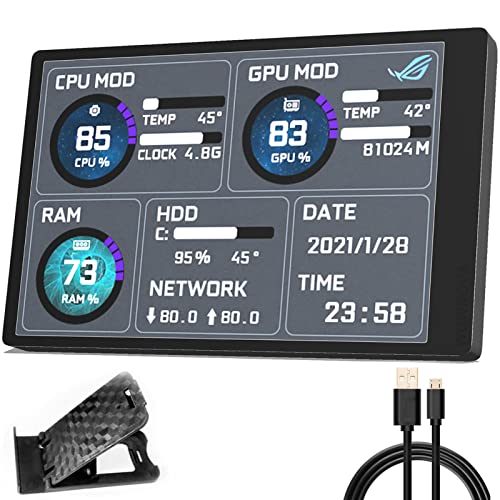
Looking for a sleek and efficient way to keep tabs on your system’s performance? The WOWNOVA Computer Temp Monitor with ARGB Display is a perfect choice. This compact 3.5-inch IPS mini screen serves as a second monitor, letting you view CPU, GPU, RAM, and HDD temperatures and usage data easily. With a single USB-C connection, installation is a breeze—no additional power or HDMI needed. You can customize layouts and orientations, plus adjust brightness for eye comfort. WOWNOVA’s commitment to customer satisfaction guarantees you’ll have support whenever you need it, making this monitor both functional and reliable.
Best For: Users looking for a compact and customizable solution to monitor their computer’s performance metrics in real-time.
Pros:
- Easy installation with a single USB-C connection, requiring no additional power or HDMI.
- Customizable screen layouts and orientations enhance user experience.
- Energy-saving features and brightness adjustment promote eye comfort during use.
Cons:
- Limited to a 3.5-inch screen, which may not be suitable for users needing more display space.
- The resolution of 320*480 may not provide the sharpest visuals compared to larger monitors.
- Dependence on USB header availability could restrict installation options for some users.
WOWNOVA 5″ Computer Temp Monitor

The WOWNOVA 5″ Computer Temp Monitor stands out as an ideal choice for gamers and PC enthusiasts who want real-time insights into their system performance. With its dynamic theme-supported ARGB panel, you can easily monitor CPU, GPU, RAM, FPS, and HDD data through a sleek IPS Type-C USB mini screen. It connects effortlessly via a single USB-C cable, simplifying your setup. The customizable themes and included 16GB flash card let you personalize your experience. Plus, user-friendly features like one-click operation and brightness adjustments enhance usability, making it a perfect addition to your gaming rig for seamless performance tracking.
Best For: Gamers and PC enthusiasts seeking real-time performance monitoring of their systems.
Pros:
- Dynamic theme support allows for customization with preset videos and personal themes.
- User-friendly features such as one-click operation and brightness adjustments enhance overall usability.
- Single USB-C connection simplifies setup without the need for additional cables or power sources.
Cons:
- Limited resolution of 800*480 may not satisfy users looking for higher display quality.
- Dependence on software updates for new themes might leave users waiting for fresh content.
- Small display size may not provide ample visibility for all users, especially in larger setups.
7.84 Inch Mini Monitor HD IPS Secondary Screen
For those seeking an ultra-compact solution, the 4 Inch Mini Monitor HD IPS Secondary Screen stands out with its exceptional portability and vivid display. With a resolution of 1280×400, it delivers bright colors and wide viewing angles, making it perfect for both work and entertainment. To get started, you’ll need to connect it to a power and signal source and download software like Aida64 for sensor display. This monitor is compatible with Windows systems, enhancing your efficiency. Plus, its dedicated casing guarantees durability while being easy to carry. Wisecoco backs it with a 30-day money-back guarantee and a 12-month warranty.
Best For: The 7.84 Inch Mini Monitor HD IPS is best for professionals and gamers looking for a compact secondary screen to enhance their productivity and entertainment experience.
Pros:
- Vivid Colors and Wide Viewing Angles: Offers an impressive display quality that makes visuals pop.
- Portable Design: Compact and easy to carry, perfect for on-the-go use.
- Compatibility with Windows Systems: Seamlessly integrates as an extended screen, improving work and entertainment efficiency.
Cons:
- Requires External Power: Needs a connection to a power source, which may limit portability.
- Software Installation Needed: Users must download additional software for optimal functionality.
- Limited Resolution: While good, the 1280×400 resolution may not meet the needs of users requiring high-definition displays.
Acer SH242Y 23.8″ IPS Full HD Gaming Monitor

Gamers seeking a reliable and visually stunning monitor will find the Acer SH242Y 23.8″ IPS Full HD Gaming Monitor an exceptional choice. With a crisp 1920 x 1080 resolution and an ultra-thin, zero-frame design, you’ll enjoy maximum visibility. The monitor delivers high-quality images and features Adaptive-Sync support for smooth performance, eliminating tears during gameplay. Its fast 1ms response time and up to 120Hz refresh rate guarantee fluid rendering, making action scenes a breeze. Plus, the adjustable stand lets you find your perfect viewing angle, while HDMI and VGA ports provide versatile connectivity options. Upgrade your gaming experience today!
Best For: Gamers looking for a high-performance monitor that delivers stunning visuals and smooth gameplay.
Pros:
- High-quality Full HD resolution (1920 x 1080) for sharp images.
- Fast 1ms response time and up to 120Hz refresh rate for fluid motion.
- Adjustable stand for personalized viewing comfort and flexibility.
Cons:
- Limited to HDMI and VGA connectivity options, lacking newer ports like DisplayPort.
- The ultra-thin design might make it less durable for some users.
- May not include built-in speakers, requiring external audio solutions.
HP 24mh FHD Monitor (23.8-Inch IPS Display)

Offering an impressive FHD display with IPS technology, the HP 24mh monitor is a top choice for anyone seeking vibrant visuals and wide viewing angles in their workspace. With a maximum resolution of 1920 x 1080 at 75 Hz and ultra-wide 178° viewing angles, your content looks stunning from any position. The ultra-slim design saves desk space, while the height-adjustable and tiltable screen guarantees comfort during long hours. Connectivity is a breeze with HDMI, DisplayPort, and VGA ports. Plus, built-in speakers enhance your audio experience, and the Low Blue Light mode helps reduce eye strain. Enjoy quality and sustainability combined!
Best For: The HP 24mh FHD Monitor is best for professionals and gamers seeking vibrant visuals and ergonomic comfort in their workspace.
Pros:
- FHD display with IPS technology provides vibrant colors and wide viewing angles.
- Height adjustable and tiltable screen ensures comfort during extended use.
- Multiple connectivity options (HDMI, DisplayPort, VGA) allow for easy connection to various devices.
Cons:
- Limited built-in audio quality from the 2W speakers may not suffice for audiophiles.
- No USB-C connectivity could be a drawback for users with modern laptops.
- Fixed color calibration may require adjustments for professional graphic work.
9.16″ Computer Temp Monitor (FHD 1920×462)

The 6″ Computer Temp Monitor packs a punch with its compact size and high-definition display, making it an ideal choice for users who need real-time system monitoring without sacrificing desk space. With a resolution of 1920×462, it delivers clear visuals while its metal shell guarantees durability and efficient heat dissipation. You’ll appreciate the single USB-C cable for easy power and data connection, compatible with Windows, macOS, and major operating systems. Brightness adjustments from 200 to 1000 nits enhance visibility, while dynamic themes let you customize your experience. This monitor effectively tracks CPU/GPU temperatures, RAM usage, and more, keeping your system in check.
Best For: Users who need a compact and efficient solution for real-time system monitoring on their desktop or laptop.
Pros:
- Durable metal shell ensures longevity and effective heat dissipation.
- High brightness range from 200 to 1000 nits allows for clear visibility in various lighting conditions.
- Plug-and-play compatibility with major operating systems simplifies setup and use.
Cons:
- Limited screen size may not be suitable for users needing extensive display space.
- Single USB-C connection may not be compatible with older devices without adapters.
- Dynamic themes may require time to customize to personal preferences.
Factors to Consider When Choosing a PC Internal System Monitor Screen
When you’re picking a PC internal system monitor screen, there are a few key factors to keep in mind. Think about the screen size, display resolution, and the connectivity options that suit your setup. Don’t forget to contemplate customization features and the overall aesthetic design that fits your style.
Screen Size Considerations
Choosing the right screen size for your PC internal system monitor is essential for both functionality and aesthetics. Ideally, you’ll want a size ranging from 5 to 8.8 inches. Larger displays, like 8.8 inches, offer more screen real estate, allowing you to monitor multiple parameters at once without sacrificing clarity. However, smaller screens might limit the amount of information you can view, impacting usability. Always consider the available space in your PC case to guarantee your chosen screen fits comfortably and doesn’t obstruct other components. Remember, a larger screen enhances readability and detail, making it easier to track your system’s performance effectively. So, pick a size that strikes the right balance for your needs.
Display Resolution Importance
While you’re selecting a PC internal system monitor screen, display resolution should be a top priority since it directly affects the clarity and detail of the visuals. A standard resolution of 1920 x 1080 (Full HD) offers clear images, but if you want even greater detail, consider options like 2560 x 1440 (QHD) or 3840 x 2160 (4K). The aspect ratio, usually 16:9 for widescreens, also impacts how you view content, enhancing your multitasking or gaming experience. Higher resolution monitors provide more screen real estate, making it easier to manage multiple applications. For gaming or media consumption, pairing a higher refresh rate with the right resolution boosts the smoothness and responsiveness of your visuals, elevating your overall experience.
Connectivity Options Available
After you’ve considered display resolution, the next significant factor is connectivity options. Many internal system monitor screens connect via a single USB-C or 9-pin cable, making it easy to plug and play without needing HDMI or extra power sources. Some models even operate independently of GPU ports, allowing you to keep those free for your primary display. It’s essential to guarantee compatibility with various operating systems, especially Windows 10 and 11, to ensure smooth integration. Additionally, look for adjustable mounting options, such as brackets that let you tweak height and tilt for improved usability. Certain models also offer dynamic control software, giving you the flexibility to customize display settings and layouts for peak system performance monitoring.
Customization Features Offered
When selecting a PC internal system monitor screen, you’ll want to contemplate the customization features it offers, as these can greatly enhance your user experience. Many screens allow you to personalize visual themes and layouts, tailoring the display to your preferences. Advanced options might include uploading videos or photos, adding a unique touch to your monitoring. You can also switch between horizontal and vertical orientations, providing flexibility in how you set up your display. With dedicated software, you can access preset themes or create custom designs for a more personalized interface. Additionally, built-in ARGB lighting strips in various models can be fully customized for colors and effects, allowing them to sync with your entire system for cohesive aesthetics.
Aesthetic Design Choices
Customizing your PC internal system monitor screen goes beyond just functionality; the aesthetic design plays a significant role in how your setup looks and feels. Consider adding customizable ARGB lighting strips that synchronize with your system for a unified visual experience. Opt for compact designs to save space while enhancing your overall aesthetic, providing a cleaner, organized look. The choice of screen color and finish, whether black or white, can greatly impact the harmony of your setup. Additionally, explore various mounting options that allow for height and tilt adjustments, improving visibility without sacrificing style. Finally, choose high-resolution displays, like IPS panels, for vibrant visuals and clearer text, elevating the overall aesthetic appeal of your monitor.