A dedicated hardware display puts CPU and GPU temperatures, usage, and other system stats where you can see them without interrupting a game or workflow. The right choice depends as much on mounting space and software as it does on screen size.
These 10 options range from compact case-mounted panels to long ultrawide screens and a touchscreen command panel. Use the buying guide below to narrow down which format fits your build.
Best 10 PC Hardware Monitoring Display Picks for 2026
Best USB-Only Ultrawide

- 1920 × 462 IPS ultrawide panel
- USB-only connection; no HDMI needed
- Extended desktop mode requires updated software
Best For: Windows builders seeking a wide USB dashboard and extra widget space
Best HDMI Sensor Panel

- 1920 × 480 IPS display at 60 Hz
- Mini HDMI video plus USB power
- VESA or adhesive mounting options
Best For: Builders wanting a mountable HDMI-connected sensor screen
Best Compact Theme Display

- Compact 800 × 480 IPS panel
- Single USB-C connection
- Custom layouts and animated themes
Best For: Compact PC builds that prioritize animated sensor layouts
Best Slim Case Accent
Thermalright Trofeo Vision 9.16
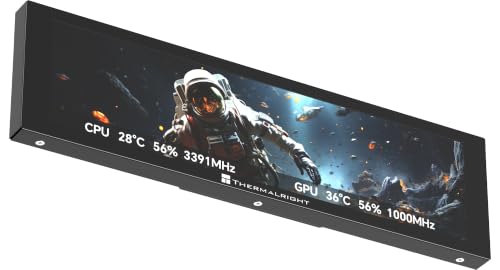
- Wide 1920 × 480 LCD screen
- TRCC themes and hardware monitoring
- Slim body with USB-C connection
Best For: Windows case builds needing a wide, slim stats display
Best for In-Case Builds
darkFlash V92 9.2-Inch Sensor Panel
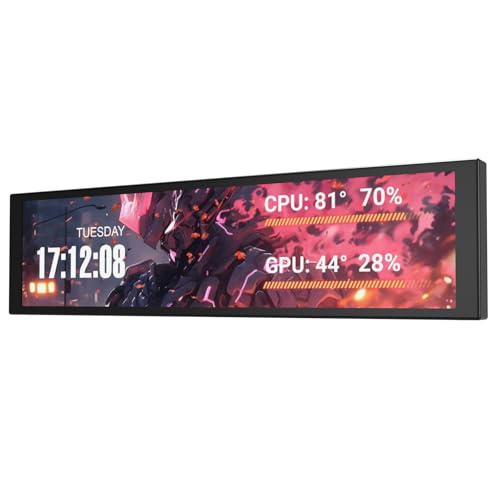
- 1920 × 462 IPS in-case screen
- USB-C or internal 9-pin USB connection
- Free Station Space themes and widgets
Best For: Windows builds with room for an in-case status screen
Best Touch Command Panel

- 7-inch, 1024 × 600 touch display
- Up to 20 widgets per page
- Hotkeys, media controls, and sensor widgets
Best For: Windows desktops needing touch controls alongside PC stats
Best Wide-Format Display

- 9.16-inch, 1920 × 480 screen
- Single USB-C connection for power and video
- Sensor layouts plus GIF and video support
Best For: Wide in-case layouts mixing live stats and custom visuals
Best Wide-Format Panel
WOWNOVA 8.8-Inch Temperature Monitor

- 8.8-inch, 1920 x 480 IPS panel
- Single USB-C or internal 9-pin connection
- Custom layouts and video themes
Best For: Wide, customizable readouts in Windows PC builds
Best Dual-Mode Option

- 8-inch, 1280 x 800 IPS panel
- Sensor and extended desktop modes
- Single USB-C or internal 9-pin connection
Best For: Windows builds needing both monitoring and desktop display modes
Best Flexible Placement
Yinker 9.2-Inch Sensor Display

- 9.2-inch, 1920 x 462 IPS panel
- Stand and case-mounting hardware included
- Dedicated sensor display; not an extended screen
Best For: Windows sensor setups needing desk or case placement
Best USB-Only Ultrawide – MT-VIKI 9.2-Inch Dashboard
The MT-VIKI 9.2-inch screen is a pc hardware monitoring display for Windows users who want a wide dashboard without using an HDMI port or GPU display output. Its 1920 × 462 IPS panel shows CPU, GPU, RAM, storage, and network data through dedicated software.
Best For: Windows PC builders who want a USB-only ultrawide dashboard that can also hold small app windows or widgets.
Pros:
- Single USB connection; desktop stand and internal motherboard cable are included.
- Updated software supports extended desktop mode and customizable dynamic themes.
- Game Mode pauses video backgrounds while gaming.
Cons:
- Requires dedicated software; it is not plug-and-play.
- Supports 64-bit Windows only, not macOS, Linux, or Chrome OS.
The ability to switch between system stats and an extended desktop makes this a versatile choice, provided its Windows-only software fits your setup.
Best HDMI Sensor Panel – AISHICHEN 8.8-Inch LCD
The AISHICHEN 8.8-inch LCD is a pc hardware monitoring display for buyers who prefer a conventional mini-HDMI video connection with separate USB power. Its 1920 × 480 IPS screen can show AIDA64 sensor layouts, and the panel supports installation inside or outside a PC case.
Best For: Builders who want a narrow HDMI-connected sensor panel with flexible mounting and adjustable brightness.
Pros:
- 50 mm and 75 mm VESA mounting options plus adhesive-pad installation.
- Adjustable 300–600 cd/m² brightness and landscape or portrait orientation.
- Works as a display with Windows, macOS, and Raspberry Pi devices.
Cons:
- Needs both mini HDMI and USB power rather than one cable.
- AIDA64 installation resources must be requested through the seller’s after-sales service after ordering.
Choose this panel if mounting flexibility and a standard display connection matter more than minimizing cables. Check that your intended monitoring software supports your operating system.
Best Compact Theme Display – WOWNOVA 5-Inch Monitor
The WOWNOVA 5-inch panel is a compact pc hardware monitoring display for a case build where an ultrawide screen would be too large. Its 800 × 480 IPS screen uses the brand’s software to show CPU, GPU, RAM, FPS, and storage data alongside customizable visual themes.
Best For: PC builders who want a small, USB-powered sensor panel with animated themes.
Pros:
- Runs through a single USB-C cable without an HDMI connection.
- Supports custom layouts, video themes, and horizontal or vertical orientation.
- Includes a 16 GB flash card for adding dynamic videos.
Cons:
- Its 800 × 480 resolution offers less room for detailed layouts than the wider panels here.
- Monitoring and theme customization depend on WOWNOVA’s software.
This is the space-saving pick if visual customization is a priority. Plan your layout around the smaller screen rather than expecting a full-size secondary desktop.
Best Slim Case Accent – Thermalright Trofeo Vision 9.16
The Thermalright Trofeo Vision 9.16-inch LCD is a pc hardware monitoring display aimed at builders who want a slim, wide screen inside or outside their case. Its 1920 × 480 panel can show CPU and GPU temperatures, fan speed, memory usage, and personalized visuals through Thermalright’s TRCC app.
Best For: Windows PC enthusiasts seeking a wide case display with preset themes and DIY customization.
Pros:
- Wide 1920 × 480 display gives system stats and visuals room to spread out.
- TRCC app includes preset themes and customization options.
- USB-C connection and slim 251 × 68 × 17 mm body suit case-focused setups.
Cons:
- The supplied compatibility information focuses on Windows systems.
- Stats and theme features rely on the TRCC app.
The Trofeo Vision is worth considering when a slim case accent matters as much as readable system data. Verify your planned mounting space and Windows setup before buying.
Best for In-Case Builds – darkFlash V92 9.2-Inch Sensor Panel
The darkFlash V92 is a pc hardware monitoring display made to sit inside a case, not act as a standard extended desktop monitor. Its 9.2-inch, 1920 × 462 IPS screen gives temperatures, usage figures, and custom widgets a wide, readable layout.
Best For: Windows builders who want a slim, customizable display visible through a case window.
Pros:
- Connects by USB-C or an internal USB 2.0 9-pin header; both cables are included.
- Free Station Space software supports sensor data, themes, images, GIFs, video, and widgets without requiring AIDA64.
- Included fan-mounting bracket supports horizontal or vertical installation.
Cons:
- Works only with Windows 10/11, and Station Space must remain running.
- Check case clearance before buying; the screen is approximately 9.54 × 2.48 × 0.47 inches.
Choose the V92 if you want an in-case status display that leaves GPU video outputs free. Its software and physical clearance requirements matter more than conventional monitor specifications.
Best Touch Command Panel – G.SKILL WigiDash 7-Inch
The G.SKILL WigiDash takes a hands-on approach to a pc hardware monitoring display. Its 7-inch, 1024 × 600 touch panel can show performance widgets alongside virtual shortcuts, media controls, and other on-screen buttons.
Best For: Windows users who want system information and customizable controls in one desktop panel.
Pros:
- Supports up to 20 widgets per page in a 5 × 4 grid, with unlimited pages.
- WigiDash Manager offers drag-and-drop widget setup.
- USB-powered design includes a 1.8-meter USB-C cable and an integrated stand.
Cons:
- Requires 64-bit Windows 10 or 11.
- Full functionality for supported HWiNFO or AIDA64 SensorPanel widgets may require a separate third-party software license.
Pick the WigiDash when touch shortcuts matter as much as sensor readings. If you only need a passive in-case readout, its command-panel focus may be more than you need.
Best Wide-Format Display – TR Trofeo Vision 9.16-Inch
The TR Trofeo Vision is a wide pc hardware monitoring display for builders who want live statistics and themed visuals inside a desktop case. Its 9.16-inch, 1920 × 480 screen offers space for temperatures, clock speeds, fan speeds, and other readings.
Best For: Builders planning a wide in-case sensor layout with custom artwork or animations.
Pros:
- Bundled software supports layouts for CPU, GPU, memory, and network activity.
- A single USB-C connection carries power and video from the PC.
- Supports static images, GIFs, and video clips; mounting accessories are included.
Cons:
- Its roughly 251 × 68 × 17 mm body needs a suitable mounting location in the case.
- The supplied specifications do not detail software operating-system compatibility.
This is a practical choice if its long, narrow format suits the space beside a motherboard tray or behind a glass panel. Confirm both fit and software compatibility for your build before ordering.
Best Wide-Format Panel – WOWNOVA 8.8-Inch Temperature Monitor
For a pc hardware monitoring display that fits a long, narrow space, this WOWNOVA panel offers an 8.8-inch IPS screen with 1920 x 480 resolution. Its Windows 10/11 software can show CPU, GPU, RAM, FPS, and drive data without using a GPU display port.
Best For: Windows PC builders who want a wide sensor panel with customizable video themes and simple internal USB wiring.
Pros:
- Runs power and data through one USB-C or internal 9-pin connection; no HDMI connection is needed.
- Supports editable layouts, preset and custom video themes, and horizontal or vertical orientation.
- Aluminum housing measures 9.33 x 2.64 inches and is 0.45 inches thick.
Cons:
- Software compatibility is specified only for Windows 10/11.
- The narrow 1920 x 480 layout offers less vertical room than a conventional screen.
Choose this model when a slim, wide readout suits your case layout and theme customization matters more than a taller display.
Best Dual-Mode Option – WOWNOVA 8-Inch PC Case Screen
This WOWNOVA pc hardware monitoring display stands out for its two operating modes: it can show system readings through the supplied Windows software or switch to an extended desktop display. Its 8-inch, 1280 x 800 IPS panel has a taller shape than the wide-format sensor panels in this roundup.
Best For: Windows 10/11 users who want an internal sensor screen that can also serve as an extended desktop.
Pros:
- Displays CPU, GPU, RAM, FPS, and drive information in sensor mode.
- Adds an extended desktop mode, plus editable image and video themes.
- Uses one USB-C or internal 9-pin connection without requiring HDMI or a separate power adapter.
Cons:
- Listed software compatibility is limited to Windows 10/11.
- Its 7.52 x 4.59-inch footprint needs more vertical clearance than a strip-style panel.
If you have room for its taller footprint, the added desktop mode makes this the most flexible choice of the three for uses beyond sensor readouts.
Best Flexible Placement – Yinker 9.2-Inch Sensor Display
For a pc hardware monitoring display you can put inside a case or on a desk, this 9.2-inch Yinker screen includes a multi-angle stand, screws, and adhesive pads. Its 1920 x 462 IPS panel uses a single USB connection for power and data, with readings managed through the included USR software.
Best For: Windows users who want a dedicated sensor display with several mounting options.
Pros:
- Shows CPU, GPU, and RAM usage and temperature, along with time and network speed.
- Includes a stand for landscape or portrait placement, plus hardware for case mounting.
- Supports adjustable sensor layouts and static or video backgrounds.
Cons:
- Cannot function as an extended PC screen; it is a sensor display only.
- Requires Windows 7 64-bit or newer and does not support Mac, Linux, or Chrome OS.
This is a practical pick when mounting flexibility matters, provided you need monitoring rather than a general-purpose second screen.
How We Picked the Best PC Hardware Monitoring Display
We compared the 10 selected models by screen format, stated resolution, connection requirements, mounting practicality, and the monitoring or customization features described in their listings. We also considered whether a display is intended primarily as an in-case sensor panel, a small secondary screen, or an interactive control surface. Product titles alone cannot establish software reliability, temperature accuracy, or long-term durability, so check current documentation and owner feedback before buying.
Quick Comparison: Which Display Format Fits?
Compact panels: A 5-inch screen such as the WOWNOVA model takes less room and suits a few prominent readings. Mid-size screens: The 7-inch G.SKILL WigiDash prioritizes touch widgets and shortcuts, while WOWNOVA’s 8-inch model offers a larger temperature-display area. Ultrawide panels: The listed 8.8- to 9.2-inch models suit long layouts across a case or desk. Their stated 1920 × 462 or 1920 × 480 resolutions provide room for multiple gauges, but the unusually wide shape can limit placement.
Key Buying Factors for a PC Hardware Monitoring Display
Software and Sensor Support
Start with the data you want to show: CPU and GPU temperatures, utilization, RAM usage, storage activity, or fan speeds. Some listings mention theme software or AIDA64; others emphasize use as a secondary monitor. Confirm whether required software, sensor access, and themes are included or need a separate installation or license. A screen can only show readings that its software can access.
Connections and Setup
“One cable” does not guarantee the same setup across models. Check whether the screen uses an internal USB header, an external USB port, USB-C, or a separate video connection. Confirm motherboard header availability, cable length, and your operating system before ordering. If you want the panel to act like a normal desktop monitor, verify that the specific model supports that mode rather than assuming every sensor panel does.
Size, Mounting, and Readability
Measure the intended location, including clearance for cables, fans, radiators, and side panels. Compare physical dimensions, not diagonal size alone: a 9-inch ultrawide display is much shorter than a conventional 9-inch screen. For a display viewed through tinted glass or from across a desk, prioritize legible text and high-contrast layouts over packing in more gauges.
Who Should Buy Which PC Hardware Monitoring Display?
Choose a compact 5-inch panel for a tight case and essential stats. Pick an 8- to 9.2-inch screen when you have a measured mounting spot and want several readings visible at once. Consider the WigiDash if touch shortcuts and widgets matter more than a passive temperature readout. If you want desktop-mode flexibility, investigate the WOWNOVA 8-inch listing; if you plan to build an AIDA64 layout, check the AISHICHEN model’s stated compatibility and software requirements. Whichever format appeals, verify the exact model’s connections and mounting method before checkout.