When setting up your PC, choosing the right internal display headers can greatly impact performance and connectivity. With a range of options available, from compact screens to customizable displays, it’s essential to know what suits your needs. Factors like USB-C connections and real-time monitoring can enhance your setup. But what should you prioritize? Let’s explore the top choices that can transform your workstation.
Lian Li 8.8″ Universal Screen for PC (SM088W)

If you’re a gamer or a content creator looking to enhance your setup, the Lian Li 8.8″ Universal Screen (SM088W) is a standout choice. This compact 8.8-inch display boasts a crisp resolution of 1920 x 480 pixels and a brightness of 500 nits, ensuring vibrant visuals. Weighing just 1.17 pounds, it won’t take up much space. With IPS LCD technology and a customizable ARGB lighting strip, it adds flair to your workstation. Plus, being USB-powered means you can save your GPU ports for other uses. Its adjustable mounting bracket allows for perfect height and tilt adjustments, making it versatile for any setup.
Best For: Gamers and content creators looking to enhance their setup with a compact and vibrant secondary display.
Pros:
- USB-powered design frees up GPU ports for other devices.
- Customizable ARGB lighting adds a stylish touch to any workstation.
- Adjustable mounting bracket allows for perfect height and tilt adjustments.
Cons:
- Limited resolution (1920 x 480) may not be suitable for high-detail tasks.
- Requires specific (H) screws for installation, which may not be included.
- May need to be detected in Device Manager for proper functionality, adding an extra step during setup.
Lian Li Universal Screen for PC (SM088X)

The Lian Li Universal Screen for PC (SM088X) is an ideal choice for gamers and content creators seeking a compact, multifunctional display that enhances both functionality and aesthetics. This 8.8″ mini monitor features a customizable ARGB frame and a temperature display panel, making it perfect for any setup. Installation is straightforward with specified screws, and it connects easily via USB, operating independently to showcase hardware stats or custom visuals. With L-Connect 3 software, you can personalize your experience by accessing themes, uploading media, and synchronizing colors. Plus, its versatile mounting options guarantee it fits seamlessly into your space.
Best For: Gamers and content creators looking for a compact, multifunctional display that enhances their PC setup with customizable visuals and hardware monitoring.
Pros:
- Compact design suitable for various setups, including gaming and workstations.
- Customizable ARGB lighting and visuals through L-Connect 3 software for personalized aesthetics.
- Easy installation and connectivity via USB, allowing independent operation without GPU ports.
Cons:
- Limited screen size may not be ideal for all users needing larger displays.
- Potential compatibility issues with L-Connect 3 if not using the latest version.
- Requires USB power, which may limit placement options depending on available ports.
USB 2.0 Internal Motherboard Header Cable (9pin Female to Female)

For anyone looking to enhance their PC’s connectivity, the USB 2.0 Internal Motherboard Header Cable (9-pin Female to Female) stands out with its 23.6-inch length, making it ideal for connecting your motherboard’s USB header to the front panel of your computer case. Its elastic PVC sheath guarantees flexibility and durability, so you won’t have to worry about wear and tear. With standard USB 2.0 pinout and color assignments, compatibility is assured. While wire color may vary, the wiring contacts and card positions remain consistent, guaranteeing seamless functionality. This cable is a must-have for any PC enthusiast aiming for peak performance.
Best For: PC enthusiasts and builders looking to improve internal USB connectivity for front panel access.
Pros:
- Durable Construction: Elastic PVC sheath ensures flexibility and longevity.
- Standard Compatibility: Follows USB 2.0 pinout and color assignments for easy integration.
- Sufficient Length: At 23.6 inches, it provides ample reach for various setups.
Cons:
- Wire Color Variability: Wire color may differ by batch, which could affect aesthetic preferences.
- Limited Use Case: Specifically designed for USB 2.0, may not support newer USB standards.
- Single Cable Only: Package includes only one cable, which may not be sufficient for larger builds.
Airgoo Internal USB Hub, 9-Pin USB 2.0 Header Splitter
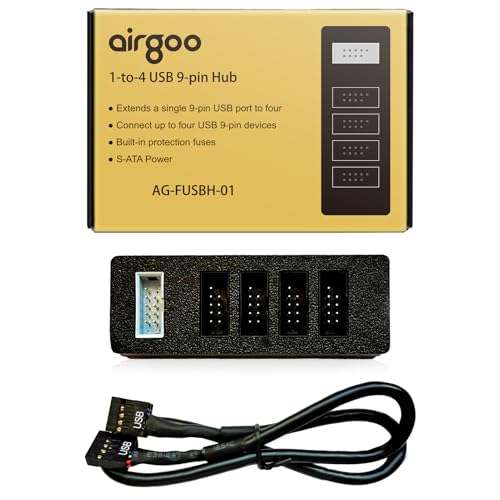
Looking to expand your PC’s connectivity without complicating your setup? The Airgoo Internal USB Hub is your solution! This 9-pin USB 2.0 header splitter converts one internal header into four, letting you connect multiple devices effortlessly. Powered by S-ATA, it guarantees stable performance, even with all ports in use. Its magnetic mount allows for easy attachment inside your case, keeping your setup tidy and organized. Plus, at just 3.35 x 1.18 x 0.75 inches, it won’t block airflow or interfere with components. With plug-and-play functionality, you’ll be up and running in no time!
Best For: Users looking to expand their PC’s USB connectivity with a simple and efficient internal solution.
Pros:
- 9-pin USB Expansion: Easily converts one internal header into four, allowing for multiple device connections without loss of performance.
- Stable S-ATA Power: Ensures consistent operation even with all four ports in use, minimizing power-related issues.
- Magnetic Mount: Facilitates easy installation and keeps the internal setup organized and clutter-free.
Cons:
- Limited to USB 2.0: May not support faster USB 3.0 devices, which can be a drawback for users needing higher speeds.
- Requires Internal Installation: May be challenging for users unfamiliar with PC hardware to install.
- Size Limitations: Its compact design may limit accessibility in tight spaces within some cases.
WOWNOVA Computer Temp Monitor with ARGB Display
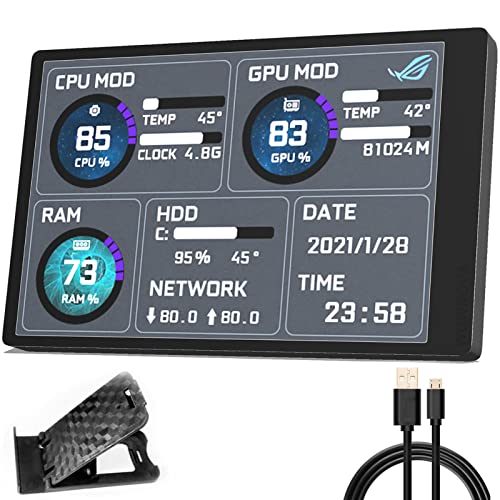
If you’re a PC enthusiast wanting to keep a close eye on your system’s performance, the WOWNOVA Computer Temp Monitor with ARGB Display is a game-changer. This compact 3.5-inch IPS display serves as a second monitor, showcasing real-time temperature and usage data for your CPU, GPU, RAM, and HDD. With a single USB-C connection, it easily mounts to a USB header without needing any additional power or HDMI. You can customize the layout, switch orientations, and even tweak brightness for comfort. Plus, WOWNOVA offers excellent customer support, ensuring your experience is smooth and satisfactory.
Best For: PC enthusiasts who want to monitor system performance and temperature in real-time.
Pros:
- Easy installation with a single USB-C connection, no additional power or HDMI required.
- Customizable display layout and brightness adjustment for personalized viewing comfort.
- Compact design with a high-resolution IPS screen, allowing for clear visibility of system data.
Cons:
- Limited screen size may not be suitable for users needing extensive data display.
- Requires USB header availability on the motherboard, potentially limiting compatibility with some builds.
- The reliance on software for customization may present a learning curve for some users.
WOWNOVA 8 Inch LCD Screen for Inside PC Case

The WOWNOVA 8 Inch LCD Screen stands out as an ideal choice for PC enthusiasts who want to enhance their setup with a sleek, multifunctional display. This smart sensor panel not only monitors CPU, GPU, RAM, and FPS but also serves as a vibrant extended screen for your desktop. Installation is a breeze with a single USB-C or 9-pin cable—no additional power or HDMI needed. With a stunning resolution of 1280×800 and customizable themes, you’ll enjoy both functionality and aesthetics. Plus, ongoing updates guarantee your display stays fresh and engaging, making it a smart addition to your PC case.
Best For: PC enthusiasts looking to enhance their setup with a multifunctional display that monitors system performance and serves as an extended screen.
Pros:
- Easy installation with a single cable connection, eliminating the need for HDMI or additional power.
- High-resolution IPS display offers vibrant visuals and customizable dynamic themes.
- Continuous software updates provide fresh themes and ensure long-term usability.
Cons:
- Limited compatibility with operating systems, only supporting Windows 10/11.
- The size may not fit in all PC cases, requiring specific dimensions for installation.
- Potential learning curve for users unfamiliar with setting up smart sensor panels.
2X 19Pin USB 3.0 Header Ports Expansion Card (FS-H2-Pro)

For tech enthusiasts and professionals needing expanded connectivity, the FS-H2-Pro 19Pin USB 3.0 Header Ports Expansion Card is an ideal solution. This PCIe X1 card adds two 5Gbps USB 3.0 headers, enabling you to connect up to four USB-A devices like keyboards and gaming pads. Thanks to its built-in self-powered technology, you won’t need an extra power supply. It’s compatible with various systems, including Windows and Linux, guaranteeing a hassle-free installation. Just verify you have an empty PCIe X1 slot available, and enjoy stable connections with features designed to protect your devices and data.
Best For: Tech enthusiasts and professionals seeking to expand USB connectivity without the need for additional power supplies.
Pros:
- Easy Installation: Plug and play compatibility with most Windows and Linux systems simplifies setup.
- High Power Output: Each USB-A port provides 5V/2A, allowing connection of high-power devices like industrial cameras and SSD enclosures.
- Comprehensive Protection: Built-in safety features, including electronic fuses and stable capacitors, ensure device and data integrity.
Cons:
- Limited Compatibility: Not supported on MAC OS X, which may restrict usage for Mac users.
- Driver Requirement for Older Systems: Windows XP, Vista, and 7 require driver installation, adding complexity for some users.
- Low-Profile Bracket Adjustment: Slim PC users must manually switch to the low-profile bracket, which may be inconvenient.
WOWNOVA 8 Inch LCD Screen for PC Case Monitor

Designed specifically for PC enthusiasts and gamers, the WOWNOVA 8 Inch LCD Screen serves as an innovative internal monitor that transforms your case into a dynamic display hub. With its 1280×800 resolution IPS panel, you can easily monitor CPU, GPU, RAM, and more. It connects via a single USB-C or 9-pin cable, eliminating the need for GPU ports. You’ll appreciate the customizable themes and brightness adjustments for eye comfort. Plus, the user-friendly software supports horizontal and vertical display modes, making setup a breeze. Enjoy continuous updates and customer support to keep your display fresh and functional.
Best For: PC enthusiasts and gamers looking to enhance their setup with a customizable internal display.
Pros:
- Customizable themes and layouts for a personalized user experience.
- Easy installation with a single cable connection, saving GPU ports.
- Continuous updates for themes and excellent customer support.
Cons:
- Limited to internal installation, which may not suit all builds.
- Resolution might not be sufficient for detailed graphic work.
- Dependent on software updates for optimal functionality.
WOWNOVA 4.6″ LCD Screen for PC Case Temperature Display Panel

If you’re looking to enhance your PC setup with real-time monitoring capabilities, the WOWNOVA 4.6″ LCD Screen is an excellent choice. This sleek display fits easily inside your case and connects with just one 9-pin cable, making setup a breeze. With a resolution of 960×320, it provides clear visuals for monitoring CPU, GPU, RAM, FPS, and HDD temperatures. Plus, the IPS technology guarantees great viewing angles. You can customize layouts and themes, switch between horizontal and vertical modes, and enjoy energy-saving features. WOWNOVA’s commitment to updates and customer support assures a satisfying experience.
Best For: PC enthusiasts and gamers looking for an efficient way to monitor system temperatures and performance metrics.
Pros:
- Easy installation with a single 9-pin cable, eliminating complex setups.
- High-resolution display and IPS technology for vibrant visuals and wide viewing angles.
- Fully customizable layouts and themes, allowing for a personalized touch to your PC setup.
Cons:
- Limited to Windows 10/11 compatibility, which may not suit all users.
- Display size may be too small for some users who prefer larger screens for monitoring.
- Ongoing updates might require users to regularly check for new themes and features.
RIITOP USB 3.0 Female Back Panel to MB Connector Cable Adapter
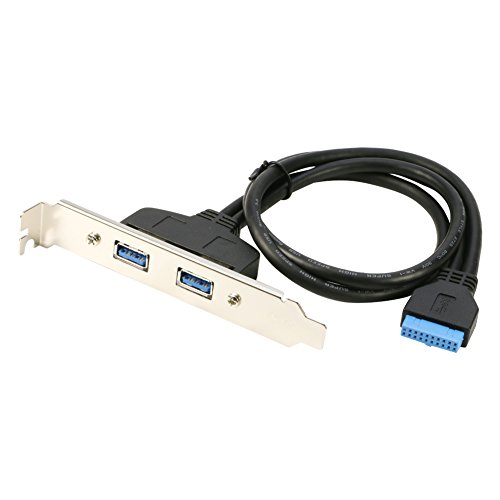
The RIITOP USB 3.0 Female Back Panel to MB Connector Cable Adapter is an ideal solution for users seeking to expand their computer’s connectivity without sacrificing valuable PCI slots. This adapter provides two additional USB 3.0 ports on your back panel, utilizing an extra internal USB 3.0 port. With a generous 50cm cable length, it fits most PC cases easily. Installation is straightforward, thanks to the included bracket, and you won’t need any additional drivers. Simply connect it to your motherboard’s 20-pin header, and you’re good to go, boosting your system’s functionality effortlessly.
Best For: Users looking to expand their computer’s USB connectivity without using PCI slots.
Pros:
- Easy Installation: Includes a bracket for straightforward setup and requires no additional drivers.
- Space-Saving: Utilizes an extra internal USB 3.0 port, freeing up PCI slots for other components.
- Versatile Compatibility: The 50cm cable length fits most PC cases, making it a flexible option for various setups.
Cons:
- Limited Ports: Only provides two additional USB ports, which may not suffice for users with multiple devices.
- Internal Port Requirement: Requires an available internal USB 3.0 header on the motherboard, which some older models may lack.
- Non-Removable: Once installed, the adapter remains fixed to the motherboard, limiting potential reconfiguration.
Factors to Consider When Choosing a PC Internal Display Header
When choosing a PC internal display header, you need to think about several key factors. Consider your screen size, resolution, and clarity to guarantee the best visual experience. You’ll also want to check power source options, customization features, and installation compatibility to avoid any issues down the line.
Screen Size Considerations
Choosing the right screen size for your PC internal display header can greatly influence how effectively you view and interpret information. Larger screens, typically ranging from 4.6 inches to 8.8 inches, provide more detailed and accessible data at a glance. For instance, an 8-inch screen usually supports a resolution of 1280×800, enhancing data clarity considerably compared to smaller options. While compact designs save space, they often compromise readability and functionality—especially if you need to monitor multiple parameters simultaneously. Smaller screens, around 4.6 inches, can limit your ability to display detailed graphs or multiple data points, so consider your needs carefully. Ultimately, choosing the right size will enhance your overall user experience and efficiency.
Resolution and Clarity
Resolution and clarity are essential factors that can make or break your experience with a PC internal display header. Higher resolutions like 1280×800 or 1920×480 deliver sharper images and detailed information, enhancing your overall visual experience. Pay attention to pixel density, measured in pixels per inch (PPI); a higher PPI means more vibrant colors and finer details. The aspect ratio also matters—common ratios like 16:9 provide a wider content range without distortion. Opt for displays featuring IPS technology for better color accuracy and wider viewing angles, especially for detailed visuals and system stats. Finally, consider brightness levels; a display with higher brightness (e.g., 500 nits) guarantees readability in various lighting conditions, essential for a satisfying user experience.
Power Source Options
While selecting a PC internal display header, considering the power source options is essential for ideal performance. Most internal displays need a power source, often supplied through USB headers on your motherboard. This setup allows for a direct connection, eliminating the need for extra power adapters. USB-powered displays typically use a single cable for both power and data transfer, simplifying installation and reducing cable clutter. Some displays may require S-ATA power connectors for stable power delivery when multiple devices are connected. When making your choice, pay attention to the voltage and current requirements, as USB 2.0 ports provide 5V/500mA, while USB 3.0 ports supply up to 5V/900mA. Compatibility with your PC’s existing power setup is vital.
Customization Features Available
When considering a PC internal display header, customization features can greatly enhance your overall experience. Many headers, particularly for mini monitors, allow dynamic control through proprietary software, letting you tailor visuals and themes to your liking. You can easily upload your own videos or photos and choose from preset themes to elevate your display. Additionally, some screens offer customizable ARGB lighting effects, syncing beautifully with your system’s aesthetics. Orientation adjustments are also available, allowing you to switch between horizontal and vertical layouts. Furthermore, certain headers let you display hardware statistics like CPU, GPU, and RAM usage, merging functional data with aesthetic personalization. These features guarantee your display is not only visually appealing but also informative.
Installation Compatibility Requirements
Choosing the right internal display header for your PC hinges on several installation compatibility requirements. First, verify the header matches your motherboard’s USB ports, typically needing a 9-pin or 20-pin connection. Next, check the physical dimensions and mounting needs of the display to guarantee it fits comfortably within your PC case, without blocking airflow or other components. Don’t forget to verify the power supply requirements; some displays might need extra power connections beyond what the motherboard header provides. Additionally, confirm that any necessary drivers or software align with your operating system, especially for custom displays. Finally, consider the tools and screws required for installation, as specific types may be needed for secure mounting.
Display Technology Types
After ensuring your installation meets the necessary compatibility requirements, it’s important to contemplate the type of display technology that will best suit your needs. For vibrant visuals and wide viewing angles, consider IPS panels, ideal for accurate color reproduction. If high contrast and deep blacks are your priority, OLED technology shines, as each pixel emits its own light. TFT LCDs offer improved image quality and faster refresh rates, making them a solid choice for responsiveness. VA panels excel in color depth, perfect for media consumption, though they may lag in response times. If you’re on a budget and prioritize speed, TN panels provide quick response times but lack in color accuracy and viewing angles. Choose wisely!
Mounting Flexibility and Design
Mounting flexibility and design play a crucial role in optimizing your PC’s internal display setup, as they directly impact both functionality and aesthetics. When choosing a display header, consider adjustable brackets that allow height and tilt adjustments for the best viewing angles. Compact designs are essential for fitting into tight spaces without obstructing airflow or interfering with other components. Magnetic mounts can also simplify installation, keeping your setup clutter-free by securely attaching to metal surfaces. Always check that the display can be installed with the specified screws to prevent damage, as some require specific types for a secure fit. Finally, evaluate overall dimensions and any additional features, like customizable lighting, to enhance your PC’s aesthetic appeal.