Running out of motherboard SATA ports doesn’t mean you need a new PC. A PCIe SATA expansion card can add connections for hard drives, SATA SSDs, and optical drives.
These 10 picks span compact four-port cards and higher-port-count options. The right choice depends on your available PCIe slot, case clearance, drive count, and whether you need to boot from an attached drive.
Best 10 PC Sata Expansion Card Picks for 2026
Bootable Four-Port Pick

- Four SATA III ports
- Bootable attached drive
- Four cables and low-profile bracket
Best For: Four-drive desktop upgrades with boot support
Flexible Case-Fit Pick
Ziyituod Marvell 9215 Four-Port Card

- Four SATA III connections
- Two bracket sizes included
- Supports boot drives
Best For: Four-drive builds in standard or low-profile cases
Six-Drive Storage Pick
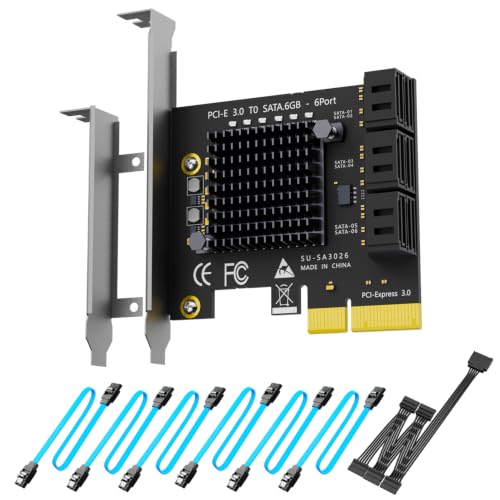
- Six SATA III ports
- Cables and power splitter included
- Not for OS booting
Best For: Six-drive PC or NAS storage arrays
Heatsink-Equipped Pick
Moonqkuses Four-Port SATA Card

- Four SATA III ports
- Bootable system disk support
- Heatsink and cables included
Best For: Accessory-ready, bootable four-drive upgrades
Best All-Around Kit
GLOTRENDS SA3234C 4-Port SATA Card

- Four SATA III ports
- Up to 415MB/s per port
- Cables and two brackets included
Best For: Ready-to-install four-drive builds
Best for Broad Compatibility
StarTech 4-Port Non-RAID SATA Card
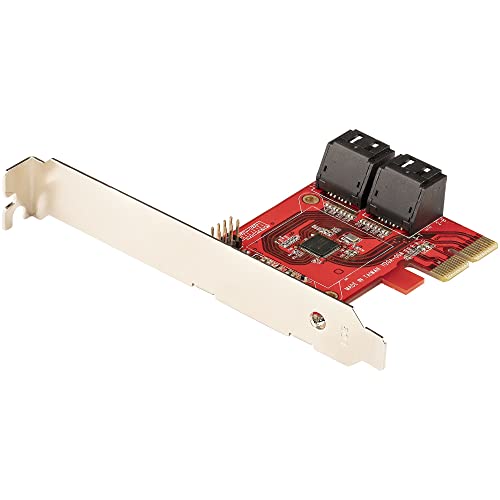
- Four SATA III ports
- Supports HDD, SSD, and optical drives
- Full- and low-profile brackets
Best For: Mixed-OS, software-managed storage builds
Best for Drive Count
GLOTRENDS SA3112C 12-Port SATA Card

- 12 SATA III ports via PCIe x1
- Cables, splitters, and drive LEDs
- Ports 3–12 rated up to 41.5MB/s
Best For: Full-height, high-drive-count builds
Most Ports
GLOTRENDS SA3116C 16-Port SATA Card

- 16 SATA III ports through PCIe 3.0 x1
- Includes 16 data cables and power splitters
- Shared bandwidth; no hardware RAID
Best For: Full-size, capacity-focused NAS builds
Six-Port Flexibility
SINEFINE SP1006 PCIe x4 SATA Card

- Six SATA III ports on PCIe 3.0 x4
- Low-profile bracket and heatsink included
- Data and power adapter cables not included
Best For: Six-drive builds needing boot and hot-swap support
Compact Four-Port Kit
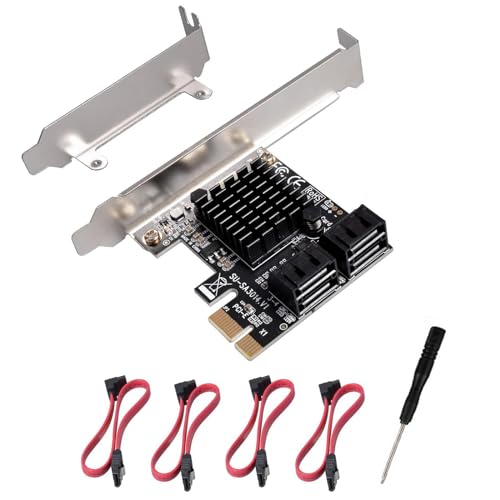
- Four SATA III ports via PCIe x1
- Four data cables and low-profile bracket included
- Boot and hot-swap support unspecified
Best For: Adding up to four drives to a PCIe x1 desktop
Bootable Four-Port Pick – Ziyituod PCIe 3.0 SATA Card
This pc sata expansion card adds four SATA III ports through a PCIe slot, making it a practical choice when you need more drive connections and want the option to boot from an attached disk.
Best For: Desktop upgrades that need four additional SATA drives and a bootable system disk.
Pros:
- Supports four SATA 6Gb/s devices.
- Includes four SATA cables and a low-profile bracket.
- Can boot from a connected drive.
Cons:
- No onboard hardware RAID.
- Motherboard-specific compatibility issues may occur.
The included cables simplify a four-drive installation. Choose it for added ports and boot support, not for hardware RAID.
This pc sata expansion card uses a Marvell 88SE9215 controller to add four SATA III connections through PCIe x1. Its included full-height and low-profile brackets make it useful for different desktop case sizes.
Best For: Desktop or workstation builds needing four more SATA ports and a choice of mounting brackets.
Pros:
- Connects up to four SATA 6Gb/s SSDs or HDDs.
- Includes four data cables plus full-height and low-profile brackets.
- Supports booting from a connected drive.
Cons:
- Does not provide hardware RAID.
This is a straightforward kit for a four-drive expansion, particularly if you have not settled on a case size. Check your system’s boot configuration before relying on an attached drive as the system disk.
For a storage-focused pc sata expansion card, the GLOTRENDS SA3026C adds six SATA III connections using a PCIe x4 physical slot. It is aimed at multi-drive PC and NAS setups rather than operating-system boot drives.
Best For: Six-drive storage builds using software RAID or other disk-management tools.
Pros:
- Supports six SATA drives, with a stated maximum of 277MB/s per port.
- Includes six SATA data cables, a 1:5 power splitter, and two bracket sizes.
- Six onboard LEDs show drive activity.
Cons:
- Cannot boot an operating system from this card.
- No hardware RAID; Windows XP is not supported.
Its accessories and per-drive indicators suit a dense storage build. Set SATA mode to AHCI in BIOS or UEFI as directed, and use a different controller for your boot disk.
This pc sata expansion card adds four SATA III ports with a Marvell 88SE9215 controller and a heatsink. The bundled cables, low-profile bracket, and installation hardware make it a convenient package for a desktop upgrade.
Best For: Four-drive desktop expansions that need boot support and included installation accessories.
Pros:
- Supports four SATA 6Gb/s devices and a bootable system disk.
- Fits PCIe x1, x4, x8, or x16 slots.
- Includes four 40cm SATA cables, a low-profile bracket, and mounting hardware.
Cons:
- Does not support hardware RAID.
The heatsink and supplied hardware distinguish this four-port option. It is a fit for adding drives to a desktop, provided you do not need RAID handled by the card itself.
Best All-Around Kit – GLOTRENDS SA3234C 4-Port SATA Card
This pc sata expansion card adds four SATA III connections through a PCIe x4-sized slot. It is a practical choice for a desktop or NAS build when you want the cables and mounting brackets included.
Best For: Four-drive storage builds that need a ready-to-install kit and software RAID support.
Pros:
- Four SATA ports, rated up to 415MB/s per port.
- Includes four SATA cables, a power splitter, and full- and low-profile brackets.
- Supports booting an OS from a SATA drive connected to port 1.
Cons:
- Does not support hardware RAID.
- Requires an x4 or larger PCIe slot.
The included accessories make this the simplest of these three options to equip for four drives. Set SATA mode to AHCI in BIOS or UEFI before installation.
Best for Broad Compatibility – StarTech 4-Port Non-RAID SATA Card
This pc sata expansion card adds four SATA III ports through a PCIe x2 connection. Its stated Windows, macOS, and Linux support makes it worth considering for a desktop or server running software-managed storage.
Best For: Four-drive builds that prioritize OS compatibility and software RAID flexibility.
Pros:
- ASM1164 controller provides four SATA III ports with up to 16Gbps combined upstream bandwidth.
- Supports HDDs, SSDs, and optical drives, plus NCQ and Port Multiplier.
- Includes full- and low-profile brackets and carries a two-year warranty.
Cons:
- SATA cables are sold separately.
- No built-in hardware RAID.
Choose this card if its documented device and OS support matters more than bundled cables. Storage Spaces, RAID Assistant, or mdraid/mdadm can handle software RAID where appropriate.
Best for Drive Count – GLOTRENDS SA3112C 12-Port SATA Card
This pc sata expansion card puts 12 SATA III connections in a PCIe x1 slot, making it a space-efficient way to attach many drives for a NAS or software-managed storage pool. Its limited shared bandwidth makes drive count, rather than transfer speed, the main reason to choose it.
Best For: Full-height builds that need connections for many drives on a PCIe x1 slot.
Pros:
- Adds 12 SATA ports and provides an activity LED for each drive.
- Includes 12 SATA cables and three 1-to-5 SATA power splitters.
- Works in PCIe x1, x4, x8, or x16 slots.
Cons:
- Ports 1–2 are rated up to 207.5MB/s each; ports 3–12 are rated up to 41.5MB/s each.
- Full-height bracket only; no hardware RAID.
It suits a high-drive-count build where peak speed on every port is not essential. Check chassis clearance and power connections before planning all 12 drives.
Most Ports – GLOTRENDS SA3116C 16-Port SATA Card
If your priority is connecting a large number of drives, this pc sata expansion card adds 16 SATA III ports through one PCIe 3.0 x1 slot. It is intended for software-managed storage pools rather than hardware RAID.
Best For: Full-size NAS or desktop builds that need many drive connections for unRAID, TrueNAS, ZFS, Proxmox, or Windows Storage Spaces.
Pros:
- Connects up to 16 SATA drives and includes 16 data cables plus three SATA power splitter cables.
- Individual LEDs show drive power and read/write activity.
- Supports Windows, macOS, Linux, and NAS systems without a separate driver.
Cons:
- PCIe 3.0 x1 bandwidth is shared; the stated per-port limits are up to 41.5 MB/s for ports 1–15 and 207.5 MB/s for port 16.
- No hardware RAID support or bracket for compact chassis.
The included cabling makes a many-drive build easier to start, but the shared bandwidth makes this a better fit for capacity-focused storage than for simultaneous high-speed transfers across all drives.
Six-Port Flexibility – SINEFINE SP1006 PCIe x4 SATA Card
This pc sata expansion card adds six SATA III ports using a PCIe 3.0 x4 interface. Its low-profile bracket, heatsink, and per-port activity LEDs make it worth considering for compact desktops as well as server-style builds.
Best For: Builders adding up to six drives who want a PCIe x4 card with low-profile mounting, boot support, and hot-swap capability.
Pros:
- Six SATA III ports connect HDDs or SSDs.
- Supports booting from connected drives and hot-swapping.
- Includes a low-profile bracket, a heatsink, and drive activity LEDs.
Cons:
- SATA data cables and power adapter cables are not included.
- Requires a PCIe x4, x8, or x16 slot; it does not fit PCIe x1.
It offers a practical middle ground between port count and slot bandwidth. Factor in separate cables before ordering, especially if you plan to populate all six ports immediately.
Compact Four-Port Kit – YUNKOZAND Marvell SATA Card
For a smaller drive upgrade, this pc sata expansion card provides four SATA III ports through a PCIe x1 connection. It comes with four SATA cables and a low-profile bracket, so the basic mounting and data cabling are covered.
Best For: Desktop owners adding up to four drives who need PCIe x1 compatibility or a low-profile bracket.
Pros:
- Four SATA III ports with four matching data cables included.
- PCIe x1 card also fits x4, x8, and x16 slots.
- Marvell 88SE9215 chipset, heatsink, and low-profile bracket are included.
Cons:
- PCIe x1 connectivity limits the bandwidth available to the four drives collectively.
- The supplied notes do not specify boot or hot-swap support.
This is a straightforward option when four additional connections are enough. Choose it for the included cables and flexible slot fit, rather than assuming the full 6 Gbps SATA link speed is available to every drive at once.
How We Picked the Best PC Sata Expansion Card
We focused on practical differences across the 10 selected cards: four, six, 12, or 16 SATA ports; PCIe interface requirements; low-profile bracket availability; included cables; and stated boot support. We also considered whether a listing identifies its controller chipset and clearly distinguishes a standard SATA controller from a RAID card. These are selection criteria, not hands-on speed or compatibility test results, so confirm the current product specifications before ordering.
Quick Comparison: Which Port Count Fits?
Four ports: A sensible starting point if you are adding a few hard drives or SSDs to a desktop. Several listed options include four SATA cables and a low-profile bracket, but check the exact package contents.
Six ports: Useful when four connections will not leave room to grow. The selected six-port cards include an ASM1166-based model and an option described as using a PCIe x4 interface; verify the slot requirements of the specific card you choose.
12 or 16 ports: Consider these for drive-heavy builds only after checking power, cooling, cable routing, and PCIe bandwidth. A high port count does not mean every attached SSD can run at full SATA speed simultaneously.
Key Buying Factors for a PC Sata Expansion Card
PCIe Slot Fit and Shared Bandwidth
Check both the physical slot size and the card’s PCIe generation and lane count. A card may fit a long slot while using fewer electrical lanes. All connected drives share the card’s host connection, so an x4 interface may be more attractive than a narrow link for frequent simultaneous transfers. Motherboard slot availability and lane-sharing rules can also change when other expansion cards or M.2 drives are installed.
Ports, Cables, and Case Clearance
Count the drives you intend to connect now, then allow a little room for future additions. Confirm whether cables are included and whether their length and connector shape suit your case. For a slim PC, verify that a compatible low-profile bracket is supplied. SATA data ports do not power drives; you also need adequate power-supply connectors and safe drive mounting.
Boot, Operating System, and RAID Needs
If the operating system will live on an attached drive, check the card’s stated boot support alongside your motherboard’s firmware settings. Confirm OS and driver support for your configuration rather than assuming every SATA card is plug-and-play. Cards described as non-RAID add drive connections, not hardware RAID functionality; if you need RAID, decide whether your intended software or a different controller meets that requirement.
Who Should Buy Which PC Sata Expansion Card?
Choose a four-port card for a straightforward desktop storage upgrade, particularly if included cables or a low-profile bracket solve an immediate installation need. Choose six ports when you expect to add drives soon; favor a suitable PCIe interface if multiple drives will be active together. Look at the 12- and 16-port options for large drive arrays only after planning the entire system around them. If booting from the card is essential, prioritize explicitly stated boot support and verify motherboard compatibility before buying.