When it comes to enhancing your PC’s connectivity, having the right USB header expansion solutions can greatly improve your setup. Whether you’re looking to add more ports or upgrade to faster transfer rates, there are several options to evaluate. From versatile hubs to specialized adapters, choosing the right one can make a noticeable difference in performance. Let’s explore the top contenders and what makes them stand out for your needs.
NZXT Internal USB Hub 3 – Expands 4 USB 2.0 Ports

If you’re looking to expand your PC’s USB capabilities, the NZXT Internal USB Hub 3 is an excellent choice. This hub adds four USB 2.0 ports, giving you the extra connections you need for peripherals. It features a sleek, compact design that can easily be hidden away, maintaining your system’s aesthetics. With a SATA power connection, you’ll enjoy a stable power source, ensuring reliable performance. Installation is user-friendly, thanks to its magnetic body and 3M dual lock tapes for secure mounting. Plus, it works seamlessly with any PC, enhancing your connectivity options without hassle.
Best For: Users looking to expand their PC’s USB connectivity with a compact and easy-to-install solution.
Pros:
- User-friendly installation with magnetic body and 3M dual lock tapes.
- Sleek, compact design easily hidden away for an aesthetically pleasing setup.
- Stable power supply through SATA connection ensures reliable performance.
Cons:
- Limited to USB 2.0 ports, which may not be suitable for high-speed devices.
- Requires internal installation, which may not be ideal for all users.
- Only one connection to the motherboard, limiting expansion options.
Corsair Internal 4-Port USB 2.0 Hub

The Corsair Internal 4-Port USB 2.0 Hub is perfect for PC builders who need extra connectivity in tight spaces. With four 9-pin USB 2.0 ports, you can easily connect additional internal devices like power supplies, AIO CPU coolers, and RGB lighting controllers. It offers a solid performance with up to 480Mbps bandwidth across all connected devices. The hub installs effortlessly on any magnetic surface in your PC case using simple USB 2.0 and SATA connections. Plus, it’s compatible with most Intel and AMD motherboards, making it a versatile choice, especially for Mini-ITX cases. Upgrade your setup with this reliable hub!
Best For: PC builders who need additional internal USB connectivity in compact spaces.
Pros:
- Compact design fits well in Mini-ITX cases and other tight spaces.
- Easy installation with magnetic attachment and straightforward USB 2.0 and SATA connections.
- High bandwidth of up to 480Mbps supports multiple devices simultaneously.
Cons:
- Limited to USB 2.0 speeds, which may not suffice for newer devices requiring faster connections.
- Requires a magnetic surface for installation, which may not be available in all PC cases.
- Some users may need additional SATA power connectors if the case lacks available connections.
GRAUGEAR USB3.2 Gen2x2 USB-C Front Panel Adapter
![GRAUGEAR 20Gbps USB3.2 Gen2x2 USB-C Front Panel Adapter, Motherboard Header Extension Cable, USB-C and USB to USB3.2 Type-E Key-A 20-Pin and 19-Pin USB3.0 Connectors with PCIe Bracket[G-AD-ETC2A-20G]](https://m.media-amazon.com/images/I/41UV72MMqML._SL500_.jpg)
For those looking to maximize their device’s connectivity, the GRAUGEAR USB3.2 Gen2x2 USB-C Front Panel Adapter offers an impressive 20Gbps transfer speed, making it perfect for power users and gamers alike. This adapter includes all necessary components, such as a motherboard header extension cable and PCIe bracket. Installation is a breeze—just plug it into available Type-E and USB3.0 slots, no drivers needed. It’s also backward-compatible with USB 2.0. With its sturdy metal construction and double shielded wires, you’ll enjoy durability and minimal interference. Plus, customer support is readily available for any questions you may have.
Best For: Power users and gamers seeking high-speed connectivity with easy installation and compatibility across multiple USB standards.
Pros:
- Supports blazing fast 20Gbps transfer speeds for efficient data transfer.
- Easy plug-and-play installation without the need for drivers.
- Durable metal construction with double shielded wires minimizes interference.
Cons:
- Full 20Gbps speed requires a specialized port, which may not be available on all devices.
- Older motherboard models may need an adapter for compatibility.
- Limited to the number of available Type-E and USB3.0 slots on the motherboard.
FebSmart 2X 19Pin USB 3.0 Expansion Card (FS-H2-Pro)

Looking to enhance your PC’s connectivity? The FebSmart 2X 19Pin USB 3.0 Expansion Card (FS-H2-Pro) is a great option. It connects via a PCIE X1 interface and gives you two 5Gbps USB 3.0 headers, plus four USB-A ports for your devices. With built-in self-powered technology, you don’t need an extra power supply, and each port delivers 5V/2A for high-power devices. It’s compatible with most Windows versions and many Linux kernels, ensuring easy installation. Just make sure you have an available PCIE X1 slot, and you’re good to go for seamless data transfers!
Best For: Users looking to expand their PC’s USB connectivity with high-speed data transfer capabilities and power support for various devices.
Pros:
- Built-in self-powered technology eliminates the need for an additional power supply.
- Supports a wide range of USB devices, making it versatile for different uses.
- Compatible with multiple Windows versions and most Linux kernels for easy installation.
Cons:
- Not compatible with MAC OS X, limiting its use for Apple users.
- Driver installation is required for Windows 7 and earlier systems, which may complicate setup for some users.
- Requires an available PCIE X1 slot, which may not be available in all systems.
OwlTree USB 2.0 to Dual 9 Pin Extension for Motherboards (2 Pack)

If you’re seeking a reliable way to expand your motherboard’s USB capabilities, the OwlTree USB 2.0 to Dual 9 Pin Extension is an excellent choice. This dual USB header splitter converts a single USB 2.0 9-pin port into two, giving you more connectivity options. With a shielded cable design, it enhances transmission speed and minimizes interference. The mistake-proof design guarantees you won’t accidentally insert it incorrectly. Made with durable materials, including 24AWG tinned copper wire and braided synthetic fiber, this extension delivers quality and reliability. With a solid customer rating of 4.6 stars, it’s a trusted choice for your setup.
Best For: Those looking to enhance their computer’s USB connectivity by converting a single 9-pin port into two.
Pros:
- Shielded cable design minimizes interference and enhances data transmission speed.
- Durable construction with high-quality materials ensures long-lasting performance.
- Mistake-proof design prevents incorrect insertion, making installation hassle-free.
Cons:
- Only compatible with USB 2.0 ports, limiting use with newer USB versions.
- May not fit in tight spaces due to the thickness of the braided cable.
- Some users may find the data transfer speed insufficient for high-bandwidth devices.
RIITOP USB 3.0 Female Back Panel to MB 20pin Header Connector Cable Adapter
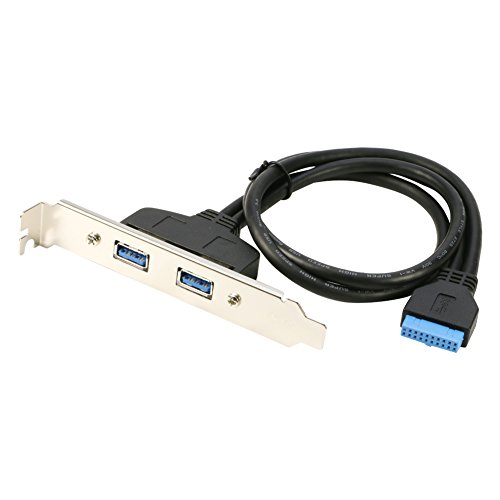
The RIITOP USB 3.0 Female Back Panel to MB 20pin Header Connector Cable Adapter stands out for its convenience, making it an ideal choice for PC builders and users needing extra USB ports. This adapter allows you to create two additional external USB ports on your computer’s back panel without occupying precious PCI slots. With a 50cm cable, it fits most PC cases easily. Plus, installation is a breeze thanks to the included bracket and the fact that no extra drivers are required. Just plug it into your motherboard’s 20-pin header, and you’re good to go!
Best For: PC builders and users looking to add extra USB ports without sacrificing PCI slots.
Pros:
- Easy Installation: Comes with a bracket and requires no additional drivers.
- Space-Saving Design: Creates two external USB ports without using PCI slots.
- Compatible with Most Cases: 50cm cable length fits easily in various PC cases.
Cons:
- Limited to USB 3.0 Speed: Does not support faster USB standards like USB 3.1 or USB-C.
- Dependent on Motherboard Header: Requires an available 20-pin USB 3.0 motherboard header for connection.
- No Power Supply: Does not provide additional power for connected devices, which may limit functionality for certain peripherals.
MEIRIYFA USB Header Extension Cable (2 Pack)
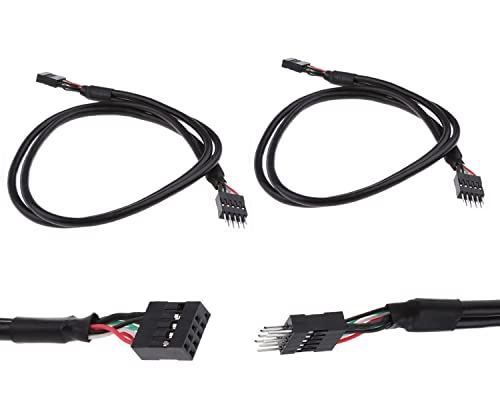
For PC builders and DIY enthusiasts seeking a reliable way to expand USB connectivity, the MEIRIYFA USB Header Extension Cable (2 Pack) stands out as an essential solution. This 20.3-inch cable features a USB 2.0 9-pin male to female connection, allowing you to easily link your motherboard’s USB header to your case’s front panel. You’ll appreciate the flexible PVC sheath, which protects against wear and tear. With a data transfer rate of 480 Mbps, it guarantees speedy performance while minimizing stress on your ports. Plus, its specialized socket design reduces the risk of short circuits, making it a smart choice for your setup.
Best For: PC builders and DIY enthusiasts looking to enhance USB connectivity with ease and reliability.
Pros:
- Flexible PVC sheath protects the cable from wear and tear, ensuring longevity.
- High data transfer rate of 480 Mbps provides fast and efficient performance.
- Specialized socket design minimizes the risk of short circuits, increasing safety during installation.
Cons:
- Limited to USB 2.0, which may not support faster data transfer for newer devices.
- Length of 20.3 inches might not be sufficient for all case layouts or configurations.
- Requires internal installation, which may not be suitable for all users, especially beginners.
9Pin USB Header Splitter with SATA Power Cable

Looking to expand your motherboard’s USB capabilities? The 9Pin USB Header Splitter with SATA Power Cable is your solution. This clever adapter transforms one USB header into four, perfect for connecting devices like CPUs, WiFi receivers, fans, and RGB lights. With a self-stick design and automotive adhesive tape, installation is a breeze. Plus, the extra SATA power connector guarantees your ports receive stable power, minimizing short circuit risks. Weighing only 1.76 ounces, it’s compact yet powerful, with a customer rating of 4.3 stars. Upgrade your setup effortlessly with this reliable USB splitter from Rocketek!
Best For: Users looking to expand their motherboard’s USB capabilities for multiple devices like CPUs, WiFi receivers, and RGB lights.
Pros:
- Extra SATA power connector ensures stable power supply for connected devices.
- Self-stick design with automotive adhesive tape allows for easy installation.
- Compact and lightweight at 1.76 ounces, making it an unobtrusive addition to your setup.
Cons:
- Limited to USB 2.0 speeds, which may not be sufficient for high-speed devices.
- Requires SATA power connection, which may not be available on all setups.
- Potential cable management issues due to multiple extensions in a small area.
2 Pack USB 9 Pin to Dual USB 2.0 Back Panel Extension Cable Connector

Enhancing your desktop experience becomes effortless with the ThtRht 2 Pack USB 9 Pin to Dual USB 2.0 Back Panel Extension Cable Connector, ideal for users who need extra USB ports without hassle. This expansion solution provides two high-speed USB 2.0 interfaces directly at the back of your PC case. With a 30 cm cable length and a data transfer rate of 480 Mbps, it’s perfect for quick file transfers. Installation is a breeze—just plug and play, with no drivers needed. Its notch design guarantees correct insertion, making it a reliable addition to your desktop setup.
Best For: Users looking to expand their desktop’s USB connectivity effortlessly with reliable, high-speed ports.
Pros:
- Easy Installation: Plug and play design requires no drivers, making setup quick and straightforward.
- High-Speed Data Transfer: Supports data transfer rates of up to 480 Mbps for efficient file transfers.
- Notch Design for Correct Insertion: Prevents incorrect connection, enhancing user experience and device safety.
Cons:
- Limited to USB 2.0: Does not convert USB versions, so output will remain at USB 1.1 if used with a USB 1.1 motherboard.
- Cable Length Might Be Short for Some Cases: At 30 cm, it may not reach all configurations in larger desktop cases.
- No Additional Ports Beyond Two: Only provides two additional USB ports, which may not suffice for users with multiple devices.
5 Ports Internal USB Hub, USB 2.0 to USB 3.2 Gen 1 Header Adapter

The 5 Ports Internal USB Hub, featuring a USB 2.0 to USB 3.2 Gen 1 Header Adapter, is an ideal solution for anyone needing to expand their PC’s connectivity without sacrificing performance. This hub provides five expansion ports, including three 9-pin USB 2.0 headers, making it compatible with all PC motherboards. You’ll appreciate the regular USB 2.0 Type A port for additional versatility. Plus, the SATA power connector guarantees stable power supply. Installation’s a breeze with double-sided tape and an 11.8-inch 9-pin USB cable. Use it to connect your CPU, WiFi receiver, cooling fan, and RGB lights effortlessly.
Best For: Users looking to expand their PC’s USB connectivity efficiently while maintaining compatibility with various components.
Pros:
- Versatile compatibility with all PC motherboards and multiple USB devices.
- Stable power supply ensured by the SATA power connector for reliable performance.
- Easy installation process with double-sided tape and an included 11.8-inch USB cable.
Cons:
- Limited to USB 2.0 read/write rates, which may not be sufficient for high-speed devices.
- Installation may require additional space within the PC case for optimal placement.
- Double-sided tape may not provide a permanent solution for securing the hub in place.
Factors to Consider When Choosing a PC USB Header Expansion
When choosing a PC USB header expansion, you should consider the number of ports you need and how well the expansion will work with your motherboard. Installation ease and power supply options are also essential factors that can save you time and hassle. Don’t forget to check the data transfer speeds to guarantee they meet your requirements.
Number of Ports
Choosing the right number of ports for your USB header expansion can profoundly impact your PC’s functionality. USB header expansions typically come with configurations ranging from a single port to up to five ports. More ports mean you can connect multiple USB devices simultaneously, enhancing your setup’s versatility. If you often use high-demand devices like external drives or RGB lighting controllers, opting for an expansion with more ports can save you from frequent device swapping. It’s also wise to contemplate your future needs; selecting an expansion with extra ports allows you to accommodate new peripherals without making additional purchases. Ultimately, the right number of ports can streamline your experience and keep your workspace organized.
Compatibility With Motherboards
Verifying compatibility with your motherboard is essential for a successful USB header expansion. First, check the USB header type on your motherboard, like 9-pin USB 2.0 or 20-pin USB 3.0, to ascertain your expansion fits. You’ll also want to verify the motherboard supports your preferred USB version—such as USB 2.0, 3.0, or 3.2—to achieve ideal data transfer rates. Don’t forget to take into account the physical space on your motherboard, as some expansion cards may require specific slot configurations. Additionally, confirm that your motherboard can handle the number of extra ports you plan to add, and verify any necessary drivers are available for your operating system, particularly if you’re using an older model.
Installation Ease
Installation ease plays an essential role in selecting a PC USB header expansion. Look for options that feature user-friendly installation, like magnetic bodies or adhesive tapes for quick mounting. Clear, straightforward connection instructions are critical—plug-and-play capabilities can considerably reduce setup time. Evaluate cable lengths as longer cables offer enhanced flexibility, making installation easier and minimizing strain on connectors. Compatibility with your motherboard‘s header layout is important; verify the expansion integrates seamlessly without needing additional adapters. Finally, prioritize products that come with necessary installation accessories, such as brackets or protective casings, to streamline the setup process. By considering these factors, you’ll guarantee a hassle-free installation experience and improved connectivity.
Power Supply Options
When it comes to selecting a PC USB header expansion, power supply options are vital for ideal performance. First, determine if your device needs a stable power source; some expansions require SATA power connections for consistent operation. Look for models with built-in power supply technology to eliminate extra power sources while supporting high-demand USB devices. Evaluate the maximum voltage and current output to guarantee compatibility with your peripherals. It’s also important to check that the power supply design includes safety features like short circuit protection and voltage regulation to protect both the expansion and your devices. Finally, review the installation requirements for power, as some expansions may need specific connections or space within your PC case.
Data Transfer Speeds
Choosing the right data transfer speeds for your PC USB header expansion can greatly impact your device’s performance. USB 2.0 offers a maximum speed of 480 Mbps, which works well for basic peripherals like keyboards and mice. However, if you need faster transfers, USB 3.0 bumps that speed up to 5 Gbps, perfect for external hard drives and video capture devices. For even higher demands, USB 3.1 and 3.2 can reach speeds of 10 Gbps and 20 Gbps, respectively. Keep in mind that actual speeds can vary based on cable quality, device compatibility, and your motherboard’s capabilities. Always check the supported USB version to avoid performance bottlenecks when connecting newer devices.
Design and Size
With the right data transfer speeds established, the design and size of your USB header expansion play an essential role in maximizing your setup. When choosing a hub, consider its compactness; smaller designs can easily fit within your case, helping to reduce clutter. Think about the installation method, too—hubs with magnetic bodies or adhesive mounts make it simpler to attach them in tight spaces. Be sure the hub’s dimensions match your PC case, especially if you’re using a Mini-ITX or other compact form factors. Assess the number of ports available; a design with multiple ports allows for connecting various devices without needing more hubs. Finally, durable construction can enhance both longevity and performance in demanding environments.
Cable Quality and Durability
Quality cables are vital for ensuring your USB header expansion works reliably and efficiently. When choosing cables, pay attention to the materials used. Tinned copper wire and aluminum foil enhance durability and reduce interference, boosting data transmission speeds. Opt for a braided design for increased resistance to wear and tear, which protects against potential damage. Shielded cables are also essential, as they prevent electromagnetic interference (EMI) and radio frequency interference (RFI). Additionally, consider the wire gauge; thicker wires, like 24AWG, handle higher power loads and minimize overheating risks. Finally, high-quality connectors and precise manufacturing reduce the likelihood of short circuits and disconnections, ensuring your setup remains safe and long-lasting. Choose wisely for best performance!