When you’re on the move, having a reliable portable printer can make all the difference. Whether you’re a business traveler needing to print documents or a student working on assignments, the right printer can simplify your tasks. With various options available, it’s crucial to know what features matter most to you. Let’s explore some of the top portable printers that deliver quality and convenience for your on-the-go printing needs.
Canon PIXMA TR160 Wireless Portable Printer

If you’re constantly on the go and need a reliable printing solution, the Canon PIXMA TR160 Wireless Portable Printer is an excellent choice. Weighing in at just a few pounds, this lightweight printer easily fits into your bag or backpack. The 50-sheet paper tray allows for efficient printing, while the 5-Color Hybrid Ink System guarantees sharp text and vibrant colors in documents and photos up to 8.5” x 11”. Plus, with a 1.44” OLED display, you can quickly check ink levels and printer status. Its connectivity options, including Canon PRINT app and Wireless Direct Mode, make printing hassle-free.
Best For: Frequent travelers or professionals who need a compact and portable printer for high-quality document and photo printing.
Pros:
- Lightweight and portable design makes it easy to carry in bags or backpacks.
- High-quality printing with a 5-Color Hybrid Ink System for vibrant colors and sharp text.
- Multiple connectivity options, including Canon PRINT app and Wireless Direct Mode, for easy printing without a router.
Cons:
- Limited paper capacity with only a 50-sheet paper tray, which may require frequent refills.
- No color display, as it only features a 1.44” monochrome OLED display, which may limit usability.
- May require specific apps for optimal connectivity, which could be an inconvenience for some users.
HP OfficeJet 250 Wireless Mobile Printer

The HP OfficeJet 250 Wireless Mobile Printer is perfect for professionals who need a versatile printing solution on the go. This compact all-in-one device lets you print, scan, and copy directly from your laptop, tablet, or smartphone without a network connection. Its battery included makes it easy to use anywhere—just toss it in your backpack or briefcase. With the HP app, wireless setup is a breeze, and it charges quickly in just 90 minutes. It supports various paper sizes, and you’ll appreciate the high page yields from Original HP 62 series cartridges, minimizing replacements. Plus, you get a one-year limited warranty!
Best For: Professionals and business travelers who need a portable and versatile printing solution on the go.
Pros:
- Compact and lightweight design for easy transportation.
- Fast charging capability allows for quick recharges in just 90 minutes.
- Supports a wide range of paper sizes for various printing needs.
Cons:
- Limited printing speed compared to larger stationary printers.
- Battery life may not last for extensive printing tasks without recharging.
- Requires specific Original HP 62 series cartridges, which may be more expensive than generic alternatives.
Portable Wireless Inkless Thermal Printer for Travel

For busy professionals and students on the go, the Portable Wireless Inkless Thermal Printer A285M is an ideal solution. Weighing only 1.5 pounds, it easily fits into your backpack or briefcase, making it perfect for business trips or school. With Bluetooth connectivity, you can print directly from your smartphone or tablet, while the USB-C connection lets you use it with laptops. The A285M utilizes advanced thermal technology, eliminating the need for ink or toner, and supports various thermal paper sizes. Just download the app, connect, and you’re ready to print documents or photos hassle-free. Enjoy the convenience of on-the-spot printing!
Best For: Busy professionals and students who need a portable and efficient printing solution while traveling.
Pros:
- Compact and lightweight design makes it easy to carry in a backpack or briefcase.
- Wireless Bluetooth connectivity allows for convenient printing from smartphones and tablets.
- Inkless thermal technology eliminates the need for ink or toner, reducing maintenance costs.
Cons:
- Limited to black and white printing only, which may not meet all users’ needs.
- Requires specific thermal paper instead of regular copy paper, potentially increasing ongoing costs.
- Driver download required for laptop connectivity, which may be inconvenient for some users.
Inkless Portable Printer for Travel

Traveling professionals and students alike will appreciate the convenience of the Inkless Portable Printer, designed specifically for on-the-go printing needs. This lightweight, wireless thermal printer weighs just 1.75 lb and fits easily into your backpack or briefcase. With seamless Bluetooth connectivity for iOS and Android devices, you can print directly using the Jadens Printer app. No ink or toner is needed; it works with Gloryang thermal paper, ensuring hassle-free printing. Plus, its built-in batteries provide up to 3 hours of continuous use, making it perfect for contracts, office documents, or even thoughtful gifts. Enjoy high-quality printing wherever you go!
Best For: Traveling professionals and students who need a lightweight and convenient printing solution on the go.
Pros:
- Compact and portable design makes it easy to carry in backpacks or briefcases.
- Inkless printing technology eliminates the need for ink, toner, or ribbons, reducing printing costs and mess.
- Long battery life allows for up to 3 hours of continuous printing, suitable for various printing needs.
Cons:
- Limited compatibility as it only works with Gloryang thermal paper.
- Requires app installation for smartphone printing, which may not be convenient for all users.
- Driver installation needed for computer printing, adding an extra step for setup.
Epson Workforce WF-110 Wireless Color Mobile Printer,White, Small,Black

If you’re constantly on the move and need a reliable printing solution, the Epson Workforce WF-110 Wireless Color Mobile Printer is an excellent choice. Its compact design in white and black makes it easy to carry. You can count on its built-in rechargeable lithium-ion battery for portable power, with flexible charging options via USB or AC. This printer supports wireless connectivity through Wi-Fi Direct, allowing seamless printing from your laptop, tablet, or smartphone. Just remember, it works best with Epson Genuine Cartridges to avoid any warranty issues. Enjoy dependable performance for all your mobile printing needs with this efficient device.
Best For: Professionals and students who require a portable and reliable printing solution while on the move.
Pros:
- Compact and lightweight design makes it easy to transport.
- Built-in rechargeable battery allows for printing without needing a power source.
- Wireless connectivity enables seamless printing from multiple devices, including smartphones and tablets.
Cons:
- Only compatible with Epson Genuine Cartridges, limiting ink options.
- Battery life may vary depending on usage, potentially requiring frequent recharging.
- Compact size may limit paper capacity, requiring more frequent paper refills.
Phomemo Portable Wireless Thermal Printer for Travel
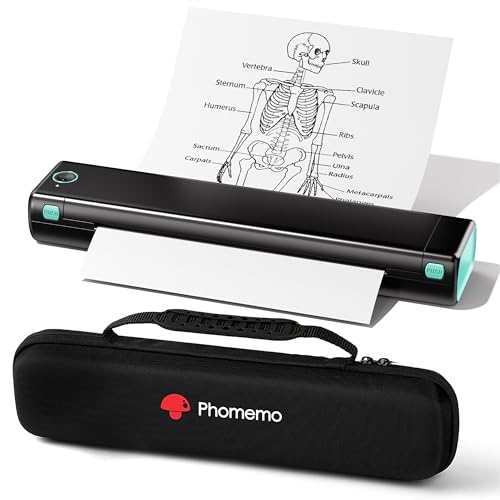
The Phomemo Portable Wireless Thermal Printer is an ideal choice for busy professionals and students who need a lightweight, efficient printing solution on the go. Weighing just 1.5 lb and only 1.5 inches thick, it fits easily in your bag. With Bluetooth connectivity via the Phomemo app, you can print directly from your phone or laptop in minutes. It uses thermal technology, so you won’t need ink or toner—just thermal paper. Expect high-quality black and white prints, perfect for photos and documents. Plus, the included carry case makes it a fantastic gift for anyone who values convenience and mobility.
Best For: Busy professionals and students who need a lightweight, portable printing solution for travel.
Pros:
- Compact and Lightweight: Weighs only 1.5 lb and is 1.5 inches thick, making it easy to carry.
- No Ink Required: Utilizes thermal technology, eliminating the need for ink, toner, or ribbons.
- High-Quality Prints: Delivers clear black and white prints, suitable for both documents and photos.
Cons:
- Thermal Paper Cost: Requires specific thermal paper, which may incur ongoing costs.
- Limited Color Printing: Only supports black and white printing, not suitable for color documents.
- Bluetooth Dependency: Requires Bluetooth connectivity and the Phomemo app for mobile printing, which may not be ideal for all users.
Portable Wireless Thermal Printer (A285M) for Travel
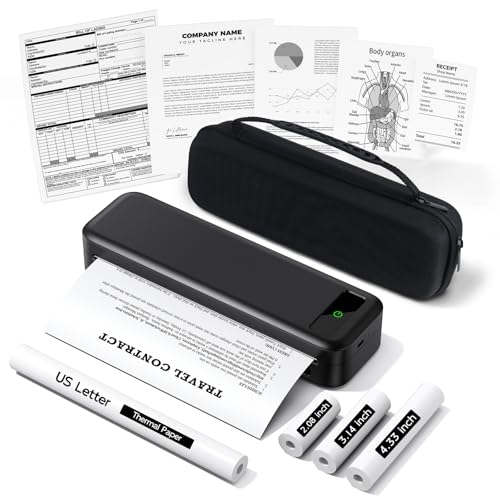
For business travelers and mobile professionals, the Portable Wireless Thermal Printer (A285M) stands out with its inkless printing technology, making it a hassle-free solution for on-the-go printing. Weighing just 1.5 pounds, it’s compact and includes a carrying case, four rolls of thermal paper, and USB cables. This printer connects effortlessly via Bluetooth to your iPhone, Android, or tablet, while also offering USB-C support for laptops. With various paper sizes available, it’s perfect for printing contracts, receipts, or notes. Ideal for anyone from mobile notaries to students, the A285M guarantees high-quality prints without the mess of traditional ink.
Best For: Business travelers, mobile notaries, and professionals needing on-the-go printing solutions.
Pros:
- Inkless printing technology eliminates the need for messy ink or toner, ensuring hassle-free operation.
- Compact and lightweight design (1.5 lbs) makes it easy to carry and perfect for travel.
- Versatile paper size support allows printing of various documents including contracts, receipts, and notes.
Cons:
- Limited to black-and-white printing, which may not suit all users’ needs.
- Requires driver download for USB-C connection, which can be inconvenient for some users.
- May not be compatible with certain thermal paper brands, restricting options for users.
Canon Pixma MG3620 Wireless All-in-One Color Inkjet Printer

Looking for a compact printer that easily fits into your mobile lifestyle? The Canon Pixma MG3620 Wireless All-in-One Color Inkjet Printer is your ideal solution. With print, copy, and scan functionality, it’s designed to save space while delivering quality results. You’ll appreciate its print speed of 9.9 ipm for black and 5.7 ipm for color, plus a 100-sheet paper capacity. Enjoy direct printing from your mobile devices, and connect to Alexa for ink notifications. This ENERGY STAR certified printer minimizes waste and requires no subscription for smart reorders, making it a smart choice for on-the-go printing.
Best For: Those who need a compact and efficient printer that supports mobile printing and offers multifunction capabilities.
Pros:
- Convenient mobile printing from various devices.
- Compact design saves space in small areas.
- Energy-efficient and certified by ENERGY STAR.
Cons:
- Print speed may be slower compared to higher-end models.
- Limited paper capacity of 100 sheets may require frequent refills.
- No advanced features like faxing or high-volume printing options.
Portable Wireless Thermal Printer for Travel

Travelers and professionals on the go will appreciate the Portable Wireless Thermal Printer, designed for seamless Bluetooth connectivity with devices like iOS and Android smartphones, as well as laptops. Weighing just 1.51 pounds and measuring 12 x 3.15 x 5.51 inches, it fits easily in backpacks or briefcases. This inkless thermal printer supports 8.5 x 11-inch thermal paper and produces clear, dark prints at a speed of up to 2 pages per minute. With a battery life of about 1.5 hours, it’s perfect for printing documents, lists, and receipts wherever you are. Just download the AiYin app to get started!
Best For: Travelers, professionals, and students needing a compact and efficient printing solution on the go.
Pros:
- Compact and lightweight design makes it easy to carry during travel.
- Bluetooth connectivity allows for wireless printing from smartphones and laptops.
- High-quality thermal printing produces clear and dark prints quickly.
Cons:
- Limited battery life of approximately 1.5 hours may require frequent recharging.
- Specific thermal paper required, limiting paper choices.
- Chromebooks are not supported for Bluetooth connectivity.
Canon PIXMA TR4720 All-in-One Wireless Printer
The Canon PIXMA TR4720 All-in-One Wireless Printer is an excellent choice for students and remote workers who need a versatile and compact printing solution. This wireless 4-in-1 printer lets you print, copy, scan, and fax, making it great for various tasks. With a print speed of 8.8 ipm for black and 4.4 ipm for color, you won’t have to wait long for your documents. It features easy ink installation, auto 2-sided printing, and a 100-sheet capacity. Plus, connect it to Alexa for low ink alerts and smart reorders, ensuring you never run out of supplies.
Best For: Students and remote workers seeking a versatile and compact all-in-one printing solution.
Pros:
- Wireless functionality allows for convenient printing from mobile devices.
- Auto 2-sided printing helps save paper and reduce waste.
- Smart features like Alexa connectivity enable low ink alerts and easy reordering.
Cons:
- Print speed may be slower compared to some high-end printers.
- Limited paper capacity of 100 sheets may require frequent refills for heavy users.
- No subscription service for ink, which could be a drawback for those who prefer automatic deliveries.
Factors to Consider When Choosing Portable Printers for Laptops
When picking a portable printer for your laptop, consider factors like size and weight, which affect how easily you can carry it. You’ll also want to think about battery life and connectivity options to guarantee it fits your needs. Finally, print quality and paper compatibility are essential for achieving the results you expect.
Size and Weight
Portability is key in choosing a printer for your laptop, and size and weight play essential roles in that equation. Look for printers that are compact enough to fit in your backpack or briefcase, ideally around 12 x 3.15 x 5.51 inches. A lightweight design, preferably under 2 pounds, makes it easier to transport during your travels or commutes. Many portable printers have a slim profile of less than 2 inches thick, allowing for easy storage without taking up significant space. For the best balance between functionality and portability, aim for models weighing between 1.5 to 1.75 pounds. Ultimately, choose a printer that suits your lifestyle, ensuring you can carry it without added strain.
Battery Life
Choosing a portable printer for your laptop isn’t just about size and weight; battery life plays a significant role too. You’ll want to know how long a printer can operate on a single charge, with some models offering up to 3 hours of continuous printing. Look for printers with fast charging capabilities that can recharge in just 90 minutes while turned off—perfect for your busy schedule. Pay attention to the battery capacity, usually measured in milliampere-hours (mAh); higher values mean longer usage. Consider the printer’s power consumption during operation and standby, as lower usage can extend battery life. Finally, some models offer external battery packs, boosting print volume and ensuring you stay productive while on the go.
Connectivity Options
While evaluating portable printers for your laptop, it’s vital to take into account the connectivity options available. Look for wireless features like Bluetooth and Wi-Fi Direct, which let you print easily from mobile devices without needing a router. Also, make certain the printer supports multiple mobile printing apps, such as Apple AirPrint and Google Cloud Print, for enhanced usability. USB connectivity is fundamental too, allowing direct connections to laptops and desktops when wireless isn’t an option. Additionally, check for technologies like Auto Wireless Connect, which simplify the setup process. Finally, evaluate the range of supported operating systems to verify compatibility with both iOS and Android devices, as well as various computer platforms, for broader usability.
Print Quality
When it comes to print quality, several key factors can make a significant difference in your portable printing experience. First, consider the printer’s resolution, typically measured in dots per inch (DPI). Higher DPI values translate to sharper, more detailed prints. Look for models with a 5-Color Hybrid Ink System, as they can produce vibrant colors and crisp black text, ideal for both documents and photos. If you’re opting for a thermal printer, remember they only support black and white printing, which may limit your options. Additionally, the type of ink used affects print longevity; some inks resist fading better than others. Finally, keep an eye on printing speed, as it can influence how quickly you achieve quality results, especially for high-volume tasks.
Paper Compatibility
Understanding paper compatibility is essential for guaranteeing your portable printer meets your specific printing needs. Start by checking the range of paper sizes the printer supports; some may only handle standard sizes like 8.5″ x 11″ or A4, while others can print on envelopes and photo paper. Be aware that certain thermal printers are limited to specific thermal paper types, which can restrict versatility. If you love photo printing, look for models that support borderless printing. Also, consider the printer’s capacity for holding sheets—some can manage 50 sheets while others hold over 100, affecting how often you’ll need to refill. Finally, verify the design allows for easy paper loading and unloading for a smoother user experience.
Cost of Supplies
The cost of supplies is a vital factor to take into account when choosing a portable printer for your laptop. Ink-based printers often require frequent cartridge replacements, which can become costly over time. In contrast, inkless thermal printers use thermal paper, typically priced around $0.12 per sheet, offering a more economical solution for those who print regularly. Keep in mind that some printers may need specific proprietary supplies, limiting your options and potentially increasing costs if they’re not easily available. When evaluating the overall affordability of a portable printer, it’s important to reflect on both the initial purchase price and the ongoing supply costs. This approach guarantees you make a financially sound decision for your printing needs.