When you’re traveling, staying connected and productive is essential, and having a reliable portable document printer can make all the difference. Whether you need to print contracts, travel itineraries, or personal documents, the right printer can offer convenience without compromising quality. From wireless options to thermal models, there are plenty of choices available. Curious about which ones stand out? Let’s explore the top contenders for on-the-go printing.
Canon PIXMA TR160 Wireless Portable Printer

If you’re a frequent traveler who needs to print documents on the go, the Canon PIXMA TR160 Wireless Portable Printer is an ideal choice. Its lightweight design makes it easy to slip into your bag or backpack. With a 50-sheet paper tray, you won’t have to constantly refill it. You’ll appreciate the high-quality prints, thanks to the 5-color hybrid ink system that delivers sharp text and vibrant colors. The 1.44” OLED display keeps you informed about ink levels and printer status. Plus, you can connect effortlessly using Canon PRINT, Apple AirPrint, or even Wireless Direct Mode.
Best For: Frequent travelers who need a compact and reliable printer for high-quality document printing on the go.
Pros:
- Lightweight and portable design allows for easy transport in bags or backpacks.
- 50-sheet paper tray reduces the need for constant refilling during use.
- High-quality printing with a 5-color hybrid ink system delivers sharp text and vibrant colors.
Cons:
- Limited paper capacity may require frequent monitoring for larger print jobs.
- Monochrome OLED display may not provide detailed information compared to larger screens.
- Wireless connectivity may have limitations in certain environments without a wireless router.
HP OfficeJet 250 Wireless Mobile Printer (CZ992A)

The HP OfficeJet 250 Wireless Mobile Printer (CZ992A) is ideal for professionals who need versatile printing solutions while on the go. This compact all-in-one printer lets you print, scan, and copy from your laptop, tablet, or smartphone without needing a network connection. It fits easily into your car, backpack, or briefcase, and the included battery guarantees you can print anywhere. With the HP app, you can print and scan directly from your mobile devices. Plus, it charges quickly in just 90 minutes. Enjoy a one-year limited warranty and compatibility with various paper sizes for all your business needs.
Best For: Professionals who require a portable all-in-one printing solution for business tasks while traveling.
Pros:
- Compact and lightweight design makes it easy to carry in bags or vehicles.
- Battery included allows for printing in remote locations without access to power.
- Fast charging capability ensures quick readiness for use, charging fully in just 90 minutes.
Cons:
- Limited paper capacity may require frequent reloading for large print jobs.
- Cost of replacement cartridges can be higher compared to some competitors.
- May have slower printing speeds compared to traditional stationary printers.
Portable Wireless Inkless Thermal Printer (A285M)

For busy professionals on the go, the Portable Wireless Inkless Thermal Printer (A285M) stands out as an ideal solution for travel printing needs. Weighing just 1.5 pounds and measuring 10.39 x 3.07 x 1.77 inches, it easily fits in your backpack or briefcase. You can print documents, photos, and web pages directly from your smartphone, tablet, or laptop via Bluetooth or USB-C. Utilizing advanced thermal technology, it eliminates the need for ink or toner, making maintenance simple. With support for various thermal paper sizes, this compact printer is perfect for business travel, schools, and home use.
Best For: Busy professionals, students, and anyone needing portable printing solutions while traveling.
Pros:
- Compact and lightweight design makes it easy to carry in bags.
- Wireless connectivity allows for printing directly from mobile devices without the hassle of cables.
- Inkless thermal technology reduces maintenance costs and mess.
Cons:
- Limited to black and white printing, which may not suit all users’ needs.
- Requires specific thermal paper, not compatible with regular copy paper.
- Driver installation needed for laptop connections, which could be inconvenient for some users.
Inkless Portable Wireless Thermal Printer for Travel

Traveling professionals and students alike will find the Inkless Portable Wireless Thermal Printer to be an invaluable companion. Weighing just 1.75 lbs, this compact printer fits effortlessly in your backpack or briefcase. With seamless Bluetooth connectivity, it pairs easily with your iOS or Android devices, letting you print directly from your smartphone using the Jadens Printer app. Enjoy high-quality prints at 203 DPI, thanks to its advanced thermal technology—no ink or toner needed. Plus, you get three rolls of thermal paper and a carry case, ensuring you’re always ready to print contracts, documents, or special gifts while on the go.
Best For: Traveling professionals and students who need a portable and efficient printing solution on the go.
Pros:
- Compact and lightweight design makes it easy to carry in backpacks or briefcases.
- Inkless thermal printing technology eliminates the need for ink or toner, reducing costs and mess.
- Seamless Bluetooth connectivity allows for quick pairing with both iOS and Android devices for direct printing.
Cons:
- Limited compatibility as it only works with Gloryang thermal paper.
- Requires driver installation for computer use, which may be inconvenient for some users.
- Battery life may be insufficient for extensive printing needs, with a maximum of 3 hours of continuous use.
Inkless Portable Wireless Thermal Printer for Travel

Looking for a hassle-free printing solution while on the go? The Gloryang Inkless Portable Wireless Thermal Printer is perfect for you. Weighing just 1.75 lbs, it’s ultra-portable and fits easily in your bag. With seamless Bluetooth connectivity, you can print directly from your iOS or Android device using the Jadens Printer app. Say goodbye to ink and toner—this printer uses thermal technology and comes with three rolls of thermal paper. Enjoy crisp, black-and-white prints for up to three hours on a single charge. It’s ideal for busy professionals and students alike, making it a thoughtful gift option too!
Best For: Busy professionals and students seeking a portable and efficient printing solution without the need for ink.
Pros:
- Seamless Bluetooth connectivity allows easy printing from iOS and Android devices.
- Cost-effective as it uses thermal technology, eliminating the need for ink or toner.
- Ultra-portable design makes it convenient for travel, fitting easily into bags or briefcases.
Cons:
- Prints only in black, limiting color options for documents.
- Requires specific Gloryang thermal paper, restricting paper choices.
- Battery life of up to 3 hours may not be sufficient for extensive printing sessions.
Inkless Portable Printer for Travel

If you’re a busy professional or student who needs to print documents on the go, the Gloryang Inkless Portable Printer is a game changer. This compact device uses advanced thermal technology, so you won’t need ink or toner. Weighing just 1.75 lbs and fitting easily into your backpack, it’s perfect for emergencies or important documents. With seamless Bluetooth connectivity, you can print from your smartphone, tablet, or laptop via the Jadens Printer app. It delivers high-quality prints and can handle up to 360 sheets per charge. Whether it’s for work or school, this printer is your ideal travel companion.
Best For: Busy professionals and students who need a portable printing solution for documents on the go.
Pros:
- Compact and lightweight: Weighs only 1.75 lbs, making it easy to carry in a backpack or briefcase.
- Inkless technology: Utilizes thermal printing, eliminating the need for ink, toner, or ribbons, which saves costs and maintenance.
- Seamless connectivity: Connects easily with iOS, Android devices, and laptops via Bluetooth, allowing for convenient printing from various devices.
Cons:
- Limited color printing: Only prints in black, which may not be suitable for all printing needs.
- Requires specific thermal paper: Compatible only with Gloryang thermal paper, limiting options for users.
- Driver installation needed for computers: Additional setup may be required for use with laptops and computers, which could be inconvenient for some users.
Portable Wireless Thermal Printer for Travel
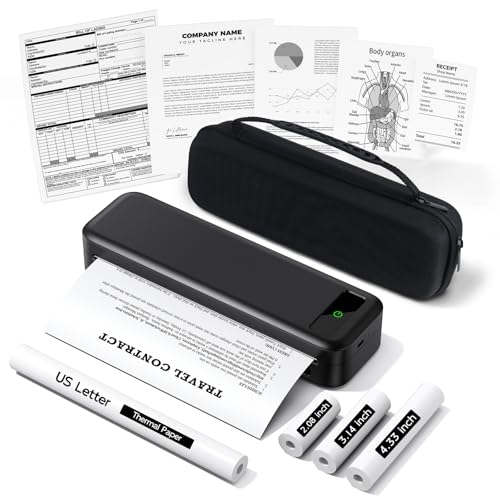
For mobile notaries and business travelers who need to print documents on the go, the Portable Travel Printer A285M is an ideal solution. Weighing just 1.5 lbs, it’s easy to carry and comes with a handy case. This Bluetooth inkless thermal printer eliminates the hassle of ink, allowing you to print contracts, receipts, and notes without clogging issues. It connects seamlessly to your iPhone, Android, or tablet. With support for multiple thermal paper sizes, you can adapt to any situation. Whether you’re in a car or at a school, this printer is perfect for all your portable printing needs.
Best For: Mobile notaries, business travelers, and anyone needing to print documents on the go.
Pros:
- Inkless printing technology eliminates the need for ink, toner, or ribbons, reducing maintenance and costs.
- Lightweight design (1.5 lbs) and included carrying case make it highly portable for travel.
- Multi-size paper support allows flexibility for different printing needs, accommodating various thermal paper sizes.
Cons:
- Limited to black-and-white printing, which may not suit all users’ needs for color documents.
- Driver download required for USB-C connection, which may complicate setup for some users.
- Only compatible with thermal paper, restricting the types of media that can be used.
Phomemo Portable Wireless Thermal Printer for Travel
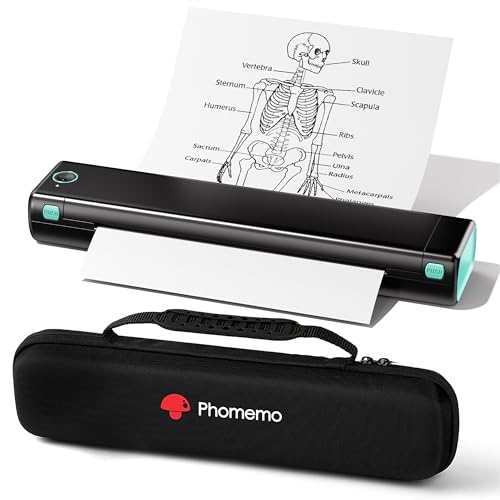
Ideal for busy professionals and students, the Phomemo Portable Wireless Thermal Printer offers a lightweight design and wireless connectivity that make printing on the go a breeze. Weighing just 1.5 pounds and only 1.5 inches thick, it easily fits in your bag. Connecting via Bluetooth through the Phomemo app on your smartphone or laptop, you can print various formats like PDFs and images without the hassle of ink. Its thermal technology guarantees high-quality black and white prints at an economical cost. Plus, setup takes under five minutes, making it a perfect companion for your travel needs.
Best For: Busy professionals and students who need a portable and efficient printing solution while traveling.
Pros:
- Lightweight and compact design makes it easy to carry in bags or backpacks.
- Wireless connectivity via Bluetooth allows for convenient printing from smartphones and laptops without the need for cables.
- Cost-effective printing using thermal technology eliminates the need for expensive ink or toner.
Cons:
- Limited to black and white printing, which may not be suitable for color documents or images.
- Requires specific thermal paper, which can limit printing options and availability.
- Setup may be challenging for users unfamiliar with Bluetooth connections or app installations.
TATTMUSE Portable Wireless Printer for Phone & Laptop
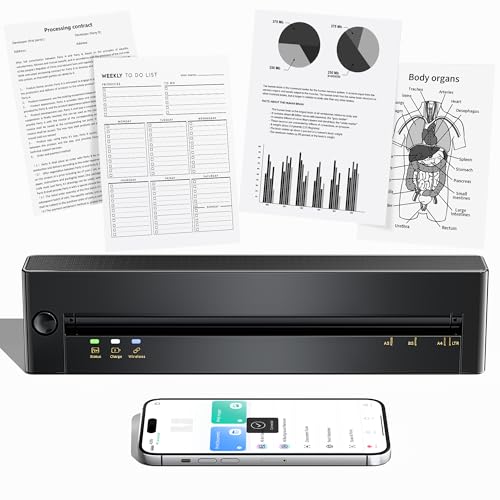
Traveling professionals seeking a reliable solution for on-the-go printing will appreciate the TATTMUSE Portable Wireless Printer. This inkless printer connects effortlessly to your phone or laptop, supporting both US Letter and A4 sizes. With advanced thermal direct technology, it delivers sharp documents thanks to its dual-zone heat control. The Double-Tap Auto Paper Return Technology makes jam removal hassle-free, reducing frustration during your travels. Plus, its lightweight design and extended battery life guarantee you can print anytime, anywhere. Bluetooth connectivity and rapid printing capabilities make this printer a must-have for those prioritizing portability without sacrificing performance.
Best For: Traveling professionals who need a reliable and portable printing solution for their documents on the go.
Pros:
- Wireless connectivity allows seamless printing from both phones and laptops.
- Compact and lightweight design makes it easy to carry while traveling.
- Advanced thermal technology ensures sharp and clear document prints.
Cons:
- Inkless technology may limit certain printing capabilities compared to traditional printers.
- Battery life may not last as long during heavy usage or extensive travel.
- Bluetooth connectivity might face compatibility issues with some devices.
Portable Wireless Thermal Printer for Travel

If you often find yourself on the go for business trips or academic pursuits, the Portable Wireless Thermal Printer is the perfect companion. Weighing just 1.51 pounds and measuring 12 x 3.15 x 5.51 inches, it easily fits in your backpack or briefcase. This inkless thermal printer supports Bluetooth connectivity with iOS and Android devices, as well as laptops. With a maximum print speed of 2 ppm and clear output, it’s ideal for documents, receipts, and more. Plus, you’ll get two rolls and ten sheets of thermal paper included, making it ready to use right away.
Best For: The Portable Wireless Thermal Printer is best for professionals and students who need a compact and efficient printing solution while traveling.
Pros:
- Lightweight and portable design makes it easy to carry during trips.
- Bluetooth connectivity allows for seamless printing from various devices, including smartphones and laptops.
- Inkless thermal printing technology ensures clear output without the need for ink, making it cost-effective.
Cons:
- Limited battery life of approximately 1.5 hours may not suffice for extended use.
- Requires specific thermal paper, limiting the types of paper that can be used.
- Max print speed of 2 ppm may be slower compared to traditional printers.
Factors to Consider When Choosing Portable Document Printers for Travel
When choosing a portable document printer for travel, you’ll want to take into account several key factors. Size and weight matter for easy transport, while printing technology affects efficiency and output. Also, take a close look at battery life, connectivity options, and print quality to guarantee the printer meets your specific needs.
Size and Weight
Choosing a portable document printer for travel means prioritizing size and weight to guarantee convenience on the go. Aim for a printer that weighs less than 5 pounds; this guarantees easy transport while you’re on the move. Look for a compact design that fits comfortably in standard backpacks or briefcases. Printers under 2 inches thick are especially convenient for slipping into tight spaces. Lightweight materials can considerably reduce weight without sacrificing durability, making your travel experience smoother. Additionally, consider models that come with a lightweight carrying case, which simplifies transport and protects your printer. By focusing on these factors, you’ll enjoy hassle-free printing wherever your travels take you.
Printing Technology
Understanding the printing technology used in portable document printers is essential for ensuring you get the best performance while traveling. Most portable printers utilize thermal printing technology, which means you won’t need ink, toner, or ribbons. This feature not only lowers operating costs but also minimizes maintenance. Thermal printers work by applying heat to specially coated thermal paper, creating clear black-and-white prints without smudging. Many models support various paper sizes, including letter and A4, making them versatile for your needs. When choosing a thermal printer, consider print resolution and the quality of the thermal paper, as these factors directly impact print clarity and durability. Battery-powered options often allow for multiple hours of continuous printing, perfect for on-the-go use.
Battery Life
Battery life plays a pivotal role in your decision-making process for portable document printers, especially since it dictates how long you can print on the go without recharging. Many portable printers provide battery durations ranging from 1.5 to 3 hours of continuous printing, allowing you to tackle multiple documents during your travels. Quick charging capabilities can enhance usability, with some models fully charged in just 90 minutes. Consider printers with larger battery capacities, as they typically support higher page yields, meaning more prints before needing a recharge. It’s also essential to think about your printing needs; high-volume tasks can drain battery life faster, so opt for a printer with a longer-lasting battery to meet your demands while traveling.
Connectivity Options
When you’re on the go, having the right connectivity options can make all the difference in your printing experience. Look for printers with Bluetooth connectivity, allowing you to easily connect with smartphones and tablets without hassle. Consider models that support USB connections for compatibility with laptops, though be mindful of potential driver installations. Evaluate whether the printer works with mobile printing apps, as these simplify the setup process. Wireless direct mode is another great feature; it lets you connect directly to the printer without needing a router, enhancing convenience. Finally, verify the printer supports multiple operating systems, including iOS and Android, so you can accommodate a wider range of devices during your travels.
Print Quality
Print quality plays an important role in your experience with portable document printers, especially while traveling. Look for models that offer high resolutions, typically around 203 dots per inch (DPI), to guarantee clear text and sharp images. Many portable printers use advanced thermal technology, which eliminates ink and often speeds up printing without sacrificing quality. If vibrant colors are important to you, consider printers with a 5-Color Hybrid Ink System for enhanced output. Additionally, check if the printer can handle various formats like borderless or square prints, as this versatility can elevate your overall print quality. Remember, using the right thermal paper is essential; regular copy paper may not deliver the results you want.
Paper Compatibility
High print quality is just one aspect to evaluate when choosing a portable document printer for travel; paper compatibility is equally important. First, check the supported paper sizes. Many models handle standard sizes like 8.5″ x 11″ and A4, but some offer additional formats like envelopes or card sizes. Next, determine if the printer needs specific types of thermal paper, as this could limit your options. If you require color prints, verify the printer can deliver that, as some only produce black-and-white. Don’t forget about the maximum input sheet capacity; limited sheets may mean constant reloading. Finally, think about paper finishes, like glossy or matte, to confirm your prints suit your intended applications.