When managing inventory in a warehouse, choosing the right barcode label printer can greatly impact your efficiency. You need a printer that not only delivers high-quality labels but also integrates seamlessly into your existing systems. With options ranging from compact models to high-capacity machines, understanding the features that matter most is essential. Let’s explore some of the top choices available and what sets them apart for your operations.
Rollo USB Shipping Label Printer – Commercial Grade Thermal Label Printer for Shipping Packages

The Rollo USB Shipping Label Printer is the ideal choice for small business owners looking to streamline their shipping process. This commercial-grade thermal printer can print at an impressive speed of 150mm/s, delivering a clear 4×6 label every second. Its compatibility with major shipping platforms like FedEx and USPS makes it incredibly versatile. You can create custom labels for barcodes, product stickers, and more, all without worrying about ink or toner costs. Plus, it integrates seamlessly with eCommerce platforms, helping you access exclusive shipping rates. With Rollo, you’ll save time and money while ensuring your packages are professionally labeled.
Best For: Small business owners looking for a fast and efficient way to print shipping labels without the hassle of ink or toner.
Pros:
- High-speed printing: Delivers labels at 150mm/s, allowing for quick processing of shipping tasks.
- Versatile compatibility: Works with major shipping platforms and eCommerce marketplaces, enhancing usability.
- Cost-effective: Eliminates the need for ink and toner, reducing overall printing costs.
Cons:
- Limited to specific label sizes: Primarily designed for 4×6 labels, which may not suit all business needs.
- USB connectivity only: Lacks wireless options, which may be inconvenient for some users.
- Potential learning curve: New users may need time to familiarize themselves with the software and setup.
DYMO Label Writer 450 Twin Turbo Direct Thermal Printer
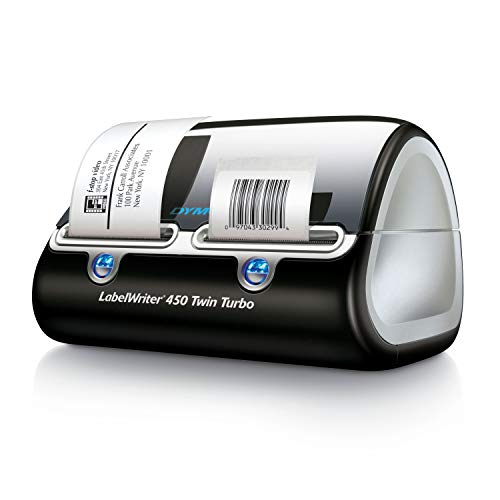
If you’re looking for a fast and efficient labeling solution for your warehouse, the DYMO Label Writer 450 Twin Turbo Direct Thermal Printer is an excellent choice. This printer lets you quickly switch between two rolls of labels, so you can print different label types without wasting time. Utilizing direct thermal technology, it eliminates the need for ink and toner, saving you money on printing costs. Plus, you can easily customize labels from Microsoft Word, Excel, Outlook, and Google Contacts, making it versatile for your needs. For best results, always use authentic DYMO LabelWriter Labels available in various sizes.
Best For: Businesses and home offices that require fast, efficient, and customizable labeling solutions.
Pros:
- Quickly switch between two rolls of labels, enhancing productivity without wasting time.
- Cost-effective printing due to direct thermal technology, eliminating the need for ink and toner.
- Versatile label customization options available through popular software like Microsoft Word and Google Contacts.
Cons:
- Limited to direct thermal printing, which may not be suitable for all label types or environments.
- Requires authentic DYMO labels for optimal performance, potentially increasing ongoing costs.
- Print quality may fade over time if labels are exposed to heat or sunlight.
CLABEL Desk Bluetooth Barcode Label Printer (Model 221D)
Compact and lightweight, the CLABEL Desk Bluetooth Barcode Label Printer (Model 221D) is perfect for small businesses and home offices that need efficient labeling solutions. With direct thermal printing, it supports label widths from 0.78 to 2.28 inches, making it versatile for barcodes and address labels. Setup is a breeze; you can be printing in under 5 minutes after downloading the software. The powerful CLABEL app lets you customize labels with multiple fonts, templates, and icons, while regular software updates keep it running smoothly. Plus, you can use any brand of printer paper, saving you costs on consumables.
Best For: Small businesses and home offices looking for efficient and customizable labeling solutions.
Pros:
- Easy setup and portability, allowing for quick installation and movement.
- Extensive customization options through the CLABEL app, including multiple fonts and templates.
- Cost-effective as it supports any brand of printer paper, reducing consumable expenses.
Cons:
- Limited to direct thermal printing, which may not be suitable for all label types.
- Print width range may not accommodate larger label sizes required for some applications.
- Dependence on software updates for enhanced functionality could be a drawback for users who prefer stability.
Westinghouse Thermal Shipping Label Printer (USB, 4×6)

For small businesses and eCommerce sellers looking to streamline their shipping process, the Westinghouse Thermal Shipping Label Printer is an ideal choice. With a USB connection and a 4×6 label size, it’s compatible with major shipping carriers like USPS, UPS, and Amazon. You’ll enjoy a fast print speed of 6 inches per second and sharp 203 DPI resolution. This commercial-grade printer supports Windows, macOS, and Linux, making setup easy. Plus, it uses direct thermal technology, so you won’t need any ink ribbons. The package includes everything you need to get started, ensuring a smooth shift to efficient shipping.
Best For: Small businesses and eCommerce sellers looking to streamline their shipping process with a reliable thermal label printer.
Pros:
- Fast print speed of 6 inches per second for efficient label production.
- Sharp print resolution of 203 DPI ensures clear text and graphics.
- No ink required thanks to direct thermal technology, reducing ongoing costs.
Cons:
- Not Bluetooth-capable, limiting wireless connectivity options.
- Only supports media widths up to 4.6 inches, which may not accommodate larger labels.
- Ethernet cable and USB-C cable/adapter sold separately, adding to initial setup costs.
Brother P-touch PT-D610BT Connected Label Maker
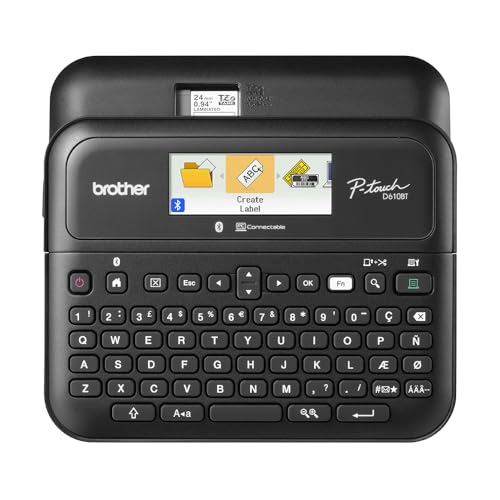
The Brother P-touch PT-D610BT Connected Label Maker is a game changer for warehouse managers who need efficient and organized labeling solutions. With Bluetooth and USB connectivity, you can easily create and print labels from multiple devices. Enjoy 17 fonts, 17 styles, and 900 symbols to design labels up to 1 inch wide, ensuring high-resolution prints for barcodes and logos. Its built-in memory stores 90 labels for quick reprints, while the automatic cutter and QWERTY keyboard boost productivity. The large color LCD display allows you to preview labels, reducing waste and maintaining a professional look, making it perfect for inventory management.
Best For: The Brother P-touch PT-D610BT Connected Label Maker is best for warehouse managers and professionals seeking efficient, customizable labeling solutions for inventory management.
Pros:
- Versatile Connectivity: Supports Bluetooth and USB for easy label creation from multiple devices.
- Robust Design Features: Offers 17 fonts, 17 styles, and 900 symbols, allowing for creative and professional label designs.
- Efficient Memory Function: Built-in memory stores up to 90 labels for quick reprinting, enhancing productivity.
Cons:
- Limited Label Width: Labels can only be created up to 1 inch wide, which may not suit all labeling needs.
- Software Dependency: Full customization requires the Brother P-Touch Editor software, which may be an additional step for some users.
- Potential Learning Curve: Users unfamiliar with label makers may need time to learn the various features and functionalities.
CLABEL Desk Bluetooth Barcode Label Printer

If you’re looking for an efficient solution to streamline labeling tasks in your small business or home office, the CLABEL Desk Bluetooth Barcode Label Printer is an excellent choice. This compact printer features direct thermal printing with a 2-inch width and high-speed 203DPI technology for sharp, clear output. You won’t need ink or toner, making it cost-effective as it’s compatible with various thermal paper brands. With USB and Bluetooth connectivity, you can easily print from your devices using the CLABEL Trade APP. Whether for inventory management or organizing, this printer handles it all, making your labeling tasks a breeze.
Best For: Small businesses and home offices looking for an efficient and cost-effective labeling solution.
Pros:
- High-speed printing with 203DPI technology ensures sharp, clear labels.
- Cost-effective as it requires no ink or toner and is compatible with various thermal paper brands.
- Versatile connectivity options including USB and Bluetooth allow easy printing from multiple devices.
Cons:
- Limited to a 2-inch print width, which may not suit all labeling needs.
- May require specific thermal paper sizes for optimal performance.
- The CLABEL Trade APP may have a learning curve for some users.
iDPRT Label Maker – 3 inch Thermal Printer for Small Business

When you need a reliable labeling solution for your small business, the iDPRT Label Maker stands out with its impressive 180mm/s printing speed. This 3-inch thermal printer supports various label types and connects seamlessly via USB or LAN, perfect for warehouses and offices. You’ll appreciate its cost-effective design, as it eliminates the need for proprietary label paper, allowing you to use thermal paper from any brand. With an intuitive app, printing from your smartphone is a breeze. Plus, you get complimentary editing tools for unique designs and excellent customer support, ensuring a smooth experience for all your labeling needs.
Best For: Small businesses looking for an efficient, cost-effective labeling solution that can handle high-volume printing tasks.
Pros:
- Fast printing speed of 180mm/s, making it ideal for large-scale printing tasks.
- Compatibility with any brand of thermal paper, reducing costs associated with proprietary label materials.
- Intuitive app for smartphone printing, enhancing convenience and usability.
Cons:
- Limited to thermal printing, which may not suit all labeling needs.
- Requires USB or LAN connection, which may limit mobility in some work environments.
- Editing tools may be complex for users unfamiliar with design software.
Phomemo M220 Portable Bluetooth Label Maker
For businesses needing a compact and efficient labeling solution, the Phomemo M220 Portable Bluetooth Label Maker stands out with its lightweight design and versatile functionality. Weighing just 328g, it’s half the weight of traditional label makers. This thermal printer eliminates the need for ink or ribbons, supporting label widths from 0.78 to 3.14 inches. Compatible with various devices via Bluetooth and the Phomemo App, you can create customized labels effortlessly. With a built-in battery that prints up to 36 rolls of labels, this portable device is perfect for on-the-go labeling in warehouses, offices, or schools.
Best For: Businesses and individuals seeking a portable, ink-free labeling solution for various applications like organization, inventory management, and crafts.
Pros:
- Lightweight and portable: Weighs only 328g, making it easy to carry for on-the-go labeling.
- No ink required: Utilizes thermal printing technology, reducing ongoing costs and maintenance.
- Versatile connectivity: Compatible with multiple devices and operating systems via Bluetooth for easy label creation.
Cons:
- Limited label sizes: Does not support larger 4 x 6 shipping labels, restricting some labeling needs.
- Requires app for connectivity: Must use the Phomemo App for printing, which may add an extra step compared to traditional printers.
- Auto sleep feature: While it saves battery, it may cause delays if the device needs to be reactivated frequently.
Brother TD-4550DNWB Thermal Barcode and Label Printer
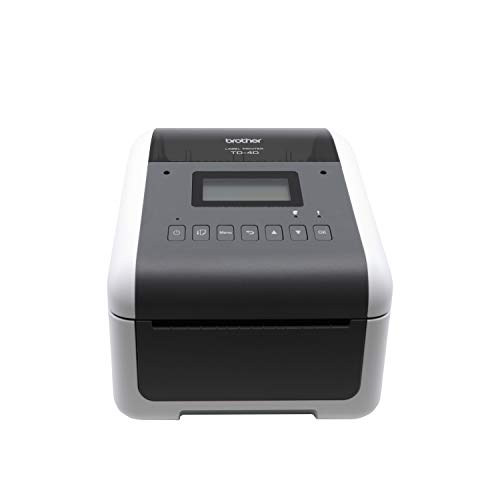
The Brother TD-4550DNWB Thermal Barcode and Label Printer stands out as an ideal choice for warehouses that require efficient, high-quality labeling solutions. With a print resolution of 300 dpi and a speed of 6 inches per second, it quickly produces sharp labels, barcodes, receipts, and tags. Its versatile connectivity options—USB, Ethernet, Wi-Fi, and Bluetooth—allow for seamless integration with mobile devices. This printer optimizes on-demand labeling, serving multiple employees while minimizing workspace hazards with its wireless capabilities. By enhancing efficiency and reducing costs, the TD-4550DNWB is a smart investment for streamlining your inventory management process.
Best For: The Brother TD-4550DNWB Thermal Barcode and Label Printer is best for warehouses and businesses that need efficient, high-quality labeling solutions for inventory management.
Pros:
- High print resolution of 300 dpi ensures sharp and detailed labels.
- Fast print speed of 6 inches per second boosts productivity.
- Wireless connectivity options reduce clutter and enhance workspace safety.
Cons:
- Limited to monochrome printing, which may not suit all labeling needs.
- Initial cost may be higher compared to simpler label printers.
- Requires regular maintenance to ensure optimal performance over time.
iDPRT Label Maker, Thermal Barcode Printer
Designed with efficiency in mind, the iDPRT Label Maker, Thermal Barcode Printer stands out as the ideal choice for busy warehouse operations. You’ll love its cost-saving features, allowing you to use any brand’s thermal paper, avoiding pricey proprietary options. Connect effortlessly via Bluetooth or USB, and print directly from your phone using an intuitive app. With a speedy output of 140 labels per minute, it’s perfect for large-scale tasks. Plus, it supports various label sizes and offers complimentary editing tools for customization. Enjoy excellent customer support, ensuring your labeling needs are met throughout the year.
Best For: The iDPRT Label Maker is best for busy warehouse operations and individuals needing quick and efficient labeling solutions.
Pros:
- Cost-saving features allow the use of any brand’s thermal paper, reducing ongoing expenses.
- High printing speed of 140 labels per minute, ideal for large-scale labeling tasks.
- Versatile labeling capabilities support various sizes and types of labels for different applications.
Cons:
- Requires thermal paper of suitable size, limiting paper options to specific dimensions.
- Bluetooth and USB connectivity may require initial setup for optimal use.
- Complimentary editing tools may not meet the needs of users seeking advanced design features.
Factors to Consider When Choosing Barcode Label Printers for Warehouses
When choosing a barcode label printer for your warehouse, you need to take into account several key factors. Think about your printing speed requirements, connectivity options, and label size compatibility. Additionally, weigh the cost-effectiveness and usability to guarantee a smooth setup and operation.
Printing Speed Requirements
Selecting the right printing speed is essential for efficient warehouse operations, especially when you need to keep up with high demand. Fast printers that exceed 150mm/s can drastically reduce waiting times during busy periods. If you’re handling large batches, look for printers that deliver around 6 inches per second; this speed keeps your workflow smooth. For mass labeling projects, aim for printers that can produce up to 140 labels per minute to guarantee quick turnarounds. High-speed capabilities prevent bottlenecks in your labeling process, markedly boosting operational efficiency. Finally, assess your daily label volume to choose a printer that meets your specific needs without causing delays. The right speed can make all the difference in your warehouse’s productivity.
Connectivity Options Available
Choosing the right connectivity options for your barcode label printer can greatly impact your warehouse’s efficiency. Look for printers that offer multiple connections like USB, Bluetooth, and Ethernet. USB connections provide a reliable, high-speed link to your computers, ensuring quick data transfer. If mobility is key, Bluetooth lets your staff print labels wirelessly from mobile devices, enhancing flexibility on the go. For larger operations, Ethernet enables multiple users to access the printer simultaneously, which is essential for high labeling demands. Additionally, consider models that support Wi-Fi, allowing seamless integration into your existing wireless network while reducing cable clutter. Evaluating these options will help you choose a printer that meets your warehouse’s specific needs.
Label Size Compatibility
Understanding label size compatibility is vital for optimizing your warehouse operations, as it directly affects your labeling efficiency. When choosing a barcode label printer, make sure it supports a range of label widths, ideally from 0.78 inches to 4.6 inches. A maximum printing width of at least 4 inches is often ideal for larger warehouse labels. You’ll want to verify that the printer can handle various label thicknesses, as durability is significant for warehouse use. Additionally, check for compatibility with standard sizes, like the commonly used 4×6 inches for shipping labels. Finally, confirm the printer can produce labels in multiple formats, including barcodes and QR codes, to support your diverse inventory management needs.
Cost-Effectiveness and Savings
Label size compatibility plays a significant role in your warehouse operations, but cost-effectiveness can’t be overlooked when evaluating barcode label printers. Opting for direct thermal printers can save you money in the long run since they eliminate the need for ink and toner. Look for printers compatible with various brands of thermal paper to avoid pricey proprietary consumables, leading to substantial savings. High-speed printing can enhance productivity, allowing you to process large batches of labels quicker and reduce labor costs. Modern printers often include advanced features and apps that streamline label design, minimize waste, and maximize efficiency. Finally, investing in wireless connectivity options can cut down on setup costs and improve flexibility throughout your warehouse.
Usability and Setup Ease
When you’re evaluating barcode label printers for your warehouse, usability and setup ease are essential factors that can greatly influence your operations. Look for printers that install quickly—ideally in under five minutes—to minimize downtime. Models with intuitive apps or software let you customize and print labels directly from your mobile devices or computers, boosting flexibility. If you need to relocate printers often, choose lightweight, portable designs for hassle-free movement. A user-friendly interface with a large display can enhance usability and reduce labeling errors. Ultimately, select devices that support multiple connectivity options like Bluetooth and USB, ensuring seamless integration with your existing systems and accommodating various warehouse environments. These features can greatly improve your efficiency.