When it comes to running a restaurant, efficiency is key. Choosing the right thermal receipt printer can make a significant difference in your service speed and customer satisfaction. With various options available, understanding which models stand out can help streamline your operations. From quick printing speeds to user-friendly features, there’s a lot to contemplate. Let’s explore the top contenders that can elevate your restaurant’s performance.
Rongta 80mm USB Thermal Receipt Printer (RP326)
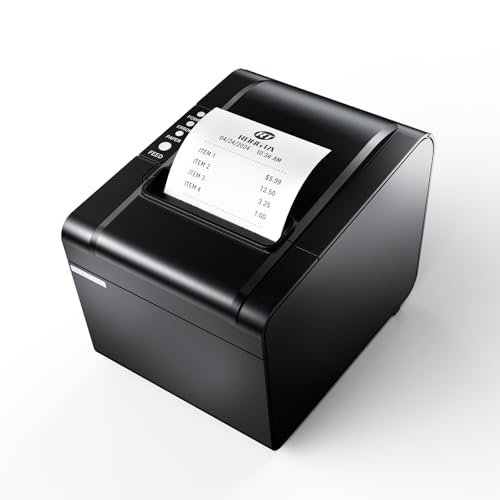
The Rongta 80mm USB Thermal Receipt Printer (RP326) is an excellent choice for restaurants looking to enhance their efficiency and streamline operations. With fast printing speeds of 250mm/sec and an auto cutter, you’ll handle receipts like a pro. This printer supports USB, LAN, and SERIAL connections, guaranteeing compatibility with various systems, including Windows and Mac. Its design allows for wall mounting, saving valuable counter space. Plus, the one-button open cover makes maintenance a breeze. Operating without ribbons or ink cartridges keeps your costs down, while the long service life assures you’ll invest in a reliable tool for your restaurant’s needs.
Best For: The Rongta 80mm USB Thermal Receipt Printer (RP326) is best for restaurants and retail environments looking for a fast and efficient receipt printing solution.
Pros:
- Fast printing speed of 250mm/sec enhances operational efficiency.
- Auto cutter prevents receipts from falling and simplifies handling.
- Compatible with multiple operating systems and offers various connection options.
Cons:
- Not compatible with popular food delivery services like Ubereats and Grubhub.
- Limited to specific operating systems, excluding some newer platforms.
- Wall mounting may not be suitable for all setups or preferences.
Rongta 80mm Thermal Receipt Printer (RP850)
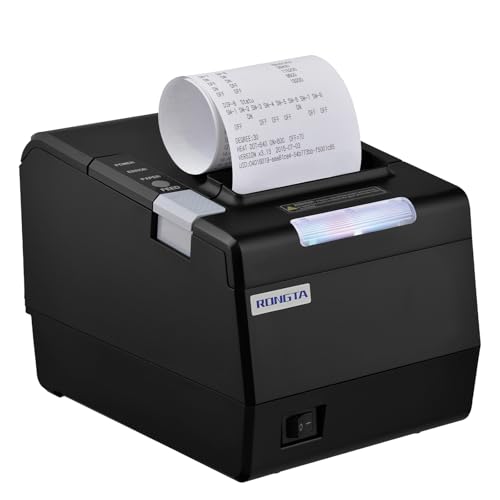
For busy restaurant environments, the Rongta 80mm Thermal Receipt Printer (RP850) stands out with its efficient auto cutter feature, streamlining the receipt process for fast-paced service. This printer supports both 80mm and 58mm paper widths, making it versatile for various needs. It’s compatible with Windows, Mac, and Linux but doesn’t work with mobile platforms like iPhone or Android. Installation is straightforward via TCP/IP, and you’ll find a USB flash drive included with drivers. Customize settings easily through DIP switches or the printer tool, ensuring it fits perfectly with your restaurant’s workflow.
Best For: Busy restaurant environments that require efficient and reliable receipt printing.
Pros:
- Supports both 80mm and 58mm paper widths for versatility.
- Easy installation via TCP/IP with included USB flash drive for drivers.
- Customizable settings through DIP switches and a printer tool for optimal workflow integration.
Cons:
- Not compatible with mobile platforms such as iPhone or Android devices.
- Limited to specific operating systems (Windows, Mac, Linux) and does not support popular POS systems like Square or Clover.
- May require additional setup steps if the USB flash drive is lost or unavailable.
Rongta 80mm Direct Thermal Receipt Printer (RP332)

When you need a reliable receipt printer for your restaurant, the Rongta 80mm Direct Thermal Receipt Printer (RP332) stands out with its impressive printing speed of 250mm/s. It supports both 80mm and 58mm paper widths, making it versatile for different needs. With USB, Serial, and Ethernet interfaces, installation is a breeze, especially with the included user guide. The built-in auto cutter and cash drawer support enhance efficiency during busy hours. However, keep in mind that it’s not compatible with mobile devices or certain popular POS systems. For peak performance, verify you check compatibility before purchasing.
Best For: Restaurants and retail businesses looking for a fast and efficient receipt printing solution.
Pros:
- High printing speed of 250mm/s ensures quick transaction processing.
- Versatile paper support for both 80mm and 58mm widths, catering to different requirements.
- Includes auto cutter and cash drawer support, enhancing operational efficiency during busy periods.
Cons:
- Not compatible with popular POS systems like Square, PayPal, and Shopify.
- Limited to laptops and desktop computers, lacking support for mobile devices.
- Requires compatibility checks before purchase to avoid issues with integration.
Epson TM-T20IV Thermal Receipt Printer

High-speed printing performance makes the Epson TM-T20IV Thermal Receipt Printer an excellent choice for busy restaurants and retail environments. With print speeds of up to 310 mm/s, you’ll enhance transaction efficiency and minimize customer wait times. Its versatile connectivity options, including USB, Serial, and Ethernet ports, guarantee seamless integration with any POS system. Plus, it’s compatible with Windows, Android, and iOS devices, perfect for modern mPOS setups. Designed to be eco-friendly, it reduces paper usage by up to 30%. Compact and durable, you can easily install it in tight spaces. With a robust warranty, you’re set for reliable service.
Best For: The Epson TM-T20IV Thermal Receipt Printer is best for busy retail and restaurant environments that require fast and efficient receipt printing.
Pros:
- High-speed printing of up to 310 mm/s enhances transaction efficiency.
- Versatile connectivity options (USB, Serial, Ethernet) for easy integration with various POS systems.
- Eco-friendly design that reduces paper usage by up to 30% and is ENERGY STAR certified.
Cons:
- Limited to thermal printing, which may not be suitable for all types of receipts or documents.
- May require specific driver installation for optimal compatibility with certain devices.
- Compact size may limit internal features compared to larger printers.
Rongta 80mm Thermal POS Receipt Printer

The Rongta 80mm Thermal POS Receipt Printer stands out as an ideal choice for small businesses looking to enhance their receipt printing efficiency. With high-speed printing at 250mm/sec and an auto cutter feature, it handles receipts quickly and clearly. Its sturdy design includes a one-button open cover and a large paper warehouse, making maintenance a breeze. Plus, you can mount it on the wall for space-saving convenience. Enjoy low operating costs with no need for ribbons or ink cartridges. Just remember, it’s not compatible with systems like Square, so check your setup before purchasing.
Best For: Small businesses seeking an efficient, cost-effective solution for receipt printing.
Pros:
- High-speed printing at 250mm/sec for quick transactions.
- Low operating costs with no need for ribbons or ink cartridges.
- Sturdy design with wall-mounting options for space-saving.
Cons:
- Not compatible with popular systems like Square, Doordash, and Uber Eats.
- Limited to a 80mm printing width, which may not suit all businesses.
- Requires checking connectivity options to ensure compatibility with existing setups.
TM-T88VI Professional POS Receipt Printer

For restaurant owners seeking a reliable and efficient solution, the TM-T88VI Professional POS Receipt Printer stands out with its impressive print speed of 350mm per second. Its built-in Ethernet connectivity allows for flexible placement, while USB and Serial ports guarantee compatibility with major POS systems like Square and Toast. You’ll appreciate the automatic cutter rated for 3 million cuts, designed to keep your service running smoothly during busy hours. Plus, with support for online ordering platforms like DoorDash, the TM-T88VI helps reduce customer wait times and boosts your overall service efficiency, making it a smart choice for any restaurant environment.
Best For: Restaurant owners looking for a reliable and fast receipt printing solution that enhances service efficiency.
Pros:
- High print speed of 350mm per second, reducing customer wait times.
- Robust connectivity options including built-in Ethernet, USB, and Serial ports, compatible with major POS systems.
- Durable design with an automatic cutter rated for 3 million cuts, ideal for busy environments.
Cons:
- Optional Bluetooth connectivity requires a separate adapter, adding to the overall cost.
- Limited color options with only a black variant available.
- Initial setup may be complex for users unfamiliar with network configurations.
Rongta Thermal Receipt Printer (80mm, Auto Cutter)

Designed with restaurant owners in mind, the Rongta Thermal Receipt Printer (80mm, Auto Cutter) offers a swift printing speed of 300mm/sec, ensuring you keep up with busy service times. It’s compatible with Windows, Mac, and Linux, supporting USB, Serial, and Ethernet connections. The printer features wall-mounting capability for space-saving and easy paper installation with a one-button cover opening. With its humanized auto-cutter, receipts stay neatly cut and prevent messes. Plus, it operates without ribbons or ink cartridges, lowering your costs. Ideal for various commercial environments, the Rongta enhances efficiency while delivering reliable performance every time.
Best For: Restaurant owners and retail businesses looking for a fast, reliable, and cost-effective receipt printing solution.
Pros:
- High printing speed of 300mm/sec, ideal for busy environments.
- No need for ribbons or ink cartridges, reducing operating costs.
- Wall-mounting capability and easy paper installation for space-saving efficiency.
Cons:
- Not compatible with Grubhub, DoorDash, Square, or Chromebook, limiting some integration options.
- No Wi-Fi or Bluetooth support, which may restrict connectivity options.
- Requires specific thermal paper roll size (80mm), which could be a limitation for some users.
NUCOUN Thermal Receipt Printer (80mm USB POS Printer)

Looking for a reliable thermal receipt printer that can keep up with the fast-paced environment of your restaurant? The NUCOUN Thermal Receipt Printer is an excellent choice. It features an auto cutter and supports cash drawers, ensuring smooth transactions. With a high-definition print resolution of 203 DPI, it prints at a lightning-fast speed of 220 mm/s. This printer is compatible with various operating systems and uses larger 230’ rolls, eliminating the need for ink cartridges. Plus, its dustproof and waterproof buttons enhance durability. Enjoy professional after-sales support, making it a smart addition to your restaurant’s operations.
Best For: Restaurants and retail businesses looking for a fast and reliable thermal receipt printer that ensures smooth transactions.
Pros:
- High printing speed of 220 mm/s, ideal for busy environments.
- Compatible with multiple operating systems, enhancing usability.
- Durable design with dustproof and waterproof buttons for longevity.
Cons:
- Not compatible with Wifi or Bluetooth connections, limiting flexibility.
- Requires installation of supporting programs for use, which may be cumbersome for some users.
- Limited to USB and LAN interfaces, which may not suit all setups.
MUNBYN 80mm USB Thermal Receipt Printer

The MUNBYN 80mm USB Thermal Receipt Printer stands out as a top choice for busy restaurants seeking efficiency and reliability. With a speedy print rate of 200mm/sec, you’ll process orders in no time. Its user-friendly design features a wall-mounted option, saving valuable counter space. While it connects via USB and cash drawer only, you can easily set it up with Windows systems. The auto-cutter guarantees clean, quick receipts without the need for ink or ribbons. Plus, MUNBYN’s dedicated customer support is ready to assist you with any compatibility questions or setup issues, enhancing your restaurant’s service efficiency.
Best For: Busy restaurants and retail businesses looking for an efficient and reliable thermal receipt printing solution.
Pros:
- Fast print speed of 200mm/sec for quick order processing.
- Space-saving wall-mounted design that optimizes counter space.
- No ink or ribbon required, minimizing maintenance and operational costs.
Cons:
- Limited compatibility as it only works with Windows systems, not iOS devices.
- No wireless options (LAN, Wi-Fi, or Bluetooth), restricting connectivity.
- Single interface (USB and cash drawer only), which may not suit all business setups.
Rongta Kitchen Restaurant POS Printer RP850P
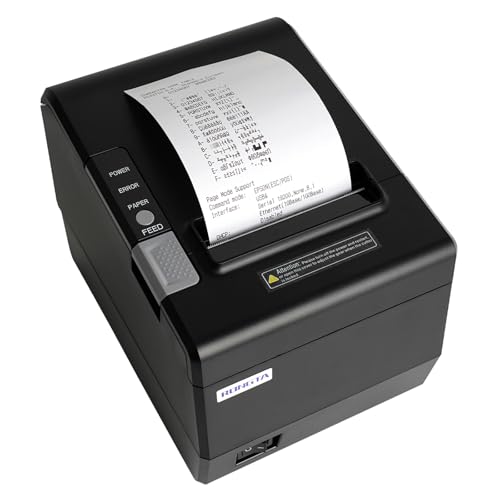
For busy restaurant environments, the Rongta Kitchen Restaurant POS Printer RP850P stands out with its fast printing speed of 300mm/s and low noise operation. This 80mm thermal receipt printer features an auto cutter and supports paper widths of 80mm and 58mm. Its wall-hanging design saves space, while sound and light indicators keep your team informed. Installation is easy, with a USB flash drive included for drivers and user guidance. Although it’s compatible with various operating systems, keep in mind it doesn’t work with mobile devices. The RP850P is a reliable choice for efficient service in your restaurant.
Best For: Busy restaurants looking for a reliable and efficient thermal receipt printer to streamline their order processing.
Pros:
- Fast printing speed of 300mm/s ensures quick service.
- Space-saving wall-hanging design with auto cutter functionality.
- Compatible with multiple operating systems including Windows and Mac.
Cons:
- Not compatible with mobile devices such as iPhones, iPads, or Android.
- Limited support for specific POS systems like Clover and Square.
- Drivers must be installed manually if USB flash drive is lost.
Factors to Consider When Choosing Thermal Receipt Printers for Restaurants
When choosing a thermal receipt printer for your restaurant, consider several key factors that can impact your operations. You’ll want to look at printing speed, compatibility with your systems, and available connectivity options. Additionally, think about maintenance needs, ease of use, cost-effectiveness, and durability to guarantee you make the best choice for your business.
Printing Speed Efficiency
In a bustling restaurant, printing speed efficiency can make or break the dining experience. High-speed thermal receipt printers can print receipts at impressive rates up to 310 mm/s, drastically reducing wait times for your customers. When you choose a printer that operates between 200 mm/s and 350 mm/s, you guarantee that transactions wrap up quickly, boosting overall satisfaction during peak hours. Efficient printing speeds help eliminate bottlenecks at the point of sale, allowing your staff to serve more customers in less time. Additionally, printers with auto cutter features enhance efficiency by automatically cutting receipts, reducing delays caused by manual handling. Selecting a printer with high-speed capabilities is essential for improving workflow and operational efficiency in your restaurant.
Compatibility With Operating Systems
Choosing a thermal receipt printer that seamlessly integrates with your restaurant’s operating systems is crucial for smooth operations. Make certain the printer is compatible with the systems you use, whether it’s Windows, Mac, or Linux. Many printers support various Windows versions, but check if they work with newer versions like Windows 11. If you plan to use mobile devices like iPhones or Android tablets, confirm the printer’s compatibility with those operating systems as well. It’s also essential to verify the printer supports your specific POS software and command protocols, such as ESC/POS and OPOS. Finally, consider printers that offer both USB and Ethernet connections for enhanced integration flexibility in your restaurant’s unique networking environment.
Connectivity Options Available
Understanding the connectivity options available for thermal receipt printers is essential for confirming they fit seamlessly into your restaurant’s workflow. Look for printers with USB, Serial (RS-232), and Ethernet ports to guarantee compatibility with various POS systems. Some models even offer additional USB-A ports, allowing you to connect peripherals like barcode scanners or customer displays, which can enhance functionality. While Wi-Fi and Bluetooth options exist, they’re less common, often making wired connections more reliable. Don’t forget to verify compatibility with your specific POS software and applications, as many printers may not support popular services like Square or mobile devices. Choosing the right connectivity confirms efficient service and smooth operation in your restaurant.
Maintenance and Ease of Use
Seamless connectivity is only one part of the equation when selecting a thermal receipt printer for your restaurant; maintenance and ease of use play a significant role too. Look for printers with a one-button open cover to make paper replacement quick and hassle-free. A large paper warehouse simplifies refilling during peak hours, minimizing downtime when you need it most. Auto cutter functionality guarantees receipts are neatly cut, preventing mess and enhancing efficiency. Choose models with user-friendly installation processes, including clear setup guides, to get you up and running fast. Regular maintenance features, like overheating protection and durable designs, can extend your printer’s lifespan, reducing the frequency of repairs or replacements and keeping your operations smooth.
Cost-Effectiveness and Durability
When it comes to selecting thermal receipt printers for your restaurant, considering cost-effectiveness and durability is essential for maximizing your investment. These printers operate without ribbons or ink, considerably lowering your ongoing expenses compared to traditional models. Look for durable options designed for high usage, often rated for 2 million auto-cuts and 60 million lines of mean time between failure (MTBF). With an average printing speed of 250 mm/sec, you’ll streamline transactions and reduce wait times. Features like overheating protection and robust construction can extend the printer’s lifespan, minimizing maintenance costs. Finally, consider wall-mounting designs to save valuable counter space while ensuring easy access for paper replacement.