If you’re an architect or engineer looking for reliable printing solutions in 2025, you’ll want to explore the top plotter printers available. These devices are essential for producing detailed designs and technical drawings, and each model offers unique features tailored to your needs. From print speed to connectivity options, the right choice can greatly impact your workflow. What sets these printers apart? Let’s unpack the best options on the market.
HP DesignJet T650 Large Format Plotter Printer (5HB10T)

The HP DesignJet T650 Large Format Plotter Printer (5HB10T) is an ideal choice for architects and engineers who need precision and efficiency in their printing tasks. This 36-inch plotter excels at producing technical line drawings, posters, and maps with remarkable accuracy. You’ll appreciate its cost-efficient ink usage and the ability to handle various media sizes without manual switching. Plus, the included HP Click Software streamlines your workflow, saving time and resources. With impressive print speeds and multiple connectivity options, you can manage and print remotely, ensuring your projects stay on track, whether you’re in the office or on the go.
Best For: Architects, engineers, and construction professionals seeking precision and efficiency in large format printing.
Pros:
- Cost-effective with significantly reduced ink usage for maintenance compared to competitors.
- Supports a wide range of media sizes and simplifies multi-size project printing.
- Offers multiple connectivity options and remote management capabilities for convenience.
Cons:
- Initial investment may be high for smaller businesses or individuals.
- Limited to HP cartridges, which could lead to higher ongoing costs for ink.
- May require some time to learn the full functionality of the HP Click Software for optimal use.
HP DesignJet T630 Large Format Plotter Printer (5HB09D)

For architects and engineers seeking precision in their designs, the HP DesignJet T630 Large Format Plotter Printer (5HB09D) stands out with its ability to produce sharp technical line-drawings and detailed renders. This 24-inch plotter supports various media sizes, making it versatile for posters, maps, and more. With connectivity options like Gigabit Ethernet and Wi-Fi, you can print seamlessly from multiple devices. The included HP Click Software simplifies the printing process, allowing you to drag and drop files effortlessly. Plus, remote management via the HP Smart app guarantees you stay efficient, even on the go.
Best For: Architects, engineers, and construction professionals looking for a reliable large format printer that delivers precise line-drawings and detailed renders.
Pros:
- High-quality prints suitable for technical drawings, posters, and maps.
- Versatile media handling with support for both rolls and sheets.
- Enhanced connectivity options including Gigabit Ethernet, USB, and Wi-Fi.
Cons:
- May not be suitable for very large printing projects due to the 24-inch width limit.
- Initial setup and configuration can be complex for some users.
- Ongoing ink and media costs can add up for high-volume printing.
HP DesignJet T210 24-inch Plotter Printer

Designed specifically for architects and engineers, the HP DesignJet T210 24-inch Plotter Printer excels at producing technical line drawings and precise renders. You’ll appreciate its versatility, handling media rolls up to 24 inches wide and sheets up to 13 by 19 inches, with features like automatic multi-size printing. Cost efficiency is a highlight, using 95% less ink for routine maintenance. Plus, the HP Click Software streamlines your printing process. With robust connectivity options and a print speed of up to 59 A1/D size prints per hour, it’s perfect for your demanding projects, ensuring quality and reliability every time.
Best For: Architects and engineers seeking a reliable plotter for technical line drawings and precise renders.
Pros:
- Cost-efficient: Uses 95% less ink for routine maintenance compared to competitors.
- Versatile media handling: Supports various media sizes and automatic multi-size project printing.
- Fast print speeds: Capable of producing up to 59 A1/D size prints per hour.
Cons:
- Limited to 24-inch width: May not be suitable for larger printing needs beyond 24 inches.
- Dependence on HP cartridges: Requires specific HP ink cartridges, which can be costly.
- Setup complexity: Initial setup may be challenging for users unfamiliar with plotters.
Canon imagePROGRAF TC-21 Large Format Printer

Architects and engineers seeking a reliable and efficient printing solution will find the Canon imagePROGRAF TC-21 Large Format Printer an excellent choice. With a print width of up to 24 inches, this 4-color ink printer delivers crisp text and vibrant images on various media types. Its automatic roll and cut sheet feeder simplifies your workflow, while high-speed USB, Ethernet, and built-in Wi-Fi guarantee seamless connectivity from any device. The intuitive tiltable touchscreen makes setup a breeze, and easy access to ink refills and paper rolls streamlines maintenance. Plus, it’s ENERGY STAR and EPEAT Gold certified for eco-friendliness.
Best For: Architects and engineers looking for a reliable large format printer that delivers high-quality prints efficiently.
Pros:
- Automatic roll and cut sheet feeder enhances workflow efficiency.
- Seamless connectivity options including high-speed USB, Ethernet, and built-in Wi-Fi for versatile printing from multiple devices.
- Eco-friendly certification with ENERGY STAR and EPEAT Gold ratings for reduced environmental impact.
Cons:
- Limited ink capacity of 280 ml may require frequent refills for high-volume printing.
- Print width of up to 24 inches may not be suitable for larger projects.
- Initial setup may require some technical knowledge despite animated installation guides.
HP DesignJet T850 Large Format Color Plotter Printer

The HP DesignJet T850 Large Format Color Plotter Printer stands out for its exceptional print quality, making it an ideal choice for professionals who demand precision in their visual presentations. With optimized resolutions of up to 2400 x 1200 dpi, your designs will feature precise lines and vibrant colors. It prints a D-size page in just 25 seconds, achieving up to 90 prints per hour. Supporting media sizes from A4 to A0, it offers flexible paper handling. Plus, its connectivity options, like Gigabit Ethernet and Wi-Fi, allow for seamless integration. With a 2-year warranty, you can trust its reliability.
Best For: Professionals in design and engineering who require high-quality, large-format printing for detailed presentations and plans.
Pros:
- Exceptional print quality with optimized resolutions up to 2400 x 1200 dpi for precise lines and vibrant colors.
- Fast print speeds of up to 25 seconds per D-size page, enabling high-volume printing with up to 90 prints per hour.
- Versatile paper handling that supports media sizes from A4 to A0, along with flexible connectivity options for easy integration into any workspace.
Cons:
- The initial investment may be high for small businesses or individual users.
- Requires regular maintenance and ink cartridge replacements, which can add to operating costs over time.
- Limited to pigment-based inks, which may not be suitable for all printing needs compared to dye-based options.
Canon imagePROGRAF TM-300 36-inch 5-Color Inkjet Printer Plotter

For professionals who demand precision and efficiency in large-format printing, the Canon imagePROGRAF TM-300 36-inch 5-Color Inkjet Printer Plotter stands out as an ideal solution. It combines a powerful printer and Z36 scanner with an All-In-One computer running SmartWorks software, allowing you to scan, copy, and share maps or renderings effortlessly. With fast scanning speeds and the ability to print up to 144 D-sized prints per hour, you’ll save time on projects. The user-friendly interface, Wi-Fi compatibility, and compact design make it perfect for any office, ensuring you stay productive without sacrificing quality.
Best For: Professionals in architecture, engineering, and design who require high-quality large-format printing and scanning capabilities.
Pros:
- Fast performance: Capable of printing up to 144 D-sized prints per hour and scanning at impressive speeds.
- High-quality output: Utilizes LUCIA TD pigment inks for sharp text and detailed graphics with water-resistant properties.
- User-friendly interface: SmartWorks software and a touchscreen operation panel make managing print jobs simple and efficient.
Cons:
- Initial cost: The investment for the printer and its integrated components may be high for small businesses or individuals.
- Ink costs: Replacement ink can be expensive, impacting long-term operational costs.
- Limited media handling: The printer may have restrictions on certain media types, which could limit versatility for some projects.
HP DesignJet T230 Large Format Plotter Printer (5HB07T)

Designed specifically for professionals in architecture and engineering, the HP DesignJet T230 Large Format Plotter Printer (5HB07T) delivers precision and versatility in a compact 24-inch format. It’s perfect for producing technical line drawings, blueprints, maps, and posters. With support for both media rolls and sheets, you’ll enjoy seamless printing with an automatic horizontal cutter. Plus, its 2-year Warranty Care Pack guarantees you have reliable support when you need it. Best of all, the T230 considerably cuts costs by using 95% less ink for routine maintenance compared to competitors, making it an efficient choice for your printing needs.
Best For: Professionals in architecture, engineering, and construction who require high-quality, large format printing.
Pros:
- Compact design allows for easy placement in smaller workspaces.
- Automatic horizontal cutter enhances efficiency by streamlining the printing process.
- Significant cost savings with 95% less ink used for routine maintenance compared to competitors.
Cons:
- Limited to a maximum media width of 24 inches, which may not suit all printing needs.
- The optional automatic sheet feeder may require additional investment.
- Onsite support may not be available in all regions, potentially leading to longer resolution times for issues.
Natwind Wide Format Printer Stand with Adjustable Storage Shelf

Architects and engineers will appreciate the Natwind Wide Format Printer Stand with Adjustable Storage Shelf for its robust construction and thoughtful design. The heavy-duty wooden top and reinforced steel tubes guarantee durability, while diagonal stabilizing bars provide stability for large equipment. With adjustable shelves, a paper roll holder, and a handy accessory drawer, it meets all your storage needs. The spacious desktop accommodates multiple devices, creating an efficient workflow. Plus, built-in power outlets and USB ports enhance connectivity. With 360° lockable casters, you can easily reposition the stand without compromising stability during your printing tasks.
Best For: Architects and engineers seeking a durable and efficient stand for wide-format printers and large equipment.
Pros:
- Robust construction with a heavy-duty wooden top and reinforced steel tubes ensures long-lasting durability.
- Spacious desktop allows for simultaneous use of multiple devices, enhancing workflow efficiency.
- Built-in power outlets and USB ports provide convenient connectivity for all your equipment.
Cons:
- Weight may be an issue for those needing a more portable solution, despite the mobility features.
- Assembly required, which may take time and effort for some users.
- Limited color options may not fit all aesthetic preferences in a professional setting.
HP DesignJet T830 24″ Wireless Plotter Printer
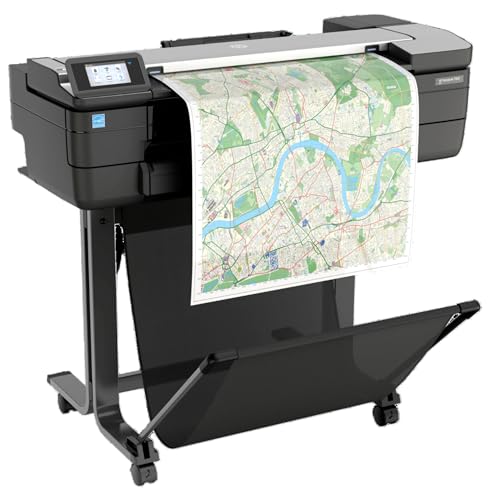
The HP DesignJet T830 24″ Wireless Plotter Printer is an exceptional choice for professionals in architecture and engineering who need efficiency and versatility in their workflow. This multifunction printer supports printing, scanning, and copying of technical documents, making it perfect for busy studios. It handles media sizes from 8.3 to 24 inches and boasts impressive print speeds of up to 26 seconds per page. With robust connectivity options, including Wi-Fi and mobile printing capabilities, you can easily print from your devices. The compact design enhances communication and project updates, ensuring you stay on top of your work seamlessly.
Best For: Professionals in architecture and engineering who require a multifunction printer for efficient printing, scanning, and copying of technical documents.
Pros:
- Supports a wide range of media sizes from 8.3 to 24 inches, accommodating various project needs.
- Offers impressive print speeds of up to 26 seconds per page, ensuring quick turnaround times.
- Features robust connectivity options including Wi-Fi and mobile printing, allowing for flexible usage from multiple devices.
Cons:
- Limited to a maximum print width of 24 inches, which may be restrictive for larger projects.
- Requires specific HP 728 ink cartridges, which could increase overall operating costs.
- Dynamic security features may prevent non-HP cartridges from functioning, limiting user options for supplies.
Epson SureColor T5170 36” Wireless Printer, White

For professionals who need to produce precise blueprints and striking graphics, the Epson SureColor T5170 36” Wireless Printer stands out with its impressive print speed of A1/D-size prints in just 31 seconds. Its compact design and ultra-small footprint make it easy to fit in any workspace. You’ll appreciate the large 4.3-inch LCD touchscreen for intuitive operation and versatile media handling options, whether you’re using rolls or the Auto Sheet Feeder. With next-generation UltraChrome XD2 inks, expect vibrant, durable prints at a maximum resolution of 2880 x 1440 dpi. Plus, wireless connectivity guarantees seamless printing from your devices.
Best For: Professionals looking to produce precise blueprints, line drawings, and vibrant graphics efficiently.
Pros:
- Impressive print speed: A1/D-size prints in just 31 seconds.
- Compact design: Ultra-small footprint fits easily into any workspace.
- High-quality output: Utilizes next-generation UltraChrome XD2 inks for vibrant and durable prints.
Cons:
- Weight: At 101 pounds, it may require multiple people to move it.
- Internet requirement: Most features need an Internet connection for full functionality.
- Limited compatibility: Genuine Epson cartridges are required, and other brands may not be compatible.
Factors to Consider When Choosing Plotter Printers for Architects and Engineers
When you’re choosing a plotter printer, several key factors can impact your decision. You’ll want to evaluate print quality, media size compatibility, and the available connectivity options. Additionally, think about cost efficiency and the maintenance support you’ll need to keep your printer running smoothly.
Print Quality Requirements
Print quality stands as a fundamental consideration for architects and engineers selecting plotter printers. You’ll want to pay attention to the dpi (dots per inch) measurement, as higher resolutions like 2400 x 1200 dpi provide finer details in your technical drawings. Choosing printers that use pigment-based inks is essential; these inks offer water and fade resistance, ensuring longevity for outdoor use. Fine line accuracy is also important—look for printers capable of producing lines as thin as 0.02 mm for precise representations. Additionally, color accuracy and consistency are significant, so opt for printers that support a wide color gamut. Finally, fast print speeds can enhance your productivity, with some models delivering A1/D-size prints in just 25 seconds.
Media Size Compatibility
Choosing the right plotter printer involves ensuring it can accommodate the media sizes you need, as compatibility plays a vital role in your workflow. Look for printers that support a range of sizes, typically from 24-inch to 36-inch wide rolls, along with various sheet sizes like 13-inch by 19-inch. This flexibility enables you to print technical drawings, posters, and maps efficiently.
Consider models with automatic media source switching, so you can easily shift between different sizes without manual adjustments. Also, check the maximum media weight and thickness the plotter can handle for specialized outputs. Finally, opt for plotters equipped with automatic feeders to streamline the printing process, boosting your efficiency for multi-size projects.
Connectivity Options Available
Connectivity options are essential for ensuring seamless communication between your devices and plotter printers. When choosing a plotter, look for Gigabit Ethernet to provide fast, reliable connections for multiple users. Many modern models also offer Wi-Fi connectivity, allowing you to print wirelessly from smartphones, tablets, or laptops. Hi-Speed USB 2.0 ports are commonly included, enabling straightforward direct printing from your computer. Additionally, some plotters come with mobile printing capabilities, which let you print documents via apps or email without needing a wired connection. Finally, built-in network protocols and compatibility with common operating systems make it easier to integrate these printers into your existing workflows, ensuring smooth operations for your architectural and engineering projects.
Cost Efficiency Considerations
When evaluating plotter printers for architectural and engineering needs, cost efficiency emerges as a key factor that can greatly impact your budget. Consider ink usage; some models consume up to 95% less ink for routine maintenance, leading to significant long-term savings. Look for printers that automate multi-size project printing to save on labor costs and minimize material waste. Integrated printing software with features like PDF error checking and auto-nesting can streamline your workflow, further reducing ink and paper usage. Additionally, choosing plotters that support high-capacity ink cartridges means fewer replacements and lower operational costs. Ultimately, connectivity options for remote management and mobile printing can enhance productivity, ultimately contributing to cost savings in your project timelines.
Maintenance and Support
While evaluating plotter printers for your architectural or engineering projects, it’s crucial to take into account the maintenance and support options that come with them. A solid warranty and support plan, including onsite and remote assistance, can greatly boost your confidence and minimize downtime. Look for models that offer impressive cost savings on routine maintenance, with some using up to 95% less ink than competitors. A robust support system, such as next business day service for unresolved issues, guarantees prompt resolutions to technical difficulties. Additionally, access to customer support for setup and inquiries is essential for seamless integration into your workflow. User-friendly interfaces and maintenance tools simplify upkeep, helping you manage your printer efficiently for peak performance.
Speed and Performance
Having a reliable plotter printer is just the beginning; understanding its speed and performance is key for any architect or engineer. Look for models that can produce A1/D-size prints in just 25 to 45 seconds to enhance your workflow. You’ll want high-performing printers that can generate up to 90 prints per hour, especially when tight deadlines loom. Consider memory capacity too; devices with 500MB to 1GB help manage complex print jobs seamlessly. A high print resolution of around 2400 x 1200 dpi guarantees your technical drawings maintain clarity. Fast processing capabilities allow you to handle multiple file types efficiently, enabling batch print jobs with a single click to streamline your overall printing process.
Software Integration Capabilities
Integrating your plotter printer with popular CAD applications is essential for maximizing efficiency in architectural and engineering workflows. Effective plotter printers should allow direct printing from design software, eliminating the hassle of file conversions. Advanced printing software like HP Click optimizes print settings automatically, saving you time on prep work. Look for compatibility with various file formats, such as PDF and HP-GL/2, to enhance your workflow. Features like PDF error checking and auto-nesting minimize waste and improve cost-efficiency. Additionally, the ability to manage print jobs remotely through mobile apps lets you initiate prints from anywhere and track job status in real-time, further streamlining your projects and keeping your work organized.