Choosing among premium 4K computer monitors is easier when you know what matters most: panel quality, connectivity, refresh rate, and color performance.
Whether you want a sharp office display, a creator-friendly screen, or a smoother all-purpose setup, this roundup focuses on models that deliver real everyday value.
Best 10 Premium 4K Computer Monitors Picks for 2026
Editor’s Pick

- 27-inch 4K IPS panel with 99% sRGB color
- 120Hz, FreeSync Premium, and 0.03ms response time
- USB-C with up to 65W power delivery
Best For: Balanced work-and-play setup with clean single-cable connectivity
Office-First Choice
Dell UltraSharp U3223QE 31.5-inch 4K
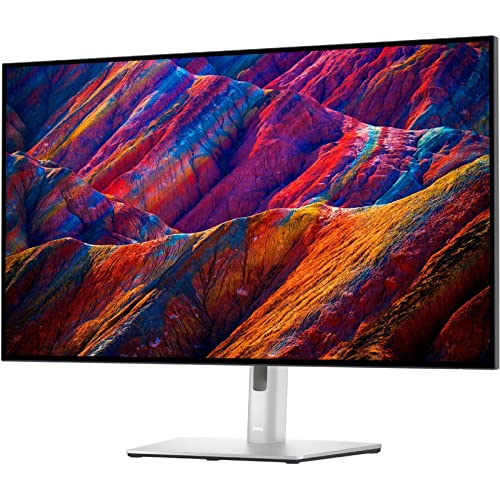
- Large 31.5-inch 4K UHD screen for productivity
- 400-nit brightness for crisp-looking content
- HDMI plus VESA mount support for flexible setups
Best For: Desk work and office productivity on a larger 4K display
Large-Screen Performer
Dell S32 32-inch 4K 120Hz Monitor

- 32-inch 4K VA panel with 99% sRGB and 95% DCI-P3
- 120Hz, FreeSync Premium, and 0.03ms response time
- Built-in 2x5W speakers for extra convenience
Best For: Large-screen users who want smooth motion and vivid color
Easy-Setup Pick
Samsung ViewFinity S7 27-inch 4K

- 27-inch 4K UHD panel with HDR10 support
- HDMI, DP, USB-A, and USB-B ports for flexibility
- Tool-free Easy Setup Stand for quick installation
Best For: Productivity-focused users who want easy setup and broad connectivity
Premium 4K Computer Monitor Pick
Dell 32 Plus 4K Monitor S3225QS

- 31.5-inch 4K VA panel
- Up to 120Hz with FreeSync Premium
- 99% sRGB, 95% DCI-P3 color
Best For: A large 4K display for work, streaming, and smoother everyday use
Value 4K IPS Pick
LG 27US500-W 27-Inch 4K UHD HDR10 Monitor

- 4K IPS panel with wide viewing angles
- HDR10 and up to 90% DCI-P3 color
- Onscreen Control and tilt adjustment
Best For: buyers wanting a clean 4K monitor for work and media
Premium Creator Gaming Choice
MSI PRO MAX 271UPX12G 27-Inch QD-OLED 4K 120Hz
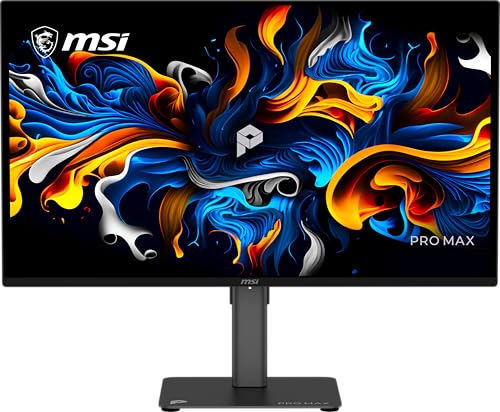
- QD-OLED panel with deep blacks and vivid color
- 120Hz refresh rate with Adaptive-Sync
- USB-C, HDMI, and DisplayPort inputs
Best For: creators and users who want a high-contrast 4K OLED display
Balanced Everyday 4K Monitor
LG 27UP650K-W 27-Inch 4K IPS HDR400

- 4K IPS panel with 95% DCI-P3 color
- Height, tilt, and pivot adjustment
- DisplayHDR 400 and multitasking Switch app
Best For: buyers who want a versatile 4K monitor for work and casual use
Editor’s Pick – Dell 27 4K USB-C Monitor
If you want a premium 4K computer monitor that feels easy to live with every day, the Dell S2725QC covers the essentials well. Its 27-inch IPS panel, 120Hz refresh rate, 99% sRGB coverage, and USB-C connection make it a practical fit for work, creative tasks, and casual play.
Best For: Users who want a balanced 27-inch 4K monitor for business, photo/video editing, and everyday desktop use.
Pros:
- 4K IPS panel with 99% sRGB for vibrant, accurate-looking color
- 120Hz refresh rate, FreeSync Premium, and 0.03ms response time for smooth motion
- USB-C connectivity with up to 65W power delivery helps reduce cable clutter
- ComfortView Plus reduces harmful blue light emissions to 35% or less
Cons:
- 27-inch size may feel compact if you prefer a larger 4K workspace
- Power delivery tops out at 65W, which may not suit every laptop
Overall, this is a strong all-rounder among premium 4K computer monitors because it combines sharp image quality, fast responsiveness, and modern single-cable convenience. It is especially appealing if you want one display that can handle both productive work and lighter entertainment.
Office-First Choice – Dell UltraSharp U3223QE 31.5-inch 4K
The Dell UltraSharp U3223QE is aimed at buyers who want a premium 4K computer monitor for desk-focused productivity. Its 31.5-inch 4K UHD screen gives you plenty of desktop space, while the 400-nit brightness and fast 5ms GTG response time make it versatile for office work and general media use.
Best For: Office users, desktop workers, and anyone who wants a larger 4K display for everyday productivity.
Pros:
- 31.5-inch 4K UHD panel provides lots of screen real estate
- 400-nit brightness helps content look crisp and energetic
- HDMI connectivity supports easy use with a range of devices
- VESA mount compatibility adds flexible setup options
Cons:
- Not positioned with gaming features as a priority
- 5ms GTG response is fine for general use, but not the fastest in this group
This monitor makes sense if your priority is a spacious, dependable 4K workspace rather than flashy extras. For buyers comparing premium 4K computer monitors for office-centric use, the larger screen size is the main draw.
Large-Screen Performer – Dell S32 32-inch 4K 120Hz Monitor
If you want a bigger premium 4K computer monitor with stronger motion handling, the Dell S32 Series stands out with a 32-inch VA panel and 120Hz refresh rate. It pairs 4K resolution with 99% sRGB, 95% DCI-P3, and AMD FreeSync Premium, making it a compelling option for mixed work, creative tasks, and gaming.
Best For: Users who want a large 4K display with smoother motion and strong color coverage.
Pros:
- 32-inch 4K VA panel gives you a roomy viewing area
- 120Hz refresh rate, FreeSync Premium, and 0.03ms response time deliver smooth visuals
- 99% sRGB and 95% DCI-P3 support richer color for content work
- Integrated 2x5W speakers add built-in audio convenience
Cons:
- VA panel contrast is strong, but viewing behavior differs from IPS options
- Wall-mount emphasis may not suit every desk setup
This is a strong choice if you value size and speed together in one display. Among premium 4K computer monitors, it offers a nice blend of large-screen comfort, sharp color, and gaming-friendly motion performance.
Easy-Setup Pick – Samsung ViewFinity S7 27-inch 4K
The Samsung ViewFinity S7 is built for users who want a straightforward premium 4K computer monitor with strong productivity features. Its 27-inch 4K UHD panel, HDR10 support, multiple ports, and tool-free Easy Setup Stand make it a practical choice for clean workspaces and creator workflows.
Best For: Buyers who want a simple, productivity-focused 27-inch 4K monitor with easy setup.
Pros:
- 4K UHD resolution delivers more screen space and finer detail
- HDR10 and wider color support aim for richer, more realistic image quality
- HDMI, DP, USB-A, and USB-B ports make connecting devices easier
- Easy Setup Stand installs without tools or screws
Cons:
- Does not emphasize high refresh rate gaming features
- 27-inch size may be limiting for users wanting more workspace
This model is a good fit if you value convenience and solid everyday performance over headline-grabbing specs. For premium 4K computer monitors in a work-oriented setup, its easy assembly and broad connectivity are major strengths.
Premium 4K Computer Monitor Pick – Dell 32 Plus 4K Monitor S3225QS
If you want premium 4K computer monitors with a larger, more immersive canvas, the Dell 32 Plus S3225QS is built for both productivity and relaxed entertainment. Its 31.5-inch VA panel, 4K resolution, and up to 120Hz refresh rate give it a strong balance of sharp detail, smooth motion, and richer contrast.
Best For: Users who want a large 4K display for work, streaming, and occasional gaming with better-than-basic color and motion.
Pros:
- 31.5-inch 4K VA panel with 99% sRGB and 95% DCI-P3 for vivid, accurate-looking color
- Up to 120Hz refresh rate with AMD FreeSync Premium and 0.03ms response time for smoother motion
- 1500:1 contrast ratio and HDR readiness for stronger depth and detail
- ComfortView Plus reduces harmful blue light emissions by up to 35% for easier all-day viewing
Cons:
- VA panel may not be the first choice for buyers who specifically prefer IPS viewing characteristics
- Large 31.5-inch size may be more monitor than some compact desks need
This Dell stands out as a versatile premium 4K computer monitor when you want size, contrast, and smoother-than-standard refresh performance in one package. It is especially appealing if you split time between office work and media, while still wanting a cleaner, modern design.
Creator-Friendly 4K Pick – SAMSUNG 27 ViewFinity S8 S80D
The SAMSUNG 27-inch ViewFinity S8 is a practical choice among premium 4K computer monitors if your priority is sharp detail, flexible setup, and easy connectivity. Its 4K UHD panel, HDR10 support, and ergonomic stand make it a strong fit for focused workspaces where image clarity and day-to-day convenience matter.
Best For: Designers, creators, and productivity users who want a sharp 4K monitor with flexible adjustment and simple setup.
Pros:
- 4K UHD resolution provides high pixel density and extra workspace for detailed tasks
- HDR10 adds deeper contrast and more lifelike color presentation
- Height-adjustable stand swivels, tilts, and pivots 90 degrees for versatile viewing
- HDMI, DisplayPort, USB-A, and USB-B ports make it easier to connect multiple devices
Cons:
- 27-inch size may feel smaller than larger-format premium 4K computer monitors
- Best suited to productivity and content work rather than high-refresh gaming
Overall, this Samsung is a well-rounded monitor for anyone who values a clean workspace and reliable day-to-day performance. The tool-free stand and broad port selection are especially useful if you want a straightforward upgrade without extra setup hassle.
Color-Accurate 4K Display – LG 27UN850-W UltraFine
The LG 27UN850-W is a strong option if you are comparing premium 4K computer monitors for color work, everyday productivity, and occasional gaming. Its IPS panel, 99% sRGB coverage, and DisplayHDR 400 support make it a practical pick for users who want dependable image quality in a clean 27-inch form factor.
Best For: Photographers, designers, and office users who want accurate color, HDR support, and USB-C convenience.
Pros:
- IPS 4K panel with 99% sRGB coverage for color-accurate work
- VESA DisplayHDR 400 and 400 nits brightness for improved contrast and brighter highlights
- USB-C, HDMI, and DisplayPort connectivity for flexible setup options
- Height, tilt, pivot, and anti-glare features support comfortable daily use
Cons:
- 60Hz refresh rate is less appealing for buyers wanting faster motion handling
- Built-in focus is on display quality and workflow, not gaming-first features
In practical terms, this LG excels when color accuracy and USB-C convenience matter more than high refresh speed. It is a steady, creator-friendly 4K monitor that should fit well in mixed work and media setups.
Value 4K IPS Pick – LG 27US500-W 27-Inch 4K UHD HDR10 Monitor
If you want a practical premium 4K computer monitor without paying for gaming extras, the LG 27US500-W is a solid fit. It combines 4K UHD resolution, an IPS panel, and HDR10 support with a simple 27-inch design that works well for everyday productivity, media, and creative viewing.
Best For: Users who want a clean, color-capable 4K display for work, multitasking, and general multimedia use.
Pros:
- 4K UHD IPS panel with wide viewing angles and 1000:1 contrast.
- Up to 90% DCI-P3 coverage with HDR10 for richer color and contrast.
- Onscreen Control makes it easy to split the screen and adjust settings.
- Ergonomic stand offers flexible tilt adjustment.
Cons:
- 60Hz refresh rate is basic compared with faster premium models.
- No USB-C or built-in speakers listed in the supplied specs.
- Best suited to general use rather than motion-heavy gaming.
Overall, this LG is a straightforward choice for buyers who want premium 4K computer monitors with strong image quality and simple usability. It focuses on clarity, color, and convenience rather than advanced performance features.
Premium Creator Gaming Choice – MSI PRO MAX 271UPX12G 27-Inch QD-OLED 4K 120Hz
The MSI PRO MAX 271UPX12G is built for shoppers seeking a premium 4K computer monitor with standout contrast and smoother motion. Its 27-inch QD-OLED panel, 120Hz refresh rate, and USB-C connectivity make it a strong pick for both creative workflows and high-end desktop use.
Best For: Users who want a high-contrast 4K OLED display for productivity, creative work, and smooth everyday use.
Pros:
- QD-OLED panel delivers deep blacks, vivid colors, and strong contrast.
- 120Hz refresh rate with Adaptive-Sync for smoother motion.
- USB-C, HDMI, and DisplayPort provide flexible connectivity.
- Height-adjustable stand plus TÜV-certified eye care features.
Cons:
- Only 15W USB-C power delivery, so it is not a full docking solution.
- Single HDMI and single USB port may limit expansion.
- Premium OLED pricing may be overkill for basic office use.
This MSI stands out if you want image quality that goes beyond standard IPS monitors. The combination of 4K detail, OLED contrast, and 120Hz fluidity makes it one of the more advanced options in the premium 4K computer monitors category.
Balanced Everyday 4K Monitor – LG 27UP650K-W 27-Inch 4K IPS HDR400
The LG 27UP650K-W is a well-rounded option for buyers comparing premium 4K computer monitors for everyday use. It pairs a 27-inch 4K IPS panel with DisplayHDR 400, 95% DCI-P3 color, and an adjustable stand, making it a practical fit for work, streaming, and casual gaming.
Best For: People who want a flexible 4K display with good color, ergonomic adjustments, and broad everyday appeal.
Pros:
- 4K IPS panel with 95% DCI-P3 color gamut expression.
- VESA DisplayHDR 400 support for improved HDR content.
- Height, tilt, and pivot adjustment on the stand.
- Switch app adds screen-splitting and multitasking convenience.
Cons:
- 60Hz refresh rate is not ideal for fast competitive gaming.
- 5ms response time is standard rather than especially fast.
- HDR400 is useful, but not as dramatic as OLED-level performance.
For shoppers who want a dependable all-rounder, this LG covers the basics very well. It offers strong 4K clarity, useful ergonomics, and enough color performance to fit many home and office setups.
How We Picked These Premium 4K Computer Monitors
We focused on monitors that offer a strong mix of image quality, modern ports, and practical features buyers actually use. Priority went to displays with accurate 4K resolution, solid panel tech, dependable ergonomics, and enough brightness or contrast for comfortable daily use. We also considered refresh rate, USB-C or hub support, and eye-care features where they add clear value.
Quick Comparison
For office and productivity work, IPS models with USB-C and good stand adjustability are usually the safest choice. Creators should pay closer attention to color coverage, HDR support, and uniformity. If you want smoother motion for mixed use or light gaming, look at higher-refresh 4K options. OLED stands out for contrast and black levels, while VA can offer stronger contrast at a lower price.
Key Buying Factors for Premium 4K Computer Monitors
Panel Type and Image Quality
IPS remains the most versatile option for Premium 4K Computer Monitors because it balances wide viewing angles, solid color accuracy, and consistent performance. OLED is best if you want outstanding contrast and deep blacks, while VA can be a good middle ground for buyers who prefer stronger contrast than IPS without jumping to OLED pricing.
Refresh Rate and Response Time
If your monitor is mainly for documents, spreadsheets, and browsing, 60Hz may be enough. For smoother scrolling, multitasking, and gaming, 120Hz models are noticeably more fluid. Response time matters most if you care about motion clarity in games or fast-moving video content.
Connectivity and Ergonomics
Look for USB-C if you want single-cable laptop docking, and check for HDMI, DisplayPort, and USB hub support if you connect multiple devices. Height adjustability, tilt, and VESA mounting can make a big difference in comfort during long work sessions.
Color, HDR, and Extra Features
For creative work, look for strong sRGB or wider gamut coverage and reliable calibration options. HDR400 is a useful baseline, but it is not the same as high-end HDR. Eye-care features such as flicker-free backlighting and low-blue-light modes can also improve comfort over time.
Who Should Buy Which Premium 4K Computer Monitors?
Choose an IPS 4K monitor if you want the most balanced option for office work, school, and general use. Pick a USB-C model if you use a laptop and want a cleaner desk setup. Go with a higher-refresh display if you split time between productivity and gaming. If deep contrast and premium image quality are your top priorities, an OLED or high-contrast VA model is worth the upgrade. For most buyers, the best Premium 4K Computer Monitors are the ones that match your workflow instead of overselling features you will never use.