When you’re searching for a printer that meets both your scanning and faxing needs, it can feel overwhelming with so many options available. The right all-in-one machine can make a significant difference in your workflow, whether you’re at home or in the office. In this guide, you’ll discover top models that balance performance and affordability, helping you make an informed choice for 2025. Let’s explore what features matter most in your next printer.
Canon PIXMA TR8620a All-in-One Printer

If you’re looking for a versatile all-in-one printer for your home office, the Canon PIXMA TR8620a is an excellent choice, especially with its built-in scanner and fax capabilities. This wireless 4-in-1 device lets you print, copy, scan, and fax with ease. You’ll enjoy fast print speeds of 15 ipm for black and 10 ipm for color, plus automatic two-sided printing to save paper. With a 200-sheet capacity, you won’t constantly reload. Connect to Alexa for ink notifications or reordering, ensuring you never run out. Plus, it’s ENERGY STAR certified, making it an eco-friendly option for your needs.
Best For: Those seeking a reliable all-in-one printer that combines printing, scanning, copying, and faxing functionality for home office use.
Pros:
- Wireless functionality allows for easy printing from various devices, including smartphones and tablets.
- Fast print speeds of 15 ipm (black) and 10 ipm (color) enhance productivity.
- Eco-friendly features such as ENERGY STAR certification help reduce energy consumption.
Cons:
- The 200-sheet capacity may require frequent reloading for larger print jobs.
- Limited duty cycle of 1,000 pages might not meet the needs of high-volume users.
- Dependence on Alexa for ink notifications and reordering could be inconvenient for those not using smart home devices.
Epson EcoTank ET-4800 Wireless All-in-One Printer

The Epson EcoTank ET-4800 Wireless All-in-One Printer stands out for its cartridge-free printing system, making it an excellent choice for home office users who want to reduce waste and save on ink costs. With high-capacity ink tanks and EcoFit ink bottles, refilling’s a breeze. You’ll enjoy sharp text and vibrant color photos thanks to Micro Piezo Heat-Free Technology. This versatile printer features a high-resolution flatbed scanner, copier, and fax capabilities, all easily navigable via a color display. Designed for various paper types, it’s perfect for tackling any task in your home office efficiently and sustainably.
Best For: Home office users looking for a sustainable and cost-effective printing solution.
Pros:
- Cartridge-free printing reduces waste and lowers ink costs.
- High-capacity ink tanks allow for fewer refills and longer usage between refills.
- Versatile all-in-one capabilities including scanning, copying, and faxing enhance productivity.
Cons:
- Initial purchase price may be higher compared to traditional printers.
- Larger physical footprint may not suit smaller workspaces.
- EcoFit ink bottles may not be as widely available as standard cartridges.
Canon PIXMA TR4720 All-in-One Wireless Printer
For busy home users seeking an efficient all-in-one solution, the Canon PIXMA TR4720 stands out with its versatile wireless capabilities. This compact printer lets you print, copy, scan, and fax effortlessly. With print speeds of 8.8 ipm for black and 4.4 ipm for color, you’ll get your documents quickly. The auto two-sided printing and 100-sheet capacity make it even more convenient. Plus, it connects to Alexa for low ink notifications and easy smart reorders, ensuring you never run out. ENERGY STAR certified, it’s designed for energy efficiency, making it a smart choice for your home office.
Best For: Busy home users looking for an efficient all-in-one printer that offers wireless capabilities and smart features.
Pros:
- Versatile 4-in-1 functionality (print, copy, scan, fax) for home office needs.
- Convenient wireless connectivity and compatibility with Alexa for low ink notifications.
- ENERGY STAR certified, promoting energy efficiency and cost savings.
Cons:
- Print speeds may be slower compared to high-performance printers.
- Limited to a 100-sheet capacity, which may not be sufficient for heavy printing tasks.
- Some users may find the smart reorder feature unnecessary if they prefer to manage ink levels manually.
HP OfficeJet Pro 8139e Wireless All-in-One Printer

Designed specifically for home office users, the HP OfficeJet Pro 8139e Wireless All-in-One Printer excels in delivering high-quality color documents quickly and efficiently. With print speeds of 10 ppm for color and 20 ppm for black, you won’t be kept waiting. It features a user-friendly 2.7-inch touchscreen and reliable dual-band Wi-Fi for seamless connectivity. You can print, scan, copy, or fax directly from your smartphone or tablet using the HP app. Plus, the 1-year Instant Ink trial guarantees you never run out of ink. With its eco-friendly design and security features, it’s a smart choice for any home office.
Best For: Home office users seeking a reliable and efficient all-in-one printer for quality color document printing.
Pros:
- High print speeds of 10 ppm for color and 20 ppm for black, ensuring quick output.
- User-friendly 2.7-inch touchscreen and dual-band Wi-Fi for seamless connectivity and easy navigation.
- 1-year Instant Ink trial included, providing convenient ink delivery and potential savings.
Cons:
- The printer works exclusively with HP cartridges, which may limit options for some users.
- Monthly fee applies for the Instant Ink subscription after the trial period unless canceled.
- While eco-friendly, the use of over 45% recycled plastic may not appeal to all consumers.
HP Laserjet Pro MFP 3101fdw Wireless All-in-One Laser Printer

Ideal for small teams needing efficiency, the HP Laserjet Pro MFP 3101fdw Wireless All-in-One Laser Printer excels with its impressive print speeds of up to 35 pages per minute. This versatile machine lets you print, scan, copy, and fax professional-quality black-and-white documents effortlessly. With features like auto 2-sided printing and an auto document feeder, you’ll save time on tasks. Its intelligent Wi-Fi guarantees a reliable connection, allowing wireless printing from your mobile devices or PCs. Plus, HP Wolf Pro Security keeps your information safe with customizable settings, making it a smart choice for any office environment.
Best For: Small teams of up to 7 people looking for an efficient all-in-one printer that delivers professional-quality black-and-white documents.
Pros:
- High print speed of up to 35 pages per minute, enhancing productivity.
- Versatile functionality including printing, scanning, copying, and faxing.
- Robust security features with HP Wolf Pro Security to protect sensitive information.
Cons:
- Limited to black-and-white printing, which may not suit all users’ needs.
- Initial setup may take some time for users unfamiliar with wireless technology.
- No color printing capability, potentially limiting use for certain tasks or documents.
HP OfficeJet Pro 8125e Wireless All-in-One Printer

The HP OfficeJet Pro 8125e Wireless All-in-One Printer stands out as an excellent choice for home office users who need a versatile and efficient printing solution. With print speeds up to 20 ppm for black and 10 ppm for color, it handles professional-quality documents effortlessly. The auto duplex printing, scanning, and copying features enhance productivity, while the 225-sheet input tray minimizes interruptions. Enjoy seamless connectivity with dual-band Wi-Fi and the HP app, allowing you to manage tasks from your smartphone or tablet. Plus, HP Wolf Essential Security safeguards your data, making it a reliable option for your home office needs.
Best For: Home office users seeking a reliable all-in-one printer for professional-quality printing and efficient document management.
Pros:
- Fast print speeds of up to 20 ppm for black and 10 ppm for color enhance productivity.
- Versatile features including auto duplex printing, scanning, copying, and a 225-sheet input tray reduce workflow interruptions.
- Seamless wireless connectivity with dual-band Wi-Fi and the HP app for easy task management from mobile devices.
Cons:
- The printer only works with HP cartridges, limiting third-party options.
- Monthly subscription fee applies after the 3-month trial of Instant Ink unless canceled.
- Some users may find the 2.7-inch touchscreen less intuitive than larger displays.
HP OfficeJet Pro 8135e Wireless All-in-One Printer
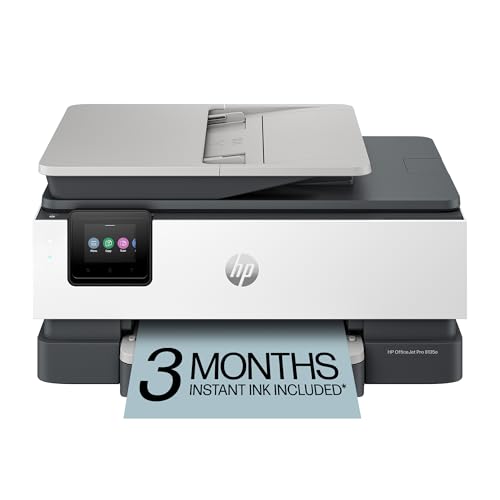
For busy professionals working from home, the HP OfficeJet Pro 8135e Wireless All-in-One Printer stands out with its impressive print speeds of up to 20 pages per minute for black and 10 pages per minute for color. This versatile printer excels in printing, scanning, copying, and faxing, all while featuring auto 2-sided printing and a 225-sheet input tray. The 2.7-inch color touchscreen makes navigation a breeze. With reliable dual-band Wi-Fi and the HP app, you can effortlessly print and scan from your devices. Plus, enjoy a 3-month Instant Ink trial for convenience and HP Wolf Essential Security to safeguard your data.
Best For: Busy professionals working from home who need a reliable all-in-one printer for high-quality document printing and efficient multitasking.
Pros:
- Fast print speeds of up to 20 ppm in black and 10 ppm in color.
- Versatile functionality including printing, scanning, copying, and faxing with auto 2-sided printing.
- User-friendly 2.7-inch color touchscreen and seamless connectivity through dual-band Wi-Fi and the HP app.
Cons:
- Monthly fees apply after the 3-month Instant Ink trial unless cancelled.
- May require regular maintenance to ensure optimal performance.
- Limited paper capacity with only a 225-sheet input tray, which may not suffice for heavy printing tasks.
Canon imageCLASS MF465dw II Wireless Duplex Laser Printer

Looking for a reliable all-in-one solution that delivers fast, high-quality printing and scanning? The Canon imageCLASS MF465dw II is perfect for your needs. This monochrome laser printer offers wireless duplex printing, scanning, copying, and faxing, with impressive speeds of up to 42 pages per minute. Its 5-inch color touchscreen provides easy access to features. Enjoy seamless mobile printing through Canon’s app, Apple AirPrint, and more. With a 250-sheet standard cassette and a 50-sheet automatic document feeder, handling paper is a breeze. Plus, it comes with a 3-year limited warranty for peace of mind.
Best For: Small to medium-sized businesses or home office users looking for a versatile, high-speed monochrome printer with advanced features.
Pros:
- Fast print speeds of up to 42 pages per minute, making it efficient for high-volume printing tasks.
- Wireless and mobile printing capabilities for convenient access from various devices.
- Includes a 3-year limited warranty, ensuring long-term reliability and support.
Cons:
- Monochrome printing only, which may not suit users needing color prints.
- Initial setup may require some technical knowledge for wireless configuration.
- The cost of high-capacity toner can add up for users with heavy printing needs.
Brother MFC-L2820DW Wireless Monochrome All-in-One Laser Printer

Ideal for small offices or home-based businesses, the Brother MFC-L2820DW Wireless Monochrome All-in-One Laser Printer combines essential features like printing, scanning, copying, and faxing into a compact design. With print speeds of up to 36 pages per minute and scan speeds of 23.6 images per minute, it efficiently handles your tasks. The 50-page auto document feeder simplifies multi-page jobs. You can connect via dual-band wireless, Ethernet, or USB, and easily manage operations through a 2.7” touchscreen or the Brother Mobile Connect app. Plus, the Refresh EZ Print Subscription Service helps you save on toner costs.
Best For: Small offices or home-based businesses looking for a compact all-in-one printer that efficiently handles printing, scanning, copying, and faxing tasks.
Pros:
- High print speeds of up to 36 pages per minute, enhancing productivity.
- Versatile connectivity options including dual-band wireless, Ethernet, and USB for flexible setup.
- User-friendly interface with a 2.7” touchscreen and mobile management through the Brother Mobile Connect app.
Cons:
- Monochrome printing only, which may not meet the needs of users requiring color prints.
- Limited scanning speed for color documents, at only 7.9 images per minute.
- Initial cost of toner can be high without utilizing the subscription service for savings.
HP OfficeJet Pro 9125e Wireless All-in-One Color Inkjet Printer

The HP OfficeJet Pro 9125e Wireless All-in-One Color Inkjet Printer stands out as the perfect choice for small businesses and home offices that demand versatility and efficiency. With print speeds of up to 18 ppm for color and 22 ppm for black, it guarantees you won’t waste time waiting. Its 250-sheet input tray and auto document feeder further enhance productivity. You’ll appreciate the professional-quality color prints for presentations and brochures, thanks to HP’s AI technology. Plus, with dual-band Wi-Fi and the HP app, printing from any device is seamless. Enjoy peace of mind with built-in security and a sustainable design.
Best For: Small businesses and home offices that require a versatile and efficient all-in-one printing solution.
Pros:
- Professional-quality color prints ideal for presentations, brochures, and flyers.
- Fast print speeds of up to 18 ppm for color and 22 ppm for black, enhancing productivity.
- Seamless connectivity with dual-band Wi-Fi and mobile printing capabilities through the HP app.
Cons:
- Requires HP cartridges only, limiting third-party options.
- Monthly fee applies after the 3-month Instant Ink trial unless canceled.
- Touchscreen size may be small for some users who prefer larger displays.
Factors to Consider When Choosing Printers With Built-in Scanners and Fax
When you’re choosing a printer with built-in scanners and fax, there are several key factors to keep in mind. Consider print speed efficiency, connectivity options, and the type of ink or toner it uses. You’ll also want to think about eco-friendly features and how user-friendly the interface is to guarantee it meets your needs.
Print Speed Efficiency
While considering a printer with built-in scanners and fax capabilities, print speed efficiency plays an essential role in your decision-making process. Look for printers measured in pages per minute (ppm); higher speeds mean quicker output, which is vital in busy environments. For black and white documents, speeds typically range from 15 to 35 ppm, while color prints usually fall between 8 to 20 ppm. Auto duplex printing can save paper and enhance efficiency, allowing double-sided printing. Additionally, an automatic document feeder (ADF) boosts productivity by letting you scan, copy, or fax multiple pages without manual intervention. Finally, check the first print time; some printers can deliver the first page in as little as 5 seconds, greatly improving workflow.
Connectivity Options Available
Achieving high print speed efficiency is just one aspect of choosing the right printer with built-in scanners and fax capabilities. Connectivity options play a vital role in ensuring seamless operation. Look for printers that offer Wi-Fi, Ethernet, and USB interfaces for versatile connections. Many modern printers support wireless printing from mobile devices through AirPrint or proprietary apps, making your printing tasks more convenient. Dual-band Wi-Fi support (2.4GHz and 5GHz) enhances reliability and speed, minimizing interruptions. If you prefer direct connections, some models even come with Bluetooth capabilities, allowing you to print straight from your smartphone or tablet. Additionally, integration with cloud services enables remote printing and scanning, giving you easy access to your documents anytime, anywhere.
Ink or Toner Type
Choosing the right ink or toner type is essential for maximizing efficiency and cost-effectiveness in your printing tasks. Inkjet printers use liquid ink cartridges, perfect for vibrant color prints, especially photos. However, if you need high-speed, high-volume black and white documents, laser printers with toner powder are your best bet. While ink cartridges may seem cheaper initially, replacement costs can add up, particularly for frequent color printing. Toner cartridges tend to be pricier upfront but offer higher page yields. Some printers even provide subscription services for discounted ink or toner delivery. Finally, consider maintenance; inkjets may clog if unused often, whereas lasers are more durable and require less upkeep, making them suitable for long-term use.
Eco-Friendly Features
As you explore printers with built-in scanners and fax capabilities, it’s important to contemplate their eco-friendly features, which can greatly affect both your environmental footprint and operating costs. Look for models that utilize cartridge-free printing systems, like high-capacity ink tanks, to reduce waste. ENERGY STAR certification is another key indicator; it shows the printer meets energy efficiency guidelines, helping cut down on both energy consumption and costs. Additionally, some printers use recycled materials in their construction, further minimizing their environmental impact. Advanced technologies, such as heat-free printing methods, also reduce energy usage. Finally, consider features like automatic duplex printing, which saves paper and promotes sustainable practices, making your printing experience more eco-conscious.
User-Friendly Interface
When you’re on the hunt for a printer with built-in scanners and fax capabilities, a user-friendly interface can make all the difference in your experience. Look for models that feature a touchscreen display, which simplifies navigation and control over various functions. Intuitive menu layouts and clear icons help you access printing, scanning, and faxing tasks without confusion. Many printers also offer mobile app integration, letting you manage tasks directly from your smartphone or tablet, adding convenience to your workflow. Additionally, clear visual indicators and prompts guide you on ink levels, paper jams, and maintenance needs. Customizable shortcuts for frequently used functions can streamline your printing process, saving you time on routine tasks.
Paper Handling Capacity
Paper handling capacity is a critical factor to evaluate in your search for a printer with built-in scanners and fax capabilities. It refers to how many sheets the printer can hold in its input trays, typically ranging from 100 to 250 sheets for smaller models, and up to 550 sheets or more for larger units. Higher capacity reduces the need for frequent refills, boosting efficiency in busy offices. Look for printers with Automatic Document Feeders (ADF); they allow multiple pages to be scanned or copied without manual intervention. Additionally, consider models that handle various paper sizes and types, like envelopes or photo paper, and those with extra trays or multipurpose feed slots for added versatility.
Warranty and Support
Choosing a printer with a built-in scanner and fax is about more than just features; warranty and support play an essential role in guaranteeing long-term satisfaction. Start by considering the warranty duration—longer warranties often reflect greater manufacturer confidence in the product’s reliability. Look for coverage that includes both parts and labor, so you’re protected from repair costs. Assess the availability of customer support services, such as online resources, phone assistance, or chat support; these can make troubleshooting much easier. Some manufacturers offer extended warranty options or service plans for added peace of mind. Finally, confirm the warranty covers common issues like paper jams and electronic malfunctions, as this indicates overall product durability and reliability.
Size and Design
Warranty and support are important, but size and design can significantly impact your overall experience with a printer that has built-in scanning and faxing capabilities. First, consider the footprint; all-in-one printers often need more space for components like scanner beds and paper trays. If you’re working with a small office, opt for a compact design that maximizes your limited desk space without sacrificing functionality. User accessibility is key, so look for intuitive interfaces, like touchscreens, for easy navigation. Also, keep the printer’s weight in mind; heavier models can be tricky to move. Finally, don’t overlook aesthetic elements—choose a color and finish that complements your decor while maintaining practicality.