When it comes to crafting and scrapbooking, having the right printer can make all the difference in your projects. You want something that delivers high-quality prints and can handle various materials. Whether you’re designing intricate layouts or vibrant stickers, the perfect printer can elevate your creative work. Let’s explore some of the top options available that can help you achieve stunning results right at home.
HP DeskJet 2827e Wireless All-in-One Printer

If you’re looking for a versatile printer that can handle all your craft project needs, the HP DeskJet 2827e Wireless All-in-One Printer is an excellent choice. This compact inkjet printer not only prints but also scans and copies, making it a perfect fit for your creative tasks. With print speeds of up to 5.5 ppm for color and 7.5 ppm for black, you won’t waste time waiting for your projects. Its reliable Wi-Fi connectivity lets you print directly from your smartphone or tablet, while the Instant Ink subscription guarantees you never run out of ink. Get started on your crafting today!
Best For: Those seeking a compact and versatile all-in-one printer for home use, particularly for crafting and creative projects.
Pros:
- Easy wireless connectivity allows printing from smartphones and tablets.
- Compact design fits well in home environments without taking up much space.
- Instant Ink subscription ensures you’ll always have ink when you need it.
Cons:
- Print speeds may be slower compared to higher-end models, especially for color prints.
- Requires HP cartridges, which may limit options for ink replacements.
- The Instant Ink subscription incurs a monthly fee after the initial trial period.
PM290C Portable Mini Sticker Printer

The PM290C Portable Mini Sticker Printer is perfect for students and crafters who crave a compact and versatile printing solution. It comes with three rolls of adhesive thermal paper, allowing you to create custom labels, cards, and even photo prints in clear black and white. With Bluetooth connectivity, you can easily link it to your iOS or Android device using the Labelnize app. Plus, the ETIKEZ app enhances your experience with advanced features like AI tools and templates. Whether you’re making study notes or fun stickers, this mini printer transforms your ideas into tangible creations effortlessly.
Best For: The PM290C Portable Mini Sticker Printer is best for students, crafters, and anyone looking for a compact and versatile printing solution.
Pros:
- Easy Bluetooth connectivity with iOS and Android devices via the Labelnize app.
- Includes three rolls of adhesive thermal paper for versatile printing applications.
- Advanced features available through the ETIKEZ app, enhancing productivity and creativity.
Cons:
- Limited to black and white printing, which may not suit all creative needs.
- Charging adapter is not included, potentially requiring an additional purchase.
- May not be suitable for large volume printing due to its compact size.
Liene PixCut S1 Color Sticker Printer & Cutting Machine
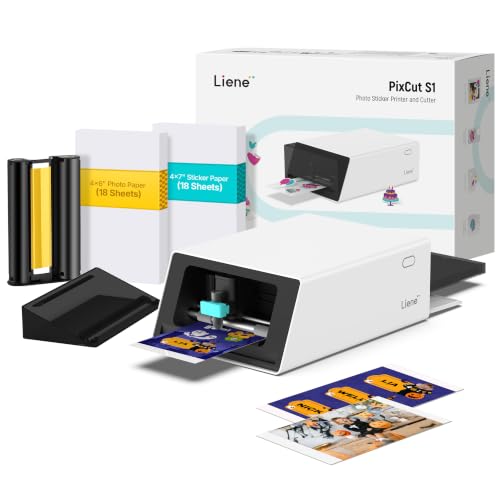
For crafters who crave versatility and efficiency, the Liene PixCut S1 Color Sticker Printer & Cutting Machine stands out as the ultimate tool. This all-in-one device lets you edit, print, and cut stickers right from your smartphone via Bluetooth, completing projects in just two minutes. With 300 DPI thermal dye-sublimation printing, expect vivid colors and exceptional detail. The AI features automatically extract images and guarantee precise cutting, giving you professional-quality results. Plus, stickers are durable, waterproof, and easy to reposition. Transform your creative ideas into stunning, long-lasting designs effortlessly with this innovative printer and cutting machine.
Best For: Crafters and DIY enthusiasts who want a versatile, efficient, and high-quality solution for creating custom stickers and labels directly from their smartphones.
Pros:
- All-in-One Functionality: Combines printing and cutting capabilities, streamlining the creative process.
- High-Quality Output: Produces vibrant, true-to-life colors with professional detail thanks to thermal dye-sublimation technology.
- Durable Stickers: Creates waterproof, scratch-resistant stickers with easy-peel backing for repositioning.
Cons:
- Limited to Sticker Production: Primarily designed for stickers and labels, limiting its use for other craft projects.
- Dependence on Smartphone: Requires a smartphone for operation, which may not appeal to users who prefer traditional methods.
- Initial Learning Curve: Users may need time to familiarize themselves with the app and AI features for optimal results.
Canon Pixma MG3620 Wireless All-in-One Color Inkjet Printer

Looking for a printer that seamlessly fits into your crafting routine? The Canon Pixma MG3620 Wireless All-in-One Color Inkjet Printer is your perfect companion. With its compact design, it won’t take up much space in your craft area. You’ll enjoy printing, copying, and scanning with speeds of 9.9 ipm for black and 5.7 ipm for color. Plus, it holds up to 100 sheets and features auto 2-sided printing, saving you paper. Easily connect your mobile devices for direct printing and scanning, and utilize smart features like ink notifications via Alexa. It’s energy-efficient and designed to minimize waste, too!
Best For: Those looking for a compact, versatile printer that can handle printing, copying, and scanning within a small crafting space.
Pros:
- Compact design makes it easy to fit in smaller spaces.
- Auto 2-sided printing helps to save paper and reduce waste.
- Mobile printing capabilities allow for convenient printing and scanning from various devices.
Cons:
- Print speed may be slower compared to higher-end models for large print jobs.
- Limited paper capacity of 100 sheets may require more frequent refilling.
- Color print quality might not meet the needs of professional photographers or graphic designers.
Canon TS9521C All-In-One Wireless Photo Printer

Craft enthusiasts will appreciate the Canon TS9521C All-In-One Wireless Photo Printer, especially with its ability to handle 12×12-inch paper, perfect for scrapbooking and other creative projects. This versatile printer supports various media, making it ideal for both crafting and everyday printing. With its 5 individual inks and ChromaLife100 technology, your photos will stay vibrant for years to come. You can easily print from smartphones, tablets, and more, thanks to its Wi-Fi connectivity options. The Auto Document Feeder simplifies multi-page tasks, ensuring you can focus on creating stunning designs without interruption.
Best For: Craft enthusiasts and individuals who frequently engage in creative projects requiring high-quality printing on larger formats.
Pros:
- Versatile printing capabilities with support for 12×12-inch paper, ideal for scrapbooking and other crafts.
- Long-lasting photo quality thanks to ChromaLife100 technology, protecting prints from fading for decades.
- Convenient connectivity options allow for printing from various devices, including smartphones and tablets.
Cons:
- Larger footprint may require more space compared to standard printers.
- Potentially higher ink costs due to the use of 5 individual inks for optimal color quality.
- Initial setup may be complex for users unfamiliar with wireless printers.
30 Sheets Black Cardstock (8.5 x 11, 92lb/250gsm)

If you’re a creative enthusiast seeking high-quality materials for your projects, the 30 sheets of black cardstock (8.5 x 11, 92lb/250gsm) are an excellent choice. Crafted from premium-quality material, this heavyweight cardstock guarantees durability and sturdiness, perfect for cutting, adhering, and decorating. You’ll love its versatility; it suits invitations, scrapbooking, DIY projects, and more. Plus, it’s compatible with both laser and inkjet printers, making it easy to print your designs effortlessly. With a stellar customer rating of 4.8 out of 5 stars, you’ll find this cardstock to be a reliable addition to your crafting supplies.
Best For: Creative enthusiasts and crafters looking for high-quality, versatile cardstock for various projects.
Pros:
- Premium-quality material ensures durability and sturdiness for extensive crafting needs.
- Compatible with both laser and inkjet printers for easy printing of designs and artwork.
- Highly versatile, suitable for invitations, scrapbooking, DIY projects, and decorations.
Cons:
- Limited to one color (black), which may not suit all project themes.
- Heavyweight texture may require specific cutting tools for precise shapes.
- May be overkill for simple projects that do not require heavyweight cardstock.
Linen Textured Cardstock White, 100 Sheets

For those who love creating stunning invitations or unique scrapbooking layouts, the Linen Textured Cardstock White, with its luxurious embossing, offers a perfect canvas. These 100 sheets of 8.5 x 11 inches cardstock, weighing 80 lb, deliver a thick and sturdy feel, making them ideal for various craft projects. Whether you’re making cards, painting, or designing stationery, this solid-core material provides a beautiful texture on both sides. Just remember to adjust your printer settings for heavy cardstock to guarantee flawless printing. With this value pack, you’ll have plenty of sheets to bring your creative visions to life!
Best For: Those who enjoy crafting, such as scrapbookers, card makers, and artists looking for a high-quality textured cardstock for their projects.
Pros:
- Thick and sturdy at 80 lb, offering durability for various craft applications.
- Beautiful embossed texture on both sides, enhancing the aesthetic of creations.
- Comes in a value pack of 100 sheets, providing ample material for multiple projects.
Cons:
- Requires specific printer settings for heavy cardstock, which may not be compatible with all printers.
- The thickness may make it challenging to fold or manipulate for intricate designs.
- Limited to white color, which may not suit all creative preferences.
Ceaco Hello Blink Mini Stickers and Photo Printer

The Ceaco Hello Blink Mini Stickers and Photo Printer is an excellent choice for kids aged 8 and up who love to express their creativity. This compact, portable Bluetooth thermal printer lets you create custom stickers directly from your iPhone or Android device—no ink needed! It’s perfect for DIY crafts, scrapbooking, and kids’ projects, encouraging imaginative designs wherever you go. The included kid-friendly sticker pack and tape rolls make it easy to get started. With its effortless design and fun functionality, you’ll find that this mini printer is a fantastic tool for releasing creativity and making memorable gifts.
Best For: Kids aged 8 and up who enjoy crafting and want a fun way to create custom stickers.
Pros:
- Compact and portable design makes it easy to take anywhere.
- No ink required for printing, which reduces mess and maintenance.
- Encourages creativity in kids through DIY projects and scrapbooking.
Cons:
- Limited to sticker printing only, without advanced photo printing features.
- Bluetooth connectivity may require troubleshooting for some users.
- Small size may limit the scale of stickers created compared to larger printers.
25 Sheets Brown Cardstock 8.5 x 11 Heavy Cardstock Printer Paper
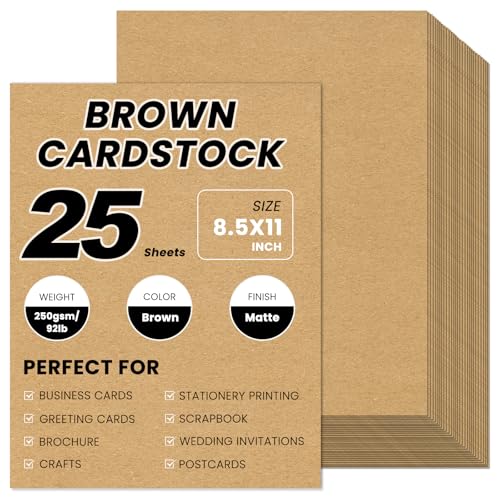
Craft enthusiasts will appreciate the 25 sheets of premium brown cardstock, specifically designed for vibrant and durable printing. Measuring 8.5 x 11 inches and weighing 92lb/250gsm, this heavy cardstock is perfect for various projects. Its high-quality double-sided matte finish guarantees excellent print results with quick ink drying, making it compatible with inkjet, laser printers, and copiers. You can easily score, cut, fold, or glue the thick cardstock for unique creations. Use it for everything from tags and greeting cards to bookmarks and posters. Release your creativity with this versatile cardstock and elevate your craft projects effortlessly!
Best For: Craft enthusiasts and professionals looking for high-quality cardstock for various creative projects.
Pros:
- Versatile Use: Suitable for a wide range of applications, including greeting cards, tags, and posters.
- High Quality: Made from premium double-sided matte paper for excellent print results and durability.
- Printer Compatibility: Works with inkjet, laser printers, and copiers, with quick ink drying for bleed-free performance.
Cons:
- Thickness Limitations: Users must check their printer’s maximum thickness specification before use to avoid jams.
- Color Limitation: Offered only in brown, which may not suit all design preferences.
- Bulk Purchase: Sold in packs of 25 sheets, which may not be ideal for those needing smaller quantities.
KODAK Step Instant Smartphone Photo Printer – Portable Mini Color Wireless Printer
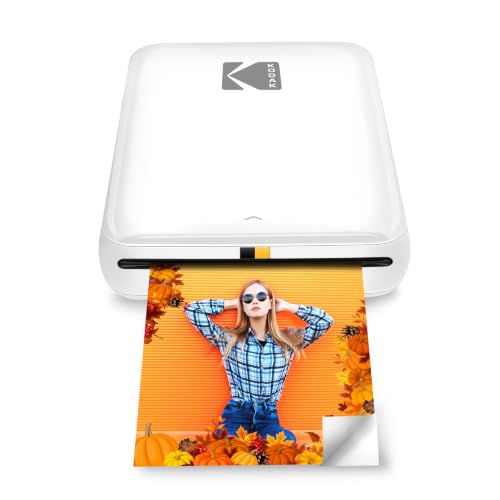
Looking for a compact and versatile printer that fits perfectly into your creative lifestyle? The KODAK Step Instant Smartphone Photo Printer is just what you need. This portable mini printer connects effortlessly to your iOS or Android device via Bluetooth or NFC. It uses ZINK technology to produce 2” x 3” sticky-back prints that resist moisture and tears. With the KODAK app, you can edit your photos, add filters, and create fun collages. Weighing less than a pound and featuring a rechargeable battery, it’s perfect for crafters and influencers on the go. Capture and print your memories instantly!
Best For: Creative individuals and influencers who want a portable and easy-to-use printer for instant photo printing on the go.
Pros:
- High-quality prints that are resistant to moisture, rips, tears, and smudges.
- Compact and lightweight design, making it easy to carry around.
- Versatile editing features available through the KODAK app, allowing for personalized photo enhancements.
Cons:
- Limited to 2” x 3” print size, which may not suit all preferences.
- Requires specific ZINK photo paper, which can add to ongoing costs.
- Battery life may be insufficient for larger printing sessions, as it prints only 25 photos on a full charge.
Factors to Consider When Choosing Printers for Craft Projects and Scrapbooking
When you’re choosing a printer for craft projects and scrapbooking, several key factors come into play. You’ll want to evaluate print quality and detail, as well as the versatility in paper types it can handle. Additionally, think about size, portability, connectivity options, and how easy it is to use.
Print Quality and Detail
Print quality plays an essential role in achieving stunning results for your craft projects and scrapbooking. To guarantee your prints look professional, aim for a printer with at least 300 DPI, which ensures vivid and detailed images. Consider printers using thermal dye-sublimation technology, as they enhance color accuracy and produce waterproof, fade-resistant prints. For intricate designs, choose a printer that supports a wider color gamut, offering millions of color variations for richer, more vibrant results. If you’re into black-and-white projects, don’t overlook monochrome printers; they can deliver high detail essential for precision. Finally, using quality paper, like heavyweight cardstock, can further enhance your prints, improving color saturation and detail reproduction.
Versatility in Paper Types
Choosing the right printer for your craft projects means ensuring it can handle a variety of paper types. You’ll want a printer that’s compatible with cardstock, photo paper, and specialty papers to achieve the results you desire. Look for models that support heavy cardstock, weighing 80 lb or more, for durable and professional-looking invitations and decorative items. It’s also important to choose a printer that accommodates different paper sizes, like 12×12 inches for larger layouts or the standard 8.5×11 inches for versatile crafting. Additionally, printers that can handle textured or embossed papers can add a unique touch to your scrapbook pages. Consider those that print on thermal and adhesive papers for easy sticker making and label creation, enhancing your crafting toolkit.
Size and Portability
Finding the right printer for your craft projects doesn’t just stop at versatility in paper types; size and portability are equally important factors. A compact model enhances portability and makes storage a breeze. Look for a lightweight printer, ideally under one pound, so you can easily craft on-the-go. You’ll want a printer that fits in standard craft bags or totes, ensuring you can transport it to workshops or events without hassle. Also, check that its dimensions accommodate your typical materials, like 2” x 3” sticky-back paper or larger cardstock. A lightweight design simplifies handling and setup, allowing for quick changes between crafting stations or while working at home. Choose wisely, and your creative process will flow more smoothly!
Connectivity Options Available
When selecting a printer for your craft projects, considering connectivity options is critical since they directly impact how easily you can print from various devices. Look for printers with USB, Wi-Fi, and Bluetooth capabilities to maximize flexibility. Wi-Fi connectivity lets you print from multiple devices—smartphones, tablets, and laptops—without needing to connect physically. If you’re often on the go, Bluetooth can be a game-changer, allowing quick connections for immediate printing. Many modern printers also support mobile apps, making it simple to print and scan directly from your smartphone. Finally, verify your printer is compatible with various operating systems and mobile platforms for seamless integration, so you can focus on your creative projects without tech hassles.
Ease of Use
While many factors influence your printer choice, ease of use stands out, especially for craft projects and scrapbooking. Look for printers with one-button operation or user-friendly interfaces to make the printing process simpler. Wireless connectivity options like Bluetooth or Wi-Fi are essential, as they let you print directly from your mobile devices or tablets without hassle. Consider models that come with dedicated apps featuring customizable templates and advanced functionalities, enhancing your crafting experience. Fast print speeds are also important, minimizing waiting times for more efficient project execution. Finally, verify the printer can handle various media types, such as stickers or cardstock, to provide versatility in your crafting endeavors without the need for complex adjustments.