Looking to elevate your marketing materials in 2025? You’ll want the right color laser printer to showcase your work with stunning visuals and crisp text. With so many options available, it can be tough to pinpoint the best models for your needs. From high-speed performance to user-friendly features, each printer has unique strengths that could enhance your business. Let’s explore the top contenders that could transform your marketing game.
HP Color LaserJet Pro MFP 3301sdw Wireless All-in-One Printer

If you’re part of a small team looking to create professional marketing materials, the HP Color LaserJet Pro MFP 3301sdw Wireless All-in-One Printer is an excellent choice. It prints, scans, and copies high-quality color documents, making it perfect for your needs. With a print speed of up to 26 pages per minute and features like auto 2-sided printing and a 250-sheet input tray, productivity won’t be an issue. Plus, the next-generation TerraJet toner guarantees vivid colors and reliable performance, so you’ll consistently impress your clients. Trust in HP’s reputation for quality and make your marketing materials shine.
Best For: Small teams looking to produce professional-quality marketing materials with high efficiency and reliability.
Pros:
- Fast print speeds of up to 26 pages per minute for both black and color documents.
- Auto 2-sided printing and a 250-sheet input tray enhance productivity and reduce paper usage.
- Next-generation TerraJet toner ensures vivid color quality and consistent output.
Cons:
- Designed to work only with HP cartridges, limiting options for toner replacements.
- Firmware updates may affect compatibility with non-HP cartridges, potentially causing inconvenience.
- Initial investment cost may be higher compared to entry-level printers, which could be a consideration for very small teams.
Canon Color imageCLASS MF662Cdw Wireless Duplex Laser Printer

The Canon Color imageCLASS MF662Cdw Wireless Duplex Laser Printer is an excellent choice for small businesses or marketing professionals who need a reliable, high-quality printing solution. With its fast print speeds of up to 26 ppm and quick first print time of about 10.3 seconds, you won’t waste time waiting. Its 3-in-1 functionality lets you print, scan, and copy efficiently. Plus, the automatic duplex printing saves paper. You can easily connect wirelessly and print from mobile devices using the Canon PRINT app or Apple AirPrint. The intuitive 5-inch color touchscreen and customizable application library enhance user experience.
Best For: Small businesses or marketing professionals seeking a reliable and efficient printing solution.
Pros:
- Fast print speeds of up to 26 ppm for both color and monochrome.
- 3-in-1 functionality allows for printing, scanning, and copying.
- User-friendly 5-inch color touchscreen with customizable application library.
Cons:
- Initial purchase cost may be higher compared to basic printers.
- Requires specific Canon toner, which can be expensive.
- Larger footprint may not suit very small office spaces.
Canon Color imageCLASS MF751Cdw II Multifunction Laser Printer

For businesses looking to produce high-quality marketing materials efficiently, the Canon Color imageCLASS MF751Cdw II Multifunction Laser Printer stands out with its impressive print speed of up to 35 pages per minute. You’ll appreciate the 5-inch color touchscreen that simplifies navigation and provides customizable access to features. With wireless capability, you can print from mobile devices using the Canon PRINT app or Apple AirPrint. Its 250-sheet capacity, along with auto duplex printing, helps reduce paper waste. Plus, the high-capacity toner guarantees fewer replacements, making it a reliable choice for your marketing needs, backed by a 3-year limited warranty.
Best For: Businesses seeking a reliable and efficient printer for producing high-quality marketing materials.
Pros:
- Fast print speed of up to 35 pages per minute for both color and monochrome documents.
- User-friendly 5-inch color touchscreen for easy navigation and quick access to frequently used features.
- Wireless and mobile printing capabilities allow for convenient printing from various devices, including smartphones and tablets.
Cons:
- Initial setup may require time for users unfamiliar with wireless configurations.
- Limited paper capacity of 250 sheets without purchasing additional cassettes for larger printing needs.
- High-capacity toner replacements may have a higher upfront cost compared to standard toners.
HP Color Laserjet Pro 3201dw Wireless Color Laser Printer

Designed specifically for small teams, the HP Color Laserjet Pro 3201dw Wireless Color Laser Printer excels in delivering professional-quality color documents. With impressive print speeds of up to 26 pages per minute, you won’t waste time waiting for your materials. Its auto 2-sided printing feature and 250-sheet input tray enhance efficiency for busy work environments. The next-generation TerraJet toner guarantees vivid color output, making your marketing materials stand out. Plus, the dual-band Wi-Fi connectivity automatically resolves issues, providing seamless wireless printing. Recognized for reliability, it’s essential to use original HP cartridges for peak performance and consistent quality.
Best For: Small teams needing professional-quality color documents with efficient printing capabilities.
Pros:
- High print speeds of up to 26 pages per minute for both black and color.
- Auto 2-sided printing feature enhances efficiency and saves paper.
- Dual-band Wi-Fi connectivity with self-reset capability for seamless wireless printing.
Cons:
- Only compatible with original HP cartridges, which may limit options for users.
- Periodic firmware updates are necessary to maintain functionality, which can be inconvenient.
- 250-sheet input tray may not be sufficient for larger print jobs or high-volume printing needs.
HP Color Laserjet Pro MFP 4301fdw Wireless All-in-One Printer
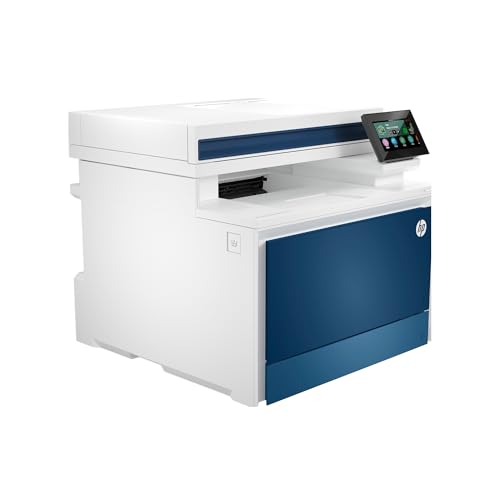
If you’re part of a small team of up to 10 users looking for an efficient solution to handle marketing materials, the HP Color Laserjet Pro MFP 4301fdw Wireless All-in-One Printer stands out. With a print speed of up to 35 color pages per minute, it guarantees your projects get completed quickly. The auto 2-sided printing and document feeder streamline scanning and copying tasks. You’ll appreciate its intelligent Wi-Fi connectivity, allowing seamless wireless printing from multiple devices. Plus, HP Wolf Pro Security keeps your data safe, and periodic updates enhance performance. This printer truly elevates your marketing efforts with ease and reliability.
Best For: Small teams of up to 10 users looking for a reliable and efficient all-in-one printing solution.
Pros:
- Fast print speed of up to 35 color pages per minute enhances productivity.
- Wireless connectivity options make it easy to print from various devices.
- Built-in security features protect sensitive data and ensure compliance.
Cons:
- Requires original HP cartridges, which may be more expensive than third-party options.
- May be overkill for very small teams or light printing needs.
- Initial setup may be complex for users unfamiliar with wireless printers.
Brother Color Laser Printer (HL-L3220CDW)

The Brother Color Laser Printer (HL-L3220CDW) stands out as an excellent choice for small businesses and marketing teams that require high-quality prints without the hassle of frequent maintenance. With a print speed of up to 19 pages per minute and a resolution of 2400 x 600 dpi, your marketing materials will look stunning. The automatic duplex printing saves time and paper, while the 250-sheet capacity reduces the need for constant refills. Plus, its wireless connectivity allows seamless printing from various devices. You’ll appreciate its user-friendly interface and the built-in security features that protect your sensitive documents.
Best For: Small businesses and marketing teams looking for high-quality, efficient printing solutions with minimal maintenance.
Pros:
- High print quality with a resolution of 2400 x 600 dpi, ideal for marketing materials.
- Automatic duplex printing saves time and reduces paper usage.
- Wireless connectivity allows for easy printing from multiple devices.
Cons:
- Limited to a maximum media size of 8.5 x 14 inches, which may restrict larger print jobs.
- Weight of 24.7 pounds may make it less portable for users needing mobility.
- Rated 4.0 out of 5 stars, indicating some users may have experienced issues or dissatisfaction.
Canon imageCLASS MF465dw II Wireless Duplex Laser Printer

For businesses needing a reliable all-in-one solution, the Canon imageCLASS MF465dw II Wireless Duplex Laser Printer stands out with its impressive print speed of up to 42 pages per minute. You’ll appreciate the 5-inch color touchscreen, which provides easy access to customizable applications. With seamless mobile printing through Canon PRINT app, Apple AirPrint, and Mopria, you can print directly from your devices. The printer features a 250-sheet standard cassette and a 50-sheet duplex automatic document feeder, ensuring efficient paper handling. Plus, its ENERGY STAR certification and 3-year limited warranty guarantee both quality and reliability for your marketing materials.
Best For: Businesses seeking a fast, reliable, and versatile all-in-one printer for their office needs.
Pros:
- Fast Print Speeds: Up to 42 pages per minute, ensuring quick output for busy environments.
- Versatile Functionality: Combines printing, scanning, copying, and faxing in one device.
- Mobile Printing Capability: Compatible with various mobile printing options for convenient access.
Cons:
- Monochrome Printing Only: Limited to black and white, which may not suit businesses needing color output.
- Initial Setup Complexity: Some users may find the wireless setup challenging if they are not tech-savvy.
- Higher Toner Costs: Requires Canon Genuine Toner, which could be more expensive than third-party alternatives.
Brother MFC-L3720CDW Wireless Color Laser Printer

Ideal for small to medium-sized businesses, the Brother MFC-L3720CDW Wireless Color Laser Printer delivers impressive performance with print speeds of up to 19 pages per minute. This all-in-one device combines printing, scanning, copying, and faxing, making it a versatile office companion. With a 250-sheet capacity and automatic duplex printing, you can efficiently handle high-demand tasks. Dual-band wireless connectivity guarantees multiple users can print seamlessly from any device. Plus, the intuitive 3.5-inch color touchscreen allows easy access to customizable shortcuts and cloud services. Enjoy smart integration and mobile management to keep your printing operations running smoothly.
Best For: Small to medium-sized businesses seeking a reliable all-in-one printer for high-demand printing tasks.
Pros:
- High print speeds of up to 19 pages per minute for efficient workflow.
- Dual-band wireless connectivity allows multiple users to print seamlessly from various devices.
- Intuitive 3.5-inch color touchscreen with customizable shortcuts enhances user experience.
Cons:
- May be more expensive than basic printers without advanced features.
- Initial setup and wireless configuration may require some technical knowledge.
- The size of the printer may not be suitable for very small office spaces.
Canon Color imageCLASS MF652Cw Wireless Laser Printer

With its impressive printing speed of 22 pages per minute, the Canon Color imageCLASS MF652Cw Wireless Laser Printer is perfect for busy marketing professionals who need high-quality materials in a flash. You’ll love the quick first print time of just 10.3 seconds, making it easy to stay on schedule. Plus, you can print on-the-go with various mobile apps, including the Canon PRINT app, and it’s Chromebook compatible. The 250-sheet standard cassette and 1-sheet multipurpose tray offer ample paper handling. With the Poster Artist Online tool, you can create stunning designs effortlessly. Enjoy peace of mind with a 3-year limited warranty.
Best For: Marketing professionals and small businesses that require high-quality printing and quick turnaround times.
Pros:
- Fast printing speed of 22 pages per minute, ideal for high-volume tasks.
- Mobile printing capabilities via various apps, including the Canon PRINT app, making it convenient for on-the-go use.
- Versatile paper handling with a 250-sheet cassette and multipurpose tray for diverse printing needs.
Cons:
- May be more expensive compared to basic printers, especially for initial setup.
- Limited to Canon Genuine Toner, which could increase long-term running costs.
- Size and weight may not be suitable for very small office spaces or home environments.
Brother HL-L3280CDW Wireless Compact Digital Color Printer

The Brother HL-L3280CDW Wireless Compact Digital Color Printer stands out as a top choice for small offices and home-based entrepreneurs who need high-quality, professional documents without sacrificing space. With print speeds of up to 27 pages per minute and automatic duplex printing, you’ll boost efficiency while saving time. The 2.7-inch touchscreen makes mobile and cloud printing a breeze, allowing you to access services like Google Drive and Dropbox effortlessly. Using Brother Genuine TN229 or TN229XL toner guarantees consistent, reliable results. Plus, the Refresh EZ Print Subscription Service helps you save on toner and never run out when you need it most.
Best For: Small offices and home-based entrepreneurs looking for a compact, high-quality color printer that maximizes efficiency and space.
Pros:
- Fast print speeds of up to 27 pages per minute enhance productivity.
- Automatic duplex printing saves time and paper by printing on both sides of the page.
- Mobile and cloud printing capabilities provide easy access to documents from popular services like Google Drive and Dropbox.
Cons:
- Initial setup may require technical knowledge, which could be challenging for some users.
- Toner replacement costs can add up, especially if not utilizing the subscription service.
- Limited paper handling capacity compared to larger printers may require more frequent refilling.
Factors to Consider When Choosing Color Laser Printers for Marketing Materials
When choosing a color laser printer for your marketing materials, you need to contemplate several key factors. Print quality and speed can directly affect the professionalism of your materials, while connectivity options and paper handling capacity impact your workflow. Don’t forget to factor in the cost of consumables, as it can influence your long-term budget.
Print Quality and Resolution
Print quality plays a pivotal role in the effectiveness of your marketing materials, directly influencing how your audience perceives your brand. To make a strong impression, aim for a print resolution of at least 2400 x 600 dpi; this guarantees vibrant colors and sharp details. Next-generation toners can also enhance color vividness, giving your prints a professional touch. Consistency in color reproduction is key, so choose a printer that maintains accurate color profiles to reflect your brand colors accurately across different materials. By focusing on these factors, you’ll create visually appealing marketing materials that stand out. Remember, high print quality not only attracts attention but also builds trust with your audience, reinforcing your brand’s image.
Speed and Efficiency
Choosing a color laser printer that meets your marketing needs often hinges on its speed and efficiency. Look for models with print speeds of up to 35 pages per minute (ppm) to handle high-demand jobs. Quick first print times of around 5 to 10 seconds mean you won’t face significant delays when producing materials. Automatic duplex printing is a must; it saves time and paper while giving your projects a polished look. Opt for high-capacity paper trays that hold 250 sheets or more to minimize interruptions during large print jobs. If you frequently scan or copy multi-page documents, consider printers with automatic document feeders (ADF) to further boost productivity. Your marketing materials deserve nothing less than peak efficiency.
Connectivity Options
Efficiency in speed and output is only part of the equation when selecting a color laser printer for your marketing materials. You need to take into account the connectivity options available. Look for dual-band Wi-Fi to enhance network stability and performance, ensuring seamless printing. Many modern printers also support mobile device printing through apps like Apple AirPrint and Canon PRINT, which lets you print directly from your smartphone or tablet. USB connectivity is essential for reliable direct connections, especially in settings without network access. Additionally, Wi-Fi Direct allows you to print without a traditional network, simplifying setup. Finally, compatibility with cloud services like Google Drive and Dropbox boosts productivity by enabling easy access and direct printing from your documents.
Paper Handling Capacity
When it comes to producing high-quality marketing materials, paper handling capacity plays an essential role in maintaining workflow efficiency. A higher capacity lets you tackle longer print runs without constant refills, boosting productivity during busy campaigns. Look for printers with a standard cassette capacity of at least 250 sheets to manage large jobs effectively. Automatic document feeders (ADF) can speed up copying or scanning multiple materials, allowing for quicker completion. Consider models with expandable options, like additional cassettes, to adapt to varying print volumes and media types. Plus, automatic duplex printing saves time and resources by enabling double-sided output, which is especially handy for brochures and flyers. Prioritize these features to make your marketing efforts seamless.
Cost of Consumables
Understanding the cost of consumables is essential for managing your budget effectively when selecting a color laser printer for marketing materials. The expenses tied to toner cartridges and paper can greatly influence your printer’s overall cost of ownership. While standard yield toner cartridges may seem cheaper initially, they often lead to higher per-page costs. Instead, consider high-yield cartridges for better value, especially if you print in high volume. Pay attention to the page yield, as it directly impacts your printing expenses. Subscription services for consumables can also offer discounts and guarantee you never run out. Finally, check the compatibility of consumables with your printer, since using proprietary cartridges can affect both cost and availability.