When it comes to equipping your church office with a reliable printer, efficiency and functionality are key. You need a machine that can handle everything from bulletins to administrative documents without breaking the bank. With so many options available, it can be tough to determine which printer will best meet your needs. Let’s explore some of the top choices that combine performance and value, ensuring your office runs smoothly.
HP OfficeJet Pro 8125e Wireless All-in-One Color Inkjet Printer

The HP OfficeJet Pro 8125e Wireless All-in-One Color Inkjet Printer is an excellent choice for church offices that need to produce professional-quality documents quickly and efficiently. With print speeds of up to 20 pages per minute in black and 10 in color, you’ll save time on reports and flyers. Its dual-band Wi-Fi guarantees reliable wireless printing, while the HP app allows you to print and scan from any device. The 2.7-inch touchscreen simplifies navigation. Plus, with three months of Instant Ink included, you won’t have to worry about running out. Its sustainable design and security features make it a smart investment.
Best For: Church offices that require efficient, professional-quality printing for reports, flyers, and other documents.
Pros:
- Fast print speeds of up to 20 ppm black and 10 ppm color enhance productivity.
- Dual-band Wi-Fi ensures reliable wireless connectivity for seamless printing from various devices.
- Includes three months of Instant Ink, minimizing concerns about running out of ink.
Cons:
- Monthly subscription fee applies for Instant Ink after the trial period ends.
- The printer only works with HP cartridges, limiting options for ink replacement.
- Some users may find the 2.7-inch touchscreen interface to be less intuitive compared to larger displays.
Epson EcoTank ET-2800 Wireless All-in-One Supertank Printer

For church offices looking to streamline their printing needs, the Epson EcoTank ET-2800 stands out with its innovative cartridge-free system. This wireless color all-in-one printer not only handles basic printing but also offers scanning and copying capabilities. Utilizing Micro Piezo Heat-Free Technology, it produces vivid, detailed prints at speeds of up to 10 pages per minute. With each ink bottle set replacing around 80 cartridges, you’ll save up to 90% on replacement ink costs. Best of all, you’ll receive up to two years of ink in the box, minimizing those frustrating out-of-ink moments.
Best For: Church offices seeking a cost-effective and efficient printing solution for basic printing, scanning, and copying needs.
Pros:
- Cartridge-free system reduces waste and saves money, replacing approximately 80 individual cartridges with each ink bottle set.
- Cost efficiency allows users to save up to 90% on replacement ink compared to traditional cartridges.
- Includes up to 2 years of ink in the box, minimizing interruptions due to low ink levels.
Cons:
- Print speed of up to 10 pages per minute may not be sufficient for high-volume printing needs.
- Limited advanced features may not meet the demands of more complex printing tasks.
- Wireless connectivity issues can occasionally arise, affecting printing convenience.
HP Envy Inspire 7255e Wireless Color Inkjet Printer

Ideal for church offices that require versatility, the HP Envy Inspire 7255e Wireless Color Inkjet Printer offers a range of features, including automatic 2-sided printing and advanced photo capabilities. With print speeds of up to 10 ppm color and 15 ppm black, you’ll handle all your printing needs efficiently. Its AI technology guarantees perfectly formatted prints, eliminating wasted pages. The wireless setup and customizable touchscreen make it user-friendly, while vibrant photo quality impresses with true-to-phone clarity. Plus, you’ll appreciate its eco-friendly design, made from over 45% recycled plastic, coupled with a convenient Instant Ink subscription for hassle-free ink management.
Best For: Churches and home offices seeking a versatile printer for documents and vibrant photos with efficient printing capabilities.
Pros:
- Automatic 2-sided printing saves paper and reduces printing costs.
- High-quality photo printing delivers true-to-phone clarity for creative projects.
- Eco-friendly design with over 45% recycled plastic content supports sustainability efforts.
Cons:
- Ink subscription fee applies after the initial 3-month trial, which may not suit all budgets.
- Compatible only with HP cartridges, limiting options for ink replacement.
- Potential connectivity issues may arise if not set up properly, despite self-healing Wi-Fi.
Brother DCP-L2640DW Wireless Compact Monochrome Laser Printer

Looking for a reliable printer that can handle the demands of a busy church office? The Brother DCP-L2640DW Wireless Compact Monochrome Laser Printer is an excellent choice. With a print speed of up to 36 pages per minute, it keeps your workflow moving efficiently. Its 50-page auto document feeder makes multi-page scanning and copying a breeze. Plus, you’ll appreciate the flexible connectivity options, including dual-band wireless and Ethernet. Use the Brother Mobile Connect app to manage printing tasks remotely, ensuring you stay organized. With the convenient toner subscription service, you won’t have to worry about running out of supplies.
Best For: Small businesses and busy church offices that require a reliable, multifunctional printer for efficient printing, scanning, and copying.
Pros:
- High print speed of up to 36 pages per minute, enhancing productivity.
- 50-page auto document feeder simplifies multi-page scanning and copying tasks.
- Flexible connectivity options including dual-band wireless and Ethernet for versatile network integration.
Cons:
- Limited to monochrome printing, which may not suit users needing color output.
- Initial cost may be higher compared to basic printers without multifunction capabilities.
- Toner replacement can add ongoing costs, even with the subscription service.
HP DeskJet 2827e Wireless All-in-One Printer

The HP DeskJet 2827e Wireless All-in-One Printer is a fantastic option for church offices that require versatility without taking up too much space. This compact printer offers color printing, scanning, and copying, with speeds of up to 5.5 ppm for color and 7.5 ppm for black. Its reliable Wi-Fi connectivity simplifies printing from your smartphone or tablet through the HP App. Plus, with a 3-month Instant Ink trial, you’ll never run out of ink unexpectedly. Made from at least 60% recycled plastic, it also meets energy efficiency standards, making it a sustainable choice for your church office needs.
Best For: The HP DeskJet 2827e is best for home offices and small church offices seeking a versatile all-in-one printer that is compact and easy to use.
Pros:
- Versatile functionality: Combines printing, scanning, and copying in one device.
- User-friendly: Reliable Wi-Fi connectivity and HP App allow for convenient mobile printing.
- Sustainable design: Made from at least 60% recycled plastic and energy efficient.
Cons:
- Print speed limitations: Slower print speeds compared to high-performance printers.
- Ongoing subscription cost: The Instant Ink service incurs a monthly fee after the trial period.
- Compatibility issues: Only works with HP cartridges, blocking non-HP options.
HP OfficeJet Pro 9125e Wireless All-in-One Printer

For church offices seeking a reliable and versatile printing solution, the HP OfficeJet Pro 9125e Wireless All-in-One Printer stands out with its impressive multifunction capabilities. This printer not only prints, scans, copies, and faxes but also features auto duplex printing and a 250-sheet input tray. With print speeds reaching 18 ppm in color and 22 ppm in black, it’s perfect for producing professional-quality documents like brochures and flyers. Its wireless connectivity and HP app allow you to print from your smartphone or tablet effortlessly. Plus, enjoy a 3-month Instant Ink trial for hassle-free ink delivery!
Best For: Church offices that require a reliable and multifunctional printer for producing professional-quality documents and managing printing tasks efficiently.
Pros:
- Versatile Functions: Combines printing, scanning, copying, and faxing in one device.
- High-Speed Printing: Offers fast print speeds of up to 18 ppm in color and 22 ppm in black.
- Wireless Connectivity: Easily print from smartphones and tablets through the HP app.
Cons:
- Cartridge Compatibility: Only works with HP cartridges, limiting options for ink replacement.
- Monthly Subscription Fee: The Instant Ink service incurs a monthly charge after the trial period ends.
- Touchscreen Size: The 2.7-inch touchscreen may be considered small for some users.
Brother Work Smart 1360 Wireless Color Inkjet All-in-One Printer (MFC-J1360DW)

Ideal for church offices that need versatility and efficiency, the Brother Work Smart 1360 Wireless Color Inkjet All-in-One Printer (MFC-J1360DW) packs a punch with its multifunctionality. It combines printing, copying, and scanning in one compact device, producing high-quality prints that impress. With automatic duplex printing and a 20-sheet Automatic Document Feeder, you’ll streamline tasks effortlessly. Enjoy fast printing speeds of up to 16 pages per minute in black and 9 in color. Connect wirelessly or via USB, and manage your printer easily using the Brother Mobile Connect app. Plus, monitor ink usage with the handy Page Gauge feature.
Best For: Churches and home offices that require a versatile and efficient all-in-one printing solution.
Pros:
- Multifunctional: Combines printing, copying, and scanning in one device, saving space and enhancing productivity.
- Fast Printing Speeds: Achieves up to 16 pages per minute in black and 9 pages per minute in color, ideal for quick document handling.
- Wireless Connectivity: Offers convenient wireless printing and scanning options, as well as easy management through the Brother Mobile Connect app.
Cons:
- Ink Dependency: Requires specific LC501 Series Inks which may need to be purchased separately, adding to ongoing costs.
- Limited Paper Capacity: The 150-sheet paper tray may require frequent refilling for high-volume printing tasks.
- Display Size: The 1.8” color display might be small for some users, potentially making navigation less user-friendly.
HP OfficeJet Pro 8139e Wireless All-in-One Printer

Looking for a reliable all-in-one printer that can handle your church office’s diverse printing needs? The HP OfficeJet Pro 8139e is perfect for you. This color inkjet printer offers impressive print speeds—10 pages per minute for color and 20 for black—and can easily print, scan, copy, and fax. With its dual-band Wi-Fi and user-friendly 2.7-inch touchscreen, you’ll navigate tasks effortlessly. Plus, the included 1-year Instant Ink trial guarantees you never run out of ink. Built with over 45% recycled plastic, it’s an eco-friendly choice, too. Enhance your office efficiency with this powerful printer!
Best For: Small to medium-sized offices, such as church offices, that require versatile printing capabilities and eco-friendly features.
Pros:
- Versatile Functions: Can print, scan, copy, and fax, meeting a variety of office needs.
- Fast Print Speeds: Offers efficient printing with 10 ppm for color and 20 ppm for black documents.
- Eco-Friendly Design: Made with over 45% recycled plastic, promoting sustainability.
Cons:
- Monthly Subscription Fee: The Instant Ink subscription incurs a fee after the first year unless canceled.
- HP Cartridge Dependency: Only works with HP cartridges, limiting third-party options.
- Initial Setup Required: May require time for setup and configuration, especially for wireless connectivity.
HP OfficeJet Pro 8135e Wireless All-in-One Color Inkjet Printer
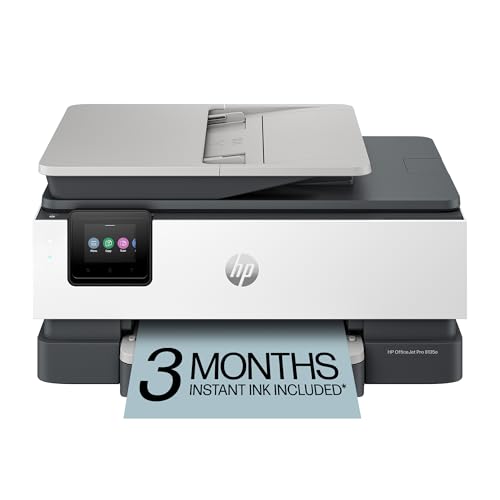
The HP OfficeJet Pro 8135e Wireless All-in-One Color Inkjet Printer stands out as a top choice for church offices that need efficient and versatile document handling. With print speeds of up to 20 ppm for black and 10 ppm for color, you’ll get your materials printed quickly. Its 2.7-inch color touchscreen makes navigation easy, while the auto document feeder and 225-sheet input tray help streamline your tasks. Plus, the HP app allows you to print and scan directly from your devices. Enjoy added security with HP Wolf Essential Security and a 3-month Instant Ink trial to keep your supplies in check.
Best For: Church offices looking for efficient and versatile document handling.
Pros:
- Fast printing speeds of up to 20 ppm for black and 10 ppm for color enhance productivity.
- The 2.7-inch color touchscreen and auto document feeder simplify navigation and task management.
- Includes HP Wolf Essential Security for data protection and a 3-month Instant Ink trial for hassle-free supply management.
Cons:
- Monthly fees apply for Instant Ink subscription after the trial period ends.
- Performance may vary depending on network conditions and device compatibility.
- The printer’s reliance on Wi-Fi connectivity can be a limitation in areas with unstable internet.
HP Smart Tank 5000 Wireless All-in-One Ink Tank Printer

For churches needing a reliable and cost-effective printing solution, the HP Smart Tank 5000 Wireless All-in-One Ink Tank Printer stands out with its cartridge-free design and impressive ink capacity. You’ll enjoy crisp text and vivid colors, with print speeds of up to 10 pages per minute for black and 5 for color. Its quick setup, easy access for ink refills, and mobile compatibility make it user-friendly. Plus, you can rely on self-healing Wi-Fi for a stable connection and HP security features to protect your data. With 6,000 pages included, this printer is perfect for high-volume needs.
Best For: Churches and families needing a reliable, cost-effective printer for high-volume color document printing.
Pros:
- Cartridge-free design allows for easy refilling and lower printing costs.
- Impressive ink capacity with up to 6,000 pages included right out of the box.
- User-friendly features such as mobile compatibility and quick setup for convenient operation.
Cons:
- Print speeds may be slower compared to some traditional cartridge printers.
- Limited color accuracy in some cases compared to higher-end models.
- Wi-Fi connectivity issues may arise in areas with poor wireless signals despite self-healing capabilities.
Factors to Consider When Choosing Printers for Church Offices
When choosing a printer for your church office, consider factors like print volume requirements and whether you need color or monochrome prints. Think about the functionality and features that will best suit your needs, as well as the connectivity options available. Don’t forget to factor in the cost of ink, as it can greatly impact your budget over time.
Print Volume Requirements
Choosing the right printer for your church office requires careful consideration of print volume requirements, especially since you might regularly produce bulletins, flyers, and newsletters. Start by evaluating your expected print volume to determine the printer’s capabilities. Look for models with higher pages per minute (ppm) rates to keep up with busy printing sessions during events. Don’t forget to assess the total cost of ownership, including ink or toner replacement, ensuring long-term affordability. Features like automatic document feeders and duplex printing can enhance efficiency for larger jobs. Finally, consider how often you’ll be printing; you’ll want a printer that can handle frequent use without constant interruptions for paper or ink replenishment.
Color vs. Monochrome
Whether your church office needs vibrant materials to engage the congregation or primarily focuses on text-heavy documents, deciding between color and monochrome printers is essential. Color printers shine when you’re creating brochures, flyers, or presentations, enhancing communication and engagement in church activities. However, if you’re printing bulletins and meeting minutes, a monochrome printer might be the better choice, as they typically offer faster print speeds and lower operating costs. While color printers usually have a higher initial cost, their value can increase if colorful materials are a regular need. Keep in mind that color printing uses more ink, leading to higher expenses if your church’s needs are limited. Ultimately, assess your printing requirements, budget, and document types to make the best choice.
Functionality and Features
Selecting the right printer for your church office goes beyond just deciding on color or monochrome; it involves considering functionality and features that meet your specific needs. Look for a multi-functional printer that can print, scan, copy, and fax to streamline various administrative tasks. High print speeds are essential, so aim for at least 20 pages per minute for black and 10 for color. Automatic duplex printing not only saves paper but also reduces long-term costs. A sizable input tray capacity, like 225 sheets, minimizes interruptions during large print jobs, such as bulletins or flyers. Prioritizing these features guarantees you’ll have an efficient and reliable printer that supports your church’s operations effectively.
Connectivity Options
When evaluating printers for your church office, connectivity options play an essential role in ensuring seamless operation. Look for printers with dual-band Wi-Fi capabilities to enhance wireless connectivity and minimize disruptions. Mobile printing support through dedicated apps is a must; it allows you to print directly from smartphones or tablets without needing a computer. Check for Ethernet ports as well, especially if your wireless network is weak. Cloud printing features are another great advantage, enabling you to print documents directly from services like Google Drive or Dropbox. Finally, prioritize printers with built-in security measures to protect sensitive data transmitted over the network, ensuring confidentiality for your church office operations.
Cost of Ink
The cost of ink is a critical factor to keep in mind as you choose printers for your church office. High-volume printing can quickly inflate your operating expenses, so consider printers with cartridge-free systems, like refillable ink tanks, which can save you up to 90% on replacement ink costs. Subscription services can also help manage expenses, offering predictable monthly charges for ink delivery. Just be cautious; some plans might lead to unexpected costs if you’re not careful. Look for high-yield cartridges and supertank printers that offer lower costs per page, allowing you to print thousands of pages with a single set of ink bottles. Remember, weighing ink costs over the printer’s lifespan is essential for long-term savings.
Security Features
As you navigate the important task of choosing printers for your church office, don’t overlook the vital role security features play in protecting sensitive information. Many modern printers come equipped with essential security measures like encryption, password protection, and secure print release, which help prevent unauthorized access to your documents. Regular firmware updates are also important; they guarantee your printer stays protected against cyber threats by addressing any vulnerabilities. Additionally, some printers offer advanced features like network monitoring and alerts for suspicious activity, further safeguarding against potential breaches. By selecting a printer with robust security features, you can help guarantee compliance with data protection regulations and maintain the confidentiality of your church’s communications and documents.
Eco-Friendly Design
Choosing an eco-friendly printer can greatly benefit your church office and the environment. Look for models that incorporate recycled materials, with some using over 40% recycled plastic. This reduces the overall environmental impact. Opt for cartridge-free systems, which minimize waste by allowing you to replace multiple cartridges with just one ink bottle set. Also, consider printers with Energy Star certification to cut down on energy consumption and lower your carbon footprint.
You can further enhance sustainability by selecting printers that use inks derived from natural or plant-based materials. Finally, subscription services for ink delivery help guarantee you use resources efficiently, reducing waste from unused or expired cartridges. By making these choices, you’re supporting both your office’s needs and the planet.