When it comes to equipping your medical office, choosing the right printer can greatly impact your workflow. You need a solution that balances speed, quality, and compliance with healthcare regulations. With so many options available, narrowing it down can be challenging. In this guide, we’ll explore the top 10 printers tailored for medical practices, highlighting their features and benefits. Let’s find the perfect fit for your needs.
HP OfficeJet Pro 8125e Wireless All-in-One Printer

The HP OfficeJet Pro 8125e Wireless All-in-One Printer is an excellent choice for medical offices needing reliable, high-quality printing. With impressive print speeds of up to 20 pages per minute in black and 10 in color, it handles reports and presentations effortlessly. You’ll appreciate features like auto duplex printing and a 225-sheet input tray, making your workflow smoother. Its dual-band Wi-Fi guarantees consistent wireless printing, and the HP app lets you print or scan from any device. Plus, with three months of Instant Ink included, you won’t have to worry about running out of ink anytime soon.
Best For: Medical offices and home offices that require reliable, high-quality printing for reports and presentations.
Pros:
- Fast print speeds of up to 20 ppm in black and 10 ppm in color, enhancing productivity.
- Dual-band Wi-Fi ensures consistent wireless connectivity, making it easy to print from any device.
- Includes 3 months of Instant Ink with HP+ activation, providing convenience and peace of mind regarding ink supply.
Cons:
- Requires HP cartridges only, limiting options for third-party ink.
- Monthly fee for Instant Ink subscription after the trial period may be a drawback for some users.
- Firmware updates needed to maintain security may cause temporary interruptions in use.
Brother DCP-L2640DW Wireless Compact Monochrome Laser Printer

For small medical offices looking to streamline their operations, the Brother DCP-L2640DW Wireless Compact Monochrome Laser Printer stands out as an ideal choice. With a print speed of up to 36 pages per minute, you’ll keep up with the demands of your practice efficiently. Its 50-page auto document feeder makes multi-page scanning and copying a breeze. You can easily connect via dual-band wireless or Ethernet, and even USB. Plus, the Brother Mobile Connect app lets you manage printing and scanning remotely. With the Refresh EZ Print Subscription Service, you’ll never run out of toner, saving you time and money.
Best For: Small medical offices seeking an efficient and reliable multi-function monochrome laser printer.
Pros:
- High print speed of up to 36 pages per minute ensures quick document processing.
- 50-page auto document feeder simplifies multi-page scanning and copying tasks.
- Dual-band wireless and Ethernet connectivity options provide flexibility for various setups.
Cons:
- Only supports black and white printing, which may not meet all business needs.
- Initial cost may be higher compared to standard inkjet printers.
- Limited color scanning capabilities with slower speeds for color documents.
HP OfficeJet Pro 9125e Wireless All-in-One Color Inkjet Printer

Looking for a reliable printer that meets the demands of a busy medical office? The HP OfficeJet Pro 9125e is your perfect solution. This wireless all-in-one printer offers fast print speeds of up to 22 ppm black and 18 ppm color, along with features like scanning, copying, and faxing. Its 250-sheet input tray and auto duplex printing streamline your workflow. Plus, with HP’s AI technology, you’ll get professional-quality documents every time. The printer’s dual-band Wi-Fi guarantees seamless connectivity, and you can manage everything from your smartphone using the HP App. Don’t forget the 3-month Instant Ink trial for hassle-free ink delivery!
Best For: The HP OfficeJet Pro 9125e is best for busy medical offices that require fast, reliable printing, scanning, and faxing capabilities.
Pros:
- Versatile All-in-One Functionality: Combines printing, scanning, copying, and faxing in one device for convenience.
- Fast Print Speeds: Offers up to 22 ppm black and 18 ppm color, helping to meet high-volume printing needs efficiently.
- Mobile Printing Capability: Allows management and printing directly from smartphones and tablets via the HP App.
Cons:
- Ink Subscription Cost: The 3-month Instant Ink trial may lead to ongoing costs if not canceled after the trial period.
- Dependency on HP Cartridges: Designed to work only with HP cartridges, limiting flexibility with third-party options.
- Touchscreen Size: The 2.7-inch touchscreen may be small for some users, making navigation less intuitive.
Epson EcoTank ET-4800 Wireless All-in-One Printer

Designed with the demands of busy medical offices in mind, the Epson EcoTank ET-4800 Wireless All-in-One Printer combines powerful functionality with eco-friendly technology. This printer features a scanner, copier, and fax capabilities, making it a versatile addition to your practice. With cartridge-free printing and high-capacity ink tanks, you’ll enjoy reduced waste and easy refills using EcoFit ink bottles. The Micro Piezo Heat-Free Technology guarantees sharp text and vibrant color photos. Plus, its high-resolution flatbed scanner and color display simplify document management. The EcoTank system not only saves you money but also supports a greener office environment.
Best For: The Epson EcoTank ET-4800 Wireless All-in-One Printer is best for busy medical offices seeking efficient and eco-friendly printing solutions.
Pros:
- Cartridge-Free Printing: Reduces waste and simplifies refilling with high-capacity ink tanks.
- Versatile Functionality: Combines printing, scanning, copying, and faxing in one device, ideal for diverse office tasks.
- Eco-Friendly Design: Minimizes environmental impact with zero cartridge waste and supports sustainable practices.
Cons:
- Initial Cost: Higher upfront investment compared to traditional cartridge printers.
- Size: The all-in-one design may take up more space than smaller, single-function printers.
- Ink Availability: May require specific EcoFit ink bottles that could be less accessible than standard cartridges.
HP OfficeJet Pro 8135e Wireless All-in-One Printer
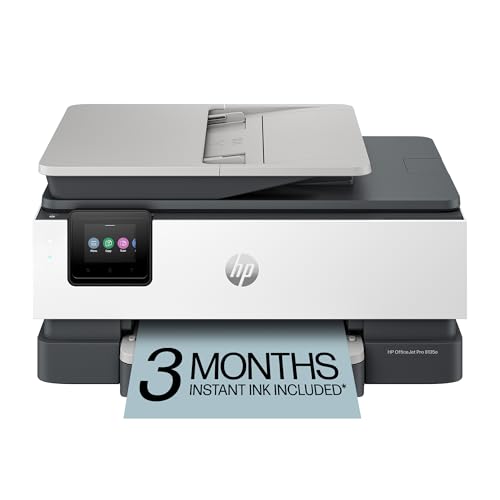
The HP OfficeJet Pro 8135e Wireless All-in-One Printer stands out as an ideal choice for medical offices, thanks to its impressive printing performance and multifunctionality. With print speeds of up to 20 ppm for black and 10 ppm for color, you can efficiently handle business reports and patient documents. It features scanning, copying, and faxing capabilities, all accessible through a user-friendly 2.7-inch touchscreen. Plus, its dual-band Wi-Fi guarantees seamless connectivity, enabling you to print directly from your smartphone or tablet. With a 3-month Instant Ink trial included, you’ll stay stocked without the hassle of running out.
Best For: The HP OfficeJet Pro 8135e is best for home offices and medical practices that require efficient, high-quality printing and multifunction capabilities.
Pros:
- Fast print speeds of up to 20 ppm for black and 10 ppm for color facilitate quick document handling.
- Multifunctionality includes printing, scanning, copying, and faxing, all in one device.
- Dual-band Wi-Fi and mobile app integration allow convenient printing and management from smartphones and tablets.
Cons:
- Monthly fees apply for the Instant Ink subscription after the trial period unless cancelled.
- The printer may have a larger footprint, which could be an issue for smaller office spaces.
- Performance may vary based on network conditions and device compatibility.
Epson EcoTank ET-2800 Wireless All-in-One Printer

For busy medical offices seeking a reliable and cost-effective printing solution, the Epson EcoTank ET-2800 Wireless All-in-One Printer stands out with its innovative cartridge-free system. This printer offers vivid, detailed prints thanks to its Micro Piezo Heat-Free Technology. You’ll appreciate its print speed of up to 10 pages per minute, while the included ink bottles can yield up to 4,500 pages in black and 7,500 in color. With the potential to save up to 90% on replacement ink, you’ll minimize costs and waste, making it an eco-friendly choice for your practice. Plus, it includes up to two years of ink!
Best For: Busy medical offices seeking a reliable and cost-effective printing solution.
Pros:
- Cost-efficient with potential savings of up to 90% on replacement ink.
- High yield ink bottles provide up to 4,500 pages in black and 7,500 pages in color.
- User-friendly with up to two years of ink included, reducing the risk of running out.
Cons:
- Initial cost may be higher compared to traditional printers.
- Limited print speed of up to 10 pages per minute may not meet high-volume demands.
- Cartridge-free system may require a learning curve for those accustomed to traditional ink cartridges.
HP Envy Inspire 7255e Wireless Color Inkjet Printer

Ideal for busy medical offices, the HP Envy Inspire 7255e Wireless Color Inkjet Printer combines versatility and efficiency in one compact device. You’ll appreciate its fast print speeds of up to 15 ppm black and 10 ppm color, perfect for your essential documents and photos. With features like automatic 2-sided printing and mobile functionality, you can print, scan, and copy with ease, using your smartphone or tablet. The AI technology guarantees precise, formatted prints without wasted pages. Plus, its eco-friendly design and included Instant Ink subscription simplify your printing needs, making it a reliable choice for your practice.
Best For: Busy medical offices looking for a versatile and efficient printing solution.
Pros:
- Fast print speeds: Up to 15 ppm black and 10 ppm color, ideal for high-volume printing.
- Mobile functionality: Print, scan, and copy easily from smartphones or tablets using the HP app.
- Eco-friendly design: Made with over 45% recycled plastic and includes a sustainable ink subscription.
Cons:
- Limited to HP cartridges: Requires specific ink cartridges which may limit options for users.
- Monthly fee post-trial: The Instant Ink subscription incurs a monthly fee after the initial three months unless canceled.
- Compact design may limit paper capacity: Smaller size could mean less paper storage compared to larger printers.
HP DeskJet 2827e Wireless All-in-One Printer

Wireless capabilities set the HP DeskJet 2827e apart as a top choice for medical offices needing a reliable all-in-one solution. This compact printer offers color printing, scanning, and copying, making it versatile for your practice. With print speeds up to 7.5 ppm for black and 5.5 ppm for color, you won’t waste valuable time. The 60-sheet input tray and AI-enabled printing guarantee you get perfectly formatted documents without unwanted content. Plus, the HP App lets you manage tasks directly from your smartphone or tablet. With a 3-month Instant Ink trial, you’ll never run out of ink unexpectedly.
Best For: The HP DeskJet 2827e is best for home users and small medical offices seeking a reliable and compact all-in-one printer solution.
Pros:
- Versatile functionality with printing, scanning, and copying capabilities.
- AI-enabled printing ensures perfectly formatted documents by removing unwanted content.
- User-friendly management through the HP App, allowing control from smartphones or tablets.
Cons:
- Limited paper capacity with only a 60-sheet input tray.
- Print speeds may be slower compared to higher-end models.
- Dependency on HP cartridges, as non-HP cartridges will be blocked.
HP OfficeJet Pro 9135e Wireless All-in-One Color Inkjet Printer

The HP OfficeJet Pro 9135e stands out as a versatile powerhouse for medical offices, expertly combining printing, scanning, copying, and faxing in one compact device. With print speeds of up to 20 ppm in color and 25 ppm in black, you’ll keep up with your busy practice. The 500-sheet capacity guarantees you won’t constantly refill paper. Its dual-band Wi-Fi offers reliable wireless printing, while the mobile app lets you print from anywhere. Plus, HP Wolf Pro Security protects your data. Designed with sustainability in mind, it uses over 40% recycled plastic, making it an eco-friendly choice for your office.
Best For: The HP OfficeJet Pro 9135e is best for busy medical offices that require efficient and high-quality printing, scanning, copying, and faxing capabilities in a compact device.
Pros:
- Versatile Functionality: Combines printing, scanning, copying, and faxing in one device, saving space and enhancing productivity.
- Fast Print Speeds: Delivers print speeds of up to 20 ppm in color and 25 ppm in black, perfect for high-demand environments.
- Sustainable Design: Made with over 40% recycled plastic, making it an eco-friendly choice for environmentally conscious offices.
Cons:
- Weight: At 26.1 pounds, it may be heavier than some competing models, making it less portable.
- Initial Cost: The upfront purchase price may be higher compared to basic printers, which could be a consideration for budget-conscious buyers.
- Subscription Requirement: The Instant Ink service requires a subscription after the free trial, potentially adding ongoing costs for users.
HP OfficeJet Pro 8139e Wireless All-in-One Color Inkjet Printer

For busy medical offices that require efficient document handling, the HP OfficeJet Pro 8139e stands out with its versatile all-in-one capabilities. It prints quality color documents at 10 ppm and black documents at 20 ppm, making it ideal for reports and presentations. You’ll appreciate the dual-band Wi-Fi for seamless wireless printing and the user-friendly 2.7-inch touchscreen. Plus, with a 1-year Instant Ink trial, you won’t have to worry about running out of ink. The printer’s eco-friendly design, made from over 45% recycled plastic, and robust security features guarantee both sustainability and data protection for your practice.
Best For: Busy medical offices that require efficient document handling and reliable printing solutions.
Pros:
- Versatile all-in-one capabilities: Prints, scans, copies, and faxes, catering to various office needs.
- Fast print speeds: Produces color documents at 10 ppm and black documents at 20 ppm, enhancing productivity.
- Eco-friendly design: Constructed with over 45% recycled plastic, promoting sustainability in the office.
Cons:
- Monthly fee after trial: The Instant Ink subscription requires a fee after the first year unless canceled.
- Limited compatibility: Designed to work only with HP cartridges, which may limit cost-effective options for ink.
- Size and weight: May take up more space in a smaller office setting compared to compact printers.
Factors to Consider When Choosing Printers for Medical Offices
When choosing a printer for your medical office, you need to contemplate several key factors. Print quality standards, speed and efficiency, and connectivity options can make a big difference in your workflow. Additionally, think about the cost of consumables and necessary security features to protect patient information.
Print Quality Standards
Choosing the right printer for a medical office hinges on meeting specific print quality standards that guarantee clear communication and compliance. You’ll want a printer that delivers high-resolution outputs, ideally a minimum of 1200 x 1200 dpi, making certain documents like patient records and prescriptions are legible. Color accuracy is also essential, particularly for charts and imaging reports, so opt for printers that produce true-to-life colors. Additionally, consider the ability to handle various paper types and sizes, including specialized forms. Consistent output quality without smudging or fading is critical, requiring reliable printers with advanced ink or toner technologies. By prioritizing these standards, you can guarantee efficient and accurate documentation in your practice.
Speed and Efficiency
Speed and efficiency play an essential role in the daily operations of a medical office, as quick access to printed materials can greatly streamline patient care. When choosing a printer, consider speed; color printers usually offer 10 to 18 pages per minute, while monochrome laser printers can reach up to 36 ppm. Features like auto duplex printing help reduce paper usage, speeding up document processing and supporting sustainability efforts. An auto document feeder (ADF) enhances workflow by allowing you to scan and copy multiple pages without manual input, saving valuable time. Finally, high-capacity input trays that hold 250 sheets or more minimize refills, ensuring your operations run smoothly, enabling you to focus on patient care and administrative tasks.
Connectivity Options Available
Connectivity options are essential for ensuring seamless operations in medical offices. Look for printers that offer dual-band Wi-Fi for reliable wireless printing and easy integration with various devices. Many modern printers also support mobile printing via dedicated apps, letting your staff print from smartphones, tablets, or computers without being near the printer.
Ethernet connectivity is important for maintaining a stable and secure network, especially when handling sensitive patient information. Don’t overlook USB connectivity, as it allows direct connections to computers, which is critical in secure environments. Additionally, some printers come with automatic issue detection and resolution features, enhancing usability and minimizing downtime in your busy office. Prioritizing these connectivity options will streamline your practice’s workflow.
Cost of Consumables
When running a medical office, understanding the cost of consumables like ink and toner is essential for managing your budget. The expense associated with these items can greatly affect your operational costs, so it’s vital to evaluate them before purchasing a printer. Inkjet printers may seem economical initially, but their frequent ink replacements can lead to higher long-term costs, especially in high-volume settings. Conversely, laser printers tend to have a higher upfront cost but offer lower per-page printing costs due to longer-lasting toner cartridges, making them more cost-effective for larger practices. Additionally, consider subscription services for timely ink delivery, and evaluate cartridge yields to determine the most cost-efficient option for your office’s printing needs.
Security Features Required
Choosing the right printer for your medical office isn’t just about cost and efficiency; securing patient information is paramount. You need printers equipped with robust security features, such as built-in data protection protocols, to safeguard sensitive data from cyber threats. Look for customizable malware protection tools and encrypted data transmission, ensuring HIPAA compliance. Regular firmware updates are essential for protecting against the latest vulnerabilities. Additionally, consider printers that only accept manufacturer-specific cartridges to prevent unauthorized access and tampering. Dual-band Wi-Fi connectivity can enhance security by automatically detecting and resolving connection issues, minimizing the risk of data breaches linked to unstable networks. Prioritizing these security features will help you maintain a secure environment for your practice.
Sustainability Practices Implemented
Sustainability is becoming increasingly important in medical offices, and incorporating eco-friendly printers can make a significant difference. Many modern printers are designed with sustainability in mind, featuring a high percentage of recycled plastic, which helps reduce environmental impact. Consider printers that utilize cartridge-free systems to minimize waste and reduce landfill contributions. Look for models with Energy Star and EPEAT certifications, ensuring they meet energy consumption standards. Subscription services for ink often include eco-friendly practices, delivering ink before you run out to avoid waste. Additionally, adopting technologies like automatic duplex printing can save significant paper, further enhancing your practice’s sustainability efforts. By choosing the right printer, you can contribute to a healthier planet while maintaining efficient operations.