As you look to elevate your 3D animation projects, choosing the right workstation is essential. In 2025, the landscape is set to shift dramatically with powerful GPUs and advanced components designed to optimize performance. Whether you’re rendering complex scenes or managing large files, these top five workstations promise to enhance your workflow. But what specific features should you consider to guarantee you select the best fit for your needs?
AMD Radeon Pro W7900 Professional Graphics Card

If you’re a 3D animator looking for a powerful graphics solution, the AMD Radeon Pro W7900 is tailored for you. With 96 Compute Units and impressive 61 TFLOPS FP32 performance, it effortlessly handles demanding tasks. Its 48GB GDDR6 memory guarantees you won’t run into limitations while rendering complex scenes. You can connect up to four 4K displays at 120Hz or a stunning 8K display at 60Hz. Plus, it supports a wide array of applications, from Maya to Unreal Engine. Designed for speed and responsiveness, this card accelerates your workflow, making it an essential tool for professional animation.
Best For: 3D animators and professionals in need of high-performance graphics for demanding rendering tasks.
Pros:
- High performance with 61 TFLOPS FP32 and 96 Compute Units, making it ideal for complex workloads.
- Supports multiple display configurations, including up to four 4K displays or a single 8K display.
- Extensive compatibility with professional applications like Maya, After Effects, and Unreal Engine.
Cons:
- May have a high power consumption with a TDP of 295W.
- The price point may be steep for hobbyists or casual users.
- Limited availability of 12K display setups may restrict full utilization of its capabilities.
ASUS Pro WS WRX90E-SAGE SE Workstation Motherboard

The ASUS Pro WS WRX90E-SAGE SE Workstation Motherboard stands out for professionals seeking unparalleled processing power, supporting up to 96-core AMD Ryzen Threadripper PRO 7000 WX-Series CPUs. With support for up to 2TB ECC R-DIMM DDR5 memory and advanced overclocking, it delivers exceptional performance. You’ll appreciate the seven PCIe 5.0 x16 slots, dual 10 Gb LAN ports, and multiple M.2 slots for expansive connectivity. The robust thermal design features 32 power stages and active cooling, ensuring stability during intense workloads. Plus, with server-grade IPMI management and ASUS Control Center Express, managing your workstation becomes effortless.
Best For: This motherboard is best for professionals and power users who require high-performance computing capabilities for demanding applications and workloads.
Pros:
- Supports up to 96-core AMD Ryzen Threadripper PRO 7000 WX-Series CPUs, providing exceptional processing power.
- Extensive connectivity options with seven PCIe 5.0 x16 slots and dual 10 Gb LAN ports for versatile expansion.
- Robust thermal design with active cooling mechanisms ensures stability during heavy workloads.
Cons:
- High price point may not be suitable for casual users or those with less demanding computing needs.
- Requires advanced knowledge for optimal configuration and overclocking, which may be daunting for inexperienced users.
- Limited availability of compatible components may pose challenges for building a complete system.
PNY NVIDIA Quadro K4200 Graphics Card VCQK4200-PB

Designed for professionals in 3D animation, the PNY NVIDIA Quadro K4200 Graphics Card VCQK4200-PB stands out with its robust 4 GB GDDR5 memory, enabling smooth rendering and visualization of complex scenes. With support for three displays, you can create an expansive workspace tailored to your needs. The card delivers impressive resolutions, reaching up to 3840 x 2160 at 60Hz via DisplayPort 1.2. Its advanced technologies, like NVIDIA Mosaic and Sync, enhance your workflow, while the parallel-computing architecture accelerates performance. With NVIDIA Enterprise Management Tools, managing your visual projects becomes straightforward and efficient.
Best For: Professionals in 3D animation and graphics design looking for high performance and multi-display capabilities.
Pros:
- High memory capacity of 4 GB GDDR5 for smooth rendering of complex scenes.
- Support for three displays allows for an expansive and customizable workspace.
- Advanced technologies like NVIDIA Mosaic and Sync enhance workflow efficiency.
Cons:
- May be overkill for casual users or those with less demanding graphics needs.
- Limited to PCI Express 2.0 x16, which may not leverage the full potential of newer systems.
- The price point may be higher compared to consumer-grade graphics cards.
ASUS Pro WS TRX50-SAGE WIFI Workstation Motherboard

For professionals seeking unparalleled performance in 3D animation, the ASUS Pro WS TRX50-SAGE WIFI Workstation Motherboard stands out with its support for up to 96-core AMD Ryzen Threadripper processors. You’ll appreciate the ability to expand memory up to 1TB with ECC R-DIMM DDR5 modules, allowing for efficient multitasking. Its robust 36 power stages and advanced thermal design guarantee stability during demanding tasks. With three PCIe 5.0 x16 slots and multiple high-speed connectivity options, you can maximize your GPU capabilities. Plus, remote management features keep your system optimized and monitored, making it an excellent choice for serious 3D animators.
Best For: Professionals in 3D animation and high-performance computing who require powerful processing capabilities and extensive memory support.
Pros:
- Exceptional compatibility with up to 96-core AMD Ryzen Threadripper processors for superior performance.
- Supports up to 1TB of ECC R-DIMM DDR5 memory, enabling efficient multitasking and stability.
- Robust connectivity options including three PCIe 5.0 x16 slots and advanced remote management features.
Cons:
- High-end features may come at a premium price, making it less accessible for budget-conscious users.
- Requires compatible high-performance components, which could increase overall system costs.
- Might be overkill for users with less demanding workloads or typical office tasks.
Dell Precision T5810 Workstation (Renewed)
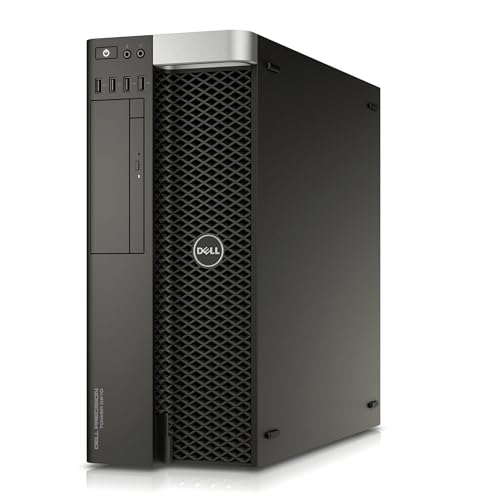
With its powerful Intel Xeon E5-2680 V3 processor and robust 12-core architecture, the Dell Precision T5810 Workstation (Renewed) stands out as an excellent choice for professionals in 3D animation. You’ll benefit from its dedicated Quadro NVS 315 graphics card, delivering exceptional graphics and visualization capabilities. With 64GB of DDR4 memory, multitasking becomes seamless, allowing you to handle demanding projects effortlessly. The 480GB SSD guarantees quick boot times and rapid application loading, enhancing your overall workflow. Pre-installed with Windows 7 Pro, you can customize your setup for compatibility with your favorite 3D animation tools. It’s a powerhouse you’ll appreciate.
Best For: Professionals in 3D animation and high-performance computing looking for a reliable workstation with powerful processing capabilities.
Pros:
- Powerful Intel Xeon E5-2680 V3 processor with 12-core architecture for high-performance tasks.
- Dedicated Quadro NVS 315 graphics card designed for exceptional graphics and visualization.
- Ample 64GB DDR4 memory facilitates seamless multitasking and handling of demanding projects.
Cons:
- No operating system included, requiring additional setup before use.
- May not support the latest software or applications due to the pre-installed Windows 7 Pro.
- Limited graphics capabilities compared to higher-end Quadro models, which may not meet all professional needs.
Factors to Consider When Choosing Pro GPU Workstations for 3D Animation
When you’re choosing a pro GPU workstation for 3D animation, several key factors come into play. You’ll want to evaluate graphics card performance, CPU compatibility, and memory capacity to guarantee smooth rendering. Additionally, think about connectivity options and thermal management to keep your system running efficiently.
Graphics Card Performance Metrics
Choosing the right graphics card for your 3D animation workstation can greatly impact your workflow and the quality of your projects. Focus on TFLOPS performance; a card with 61 TFLOPS FP32 can efficiently handle complex rendering tasks. The amount of dedicated memory matters too—look for at least 48GB GDDR6 to manage large textures and detailed models without lag. Support for multiple display outputs is vital; aim for capabilities that handle 4K and 8K resolutions to view high-fidelity graphics. Verify API compatibility with OpenCL, DirectX, and Vulkan for seamless integration with various animation software. Finally, consider the number of compute units (CUs), as more CUs enhance parallel processing, essential for accelerating rendering and simulation in your projects.
CPU Compatibility and Support
Selecting a pro GPU workstation for 3D animation hinges on guaranteeing CPU compatibility and support, as this can greatly influence your rendering efficiency. You’ll want to choose a workstation that accommodates high-core processors, like AMD’s Ryzen Threadripper PRO 7000 WX-Series, which supports up to 96 cores. Motherboards with overclocking capabilities are essential for maximizing CPU performance during complex renders. Look for workstations that support ECC (Error-Correcting Code) memory to enhance stability and reliability. Confirm the workstation features robust power delivery systems, such as multiple 8-pin connectors, to prevent thermal throttling. Finally, opt for motherboards with advanced cooling solutions that include massive VRM heatsinks and active cooling to maintain peak temperatures during heavy workloads.
Memory Capacity and Speed
Memory capacity and speed are crucial to ensuring smooth performance in 3D animation tasks, as they directly impact your ability to handle complex scenes and high-resolution assets. Opting for workstations with 48GB or 64GB of memory lets you tackle intricate textures and models without hitting performance bottlenecks. Fast memory speeds further enhance data transfer rates, ensuring quicker access to textures and geometry, which is essential for real-time editing and rendering. Look for systems that support ECC memory for added stability, reducing crash risks during intense sessions. DDR5 memory modules can also notably boost performance due to their higher bandwidth. Additionally, having the option to overclock both the CPU and memory can tailor your workstation to meet specific animation needs.
Connectivity and Expansion Options
When it comes to 3D animation, having the right connectivity and expansion options is vital for maximizing your workstation’s potential. Look for multiple PCIe slots to accommodate high-performance GPUs and other expansion cards that enhance your animation tasks. High-speed features like USB4 and Thunderbolt ports facilitate quick data transfer and seamless peripheral connectivity, boosting your workflow efficiency. Additionally, support for multiple M.2 slots enables installation of fast NVMe SSDs, markedly improving data access speeds for large 3D files. Dual LAN ports, especially with 10 Gb connections, guarantee rapid network performance, essential for collaborative projects. Finally, integrated server-grade management features enhance stability and allow for real-time monitoring during demanding rendering tasks, guaranteeing your workstation runs smoothly.
Thermal Management Solutions
Effective thermal management solutions are vital for keeping your workstation’s GPU performing at its best during intensive 3D animation tasks. Look for systems that employ multiple heat sinks and active cooling to dissipate heat effectively. Advanced designs with M.2 thermal pads and robust VRM cooling can markedly enhance performance under demanding workloads. Additionally, dedicated power stages and extra connectors guarantee stable power delivery, helping maintain lower temperatures during high-load scenarios. The integration of server-grade IPMI remote management tools allows for real-time thermal monitoring, enabling you to optimize cooling based on your workload. Smart thermal management not only boosts performance but also extends the longevity of your components, essential for workstations that operate continuously under heavy loads.