A refurbished workstation can offer more memory, expansion room, and professional graphics capability for the money than a similarly priced new desktop. But specifications vary widely, even between towers that look nearly identical.
These eight options span everyday office and design work through more demanding multitasking. The right choice depends on your software, GPU needs, upgrade plans, and whether the seller includes a usable operating system.
Best 8 Refurbished Workstation PCs Picks for 2026
Balanced CAD Pick
Dell Precision 5820 with Quadro P2000

- Four-core Xeon W-2123
- 64GB DDR4; title lists 1TB NVMe
- Quadro P2000 with 5GB VRAM
Best For: CAD users prioritizing dedicated graphics and ample RAM
Office Workhorse

- 16GB RAM and 512GB SSD
- Windows 11 Pro; extensive USB ports
- CPU descriptions conflict
Best For: Business users seeking a well-connected desktop
Memory-Heavy Choice

- 128GB ECC DDR4 memory
- Six-core Xeon W-2135; 1TB NVMe
- Quadro P1000 with 4GB VRAM
Best For: Memory-intensive professional workloads
High-Core-Count Option
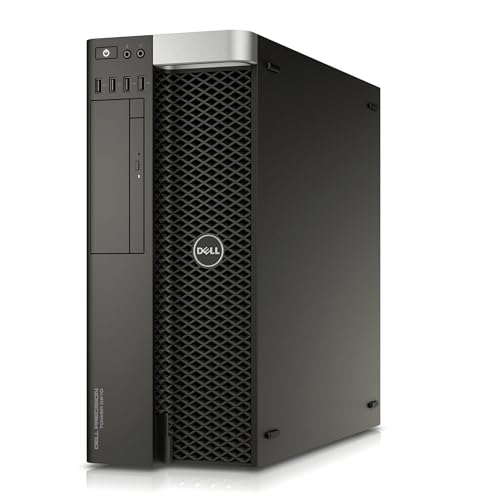
- Title lists a twelve-core Xeon
- 64GB DDR4 RAM
- OS, GPU, and SSD details conflict
Best For: Buyers prepared to verify a high-core-count configuration
Bring-Your-Own-OS Pick

- Six-core Xeon E5-1650 v4
- 16GB RAM and 1TB NVMe storage
- Quadro K2000; no OS included
Best For: Buyers planning their own OS installation
Memory-First Pick

- 64GB DDR4 and six-core Xeon
- 512GB NVMe SSD plus 2TB HDD
- Quadro P400 2GB; Windows 11 Pro
Best For: Memory-heavy work with mixed storage needs
Office-Ready Pick

- Six-core i5-9500 and 16GB RAM
- 1TB SSD and Quadro P620 2GB
- Wi-Fi 6, Bluetooth, keyboard, and mouse
Best For: Office desks needing included peripherals
Graphics-Memory Pick

- Quadro M4000 with 8GB graphics memory
- 64GB DDR4; 512GB NVMe plus 2TB HDD
- Windows 11 Pro and dual 1GbE LAN
Best For: Design users prioritizing Quadro memory
Balanced CAD Pick – Dell Precision 5820 with Quadro P2000
Dell Precision Tower 5820 Workstation W-2123 4C 3.6Ghz 64GB 1TB NVMe P2000 Win 11 (Renewed)
Check Price On AmazonAmong refurbished workstation pcs, this Dell Precision 5820 pairs a four-core Xeon W-2123 with 64GB of DDR4 memory and a 5GB Quadro P2000. The title lists a 1TB NVMe drive, making it a practical option for buyers who need dedicated graphics and substantial memory.
Best For: CAD and visualization work that benefits from a dedicated Quadro GPU and 64GB of RAM.
Pros:
- Quadro P2000 with 5GB of graphics memory.
- 64GB DDR4 RAM and a title-listed 1TB NVMe drive.
- Windows 11 Pro and a DVD-RW drive are listed.
Cons:
- The Xeon W-2123 has four cores, fewer than the six- and twelve-core options in this roundup.
- Storage details conflict: the title says 1TB, while another specification lists 512GB.
Choose this model for its P2000 and memory capacity, but confirm the installed drive size and display connections with the seller before ordering.
Office Workhorse – HP Z2 G5 MT Desktop
If you are comparing refurbished workstation pcs for everyday business use, the HP Z2 G5 MT lists 16GB of DDR4 RAM, a 512GB SSD, and Windows 11 Pro. Its port selection includes two DisplayPort 1.4 connections, Gigabit Ethernet, and USB-C.
Best For: Office multitasking and business setups that need plentiful wired connections rather than a listed dedicated GPU.
Pros:
- 16GB RAM and a 512GB SSD suit typical office workloads.
- Two DisplayPort 1.4 outputs and a range of USB ports are listed.
- Windows 11 Pro, a Wi-Fi adapter, and a Bluetooth adapter are listed.
Cons:
- Graphics are listed as integrated, not dedicated.
- Processor descriptions conflict: the title and specifications name a Core i5-10500, while one bullet describes a Core i7-10700.
This is the connectivity-focused choice here; verify the installed CPU before purchase if processor performance matters to your workflow.
Memory-Heavy Choice – HP Z4 G4 with 128GB RAM
HP Z4 G4 W-2135 6C 3.7Ghz 128GB RAM 1TB NVMe Quadro P1000 Windows 11 (Renewed)
Check Price On AmazonFor buyers browsing refurbished workstation pcs with large memory requirements, the HP Z4 G4 stands out with 128GB of ECC DDR4 RAM. It also lists a six-core Xeon W-2135, a 1TB NVMe M.2 SSD, and a dedicated 4GB Quadro P1000.
Best For: Memory-intensive professional workloads that can use ECC RAM and a dedicated workstation graphics card.
Pros:
- 128GB ECC DDR4 provides the largest listed RAM capacity in this group.
- Six-core Xeon W-2135 and 1TB NVMe M.2 SSD.
- Quadro P1000 with 4GB GDDR5 and Windows 11 Pro.
Cons:
- The Quadro P1000 has 4GB of graphics memory, less than the 5GB P2000 listed in the Dell 5820.
- Only four total USB ports are stated in the specifications.
Prioritize this configuration when memory capacity is the deciding factor; check its ports against your peripherals before committing.
High-Core-Count Option – Dell Precision T5810
Among refurbished workstation pcs in this lineup, the Dell Precision T5810 advertises a twelve-core Xeon E5-2680 v3 and 64GB of DDR4 RAM. Its title also lists a 480GB SSD, but the operating-system and graphics descriptions are inconsistent, so this configuration needs extra scrutiny.
Best For: Buyers seeking a listed twelve-core Xeon who are willing to verify the exact refurbished configuration.
Pros:
- Title lists a twelve-core Xeon E5-2680 v3 running at 2.5GHz.
- 64GB DDR4 RAM is listed.
- SSD storage and dedicated NVIDIA Quadro graphics are described.
Cons:
- The title says no operating system, while other notes list Windows 7 Professional.
- Graphics conflict between Quadro NVS 315 and Quadro K620; SSD capacity also differs between the title and specifications.
The core count is its main draw. Confirm the installed OS, GPU, and SSD capacity with the seller before treating the listing as a match for your needs.
Bring-Your-Own-OS Pick – HP Z440 Xeon Workstation
HP Z440 Workstation E5-1650 v4 Six Core 3.6Ghz 16GB 1TB NVMe K2000 No OS (Renewed)
Check Price On AmazonAmong refurbished workstation pcs, this HP Z440 suits buyers who want a six-core Xeon E5-1650 v4, 16GB of RAM, and a 1TB NVMe drive but plan to supply their own operating system.
Best For: Buyers comfortable installing an OS for business, photo-editing, or multimedia work.
Pros:
- Six-core Xeon processor rated at 3.6GHz.
- 1TB NVMe storage provides substantial solid-state capacity.
- Dedicated Quadro K2000 graphics and DisplayPort output.
Cons:
- No operating system is included.
- 16GB of installed RAM is less than the 64GB supplied with the Z4 G4 options here.
The no-OS configuration is the deciding factor: it offers useful workstation hardware if you are prepared to handle software setup yourself.
Memory-First Pick – HP Z4 G4 with 64GB RAM
This HP Z4 G4 stands out among refurbished workstation pcs for its 64GB DDR4 memory and split storage: a 512GB NVMe boot drive plus a 2TB hard drive. It arrives with Windows 11 Pro.
Best For: Professional users who prioritize ample memory and separate fast-boot and bulk-storage drives.
Pros:
- Six-core Xeon W-2133 runs at 3.6GHz, with up to 3.9GHz turbo.
- 64GB DDR4 RAM and two-drive storage configuration.
- Quadro P400 graphics offers three Mini DisplayPort outputs.
Cons:
- The Quadro P400 has 2GB of graphics memory.
- Keyboard and mouse are listed as not included.
Choose this configuration for memory and storage capacity rather than a high-memory graphics card; check your monitor connections and peripherals before ordering.
Office-Ready Pick – Dell Precision 3431
If you need refurbished workstation pcs for an office desk, this Dell Precision 3431 pairs a six-core Core i5-9500 with 16GB DDR4, a 1TB SSD, and Windows 11 Pro. A wired keyboard and mouse are included.
Best For: Business users who want a compact workstation with Wi-Fi, Bluetooth, and included input devices.
Pros:
- 1TB SSD and 16GB RAM support everyday multitasking and file storage.
- Quadro P620 2GB graphics provides dedicated graphics for visual work.
- Wi-Fi 6 AX200, Bluetooth, keyboard, and mouse are included.
Cons:
- 16GB installed RAM may require an upgrade for more demanding workloads.
- Listed warranty is 30 days.
This is the most straightforward desk-setup choice of the four, provided its installed memory and stated warranty fit your needs.
Graphics-Memory Pick – PCSP Z4 G4 with Quadro M4000
For shoppers comparing refurbished workstation pcs for design work, this PCSP Z4 G4 combines a six-core Xeon W-2133, 64GB DDR4, and a Quadro M4000 with 8GB of graphics memory. It also includes Windows 11 Pro.
Best For: CAD and creative users seeking a listed 8GB Quadro card alongside substantial system memory.
Pros:
- Quadro M4000 8GB has four DisplayPort outputs.
- 64GB RAM, a 512GB NVMe SSD, and a 2TB HDD.
- Dual 1GbE LAN and a listed 90-day warranty.
Cons:
- No optical drive is included.
- Only the computer and power cord are listed as included accessories.
Its main advantage over the other Z4 G4 configuration here is the higher-memory Quadro card; budget separately for any missing peripherals.
How We Picked These Refurbished Workstation PCs
We compared the listed processor generation and core count, installed RAM, SSD and hard-drive capacity, graphics card, and operating system. We also considered whether each configuration offers a sensible starting point for upgrades. These are configuration-based comparisons, not hands-on performance or reliability tests; refurbished units can differ in condition, included accessories, and seller support.
Quick Comparison: Which Configuration Fits?
For a relatively modern general-purpose desktop, the HP Z2 G5 with a Core i5-10500 and the Dell Precision with an i5-9500 are straightforward starting points. The Dell Precision 5820 pairs 64GB of RAM with a Quadro P2000, making it worth a closer look for buyers whose applications benefit from a dedicated GPU. The HP Z4 G4 with a Xeon W-2135 and 128GB of RAM stands out when memory capacity matters most.
For bulk file storage, the two Xeon W-2133-based Z4 G4 listings combine an NVMe SSD with a 2TB hard drive; their GPUs differ substantially. The older Dell T5810 and HP Z440 may suit cost-conscious buyers comfortable checking software compatibility and installing an operating system.
Key Buying Factors for Refurbished Workstation PCs
Match the CPU and RAM to Your Workload
Higher core counts can help with rendering, compiling, and other parallel tasks, while clock speed and processor generation matter for responsive everyday work. Do not judge a Xeon by core count alone. Check your application’s recommended specifications, then choose enough RAM for your typical project sizes; 16GB can be a starting point, while 64GB or 128GB offers more headroom for large files and multiple demanding programs.
Check the GPU, Storage, and OS
A Quadro model number does not, by itself, guarantee good performance in current software. Check your application’s supported GPU list, required VRAM, display outputs, and driver support. An NVMe SSD is useful for the operating system and active projects; a secondary hard drive adds capacity but is slower. Two listings explicitly say no operating system, so budget for installation and a valid license if needed. For any listing that claims Windows 11, confirm activation and hardware compatibility with the seller.
Verify the Refurbishment Details
Before ordering, confirm the exact GPU and storage configuration, RAM layout, included power cable, cosmetic grade, warranty, return window, and whether the machine has been tested under load. Ask about available drive bays, expansion slots, and power connectors if you plan to upgrade.
Who Should Buy Which Refurbished Workstation PCs?
Choose an i5-based system for office work and lighter creative tasks when you do not need extensive RAM. Prioritize the 128GB Z4 G4 for memory-heavy workloads, or compare the P2000-equipped Precision 5820 and M4000-equipped Z4 G4 against your software’s GPU requirements. Pick a dual-drive Z4 G4 if convenient local capacity matters. Consider the no-OS T5810 or Z440 only if you are prepared to handle setup and have verified that their older components meet your needs.