The best enterprise workstation PC depends on the work it needs to do. A compact system with fast networking may suit a lab or edge deployment, while an expandable tower is often a better fit for an office team planning to add storage or memory.
These 10 picks span everyday business desktops, higher-memory configurations, and specialized compact systems. Use the guide below to narrow the field by workload and verify the details that matter before ordering.
Best 10 Enterprise Workstation PCs Picks for 2026
Best for Network-Heavy Workloads
MINISFORUM MS-01 Mini Workstation

- Core i9-13900H with 32GB DDR5
- Dual 10Gbps SFP+ and dual 2.5G RJ45
- Three M.2 slots and PCIe expansion
Best For: Compact network-heavy workstations and homelabs
Best for Everyday Office Work

- Core i3-14100, 16GB DDR5, 512GB SSD
- Windows 11 Pro with BitLocker
- Wi-Fi 6 and dual display outputs
Best For: Routine small-office and home-office work
Best for Multitasking
Dell Pro Tower Plus Business Desktop

- Core Ultra 5 235 with 13 TOPS NPU
- 32GB DDR5 memory and 1TB SSD
- Supports three 4K displays
Best For: Multitasking across a three-monitor office setup
Best for Local AI Development
AI MAX+ 395 Mini PC Workstation

- 16-core AI MAX+ 395 and Radeon 8060S
- 128GB LPDDR5X memory and 8TB SSD
- 10GbE, 2.5GbE, and four M.2 slots
Best For: Compact local AI and development workflows
IT-Managed Starter
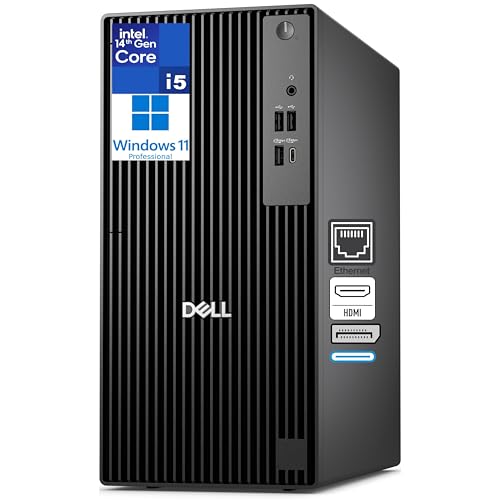
- 14-core i5 with vPro management features
- 8GB DDR5 and 512GB SSD
- Dual 4K outputs; adapter needed for Wi-Fi
Best For: Managed office desktops with room for a RAM upgrade
Multitasking Upgrade

- 20-core i7-14700T vPro processor
- 16GB DDR5 and 1TB NVMe SSD
- Dual 4K support; no built-in Wi-Fi
Best For: Managed teams running several business applications
Connectivity-Focused Tower

- 14-core Core i5-14500
- Built-in Wi-Fi 6 and Bluetooth
- Confirm RAM, SSD, and Windows edition
Best For: Business desks needing built-in wireless and included peripherals
Balanced Office Pick
Dell Pro Tower Plus 16GB/512GB
- Core Ultra 5 235 with 13 TOPS NPU
- 16GB DDR5 and 512GB SSD
- Three 4K displays; DVD-RW
Best For: Office multitasking with moderate storage needs
Extra Storage Pick
- 1TB SSD for local files
- 16GB DDR5; Core Ultra 5 235
- Three 4K displays supported
Best For: Teams needing more local storage
Light-Duty Office Pick
- Core Ultra 5 235 with 13 TOPS NPU
- 8GB DDR5 and 512GB SSD
- Three 4K displays; DVD-RW
Best For: Lighter office workloads with modest memory needs
Best for Network-Heavy Workloads – MINISFORUM MS-01 Mini Workstation
Among enterprise workstation pcs, the MINISFORUM MS-01 stands out for its unusually dense networking and storage options. Its Core i9-13900H, 32GB DDR5 memory, and 1TB SSD make it a compact choice for demanding desk setups and homelabs.
Best For: IT users who need a small workstation with fast network connections and flexible storage.
Pros:
- Two 10Gbps SFP+ ports and two 2.5G RJ45 ports support network-heavy setups.
- Supports up to three M.2 NVMe SSDs, with a U.2 option and RAID 0/1 support.
- Includes two USB4 ports and a PCIe 4.0 x16 slot for expansion.
Cons:
- Integrated Iris Xe graphics may not suit buyers who need a dedicated GPU out of the box.
- The supplied details do not identify a preinstalled operating system.
The MS-01 is the most compelling fit here when network throughput and expansion matter more than a conventional tower chassis. Check OS requirements before ordering.
Best for Everyday Office Work – Dell Pro 2026 Desktop Tower
The Dell Pro 2026 is a straightforward entry in the enterprise workstation pcs category for buyers focused on daily office tasks. A Core i3-14100, 16GB DDR5 memory, 512GB SSD, and Windows 11 Pro provide a practical starting configuration.
Best For: Small offices and home-office users who need a Windows 11 Pro desktop for routine work.
Pros:
- Windows 11 Pro includes BitLocker and Remote Desktop capabilities.
- HDMI and DisplayPort outputs accommodate multiple displays.
- Wi-Fi 6, Bluetooth, Gigabit Ethernet, and physical lock points support flexible office placement.
Cons:
- Integrated Intel UHD Graphics 730 is not aimed at demanding graphics work.
- The Core i3 processor and listed 16GB maximum RAM leave less headroom for heavier workloads.
Choose this tower for a ready-to-use business desktop rather than intensive rendering or computation. Its appeal is the balanced office configuration and built-in Pro features.
Best for Multitasking – Dell Pro Tower Plus Business Desktop
For enterprise workstation pcs used across busy office workflows, the Dell Pro Tower Plus offers more memory and storage than a basic business desktop. It pairs an Intel Core Ultra 5 235 with 32GB DDR5, a 1TB SSD, and Windows 11 Pro.
Best For: Office teams juggling many applications and using up to three 4K displays.
Pros:
- 32GB DDR5 memory and a 1TB SSD provide room for multitasking and files.
- Supports three 4K monitors for an expanded workspace.
- Includes a DVD-RW drive, Gigabit Ethernet, and Windows 11 Pro.
Cons:
- Integrated graphics may limit suitability for demanding GPU-based work.
- Gigabit Ethernet is the only network connection specified in the supplied details.
This is a sensible step up for productivity-focused buyers who value memory, storage, and multiple screens. The stated 13 TOPS NPU adds AI acceleration, but GPU-heavy tasks call for closer scrutiny.
Best for Local AI Development – AI MAX+ 395 Mini PC Workstation
This AI MAX+ 395 mini PC targets the demanding end of enterprise workstation pcs, particularly local AI development. Its 16-core, 32-thread processor, Radeon 8060S integrated graphics, 128GB LPDDR5X memory, and 8TB SSD make it a notably well-equipped compact system.
Best For: Developers building local AI, software engineering, or virtualization workflows in a small footprint.
Pros:
- 128GB LPDDR5X memory offers substantial capacity for memory-intensive work.
- AI MAX+ 395 platform lists up to 126 total TOPS, including more than 50 NPU TOPS.
- 10GbE and 2.5GbE LAN, Wi-Fi 7, four M.2 slots, and four-display support broaden connectivity.
Cons:
- The 128GB onboard memory is listed as the system maximum, limiting memory upgrade options.
- Graphics are integrated rather than a separate dedicated GPU.
Its standout advantage is combining substantial memory with fast networking in a compact chassis. Check the requirements of your specific AI tools before treating total TOPS or shared graphics memory as a guarantee of workload performance.
IT-Managed Starter – Dell Pro Tower i5-14500 vPro
For buyers comparing enterprise workstation pcs, this Dell Pro Tower offers a 14-core Intel Core i5-14500 vPro, Windows 11 Pro, and a compact tower footprint. Its 8GB of DDR5 memory and 512GB SSD suit a straightforward office deployment, though heavier workloads may call for a memory upgrade.
Best For: IT-managed office desktops that need vPro features and dual-monitor support without a high-end graphics card.
Pros:
- Intel vPro platform supports hardware-based security and remote management.
- HDMI 2.1 and DisplayPort 1.4a support two 4K displays.
- Windows 11 Pro, Gigabit Ethernet, USB-C, and tower expansion slots cover common business needs.
Cons:
- 8GB RAM is modest for virtual machines or memory-heavy applications.
- Graphics are integrated; Wi-Fi requires an adapter.
This is a sensible starting point for managed office fleets. Budget for more RAM if users routinely run several demanding applications at once.
Multitasking Upgrade – Dell Pro Tower i7-14700T
Among enterprise workstation pcs, this Dell Pro Tower is the stronger out-of-box multitasking choice of the listed vPro configurations: it pairs a 20-core Intel Core i7-14700T with 16GB DDR5 and a 1TB PCIe NVMe SSD. Windows 11 Pro and Gigabit Ethernet make it a practical fit for business desks.
Best For: Teams juggling multiple business applications, analytics tools, and large working files.
Pros:
- 20-core vPro processor brings remote-management and hardware-enhanced security features.
- 16GB RAM and 1TB SSD provide more working capacity than an entry-level configuration.
- HDMI and DisplayPort support two 4K monitors; eight USB ports accommodate peripherals.
Cons:
- No built-in Wi-Fi; the listing specifies a USB Wi-Fi adapter.
- Intel UHD Graphics 770 is integrated rather than a dedicated graphics card.
Choose this configuration when CPU throughput, storage, and manageability matter more than dedicated graphics. Check that its USB-adapter approach to wireless fits your deployment policy.
Connectivity-Focused Tower – Dell QCT1250 i5-14500
The Dell QCT1250 stands out among these enterprise workstation pcs for its listed Wi-Fi 6, Bluetooth, and included wired keyboard and mouse. Its 14-core Core i5-14500, DDR5 memory, PCIe SSD storage, and HDMI and DisplayPort outputs address everyday business multitasking and dual-monitor setups.
Best For: Offices that want built-in wireless connectivity and included input devices for a new desk setup.
Pros:
- Wi-Fi 6, Bluetooth, Gigabit Ethernet, USB-C, and USB-A offer flexible connectivity.
- HDMI 2.1 and DisplayPort 1.4a provide outputs for a two-monitor workspace.
- TPM 2.0, a lock slot, and a padlock loop add security options.
Cons:
- The supplied listing conflicts on installed RAM and storage: the title says 32GB/1TB, while the details state 16GB RAM and the bullets describe configurable storage.
- The notes also disagree on whether the installed Windows edition is Windows 11 or Windows 11 Pro.
The connectivity and included peripherals are appealing, but confirm the exact memory, SSD capacity, and Windows edition for this ASIN before ordering multiple units.
Balanced Office Pick – Dell Pro Tower Plus 16GB/512GB
For teams comparing enterprise workstation pcs, this Dell Pro Tower Plus pairs an Intel Core Ultra 5 235 with 16GB of DDR5 memory and a 512GB SSD. It is a practical fit for office multitasking without paying for storage you may not need.
Best For: Business users who want a Windows 11 Pro tower with 16GB of RAM and room for a three-display workflow.
Pros:
- Core Ultra 5 235 includes a 13 TOPS NPU for supported AI features.
- Supports three 4K monitors for spread-out workspaces.
- Includes a DVD-RW drive and Gigabit Ethernet.
Cons:
- 512GB SSD offers less storage than the 1TB configuration.
- Integrated graphics may not suit buyers seeking a dedicated GPU.
This is the balanced configuration in the group: 16GB of RAM for everyday business workloads, with a smaller SSD than the otherwise similar 1TB model.
Extra Storage Pick – Dell Pro Tower Plus 16GB/1TB
Among these enterprise workstation pcs, this Dell Pro Tower Plus is the option for buyers who want more local storage: it combines 16GB of DDR5 memory with a 1TB SSD. The Intel Core Ultra 5 235 and Windows 11 Pro make it a business-oriented desktop.
Best For: Teams keeping larger collections of local files and applications while using multiple monitors.
Pros:
- 1TB SSD provides twice the listed capacity of the 512GB models.
- Supports three 4K displays.
- Includes a 13 TOPS NPU, DVD-RW drive, and Gigabit Ethernet.
Cons:
- Still ships with 16GB of RAM despite its larger SSD.
- Integrated graphics are not a substitute for a dedicated graphics card.
Choose this configuration over the 16GB/512GB version when local storage matters more; their listed processor and installed RAM are the same.
Light-Duty Office Pick – Dell Pro Tower Plus 8GB/512GB
If you are evaluating enterprise workstation pcs for lighter office use, this Dell Pro Tower Plus offers the same listed Intel Core Ultra 5 235 as the other configurations, but starts with 8GB of DDR5 memory. Its 512GB SSD, Windows 11 Pro, and Ethernet connection cover common business basics.
Best For: Office users with modest memory demands who want a business tower with three-display support.
Pros:
- Core Ultra 5 235 includes a 13 TOPS NPU.
- Supports three 4K monitors.
- Includes a DVD-RW drive and Gigabit Ethernet.
Cons:
- 8GB of installed RAM is less suited to heavy multitasking than the 16GB configurations.
- 512GB SSD is smaller than the 1TB option.
This model keeps the listed business features but makes the clearest compromise on memory. Consider the 16GB configurations if you regularly keep many applications open.
How We Picked These Enterprise Workstation PCs
We grouped the selected systems by their listed processors, memory, storage, form factors, networking, and business-oriented features. The lineup includes compact PCs and Dell towers with different configurations, so the most useful comparison is fit for purpose—not a single performance ranking. Seller listings do not establish benchmark results, long-term reliability, or service quality; confirm those separately if they are critical to your purchase.
Quick Comparison by Use Case
For standard office deployment, start with the Dell towers offering 16GB of RAM and a 512GB or 1TB SSD. The 32GB configurations provide more headroom for heavier multitasking and larger working files. An 8GB tower may be a lower-cost starting point, but check its upgrade path and budget for more memory if users run demanding applications.
The MINISFORUM MS-01 stands out on its listed compact footprint and dual 10Gbps SFP+ and dual 2.5G RJ45 ports, making it worth considering where networking and space take priority. The AI MAX+ 395 mini system lists 128GB of memory, an 8TB SSD, and Radeon 8060S graphics; assess it against your specific software requirements rather than assuming its AI-focused specifications translate to every workload.
Key Buying Factors for Enterprise Workstation PCs
Match the Hardware to the Software
Check the CPU, RAM, storage, and graphics requirements of your actual applications. Memory capacity matters for large datasets and concurrent tasks; SSD capacity matters when projects must remain local. If your workflow requires certified drivers or a particular GPU, verify those requirements explicitly—none should be assumed from a “workstation” or “AI-powered” label.
Plan for Deployment and Growth
Before choosing a tower, confirm available memory slots, drive bays, PCIe slots, power-supply capacity, and display outputs. For a mini PC, check whether its built-in ports replace the expansion you would otherwise need. Across either form factor, verify network compatibility, operating-system licensing, warranty terms, and the support process your IT team will use.
Compare Exact Configurations
Several Dell Pro Tower Plus entries differ chiefly in listed RAM or SSD capacity. Compare the full SKU, processor, included operating system, and upgrade options—not just the shared product name. Also confirm seller-provided specifications and what ships in the box before placing a fleet order.
Who Should Buy Which Enterprise Workstation PCs?
Choose a 16GB Dell tower for routine business productivity, or a 32GB tower when users regularly keep more applications and data open. Consider an 8GB configuration only with a clear upgrade plan. Pick the MS-01 for compact deployments that can use its specified high-speed networking. Shortlist the AI MAX+ 395 system for specialized, memory-intensive or local AI work after checking software and graphics compatibility. For any organization buying at scale, test one exact configuration with its applications and peripherals before standardizing.