Keeping laptops and tablets charged, secure, and ready for use is easier with the right charging cabinet. The best models combine dependable storage with organized cables, ventilation, locking access, and a layout suited to your devices.
We selected 10 charging cabinets for different environments and workloads, from compact wall-mounted stations to high-capacity cabinets for classrooms, offices, and shared technology rooms.
Best 10 Premium Device Charging Cabinets Picks for 2026
Best Overall
16-Device Combination-Lock Charging Cabinet
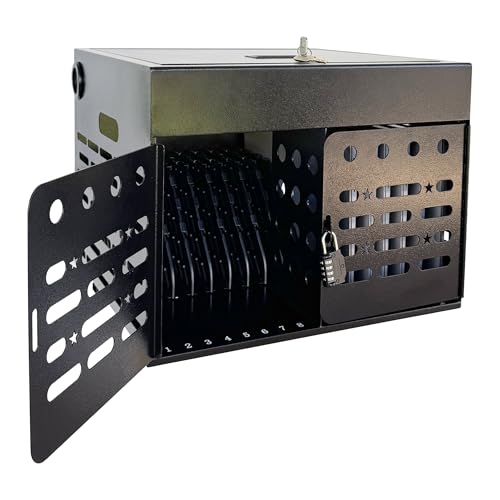
- Stores and charges up to 16 devices up to 15.6 inches.
- Combination lock, ventilation, and cable management.
- Fully assembled with desktop or wall-mounting options.
Best For: Schools and offices seeking organized, ready-to-use device storage.
Best Safety Features
POCHAR 16-Unit Charging Cabinet

- Ground-fault protection and ventilated sides.
- Stores and charges up to 16 devices up to 14 inches.
- Lockable, cable-managed, and wall-mountable.
Best For: Schools and shared facilities focused on safety and organization.
Best Compact Option
VIVO 16-Bay Locking Charging Station

- Stores and charges 16 devices up to 14 inches.
- Padded shelves help reduce surface damage.
- Key lock with wall-mount or tabletop installation.
Best For: Facilities wanting protected 16-device storage in a compact cabinet.
Best High-Capacity Pick

- Stores up to 40 devices in eight slotted baskets.
- Tall, slim design uses less floor area than a traditional cart.
- ECO Safe Charge helps manage power across the cabinet.
Best For: Large device deployments needing high capacity and organized access.
Best for Individual Security
10-Compartment Tablet Charging Cabinet
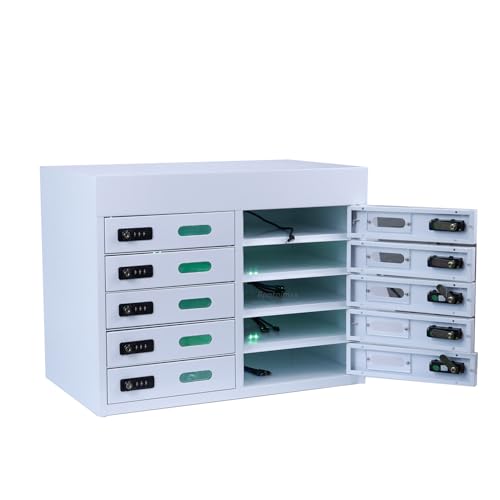
- Ten individually lockable compartments
- Built-in Type-C and Apple charging heads
- Steel desktop design for tablets up to 13 inches
Best For: Schools, libraries, and offices charging smaller tablets
Best Wall-Mounted Value

- Charges up to 12 devices
- Cable clips help prevent tangles
- French cleat wall-mounting system
Best For: Classrooms and offices with limited floor space
Best for Larger Fleets
16-Device Locking Charging Station

- Stores up to 16 devices
- Fits laptops and tablets up to 15.6 inches
- Ventilation and overload protection included
Best For: Classrooms and offices with larger mixed-device fleets
Best Wall-Mount Value
Pearington 12-Device Charging Station

- Wall-mountable cabinet with one-point lock
- Adjustable dividers for laptops and tablets
- 12-outlet strip and included cable straps
Best For: Secure, space-saving charging in classrooms and offices
Best Modular Steel Cabinet

- Steel cabinet with locking front door
- Padded slots for 10 devices up to 13 inches
- Stackable, wall-mountable, and dolly-compatible design
Best For: Durable, expandable device storage for shared environments
Best High-Capacity Portable Cabinet
Metateel 16-Device Charging Cabinet

- Charges and stores up to 16 devices
- Fits screens up to 15.6 inches
- Fully assembled with locks and two power strips
Best For: High-volume device storage across classrooms and facilities
Best Overall – 16-Device Combination-Lock Charging Cabinet
For schools, offices, and shared workspaces, this premium device charging cabinet combines storage, charging organization, and access control in a fully assembled steel enclosure. It holds up to 16 laptops, Chromebooks, tablets, or iPads up to 15.6 inches and can be used on a desktop or mounted to a wall.
Best For: Classrooms and offices that want a ready-to-use, space-saving cabinet with combination-lock security.
Pros:
- Stores and charges up to 16 devices, including models up to 15.6 inches.
- Combination lock and enclosed steel construction help limit unauthorized access.
- Ventilated panels, cable-routing slots, and an upper adapter compartment help organize charging.
- Ships fully assembled and supports desktop or wall-mounted installation.
Cons:
- Its 16-device capacity may be limiting for larger deployments.
- The cabinet is designed for indoor shared-use environments rather than mobile cart use.
This is a practical all-around choice when straightforward deployment, flexible mounting, and organized storage matter more than maximum capacity.
Best Safety Features – POCHAR 16-Unit Charging Cabinet
The POCHAR 16-Unit Charging Cabinet is a premium device charging cabinet for schools, offices, hospitals, and libraries that need secure storage with practical cable control. It accommodates devices up to 14 inches, includes grounding protection, and can sit on a desk or be mounted to a wall.
Best For: Teachers and shared facilities prioritizing lockable storage, cord organization, and electrical safety features.
Pros:
- Charges and stores up to 16 Chromebooks, laptops, tablets, or iPads.
- Includes enclosed doors, key-lockable top, and combination-lock security features.
- Ground-fault protection and ventilated sides support safer everyday charging.
- Cable slots and top storage help keep chargers organized.
Cons:
- Compatibility is specified for devices up to 14 inches and 1 inch thick.
- It weighs 33 pounds, so relocating it may require some effort.
- The listed warranty is one year.
Choose this model if safety-oriented features and flexible placement are high priorities for a 16-device charging setup.
Best Compact Option – VIVO 16-Bay Locking Charging Station
VIVO’s 16-Bay station is a premium device charging cabinet for organizations that need concealed charging in a relatively compact steel enclosure. It stores and charges up to 16 laptops or tablets up to 14 inches, with built-in outlets, a key lock, padded shelves, and countertop or wall-mounting flexibility.
Best For: Classrooms, offices, and healthcare facilities that need protected 16-device storage with padded shelf surfaces.
Pros:
- Holds up to 16 devices and supports a stated 66-pound capacity.
- Padded storage shelves help protect devices from surface scratches.
- Key-locking design conceals devices during charging and storage.
- Can be wall-mounted or secured to a tabletop with included hardware and instructions.
Cons:
- Device compatibility is listed up to 14 inches.
- The station weighs 31.7 pounds and does not function as a rolling cart.
- Its single-level compartment layout may offer less individual separation than multi-shelf designs.
This VIVO cabinet is a sensible pick when device protection, concealed storage, and flexible installation are more important than a larger capacity.
Best High-Capacity Pick – LocknCharge GIGA 40 Cabinet
For larger deployments, the LocknCharge GIGA 40 is a premium device charging cabinet with 40 bays in a tall, slim floor-standing design. Its eight slotted baskets hold five laptops, tablets, or Chromebooks each, while ECO Safe Charge helps manage power availability across the cabinet.
Best For: Schools, training centers, and organizations that need high-capacity storage in a smaller footprint than a traditional charging cart.
Pros:
- Stores up to 40 devices up to 13 inches, with or without cases.
- Eight slotted baskets can speed device deployment and retrieval.
- ECO Safe Charge stages power availability to help manage charging demand.
- Combination-padlock storage secures devices in a freestanding steel cabinet.
Cons:
- Its 121.2-pound weight makes repositioning difficult.
- It is a floor-standing unit rather than a wall-mounted or desktop cabinet.
- The listed device capacity is for screens up to 13 inches.
If your priority is maximum capacity without the footprint of a traditional cart, the GIGA 40 offers the strongest fit in this roundup.
Best for Individual Security – 10-Compartment Tablet Charging Cabinet
For schools, libraries, and home offices seeking premium device charging cabinets, this desktop steel locker combines ten individually secured compartments with built-in charging. Each compartment includes Type-C and Apple charging heads, making it a practical choice for mixed tablet and smartphone fleets.
Best For: Tablet storage and charging for devices up to 13 inches in classrooms, libraries, and offices.
Pros:
- Ten independent compartments with customizable 3-digit combination locks.
- Built-in Type-C and Apple charging heads, with 10–20W charging per compartment.
- All-steel, powder-coated construction with a 120-pound maximum weight capacity.
- Ships without complex installation; unpack, plug in, and use.
Cons:
- Compartments are not recommended for tablets larger than 13 inches.
- Desktop placement is required; the cabinet weighs 40 pounds.
This cabinet stands out when individual user access and straightforward setup matter more than high-capacity laptop storage. Confirm device dimensions before ordering, especially for larger tablets.
Best Wall-Mounted Value – 12-Device Charging Cabinet
This premium device charging cabinet offers a wall-mounted storage and charging solution for classrooms and offices. Its twelve interior slots, cable-management clips, and one-point key lock keep Chromebooks, laptops, and tablets organized while they charge.
Best For: Wall-mounted charging and storage for up to 12 laptops, Chromebooks, or tablets.
Pros:
- Stores and charges up to 12 devices using an interior 12-outlet power strip.
- Rotated outlet orientation helps make all outlets usable.
- Twelve cable-management clips help reduce wire tangling.
- French cleat system supports quick wall mounting.
Cons:
- Mounting hardware is not included.
- Uses a key lock rather than individual compartment locks.
- Its 65-pound capacity is lower than some larger steel cabinets.
Choose this model when saving floor or desktop space is a priority. The wall-mount format is especially useful in classrooms, but installation planning and suitable mounting hardware are necessary.
Best for Larger Fleets – 16-Device Locking Charging Station
For buyers comparing premium device charging cabinets for shared classrooms or offices, this fully assembled steel station provides capacity for up to 16 devices. It supports laptops and tablets up to 15.6 inches, while ventilation and power protection help address the demands of multi-device charging.
Best For: Larger classroom and office fleets needing secure charging for laptops and tablets up to 15.6 inches.
Pros:
- Holds up to 16 laptops, tablets, or other compatible devices.
- Fits devices up to 15.6 inches with wider outlet spacing to reduce plug interference.
- Dual-lock security combines two physical key locks with an independent combination lock.
- Vented side panels, overload protection, and automatic shutoff support safer charging.
Cons:
- At 39 pounds, it may require careful positioning or mounting.
- Only the supplied notes specify one shelf, so internal compartment flexibility may be limited.
- Security relies on keys and an independent combination lock rather than individual locks.
This is the strongest capacity choice in the group, particularly for mixed laptop and tablet programs. Its fully assembled design and included mounting hardware make deployment easier, while the ventilation and protection features add practical value.
Best Wall-Mount Value – Pearington 12-Device Charging Station
For buyers seeking premium device charging cabinets without unnecessary complexity, the Pearington provides a practical wall-mounted solution for up to 12 laptops, Chromebooks, or tablets. Its adjustable dividers, locking enclosure, and included cable-management straps suit organized shared-device storage.
Best For: Classrooms, offices, or other spaces that need secure, wall-mounted charging for mixed-size devices.
Pros:
- Adjustable interior dividers accommodate laptops, Chromebooks, and tablets.
- Locking design and cable grommets allow devices to charge while secured.
- Includes a 12-outlet power strip, Velcro straps, mounting hardware, and five key fobs.
- Offers 12 slots with a listed 65-pound weight capacity.
Cons:
- Wall mounting is required for its intended installation.
- Its 1.25-inch-wide slots may not suit thicker devices or bulky cases.
The Pearington is a strong fit when wall space is available and straightforward secure charging matters more than modular expansion or mobility.
Best Modular Steel Cabinet – Luxor LLMC10 Charging Cabinet
The Luxor LLMC10 is a premium device charging cabinet for organized storage of up to 10 tablets, iPads, or Chromebooks up to 13 inches. Its powder-coated steel construction, locking door, padded slots, and modular design make it suitable for demanding shared-device environments.
Best For: Classrooms, offices, warehouses, and retail settings that need durable storage with flexible installation options.
Pros:
- Heavy-duty powder-coated steel construction is designed for indoor use.
- Locking front door and padded slots help protect stored devices.
- Can be stacked, wall mounted, or connected to compatible dollies.
- Dedicated power-strip drawer and cord organization help keep cables tidy.
Cons:
- Its 10-device capacity is lower than larger charging cabinets.
- The 30-pound cabinet is heavier than basic plastic alternatives.
- It is intended for devices up to 13 inches.
Choose the Luxor when robust construction and the ability to expand or reconfigure the setup are priorities. It is especially compelling for facilities that may change their storage layout over time.
Best High-Capacity Portable Cabinet – Metateel 16-Device Charging Cabinet
The Metateel 16-device cabinet is a premium device charging cabinets option for organizations that need higher capacity and flexible placement. It stores and charges up to 16 devices, supports screens up to 15.6 inches and devices up to 1 inch thick, and arrives fully assembled.
Best For: Classrooms, libraries, offices, hospitals, and warehouses managing larger groups of laptops or tablets.
Pros:
- Stores and charges up to 16 devices at once.
- Fits devices with screens up to 15.6 inches and up to 1 inch thick.
- Locking front door and top cover help restrict unauthorized access.
- Offers wall-mounting holes, carry handles, ventilation panels, and two power strips.
Cons:
- The listed maximum weight capacity is 28 pounds.
- Its 17-by-21-by-13.75-inch footprint requires dedicated space.
- It lacks a stated caster system despite being designed for transport between rooms.
The Metateel stands out for capacity and convenience: it is fully assembled, portable, and compatible with relatively large devices. It is a practical choice when one cabinet must serve many users.
How We Picked the Best Premium Device Charging Cabinets
We focused on the features that matter after installation: usable device capacity, compatibility with laptops and tablets, locking design, cable organization, construction, mounting or placement options, and day-to-day accessibility. We also considered whether each cabinet suits a specific use case, such as classroom storage, office hot-desking, library checkout, or centralized charging for a larger fleet.
Capacity claims can vary depending on device size, power adapters, and internal dividers, so confirm the cabinet’s stated dimensions before ordering. A cabinet rated for a certain number of tablets may not accommodate thicker laptops or protective cases at the same time.
Quick Comparison
Ten-device cabinets are useful where floor space is limited or a smaller fleet needs controlled storage. Twelve- and 16-device models offer a practical middle ground for classrooms and shared work areas. A 40-device cabinet is better suited to larger deployments, but it also requires more space and a clear plan for power distribution.
Wall-mounted models can free up floor space and improve visibility, while freestanding cabinets are usually easier to reposition. Individual compartments and built-in Type-C charging can simplify device handling, whereas open bays with cable management may be more flexible for mixed equipment.
Key Buying Factors for Premium Device Charging Cabinets
Capacity and Device Fit
Count your devices, then allow room for future additions. Check maximum device width, height, and thickness, especially if laptops use protective cases. Confirm whether the listed capacity assumes one charger per bay.
Security and Access
Locking doors help prevent unauthorized access and reduce the risk of devices being misplaced. Combination locks can simplify shared access, while keyed or managed-lock systems may be preferable when administrators need tighter control. Individual compartments add another layer of organization and accountability.
Power and Cable Management
Look for separated cable paths, accessible power strips, and enough room for adapters. Built-in charging may be convenient, but verify connector compatibility and charging performance. Avoid overloading a circuit, and follow the manufacturer’s electrical and ventilation guidance.
Installation, Ventilation, and Durability
Wall-mounted cabinets require suitable anchors and a strong mounting surface. Freestanding units need stable placement and enough clearance for doors and cables. Steel construction is valuable in busy environments, while ventilation openings help manage heat during extended charging cycles.
Who Should Buy Which Premium Device Charging Cabinets?
Choose a compact 10-device cabinet for a small office, library, or resource room. A 12-device wall-mounted station fits classrooms and workspaces that need to preserve floor area. For typical school or team deployments, a 16-device locking cabinet offers a useful balance of capacity and footprint. Choose the 40-device option when a large fleet must be charged and secured in one central location.
If fast deployment matters, consider a fully assembled cabinet. If flexibility matters more, prioritize adjustable storage, clear cable routing, and compatibility with different device sizes. Before purchasing, measure the installation area, inventory your chargers, and confirm the cabinet’s electrical requirements.