Keeping tablets, Chromebooks, and laptops charged is easier when storage and power management happen in one organized location. The best compact charging cabinets help reduce cable clutter, protect devices, and make daily check-in and checkout faster.
We selected 10 cabinets with different capacities, locking designs, charging layouts, and installation options so you can match the cabinet to your devices, room, and charging routine.
Best 10 Compact Device Charging Cabinets Picks for 2026
Best Wall-Mount Solution
12-Device Lockable Charging Cabinet

- Wall-mount French cleat design
- 12 slots with cable clips
- Lockable steel storage cabinet
Best For: Classrooms and offices needing secure wall-mounted charging for up to 12 devices
Best High-Capacity Portable Pick
16-Device Steel Charging Cabinet

- Holds up to 16 devices
- Tabletop or wall-mount placement
- Dual locks and ventilation holes
Best For: Shared facilities needing high-capacity charging with movable or wall-mounted setup
Best Open-Access Organizer
10-Device AC and USB Charging Rack

- Six AC outlets and four USB ports
- Open vertical slots for quick access
- Surge-protected power management
Best For: Workstations and shared areas needing accessible charging for mixed devices
Best Small-Fleet Cabinet
8-Unit Locking Charging Station

- Charges up to eight devices
- Compact tabletop or wall-mount design
- Dual locking system and no assembly
Best For: Small device fleets in classrooms, offices, and shared workspaces
Best Wall-Mountable Compact Cabinet
Meteteel 12-Device Charging Lock Box

- Stores and charges up to 12 devices.
- Locking steel cabinet with two keys.
- Tabletop or wall-mount installation with ventilation.
Best For: Schools and offices needing secure, space-conscious charging.
Best for Larger Devices
Pearington 16-Device Portable Charging Cabinet

- Charges and stores 16 devices.
- Fits devices with screens up to 17 inches.
- Includes padded slots, handles, and swivel casters.
Best For: Portable classroom or office charging for larger laptops and tablets.
Best Combination-Lock Option
16-Device Steel Charging Cabinet
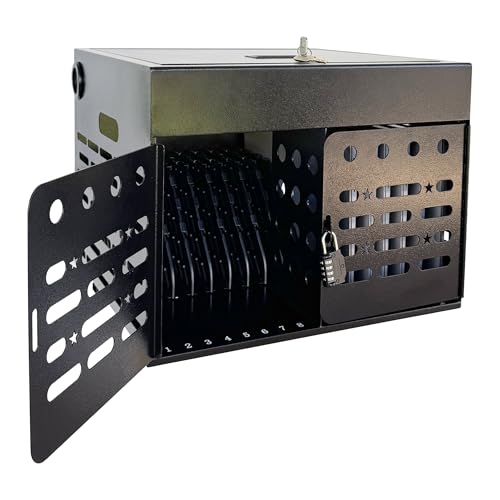
- Charges and stores up to 16 devices.
- Uses a built-in combination lock.
- Fully assembled and desktop or wall mountable.
Best For: Shared environments seeking keyless access and organized charging.
Best Wall-Mount Pick
Pearington 12-Device Charging Station

- Holds and charges up to 12 devices
- Adjustable dividers and cable straps
- Lockable wall-mount design
Best For: Higher-capacity classroom and office charging
Best Compact Steel Cabinet
Plugsharge 8-Device Charging Cabinet

- Compact 15-by-10.5-by-13.5-inch design
- Lockable steel door with two keys
- Fully assembled with built-in 8-outlet strip
Best For: Small shared-device areas needing secure storage
Best Black Wall-Mount Option
Powervize 8-Device Charging Cabinet
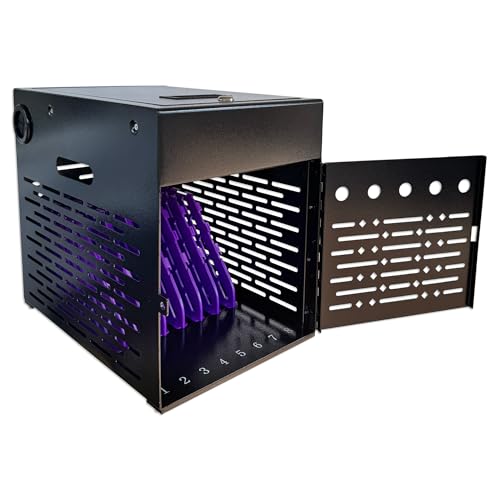
- Fits up to eight devices up to 14 inches
- Lockable alloy-steel cabinet with keys
- Supports wall mounting or desktop placement
Best For: Professional shared spaces needing flexible installation
Best Wall-Mount Solution – 12-Device Lockable Charging Cabinet
For classrooms or offices that need compact device charging cabinets, this wall-mount Learniture station combines storage, charging, and lockable access in one steel unit. Its 12 individual slots fit Chromebooks, laptops, and tablets, while cable clips help keep cords organized.
Best For: Classrooms and offices that want a permanently mounted, lockable cabinet for up to 12 devices.
Pros:
- Stores and charges up to 12 devices simultaneously.
- French cleat system supports wall mounting.
- Locking door and charging grommets allow devices to charge while secured.
- Interior dividers and cable clips help prevent tangling.
Cons:
- Mounting hardware is not included.
- At 65 pounds maximum capacity, it is intended for lighter device loads rather than heavy equipment.
Choose this model when wall space is more valuable than countertop space and secure, organized storage matters. Confirm the available wall structure and device dimensions before installation.
Best High-Capacity Portable Pick – 16-Device Steel Charging Cabinet
This POCHAR cabinet is one of the more capable compact device charging cabinets for shared spaces, accommodating up to 16 laptops, Chromebooks, tablets, or iPads. It can sit on a tabletop or mount to a wall, and side handles make relocation easier.
Best For: Schools, offices, libraries, and other facilities managing up to 16 devices with flexible placement needs.
Pros:
- Charges and stores up to 16 devices.
- Fits devices up to 15.6-inch screens and 1-inch thickness.
- Dual key locks secure both the front and top doors.
- Ventilation holes and cable-management slots support organized charging.
Cons:
- Assembly is required.
- Its 38-pound weight capacity may limit the total load of heavier laptops.
With dual-door security, built-in mounting holes, and carry handles, this is a flexible choice for locations that may alternate between fixed and portable use. Check the cabinet’s dimensions and weight capacity against your device fleet.
Best Open-Access Organizer – 10-Device AC and USB Charging Rack
For buyers who prefer quick access over enclosed storage, this open-rack option provides compact device charging cabinets functionality in a vertical organizer. It charges up to 10 devices through six AC outlets and four USB ports while routing cords to reduce clutter.
Best For: Teacher workstations, offices, libraries, and reception areas where devices need to be accessed frequently.
Pros:
- Supports up to 10 devices in an open vertical layout.
- Combines six AC outlets with four USB charging ports.
- Built-in cable routing helps organize cords.
- Includes a surge-protected 110V/10A power strip.
Cons:
- Open design does not provide lockable security.
- It is a rack rather than a closed cabinet, so devices remain visible and accessible.
This rack makes sense when fast insertion and removal are more important than locking devices away. Its mixed AC and USB ports also make it useful for work areas charging laptops alongside phones and accessories.
Best Small-Fleet Cabinet – 8-Unit Locking Charging Station
This compact POCHAR model is designed for smaller device groups, storing and charging up to eight Chromebooks, tablets, laptops, or mobile devices. Its tabletop or wall-mount format makes it a practical option when compact device charging cabinets must fit into limited classroom or office space.
Best For: Small classrooms, offices, meeting rooms, and shared workspaces managing up to eight devices.
Pros:
- Stores and charges eight devices simultaneously.
- Compact 10.5-inch-wide footprint with wall-mount or tabletop placement.
- Combination-lock front door and key-lock top door provide dual security.
- Arrives fully assembled with cable slots and internal dividers.
Cons:
- Designed for devices up to 14-inch screens and 1-inch thickness.
- The blue finish may not suit every office or classroom décor.
If eight-device capacity is sufficient, this fully assembled cabinet offers a convenient balance of portability, security, and space efficiency. Measure larger laptops carefully before ordering.
Best Wall-Mountable Compact Cabinet – Meteteel 12-Device Charging Lock Box
For smaller classrooms, offices, and shared workspaces, this compact device charging cabinet combines storage, charging, and access control in a fully assembled metal cabinet. It holds up to 12 devices measuring up to 15 inches and 1 inch thick, with tabletop or wall-mount installation.
Best For: Schools, offices, libraries, and other indoor settings that need secure, space-conscious charging for tablets, Chromebooks, and laptops.
Pros:
- Stores and charges up to 12 devices simultaneously.
- Locking front door includes two keys for controlled access.
- Ventilation on all four sides, overload-protected power strip, and cable-management slots support organized charging.
- Handles and pre-drilled wall-mount holes make it portable or installable.
Cons:
- Capacity is limited to 12 devices.
- Fits devices up to 15 inches, so larger laptops may not be compatible.
- Wall-mount hardware is included, but installation is still required.
Choose this model when a lockable, ventilated cabinet with flexible placement matters more than maximum capacity. Its relatively compact footprint and fully assembled design make it practical for shared indoor charging areas.
Best for Larger Devices – Pearington 16-Device Portable Charging Cabinet
This compact device charging cabinet is designed for portable, tabletop use while accommodating up to 16 devices with screens up to 17 inches. Padded storage slots, a locking front door, side handles, and cord-management features make it suited to shared device programs.
Best For: Classrooms, offices, and training spaces that need portable charging and storage for larger iPads, Chromebooks, and laptops.
Pros:
- Charges and stores up to 16 devices at once.
- Supports devices with screens up to 17 inches.
- Padded slots help protect stored devices.
- Side handles and swivel casters support movement between locations.
Cons:
- Its 17-inch depth and 20-inch height may require more tabletop or floor space than smaller cabinets.
- The notes identify cord-management slots and clips but do not specify ventilation features.
- It is a tabletop cabinet rather than a wall-mountable model.
This Pearington cabinet is a strong fit when capacity and compatibility with larger devices take priority. Its handles, casters, and key-fob entry add convenience for environments that move equipment between rooms.
Best Combination-Lock Option – 16-Device Steel Charging Cabinet
For organizations comparing compact device charging cabinets with keyless access, this 16-device steel model offers a built-in combination lock, organized cable routing, and a dedicated upper compartment for power adapters. It arrives fully assembled and supports desktop or wall-mounted use.
Best For: Classrooms, libraries, offices, healthcare facilities, and training centers managing up to 16 laptops, Chromebooks, tablets, or iPads up to 15.6 inches.
Pros:
- Stores and charges up to 16 devices up to 15.6 inches.
- Combination lock helps avoid managing physical keys.
- Ventilated steel construction and cable-routing slots help organize charging.
- Fully assembled, with handles and included wall-mount hardware for flexible deployment.
Cons:
- Device compatibility is limited to units up to 15.6 inches.
- Combination locks may be less convenient if multiple users need access codes.
- Wall mounting requires installation despite the cabinet arriving assembled.
This model stands out for facilities that want 16-device capacity without relying solely on a keyed lock. Its assembled, wall-mountable design and structured cable management make it a practical choice for organized shared charging.
Best Wall-Mount Pick – Pearington 12-Device Charging Station
The Pearington 12-device station is a practical option when compact device charging cabinets need to hold a larger mix of Chromebooks, laptops, and tablets. Its adjustable dividers, lockable enclosure, and wall-mount design help conserve floor and countertop space while keeping charging cables organized.
Best For: Classrooms, offices, and shared-device areas that need storage for up to 12 devices with wall-mounted installation.
Pros:
- Stores and charges up to 12 laptops, Chromebooks, or tablets.
- Adjustable dividers and included Velcro straps help manage different devices and cables.
- Locking system, cable grommets, and wall-mount hardware support secure charging.
- 65-pound weight capacity provides substantial storage support.
Cons:
- Its 15-by-19-by-13-inch footprint is larger than the 8-device alternatives.
- The plastic enclosure may provide less rigidity than a steel cabinet.
- Wall mounting requires installation before use.
Choose this model when capacity is more important than the smallest possible footprint. The adjustable interior and 12-outlet strip make it versatile, while the wall-mount format keeps the cabinet off a desk or floor.
Best Compact Steel Cabinet – Plugsharge 8-Device Charging Cabinet
For buyers prioritizing a small footprint, this Plugsharge cabinet is one of the more space-conscious compact device charging cabinets. It stores and charges up to eight devices measuring up to 14 inches, with a lockable steel door, ventilation, and optional wall or desktop placement.
Best For: Small classrooms, offices, libraries, and reception areas needing an assembled, lockable cabinet for up to eight devices.
Pros:
- Compact 15-by-10.5-by-13.5-inch dimensions help limit workspace usage.
- Steel cabinet, lockable door, and two included keys support controlled access.
- Built-in UL-listed 8-outlet power strip supports simultaneous charging.
- Ships fully assembled with hardware for optional mounting.
Cons:
- Capacity is limited to eight devices.
- Supports devices up to 14 inches, which may exclude larger laptops.
- Its white finish may show marks more readily in busy environments.
This is a straightforward choice for shared-device areas where security and minimal space usage matter. Its assembled design reduces setup work, while ventilation and the integrated power strip keep the charging arrangement organized.
Best Black Wall-Mount Option – Powervize 8-Device Charging Cabinet
The Powervize cabinet combines a compact profile with a black alloy-steel enclosure, making it a useful fit for compact device charging cabinets in classrooms, offices, libraries, and healthcare settings. Adjustable dividers, ventilation, a lockable door, and optional wall mounting support organized shared-device management.
Best For: Organizations wanting an 8-device cabinet with a black steel finish and flexible wall-mounted or desktop placement.
Pros:
- Stores and charges up to eight devices measuring up to 14 inches.
- Alloy-steel enclosure and included keys provide a more secure storage setup.
- Adjustable divider slots help separate devices during charging.
- Fully assembled design includes drywall mounting hardware.
Cons:
- Eight-device capacity is lower than the Pearington model.
- Devices larger than 14 inches may not fit.
- Wall mounting may require suitable drywall installation.
The Powervize is a balanced option for buyers who want a compact, lockable steel cabinet without committing to a larger charging station. Its black finish and flexible placement make it adaptable to professional shared spaces.
How We Picked the Best Compact Device Charging Cabinets
We focused on the features that matter most in classrooms, offices, libraries, training rooms, and shared workspaces: device capacity, compatibility with laptops and tablets, cabinet construction, lock design, charging access, portability, and installation flexibility. We also considered whether a cabinet is wall-mounted, tabletop, or freestanding, since available floor and counter space can determine the best fit.
Because charging needs vary, this list includes smaller 8-device options as well as cabinets designed for 10, 12, and 16 devices. Always confirm the listed screen-size limit, slot dimensions, and charging hardware before ordering.
Quick Comparison
| Capacity | Best For | Useful Features |
|---|---|---|
| 8 devices | Small groups and compact rooms | Space-efficient storage |
| 10 devices | Mixed charging setups | Dedicated AC and USB connections |
| 12 devices | Classrooms and shared work areas | Balanced capacity and footprint |
| 16 devices | Larger groups | Higher storage capacity and lockable designs |
Key Buying Factors for Compact Device Charging Cabinets
Capacity and Device Fit
Count the devices that need simultaneous storage, then leave some room for future additions if possible. Check each slot’s width, depth, and height rather than relying only on the advertised device count. Bulky protective cases may not fit, and laptops with larger screens can require wider compartments.
Charging Configuration
Review whether the cabinet includes AC outlets, USB ports, power strips, or only cable-management channels. Confirm that the charging arrangement supports your device chargers and that cables can be routed without excessive bending. A cabinet with organized individual slots is generally easier to maintain than one large open compartment.
Security and Access
A keyed or combination lock can deter casual access and keep devices together when unattended. Consider who will manage the cabinet, whether multiple staff members need access, and whether a combination lock is preferable to tracking keys.
Mounting, Mobility, and Ventilation
Wall-mounted models conserve floor space but require a suitable surface and secure installation. Tabletop cabinets are convenient where counter space is available, while portable designs are easier to relocate. Look for ventilation openings and avoid placing a powered cabinet where airflow is blocked.
Who Should Buy Which Compact Device Charging Cabinets?
Choose an 8-device cabinet for a small office, tutoring room, or compact classroom. A 10- or 12-device model is a practical middle ground for typical shared-device programs, especially when you want a manageable footprint without giving up organized storage. Select a 16-device cabinet for larger classes, training groups, or workplaces that need to charge many devices at once.
Wall-mounted cabinets are best when floor space is limited and the installation surface is suitable. Choose a tabletop or portable cabinet when flexibility matters more than saving floor area. For mixed laptop and tablet fleets, prioritize adjustable or generously sized compartments, clear device-size specifications, and a charging layout compatible with your existing adapters.