The best smart golf launch monitors turn practice sessions into measurable, useful feedback. Whether you want a compact range companion or a full simulator setup, the right device can help you understand distance, speed, carry, and swing performance.
These 10 options cover portable Doppler radar units, camera-based systems, and premium launch monitors with simulator features. Use the guide below to narrow your choice by accuracy, software, setup, and budget.
Best 10 Smart Golf Launch Monitors Picks for 2026
Budget Speed Training Pick

- Measures club speed with or without a ball
- Tracks speed, smash factor, and distance
- No app, Bluetooth, or Wi-Fi required
Best For: Affordable speed training and simple range feedback
Advanced Simulator Choice

- Uses Doppler radar and dual cameras
- Captures 15 shot and swing metrics
- Includes a 45-day premium trial
Best For: Detailed practice analysis and home simulator use
All-Around Connected Pick

- Tracks speed, tempo, spin, and launch data
- Records swings through the Garmin Golf app
- Offers up to 10 hours of battery life
Best For: Portable, app-connected practice at home or the range
Simple iOS Practice Pick

- Designed for iPhone and iPad
- Shows speed, launch, distance, and shot shape
- Adds video replay with shot tracer
Best For: Portable iOS-based practice at the range or home
Best Budget Swing Trainer

- Swing Speed Mode supports no-ball practice
- Doppler radar provides real-time shot data
- Stores club statistics and average distances
Best For: Portable swing and distance practice
Best Premium Simulator

- Three-camera system tracks advanced metrics
- 10-inch touchscreen displays impact videos
- Supports virtual rounds with optional membership
Best For: All-in-one indoor and range simulation
Best Software Bundle

- Includes one year of Core Foresight software
- Battery is included with the package
- Listed package weight is 5 pounds
Best For: Buyers prioritizing included practice software
Premium Indoor Precision
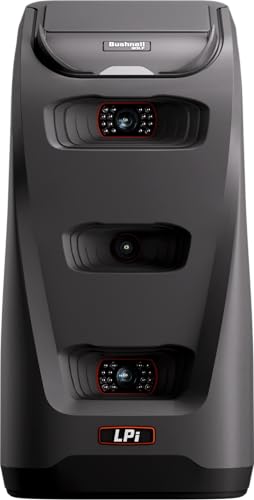
- Three-camera infrared impact measurement
- Detailed ball and club data
- Foresight+ simulation connectivity
Best For: Indoor golfers seeking detailed, accuracy-focused simulator data
Portable Practice Companion
- Indoor, home, and range use
- App-based metrics and swing video
- Up to 10 hours of battery life
Best For: Golfers wanting portable practice analysis and virtual rounds
Simple Range Feedback

- Doppler radar core metrics
- Built-in color LCD display
- Stores up to 1,000 shots
Best For: Golfers wanting simple, on-device range feedback
Budget Speed Training Pick – PRGR HS 130-A
The PRGR HS 130-A is a straightforward choice among smart golf launch monitors for golfers who primarily want club- and ball-speed feedback without an app or subscription. Its Doppler radar measures club head speed with or without a ball, along with ball speed, smash factor, and estimated carry and total distance.
Best For: Speed training, simple range sessions, and golfers seeking an affordable, app-free monitor.
Pros:
- Measures club head speed without requiring a ball, supporting dedicated speed training.
- Tracks club speed, ball speed, smash factor, carry distance, and total distance.
- Stores up to 500 past swings and runs on readily available AAA batteries.
- Compact, lightweight design with IP54 water resistance.
Cons:
- Does not offer Wi-Fi, Bluetooth, or app-based analysis.
- Its feature set is focused on speed and distance rather than advanced launch or spin metrics.
The PRGR makes the most sense when uncomplicated feedback is the priority. It is less suitable for golfers wanting simulator features or extensive shot analytics, but its ball-free speed measurement and simple operation make it a practical training tool.
Advanced Simulator Choice – Rapsodo MLM2PRO
The Rapsodo MLM2PRO is one of the more feature-rich smart golf launch monitors in this group, combining Doppler radar with dual cameras. It captures 15 metrics, including spin rate, spin axis, carry distance, club path, club speed, and launch angle, while also supporting practice and simulator features through its premium membership.
Best For: Golfers who want detailed shot data, swing video, and home simulator options.
Pros:
- Dual-camera and Doppler-radar setup provides broad shot-tracking capabilities.
- Captures 15 metrics for more detailed practice analysis.
- Includes a 45-day premium trial with simulated courses, target range, and training tools.
- Supports swing recording and slow-motion impact review.
Cons:
- Many simulator and advanced practice features require an active premium membership.
- Requires a compatible smartphone and Bluetooth connectivity for its connected features.
The MLM2PRO is a strong fit for golfers who will use its deeper analytics and simulator ecosystem. It offers more insight than a basic speed monitor, but buyers should account for the membership requirement when evaluating its overall value.
All-Around Connected Pick – Garmin Approach R10
The Garmin Approach R10 is a versatile option among smart golf launch monitors for home practice, indoor nets, and driving-range sessions. When paired with the Garmin Golf app, it tracks metrics such as club and ball speed, swing tempo, spin, launch angle, and shot dispersion, with up to 10 hours of battery life.
Best For: Golfers wanting portable practice data, swing video, and Garmin app integration.
Pros:
- Works at home, indoors, or on the driving range.
- Tracks key speed, tempo, spin, launch, and dispersion information through the app.
- Automatically records swing videos with the metrics for that swing.
- Offers up to 10 hours of battery life and IPX7 waterproofing.
Cons:
- Requires a compatible smartphone and Garmin Golf app for its detailed tracking features.
- Virtual rounds and the full course library require an active subscription.
The Approach R10 balances portability with a broad set of connected practice features. It is a compelling choice for golfers comfortable using a phone app, especially those who value swing video and longer battery life.
Simple iOS Practice Pick – Rapsodo Mobile Launch Monitor
The original Rapsodo Mobile Launch Monitor is a practical entry point for golfers seeking smart golf launch monitors that pair directly with an iPhone or iPad. It provides shot-by-shot ball speed, club speed, launch angle, carry distance, and shot-shape feedback, along with video replay and a shot tracer.
Best For: iPhone and iPad users who want portable range or backyard swing feedback.
Pros:
- Provides real-time feedback for range, backyard, and indoor-net practice.
- Reports ball speed, club speed, launch angle, carry distance, and shot shape.
- Records swing video with an on-screen tracer for easier review.
- Lightweight and portable, with a carrying case included.
Cons:
- Compatible with iPhone and iPad only.
- Simulator courses and game modes require a premium upgrade.
This Rapsodo model is best suited to iOS users who want clear fundamentals rather than an extensive standalone display or multi-platform setup. Its combination of shot data and video replay makes it useful for focused practice in a compact package.
Best Budget Swing Trainer – Voice Caddie SC200Plus
The Voice Caddie SC200Plus is a compact option for golfers comparing smart golf launch monitors for straightforward practice feedback. Doppler radar tracks shots, while the LCD screen and voice output provide immediate results indoors or outdoors.
Best For: Golfers who want portable club-distance and swing-tempo practice without a full simulator setup.
Pros:
- Swing Speed Mode supports no-ball speed and tempo practice.
- Doppler radar and atmospheric-pressure sensors support shot-data collection.
- Stores shot data and club statistics for reviewing average distances.
- Offers adjustable loft angles for varied club-condition practice.
Cons:
- Its feature set is focused on training feedback rather than virtual-course simulation.
- The listed model year is 2019.
The SC200Plus is best suited to golfers who prioritize simple, portable feedback and repeatable club-distance practice over advanced simulator features.
Best Premium Simulator – Garmin Approach R50
The Garmin Approach R50 is a premium choice among smart golf launch monitors, combining a three-camera system with a built-in 10-inch touchscreen. It provides detailed practice metrics, impact videos, and simulator features for indoor use or range sessions.
Best For: Golfers seeking an all-in-one launch monitor and simulator with on-device analysis and optional virtual rounds.
Pros:
- Tracks ball speed, launch angle, face-to-path, spin rate, and spin axis.
- Training mode records club statistics and displays shot-dispersion charts.
- Built-in touchscreen shows impact footage and supports course play.
- HDMI connectivity enables use with a monitor or projector.
Cons:
- Virtual rounds and the broader course library require an active Garmin Golf membership.
- Battery life is listed at up to 4 hours.
- At 9 pounds, it is less lightweight than basic portable monitors.
The R50 is the most feature-rich option here for golfers who want detailed metrics and a self-contained simulator, provided the subscription requirement and shorter battery life fit their plans.
Best Software Bundle – SkyTrak ST MAX
The SkyTrak ST MAX is a practical contender for golfers comparing smart golf launch monitors and prioritizing included software. This package comes with one year of Core Foresight software, giving buyers a bundled starting point for launch-monitor practice.
Best For: Golfers who want a launch monitor package with a year of Core Foresight software included.
Pros:
- Includes one year of Core Foresight software at no additional cost.
- Includes a lithium-polymer battery.
- Listed package weight is 5 pounds for comparatively manageable transport.
Cons:
- The supplied details do not specify the tracked metrics or simulator features.
- Only one year of included software is stated.
The ST MAX stands out primarily for its bundled software value. Buyers who need specific tracking metrics should verify those capabilities before choosing it over the more fully documented alternatives.
Premium Indoor Precision – Bushnell Launch Pro i
For golfers prioritizing accuracy in an indoor setup, the Bushnell Golf Launch Pro i is a camera-based option among smart golf launch monitors. Its three-camera infrared system measures performance at impact and provides detailed ball and club data, though some data requires an active software subscription.
Best For: Indoor golfers who want Tour-level measurement and a connected simulation experience.
Pros:
- Three-camera infrared system measures at impact rather than relying primarily on radar algorithms.
- Provides carry distance, ball speed, total spin, launch angle, club head speed, smash factor, and more.
- Works with Foresight+ for simulation, shot history, sessions, and performance insights.
- Includes essential setup accessories and a 30-day Foresight+ trial.
Cons:
- Designed specifically for indoor simulator use.
- Ball and club data require an active software subscription.
The Launch Pro i is the most accuracy-focused choice in this group for an indoor simulator. It makes the most sense for buyers who are comfortable with a subscription-backed software ecosystem and want detailed impact data.
Portable Practice Companion – Garmin Approach R10
The renewed Garmin Approach R10 is one of the more flexible smart golf launch monitors for home practice, indoor sessions, or the driving range. It tracks key swing and ball metrics through the Garmin Golf app, offers training tools and recorded swing clips, and provides up to 10 hours of battery life.
Best For: Golfers who want a portable monitor with app-based practice analysis and virtual-course features.
Pros:
- Supports indoor, home, and driving-range practice.
- Tracks club head speed, ball speed, swing tempo, ball spin, launch angle, and more with a compatible smartphone.
- Training mode includes club statistics and a shot dispersion chart based on estimated ball flight.
- Offers up to 10 hours of battery life and access to virtual rounds on over 42,000 courses with an active subscription.
Cons:
- Requires a compatible smartphone and Garmin Golf app for tracking and analysis.
- Some virtual-course features require an active subscription.
- This is a renewed product with a listed 90-day limited warranty.
The Approach R10 is a practical all-around pick for golfers who value portability and app-guided improvement. Its training modes and video clips make it especially useful for structured practice rather than standalone measurement only.
Simple Range Feedback – GOLFBUDDY Shot Mate
The GOLFBUDDY Shot Mate is a straightforward Doppler radar option among smart golf launch monitors, with a built-in color display for quick feedback. It measures core swing and ball metrics, includes practice and target modes, and stores up to 1,000 shots for review.
Best For: Beginners and improving players who want immediate, on-device range feedback without depending on a phone.
Pros:
- Displays club speed, ball speed, smash factor, and carry distance using Doppler radar.
- Built-in full-color TFT LCD provides real-time feedback.
- Practice and target modes support repetition and accuracy-focused training.
- Stores up to 1,000 shots and offers up to 10 hours of battery life.
Cons:
- Its listed measurements focus on core metrics rather than a broader set of advanced data.
- Does not list app connectivity or simulation features in the supplied details.
The Shot Mate is a convenient choice when simplicity matters. Its display, storage, practice modes, and compact 191-gram design make it well suited to golfers who want quick feedback at the range or in an indoor practice area.
How We Picked the Best Smart Golf Launch Monitors
We compared these Smart Golf Launch Monitors by the quality and usefulness of their shot data, portability, indoor and outdoor flexibility, software experience, simulator support, battery life, and overall value. We also considered how easily each model fits a real practice routine, from quick range sessions to dedicated home setups.
Because launch monitors vary significantly in tracking technology and software requirements, the best option depends on how you plan to use it. A compact radar unit may be ideal for basic feedback, while a premium camera-based system can provide a more immersive simulator experience.
Quick Comparison
| Best For | What to Prioritize | Typical Advantage |
|---|---|---|
| Range practice | Portability and battery life | Fast setup and useful carry-distance feedback |
| Indoor practice | Room requirements and ball tracking | Convenient practice away from the course |
| Home simulation | Software, compatibility, and subscription costs | Courses, practice modes, and entertainment |
| Detailed swing analysis | Measured club and ball metrics | More actionable feedback for improvement |
Key Buying Factors for Smart Golf Launch Monitors
Tracking Technology and Accuracy
Doppler radar models are often portable and effective outdoors, while camera-based systems can be especially useful indoors when positioned correctly. Check which metrics are measured directly and which are calculated, and remember that setup, alignment, lighting, and hitting-area dimensions affect results.
Metrics and Display
At minimum, look for carry distance, total distance, ball speed, club speed, and smash factor. More advanced models may add launch angle, spin, attack angle, club path, face angle, and shot-shape information. A built-in screen is convenient at the range, while phone or tablet apps typically provide deeper analysis.
Software and Subscriptions
Simulator compatibility can be a major differentiator. Confirm whether the software works with your phone, tablet, computer, or projector, and check whether essential features require a paid plan. Also verify included trial periods and any course or practice-content limitations.
Portability and Setup
For outdoor use, consider weight, battery life, weather tolerance, and how much space the unit needs behind or beside the ball. Indoor buyers should measure ceiling height, ball-flight space, hitting distance, and the required safety area before purchasing.
Total Cost
Compare the complete ownership cost, including software subscriptions, compatible balls, mats, nets, protective cases, and accessories. A lower-priced monitor may be the better value for feedback-focused practice, while a premium system can make sense if you will use its simulator capabilities regularly.
Who Should Buy Which Smart Golf Launch Monitors?
Choose a Compact Basic Monitor for Simple Feedback
Golfers who mainly want distance, speed, and smash-factor information should focus on lightweight, easy-to-use models that start quickly and work well at the driving range.
Choose a Connected Portable Monitor for Flexible Practice
If you want phone-based shot visualization, more detailed metrics, and occasional simulator play, a portable model with a capable companion app offers a strong balance of convenience and features.
Choose a Premium System for Serious Home Simulation
Dedicated indoor users should prioritize measurement consistency, software depth, compatible simulation platforms, and a clear upgrade path. These buyers benefit most from investing in a model that supports their planned space and long-term practice goals.
Before ordering, confirm device compatibility, subscription terms, space requirements, and the metrics you actually need. The best smart golf launch monitor is the one you will set up consistently and use to make better practice decisions.