Space-saving golf launch monitors make it easier to practice with useful shot data without dedicating an entire room to a simulator. The right model can fit in a golf bag, sit beside a hitting mat, or pair with a phone or tablet.
Our roundup covers compact options ranging from simple distance and swing-speed trackers to advanced monitors with club data, simulator compatibility, and detailed indoor performance feedback.
Best 10 Space-Saving Golf Launch Monitors Picks for 2026
Compact Speed Trainer

- Measures club and ball speed plus distance
- Works without Wi-Fi, Bluetooth, or apps
- Stores up to 500 swings
Best For: Simple swing-speed training and portable range practice
Phone-Powered Practice Pick

- Provides shot-by-shot launch and distance data
- Adds swing video replay with shot tracer
- Designed for iPhone and iPad
Best For: Apple-device users practicing indoors or outdoors
Speed-and-Wedge Specialist
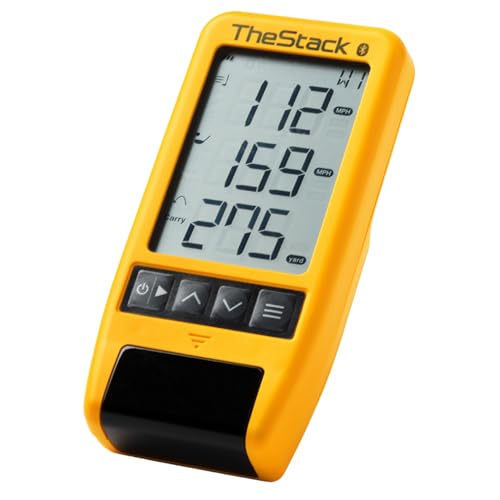
- Tracks swing speed and ball speed
- Connects to TheStack app by Bluetooth
- Adds speed and wedge training tools
Best For: TheStack users focused on speed and wedge practice
Full-Feature Home Practice Option

- Tracks a broad range of swing and ball metrics
- Includes swing video and dispersion analysis
- Offers up to 10 hours of battery life
Best For: Golfers wanting portable practice with optional virtual rounds
Best Data-Rich Pick
Rapsodo MLM2PRO Launch Monitor

- Tracks 15 shot and swing metrics
- Radar and dual-camera tracking
- Includes case, tripod, and three Pro V1 balls
Best For: Golfers who want detailed data in a portable setup
Best Portable Value
- Up to 10 hours of battery life
- Works indoors, at home, or on the range
- Tracks metrics and records swing videos via app
Best For: Golfers wanting long battery life and app-based practice
Best Compact Simulator Core

- Near-zero-latency camera and infrared tracking
- Reads any ball without stickers
- Compatible with leading simulator software
Best For: Golfers building a PC-based home simulator
Best Compact Swing Trainer

- Ball-free swing-speed mode
- Doppler radar with voice feedback
- Stores club and shot statistics
Best For: Portable, straightforward swing and distance practice
Best Display-Focused Monitor

- Full-color TFT LCD display
- Practice and Target modes
- Stores up to 1,000 shots
Best For: Portable practice with clear on-device metrics
Best Smartphone Simulator

- Uses a smartphone for 3D practice
- Includes environmental sensors
- Provides expanded swing metrics
Best For: App-based home training and visual swing analysis
Compact Speed Trainer – PRGR HS 130-A Launch Monitor
For golfers seeking space-saving golf launch monitors, the PRGR HS 130-A is a compact, battery-powered option focused on essential speed and distance feedback. It measures club and ball speed, smash factor, and estimated total and carry distance without requiring Wi-Fi, Bluetooth, or an app.
Best For: Golfers who want a simple monitor for swing-speed training, range practice, or multi-sport use.
Pros:
- Measures club speed with or without a ball.
- Stores up to 500 past swings.
- Lightweight 4.9-ounce design with AAA-battery operation.
- Also supports training for baseball, tennis, soccer, and hockey.
Cons:
- Does not offer Wi-Fi, Bluetooth, or app connectivity.
- Provides a more focused feature set than simulator-oriented monitors.
The PRGR is a practical pick when portability and straightforward speed feedback matter more than connected features or virtual-course play. Its small footprint makes it easy to keep in a golf bag or training area.
Phone-Powered Practice Pick – Rapsodo MLM
The Rapsodo MLM suits golfers comparing space-saving golf launch monitors for the range, backyard, or indoor net. Its compact unit pairs with an iPhone or iPad to provide shot-by-shot data, video replay, and a shot tracer through the Rapsodo app.
Best For: iPhone and iPad users who want portable feedback with video analysis and optional simulator features.
Pros:
- Tracks ball speed, club speed, launch angle, carry distance, and shot shape.
- Records swings with video replay and an on-screen tracer.
- Works at the driving range, in a backyard, or with an indoor net.
- Includes a carrying case and charging cord.
Cons:
- Compatible with iPhone and iPad rather than Android devices.
- Simulator courses and game modes require the premium app unlock.
Choose the Rapsodo MLM if your phone is central to your practice setup. It takes up little space while adding visual feedback that can help connect launch data with the swing that produced it.
Speed-and-Wedge Specialist – TheStack Radar
TheStack Radar is one of the more focused space-saving golf launch monitors for golfers prioritizing speed development and wedge practice. It measures swing speed and ball speed, estimates carry distance and smash factor, and sends data to TheStack app over Bluetooth.
Best For: Golfers using TheStack training system who want a small radar with connected speed and wedge-practice tools.
Pros:
- Measures swing speed and ball speed while calculating estimated carry and smash factor.
- Connects directly to TheStack app on iOS and Android for speed training.
- Includes access to gamified wedge-practice features through Stack Wedging.
- Lightweight 0.12-kilogram unit.
Cons:
- Stack Wedging and Stack Putting features are iOS only.
- Some app features depend on the TheStack ecosystem and trial or subscription access.
TheStack Radar makes the most sense for a structured training routine rather than broad simulator use. Its small size and app connection keep speed sessions organized without adding a larger screen or separate console.
Full-Feature Home Practice Option – Garmin Approach R10
The Garmin Approach R10 is a versatile choice among space-saving golf launch monitors for home, indoor, and driving-range practice. It pairs with a compatible smartphone and the Garmin Golf app to track multiple metrics, record swing video, and support virtual rounds with an active subscription.
Best For: Golfers who want broad shot tracking, training charts, swing video, and optional simulator-style course play.
Pros:
- Tracks club speed, ball speed, swing tempo, spin, launch angle, and more.
- Provides training statistics and shot-dispersion charts through the Garmin Golf app.
- Automatically records swing clips with the related metrics.
- Offers up to 10 hours of battery life and IPX7 water resistance.
Cons:
- Requires a compatible smartphone for app-based metrics and analysis.
- Virtual rounds and the global tournament require an active subscription.
- Its feature-rich setup is less minimal than a basic speed-only monitor.
The R10 is a strong fit when you want a compact device that can grow from range feedback into home practice and virtual play. The included tripod, phone mount, and carry case make the setup easier to move between locations.
Best Data-Rich Pick – Rapsodo MLM2PRO Launch Monitor
The Rapsodo MLM2PRO is a strong choice for golfers seeking a space-saving golf launch monitor with detailed shot analysis. Its Doppler radar and dual-camera setup track 15 metrics, while the compact handheld design works indoors or outdoors.
Best For: Golfers who want detailed swing and ball data in a portable setup.
Pros:
- Tracks 15 key metrics, including spin rate, carry distance, club speed, club path, and launch angle.
- Combines Doppler radar with dual cameras for shot tracking and swing review.
- Includes a tripod, carrying case, charging cable, and three Pro V1 golf balls.
- Includes a 45-day premium trial with simulated courses, training tools, and third-party app integration.
Cons:
- Premium features and more than 30,000 simulator courses require the premium membership.
- Software update support is not specified in the supplied details.
With its handheld form factor and included carrying case, the MLM2PRO is easy to add to a compact practice area. It is especially appealing if detailed metrics and swing video matter more than having a built-in display.
Best Portable Value – Garmin Approach R10
The renewed Garmin Approach R10 is a practical space-saving golf launch monitor for home practice, indoor sessions, or the driving range. It pairs with the Garmin Golf app to display key metrics, training data, and automatically recorded swing videos.
Best For: Golfers who prioritize portability, long battery life, and app-based practice tools.
Pros:
- Tracks club head speed, ball speed, swing tempo, spin, launch angle, and more through a compatible smartphone.
- Offers up to 10 hours of battery life.
- Includes a tripod stand, phone mount, carrying case, and microUSB cable.
- Supports virtual rounds on more than 42,000 courses with an active subscription and the Garmin Golf app.
Cons:
- Requires a compatible smartphone and Garmin Golf app for metric tracking and video features.
- Virtual courses require an active subscription.
- This listing is renewed and includes a 90-day limited warranty.
The R10 is well suited to tight practice spaces because the monitor itself is portable and the phone mount keeps the companion display nearby. Its extended battery life also makes it convenient for sessions away from home.
Best Compact Simulator Core – Uneekor EYE MINI CORE
The Uneekor EYE MINI CORE is a compact, camera-based option for a space-saving golf launch monitor and simulator setup. It uses high-speed cameras and infrared sensors for near-zero-latency tracking, while VIEW software provides 15 ball data points and session reports.
Best For: Golfers building a PC-based home simulator with third-party software compatibility.
Pros:
- Uses Dimple Optix to read any dimple pattern without requiring ball stickers.
- Provides 15 ball data points, session reports, and near-zero-latency tracking.
- Works with GSPro, E6 Connect, TGC19, and Creative Golf 3D, with subscriptions required where applicable.
- Includes a three-month Ultimate Package trial and a two-year warranty.
Cons:
- Simulation requires a compatible Windows PC with substantial recommended hardware.
- Third-party simulator software may require separate subscriptions.
- Club Optix visual feedback requires a software upgrade, and Swing Optix is sold separately.
Measuring 6.5 by 3.38 by 13.9 inches, the EYE MINI CORE can fit into a streamlined simulator arrangement while still supporting advanced software options. Plan carefully for the required PC, Ethernet connection, and display setup.
Best Compact Swing Trainer – Voice Caddie SC200Plus
For golfers seeking space-saving golf launch monitors, the Voice Caddie SC200Plus is a compact practice option for indoor or outdoor use. Doppler radar, real-time feedback, and a swing-speed mode support focused training without requiring a full simulator setup.
Best For: Golfers who want portable club-distance and swing-tempo practice with simple feedback.
Pros:
- Swing Speed Mode enables practice without a ball.
- Doppler radar and atmospheric pressure sensors support data collection.
- Provides instant LCD and voice feedback.
- Stores shot data and club statistics for distance review.
Cons:
- It is a training monitor rather than a complete simulator system.
- Its listed model year is 2019.
The SC200Plus is a practical choice when portability and uncomplicated feedback matter most. Adjustable loft angles add flexibility for golfers building a compact home or range practice routine.
Best Display-Focused Monitor – GOLFBUDDY Shot Mate
The GOLFBUDDY Shot Mate fits the space-saving golf launch monitors category with a lightweight design suited to driving-range or indoor practice. Its full-color TFT LCD presents key metrics clearly, while practice and target modes add structure to training sessions.
Best For: Golfers who want an easy-to-read portable monitor with shot storage and targeted practice modes.
Pros:
- Tracks club speed, ball speed, smash factor, and carry distance.
- Full-color, auto-adjusting TFT LCD improves visibility.
- Practice and Target modes support repeatable training.
- Stores up to 1,000 shots and the last 10 swings.
Cons:
- Battery life is listed at up to 10 hours.
- The supplied notes do not identify supported simulator software.
Shot Mate offers a balanced mix of portability, readable data, and memory for comparing swings. It is especially appealing for golfers who prefer built-in controls and display feedback instead of relying on a phone.
Best Smartphone Simulator – GX-10 Mobile Launch Monitor
The GX-10 turns a smartphone into a compact training setup, making it a strong option among space-saving golf launch monitors. Its environmental sensors, expanded swing metrics, and 3D trajectory views are designed for home or outdoor practice without a subscription.
Best For: Golfers who want app-based swing analysis, 3D visualization, and broader performance metrics in a small setup.
Pros:
- Environmental sensors adjust data for temperature, humidity, and pressure.
- Measures metrics including attack angle, launch angle, spin rate, and spin axis.
- Offers 3D driving-range views and trajectory playback.
- Supports iOS, Android, and HarmonyOS systems with no subscription.
Cons:
- Requires a compatible smartphone for the app experience.
- The supplied notes do not specify battery life or measurement range.
- Setup may involve more technology than a standalone display monitor.
The GX-10 is the most feature-oriented choice here for golfers who value visual analysis and detailed swing data. Its phone-based design can save space, but users should confirm device compatibility before buying.
How We Picked These Space-Saving Golf Launch Monitors
We focused on launch monitors that are genuinely portable or practical for limited-space practice areas. The selection considers the data each device measures, indoor and outdoor compatibility, companion-app requirements, battery life, display options, simulator support, setup demands, and overall usefulness for practice.
Because compact launch monitors vary widely in capability, we included both straightforward radar units for quick feedback and more advanced systems for golfers who want detailed shot analysis or a home-simulator experience.
Quick Comparison
- Basic distance and speed feedback: Look for a simple Doppler-radar unit with an integrated display and minimal setup.
- Phone-based practice: Mobile launch monitors can provide richer analysis, but check device compatibility before buying.
- Indoor and outdoor versatility: Models designed for both environments are useful when weather, space, or access to a range changes.
- Simulator use: Advanced units may support platforms such as GSPro, TGC 2019, or E6, but subscriptions, compatible hardware, and adequate ball flight space may still be required.
Key Buying Factors for Space-Saving Golf Launch Monitors
Size and Setup
Measure the area around your hitting mat, not just the storage space. A compact monitor still needs a clear position relative to the ball and enough room for safe swings. Foldable or self-contained designs are especially convenient for shared rooms.
Data Quality and Range
Decide whether you need carry distance and club speed only, or more detailed metrics such as ball speed, smash factor, launch angle, spin rate, club path, and face data. More measurements can improve practice decisions, but they often increase price and setup complexity.
Indoor Performance
Indoor radar systems may need sufficient ball flight or reflective conditions to estimate shots accurately. Camera-based systems can work well in tighter spaces but may require precise placement, lighting, and a compatible hitting setup.
Display and Connectivity
An integrated screen is convenient for quick range sessions. App-based models may offer better charts, video, and session history, but confirm whether they require iOS, Android, Bluetooth, Wi-Fi, or a paid subscription.
Battery and Portability
For range use, prioritize dependable battery life, quick charging, and a protective case. A monitor that is easy to carry but slow to set up may be less useful than a slightly larger unit that starts practicing immediately.
Who Should Buy Which Space-Saving Golf Launch Monitors?
Choose a simple radar monitor if you mainly want fast feedback on swing speed, ball speed, smash factor, and distance without building a simulator.
Choose a phone-connected model if you practice with an iPhone or iPad and want session history, visual shot data, or swing-analysis features. Verify compatibility before purchase.
Choose an advanced simulator-ready monitor if you have a permanent or semi-permanent hitting area and want detailed metrics, low latency, and third-party simulation options.
Choose a compact training analyzer if your priority is improving speed, contact, or consistency rather than playing virtual courses. These devices can be easier to store and faster to use for short practice sessions.