The best smart ultrawide gaming monitors combine an expansive 21:9 or 32:9 workspace with fast refresh rates, vivid panels, and convenient smart features. They can replace a multi-monitor setup while making games, movies, and everyday multitasking more immersive.
Our lineup includes OLED and LCD displays, compact 34-inch models, and super-ultrawide screens up to 49 inches. Use the guide below to compare the features that matter most before choosing the right fit for your desk, graphics hardware, and viewing habits.
Best 10 Smart Ultrawide Gaming Monitors Picks for 2026
Best Super Ultrawide Workspace

- 49-inch 5120x1440 32:9 display
- 120Hz refresh with 1ms MPRT and Adaptive Sync
- 65W USB-C, KVM, and PIP/PBP support
Best For: Multitaskers replacing a multi-monitor setup
Best QD-OLED Performance

- 34.2-inch 3440x1440 QD-OLED panel
- 240Hz refresh and 0.03ms response time
- 99.3% DCI-P3 with HDR TrueBlack 400
Best For: Enthusiast gamers prioritizing color and motion
Best Budget Smart Monitor

- 34-inch 3440x1440 curved VA display
- 100Hz refresh with HDR10 and up to 99% sRGB
- webOS streaming, AirPlay 2, and screen sharing
Best For: Home offices and casual gaming with built-in streaming
Best Balanced Ultrawide

- 34-inch WQHD curved display with 180Hz refresh
- 1ms response with FreeSync Premium and AdaptiveSync
- 95% DCI-P3 and DisplayHDR 400 support
Best For: Fast-paced gaming and immersive 21:9 play
Best Super Ultrawide OLED

- 49-inch 32:9 Dual QHD QD-OLED panel
- 0.03ms response and 144Hz refresh rate
- Picture-in-Picture plus G-Sync and FreeSync support
Best For: Immersive gaming and replacing a dual-monitor setup
Best Smart Features
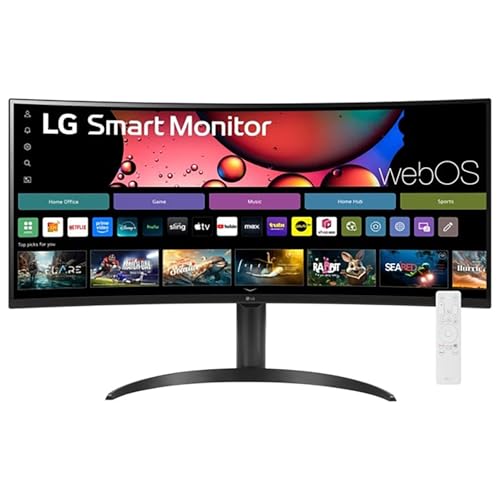
- 34-inch 3440x1440 curved smart display
- webOS streaming with Magic Remote and AirPlay 2
- HDR10 and up to 99% sRGB color coverage
Best For: Streaming, multitasking, and casual gaming
Premium WUHD Immersion

- 40-inch 1000R curved WUHD display
- 180Hz refresh rate and 1ms response time
- DisplayHDR 600 and FreeSync Premium Pro
Best For: Detailed gaming, photo work, and video editing
Dual-QHD Multitasking

- 49-inch 32:9 curved display
- 5120 x 1440 resolution at 120Hz
- USB-C 65W, PIP/PBP, and HDR400
Best For: Gaming, multitasking, and multiple device connections
High-Refresh Competitive Play

- 240Hz refresh rate with 1ms MPRT
- 3440 x 1440 UWQHD curved display
- AI crosshair, sniper scope, and FreeSync
Best For: Competitive ultrawide gaming
Best Smart OLED Pick – LG UltraGear 34GX90SA-W
For shoppers seeking smart ultrawide gaming monitors, the LG UltraGear combines a 34-inch 3440×1440 OLED panel with a fast 240Hz refresh rate and 0.03ms response time. Its dramatic 800R curve, webOS streaming, and cloud-gaming access make it a versatile centerpiece for gaming and entertainment.
Best For: Competitive gamers who also want built-in streaming and cloud-gaming features.
Pros:
- 240Hz refresh rate and 0.03ms response time support fast, smooth gameplay.
- OLED contrast, DisplayHDR True Black 400, and up to 98.5% DCI-P3 coverage produce vivid images.
- webOS provides streaming apps, LG Channels, and access to cloud-gaming services.
- HDMI 2.1, DisplayPort, and USB-C with 65W power delivery offer flexible connectivity.
Cons:
- The steep 800R curve may not suit every desk setup or viewing preference.
- Its gaming-focused specifications may be more than needed for general office use.
This is one of the strongest all-in-one choices when speed, OLED image quality, and smart functionality matter equally. The included OLED care tools and two-year limited warranty add useful reassurance for long-term ownership.
Best Super Ultrawide Workspace – Deco Gear 49-Inch 5K2K
The Deco Gear is a practical option among smart ultrawide gaming monitors for buyers who need maximum screen real estate. Its 49-inch 32:9 panel provides a 5120×1440 canvas for games, spreadsheets, timelines, and side-by-side windows, while USB-C, KVM, and PIP/PBP support make it useful across multiple systems.
Best For: Multitaskers, creators, traders, and gamers who prefer a single super-ultrawide display.
Pros:
- 5120×1440 resolution and 32:9 aspect ratio provide extensive horizontal workspace.
- 120Hz refresh rate, 1ms MPRT, and Adaptive Sync make motion smoother.
- USB-C supports video, data, and up to 65W charging for compatible laptops.
- KVM, PIP/PBP, USB hub, and built-in speakers improve workstation flexibility.
Cons:
- Its VA panel and 300-nit brightness are less specialized for premium HDR than OLED alternatives.
- The 49-inch width requires substantial desk space.
- The listed warranty is one year.
This monitor favors productivity and connectivity over extreme gaming performance. It is a compelling fit if replacing a multi-monitor setup is the priority and 120Hz is sufficient for your games.
Best QD-OLED Performance – Alienware AW3425DW
The Alienware AW3425DW is built for buyers who want high-end smart ultrawide gaming monitors without sacrificing image quality. Its 34.2-inch QD-OLED display pairs 3440×1440 resolution with 240Hz motion, a 0.03ms response time, and a wide 99.3% DCI-P3 color gamut.
Best For: Enthusiast PC gamers who prioritize QD-OLED color, contrast, and rapid motion.
Pros:
- QD-OLED technology delivers an infinite contrast ratio and vivid color.
- 240Hz refresh rate and 0.03ms response time are well suited to fast games.
- G-SYNC Compatible, FreeSync Premium Pro, and VESA AdaptiveSync help reduce tearing.
- DisplayHDR TrueBlack 400 and 1000-nit peak HDR brightness enhance supported content.
Cons:
- It does not list built-in streaming or webOS smart-TV functionality.
- The 21:9 format offers less horizontal workspace than a 32:9 super-ultrawide.
- Its premium gaming features may be unnecessary for casual users.
For pure gaming performance and QD-OLED presentation, the AW3425DW is a focused and compelling choice. Its three-year warranty is also longer than the coverage listed for several alternatives here.
Best Budget Smart Monitor – LG 34SR60QC-W
The LG 34SR60QC-W is a balanced choice for shoppers comparing smart ultrawide gaming monitors for mixed use. Its 34-inch 3440×1440 curved VA display offers a roomy 21:9 workspace, 100Hz refresh rate, HDR10 support, and built-in webOS streaming.
Best For: Home offices and casual gamers who want streaming features in an ultrawide monitor.
Pros:
- 34-inch 3440×1440 resolution provides a broad multitasking and entertainment view.
- webOS includes popular streaming apps, LG Channels, and cloud PC access.
- HDR10 and up to 99% sRGB coverage support colorful multimedia viewing.
- AirPlay 2, HomeKit, screen sharing, Bluetooth, and multiple ports add convenience.
Cons:
- Its 100Hz refresh rate and listed 5ms response time are less suited to competitive gaming.
- It lacks the OLED contrast and extreme brightness of the premium gaming models.
- The listed warranty is one year.
This LG is best viewed as a smart entertainment and productivity display with gaming capability, rather than a dedicated esports monitor. It makes sense when built-in apps and everyday versatility matter more than maximum refresh rate.
Best Balanced Ultrawide – Alienware AW3425DWM
For shoppers comparing smart ultrawide gaming monitors, the Alienware AW3425DWM offers a practical balance of immersive screen space, speed, and image quality. Its 34-inch WQHD panel, 1500R curve, 180Hz refresh rate, and 1ms response time suit fast-paced gaming while remaining useful for entertainment and photo or video editing.
Best For: Gamers who want a fast, curved 21:9 display with strong color coverage and adaptive-sync support.
Pros:
- 34-inch WQHD resolution with a spacious 21:9 ultrawide layout
- 180Hz refresh rate and 1ms gray-to-gray response time
- AMD FreeSync Premium and VESA AdaptiveSync help reduce tearing
- DCI-P3 95% coverage and DisplayHDR 400 support
Cons:
- Its 34-inch format provides less desktop width than a 49-inch super ultrawide
- Connectivity is centered on HDMI, DisplayPort, USB, and Bluetooth rather than built-in streaming features
The AW3425DWM is a well-rounded choice when smooth gaming performance matters more than maximum screen width. Height and tilt adjustment, a matte finish, low-blue-light hardware, and a dedicated console mode add useful everyday flexibility.
Best Super Ultrawide OLED – Samsung Odyssey OLED G9 G91SD
The Samsung Odyssey OLED G9 G91SD is built for shoppers who want an expansive alternative to a two-monitor setup. Among smart ultrawide gaming monitors, its 49-inch 32:9 QD-OLED panel stands out with Dual QHD resolution, near-instant response, and multitasking features such as Picture-in-Picture.
Best For: Gamers and multitaskers who want a wide, high-contrast OLED workspace for games, media, and desktop use.
Pros:
- 49-inch Dual QHD 5120×1440 display provides extensive horizontal workspace
- QD-OLED delivers true blacks, vivid color, and a 0.03ms response time
- 144Hz refresh rate with G-Sync compatibility and FreeSync Premium Pro
- Picture-in-Picture supports multitasking without a second monitor
Cons:
- The 32:9 format and large footprint require substantial desk space
- Its 250 cd brightness rating may be less suitable for very bright rooms
- Higher listed power consumption than the smaller displays in this roundup
The G91SD is the strongest fit when immersion and workspace take priority. Its thermal modulation, logo and taskbar detection, and screen saver are useful OLED-care features, while the adjustable stand helps accommodate the display’s substantial size.
Best Smart Features – LG 34SR65QC-B UltraWide
The LG 34SR65QC-B takes a more versatile approach to smart ultrawide gaming monitors by combining a 34-inch curved gaming screen with built-in webOS streaming. Its 3440×1440 resolution, HDR10 support, Magic Remote, and AirPlay 2 make it suitable for users who want one display for gaming, work, and entertainment.
Best For: Casual gamers and home users who want streaming apps and a wide monitor without relying on a connected computer.
Pros:
- 34-inch 21:9 UltraWide QHD display with an immersive 1800R curve
- Built-in webOS access to major streaming services and LG Channels
- Includes a Magic Remote with voice-command navigation
- HDR10 and up to 99% sRGB coverage support colorful content
Cons:
- 100Hz refresh rate and 5ms response time are less gaming-focused than the faster models here
- Its VA LCD panel lacks the OLED contrast of the Samsung
- Only a one-year manufacturer warranty is listed
The LG is the most convenient choice for mixed-use spaces, especially if built-in streaming matters as much as gaming. FreeSync, flicker-free operation, adjustable stand features, and a 60-watt power rating round out its practical everyday design.
Premium WUHD Immersion – Samsung Odyssey G7 G75F
The Samsung Odyssey G7 G75F is a strong choice for shoppers comparing smart ultrawide gaming monitors with an emphasis on resolution and immersive single-screen gaming. Its 40-inch 21:9 curved display combines 5120 x 2160 WUHD resolution, a 180Hz refresh rate, and a 1ms response time.
Best For: Gamers and creators who want a highly detailed ultrawide display for gaming, photo work, and video editing.
Pros:
- WUHD 5120 x 2160 resolution delivers highly detailed images.
- 1000R curvature and the 40-inch 21:9 format create an immersive viewing experience.
- 180Hz refresh rate, 1ms response time, FreeSync Premium Pro, and DisplayHDR 600 support smooth, high-contrast gameplay.
Cons:
- Its 140W power consumption is relatively substantial.
- The large display requires considerable desk space.
- Its VA panel may be less suitable for buyers specifically seeking another panel technology.
Choose this Samsung if resolution and cinematic immersion matter more than minimizing desk footprint. Height and swivel adjustment add useful flexibility for a premium gaming or editing setup.
Dual-QHD Multitasking – INNOCN 49C1R
The INNOCN 49C1R stands out among smart ultrawide gaming monitors for its expansive 49-inch 32:9 format. The 5120 x 1440 resolution, 120Hz refresh rate, USB-C connectivity, and PIP/PBP support make it useful for gaming and managing multiple sources on one screen.
Best For: Users who want a super-ultrawide workspace for gaming, multitasking, and connecting laptops or consoles.
Pros:
- 49-inch 32:9 screen provides extensive horizontal workspace.
- 5120 x 1440 resolution, 120Hz refresh rate, Adaptive-Sync, and HDR400 support gaming and video viewing.
- USB-C with 65W power delivery, DisplayPort, HDMI 2.1, USB ports, and RJ45 offer versatile connectivity.
- PIP/PBP enables content from two input sources to appear simultaneously.
Cons:
- The very wide 49-inch design demands a large desk.
- Its 120Hz refresh rate is lower than some faster gaming-focused alternatives.
- The glossy finish may be less desirable in bright environments.
This INNOCN is a practical pick when one screen needs to replace a multi-monitor setup. Its broad aspect ratio and input flexibility are especially valuable for users switching between a computer, laptop, or console.
High-Refresh Competitive Play – SANSUI 34-Inch UWQHD
The SANSUI 34-inch model is a compelling option among smart ultrawide gaming monitors for buyers prioritizing fast gameplay. Its 3440 x 1440 UWQHD resolution pairs with a 240Hz refresh rate, 1ms MPRT response time, FreeSync, and a range of gaming-oriented visual tools.
Best For: Competitive gamers who want a fast 21:9 display with gaming aids and flexible connectivity.
Pros:
- 240Hz refresh rate and 1ms MPRT response time support responsive gameplay.
- UWQHD 3440 x 1440 resolution provides a detailed ultrawide image.
- AI crosshair, sniper scope, game mode, AI PQ, and blue-light features add gaming and comfort options.
- Two HDMI 2.1 and two DisplayPort 1.4 inputs support up to 240Hz at 2K.
Cons:
- It does not include built-in speakers.
- The 34-inch size offers less screen area than 40- or 49-inch alternatives.
- The monitor’s most advanced refresh-rate capability depends on compatible connections and hardware.
For fast-paced games, this SANSUI offers the highest listed refresh rate in this roundup while retaining the useful 21:9 format. It is a sensible fit for players who value responsiveness and built-in competitive display tools.
How We Picked These Smart Ultrawide Gaming Monitors
We selected displays across the most useful ultrawide categories: 34-inch 3440 × 1440 models, 49-inch 5120 × 1440 super-ultrawides, OLED and QD-OLED panels, and smart monitors with webOS or streaming-focused features. We considered refresh rate, response time, adaptive sync support, HDR capability, connectivity, ergonomics, screen curvature, and overall use case.
Specifications can vary by connection, operating mode, and regional version, so confirm the manufacturer’s current details before buying. A powerful graphics card may also be necessary to drive the highest resolutions and refresh rates.
Quick Comparison
| Best For | Typical Size | Resolution | Panel Strength |
|---|---|---|---|
| Competitive gaming | 34 inches | 3440 × 1440 | High refresh rate and low response time |
| Cinematic gaming | 34 inches | 3440 × 1440 | OLED contrast and deep blacks |
| Multitasking | 49 inches | 5120 × 1440 | 32:9 workspace similar to two monitors |
| Streaming and everyday use | 34 inches | 3440 × 1440 | Smart platform, speakers, and remote features |
Key Buying Factors for Smart Ultrawide Gaming Monitors
Resolution, Size, and Graphics Requirements
A 34-inch 3440 × 1440 monitor is the most balanced choice for many desks, offering more horizontal space without the extreme width of a 49-inch display. Super-ultrawide 5120 × 1440 monitors provide outstanding multitasking room but require more desk depth, stronger GPU performance, and games that properly support a 32:9 aspect ratio.
Panel Type, HDR, and Burn-In Considerations
OLED and QD-OLED screens deliver exceptional contrast, rapid pixel response, and more convincing HDR than most conventional LCD panels. They can be ideal for dark-room gaming, but static desktop elements may increase long-term image-retention risk. LCD models are often better suited to bright rooms, extended productivity, or buyers prioritizing lower maintenance.
Refresh Rate and Adaptive Sync
Choose at least 100Hz for smooth general gaming, while 180Hz, 240Hz, or higher benefits fast competitive titles when your GPU can sustain the frame rate. NVIDIA G-Sync compatibility, AMD FreeSync, or VESA AdaptiveSync can help reduce tearing and stutter, but check which inputs and refresh modes support each feature.
Smart Features and Connectivity
Smart monitors with webOS, streaming access, AirPlay, built-in speakers, or a remote can function as entertainment displays without a separate computer. Also check HDMI and DisplayPort versions, USB-C power delivery, USB hubs, KVM features, headphone output, and stand adjustability.
Who Should Buy Which Smart Ultrawide Gaming Monitors?
- Competitive players: Choose a high-refresh 34-inch model with low latency and reliable adaptive sync.
- Immersion-focused gamers: An OLED or QD-OLED ultrawide offers the strongest contrast and motion clarity.
- Multitaskers and creators: A 49-inch 32:9 display can replace two monitors and reduce bezel interruptions.
- Streamers and casual users: A smart 34-inch monitor with webOS, speakers, and casting support adds convenience.
- Value-conscious buyers: A fast LCD ultrawide can provide high refresh rates and broad workspace without OLED’s premium price or burn-in concerns.