In today’s fast-paced world, having the right tools is essential for maximizing your productivity. Sonnet Thunderbolt docks offer a range of features tailored to meet the needs of professionals. From seamless connectivity to robust designs, these docks can elevate your workspace. But with so many options available, how do you choose the best one for your specific requirements? Let’s explore the top contenders that could transform your setup.
Sonnet Echo 11 Thunderbolt 4 Dock

If you’re looking for a versatile docking solution that maximizes your workspace, the Sonnet Echo 11 Thunderbolt 4 Dock is the perfect choice. With eleven interfaces, you can connect multiple devices seamlessly. It features four Thunderbolt 4 ports, three USB 3.2 Gen 2 Type A ports, and even a USB 2.0 port for charging. You’ll enjoy stunning visuals, supporting up to 8K displays at 60Hz. Plus, it provides up to 90W power to charge your laptop through a single Thunderbolt 4 cable. Compatible with Apple M1 Macs and Thunderbolt 3 or 4 Windows computers, it’s a must-have for any setup.
Best For: Professionals and creatives who require a powerful docking solution to connect multiple devices and high-resolution displays seamlessly.
Pros:
- Offers eleven versatile interfaces for extensive connectivity options.
- Supports high-resolution displays up to 8K at 60Hz, perfect for graphic-intensive work.
- Provides 90W power delivery to charge laptops, reducing cable clutter.
Cons:
- May be overkill for casual users with minimal connectivity needs.
- Higher price point compared to simpler docking solutions.
- Compatibility limited to Thunderbolt 3 and 4 devices, excluding older USB-C models.
Sonnet Echo 20 Thunderbolt 4 SuperDock

The Sonnet Echo 20 Thunderbolt 4 SuperDock is ideal for creative professionals and tech enthusiasts who demand extensive connectivity and high-performance capabilities. With twenty interfaces, including three Thunderbolt 4 and multiple USB ports, you’ll have all the connections you need. It supports stunning 4K to 8K displays at 60Hz, ensuring your visuals are exceptional. Plus, it delivers up to 100W charging through the included Thunderbolt 4 cable. Need storage? The M.2 NVMe SSD slot supports up to 8TB, offering blazing data transfer speeds. Compatible with various devices, this dock takes your setup to the next level.
Best For: Creative professionals and tech enthusiasts who require extensive connectivity and high-performance capabilities.
Pros:
- Versatile Connectivity: Offers twenty interfaces including multiple Thunderbolt 4 and USB ports for maximum device compatibility.
- High-Quality Display Support: Capable of supporting 4K, 5K, 6K, and 8K displays at 60Hz for exceptional visual quality.
- Fast Storage Expansion: Features an M.2 NVMe SSD slot that supports up to 8TB of storage with high data transfer speeds.
Cons:
- Cost: The advanced features and connectivity may come at a higher price point compared to simpler docks.
- Size: The dock may be bulkier than other portable options, making it less convenient for on-the-go use.
- SSD Sold Separately: The M.2 NVMe SSD must be purchased separately, which can add to the overall expense.
Sonnet Echo 13 Thunderbolt 5 SSD Dock (1TB)

For professionals seeking lightning-fast data transfer and versatile connectivity, the Sonnet Echo 13 Thunderbolt 5 SSD Dock (1TB) stands out as the ideal solution. With its integrated 1TB Kingston PCIe 4.0 NVMe SSD, you’ll experience speeds up to 6000 MB/s using Thunderbolt 5. The dock features 12 high-speed ports, including four Thunderbolt 5 ports and three USB 3.2 Gen 2 ports, ensuring you can connect multiple devices seamlessly. Plus, with up to 140W power delivery, it efficiently charges your laptops. Enjoy stunning display support for up to three 4K displays or one 8K display, perfect for any workstation setup.
Best For: Professionals and creatives who require ultra-fast data transfer and versatile connectivity for high-performance workstations.
Pros:
- Ultra-fast storage speeds of up to 6000 MB/s with Thunderbolt 5.
- Extensive connectivity options with 12 high-speed ports, accommodating various devices.
- High power delivery (up to 140W) for effectively charging laptops while in use.
Cons:
- Higher price point compared to standard SSD docks.
- Limited to Thunderbolt-compatible devices for optimal performance.
- May be overkill for casual users or those with minimal storage needs.
Sonnet Echo 20 Thunderbolt 5 SecureDock
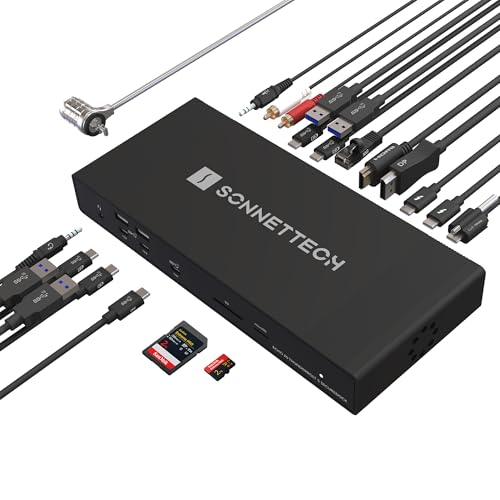
Designed for professionals who demand exceptional performance, the Sonnet Echo 20 Thunderbolt 5 SecureDock delivers unmatched connectivity and power. With three Thunderbolt 5 ports and nine USB 10Gbps ports, you can connect all your essential devices effortlessly. Enjoy lightning-fast 80Gbps bi-directional data bandwidth and support for up to two 8K displays. The 140W charging capability guarantees your laptop stays powered while you work. Plus, with 20 interfaces, including HDMI, DisplayPort, and 10Gb Ethernet, this dock transforms your laptop into a full workstation, making it a must-have for any creative or tech-savvy user.
Best For: Professionals and creatives seeking high-performance connectivity and power management for their laptops.
Pros:
- High-speed connectivity with Thunderbolt 5 technology, offering up to 80Gbps data bandwidth.
- Supports multiple high-resolution displays, accommodating up to two 8K or several 4K displays.
- Single-cable solution that provides 140W Power Delivery, charging your laptop while connecting various devices.
Cons:
- Premium price point may be a barrier for some users.
- Limited compatibility with older Thunderbolt versions or non-Thunderbolt devices.
- Physical size may require more desk space compared to smaller docking solutions.
Sonnet Echo 11 Thunderbolt 4 HDMI Dock
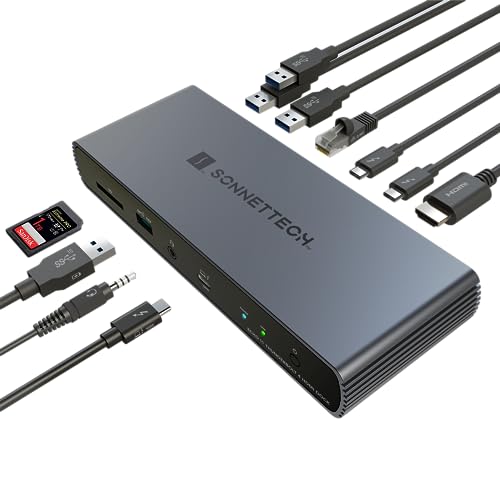
Looking for a powerful docking solution to enhance your productivity? The Sonnet Echo 11 Thunderbolt 4 HDMI Dock is just what you need. Weighing only one pound, it connects seamlessly to Intel Macs, Apple M1/M2 devices, and Windows laptops equipped with Thunderbolt 4 ports. With 11 versatile interfaces—including three Thunderbolt 4 and four USB 3.2 ports—you’ll enjoy lightning-fast data transfer and charging. Plus, it supports stunning 4K to 8K displays at 60Hz. With a robust 100W power delivery and a 2-year warranty, this dock is a reliable choice to elevate your workspace setup.
Best For: Users seeking a high-performance docking solution for laptops and devices with Thunderbolt 4 connectivity, including professionals and creatives needing extensive display support.
Pros:
- Versatile Connectivity: Offers 11 ports including multiple Thunderbolt 4 and USB 3.2 connections for diverse device compatibility.
- High Display Support: Capable of supporting resolutions from 4K to 8K at 60Hz, ideal for graphic-intensive tasks.
- Power Delivery: Provides up to 100W charging to laptops, ensuring devices stay powered during use.
Cons:
- Weight: At 1 pound, it may be considered slightly heavier compared to other ultra-portable docks.
- Price Point: Higher-end pricing may not be suitable for budget-conscious consumers.
- Limited Compatibility: Requires Thunderbolt 4 ports, which may not be available on all laptops or devices.
Sonnet Echo 13 Thunderbolt 5 SSD Dock with 2TB Storage

The Sonnet Echo 13 Thunderbolt 5 SSD Dock with 2TB storage is the ultimate solution for creative professionals who demand lightning-fast data transfer speeds and extensive connectivity options. With integrated 6000MB/s NVMe storage, it excels at handling high-performance workflows. You’ll enjoy ultra-fast speeds, reaching up to 3400MB/s with Thunderbolt 4 or 3. Featuring 12 high-speed ports, including four Thunderbolt 5 and multiple USB ports, it guarantees maximum connectivity for your devices. Plus, it supports a range of display resolutions up to 8K at 240Hz and provides up to 140W to power your laptop, making it a powerhouse for your workspace.
Best For: Creative professionals and high-performance users seeking ultra-fast data transfer speeds and extensive connectivity options.
Pros:
- Ultra-fast storage speeds of up to 6000 MB/s with Thunderbolt 5 for efficient data handling.
- Versatile connectivity with 12 high-speed ports, including multiple Thunderbolt and USB options.
- Supports high-resolution displays up to 8K at 240Hz, catering to demanding visual workflows.
Cons:
- Higher price point compared to standard SSD docks, which may not suit all budgets.
- Limited compatibility with older devices that do not support Thunderbolt 3 or higher.
- Requires additional setup for optimal use, which may be overwhelming for casual users.
Plugable Thunderbolt 4 Dock with 100W Charging
For professionals needing seamless connectivity and robust performance, the Plugable Thunderbolt 4 Dock with 100W Charging stands out as an ideal solution. With 40Gbps speeds, it supports dual 4K 60Hz HDMI or a single 8K display, making it perfect for high-resolution tasks. Its 13-port configuration includes USB-C, Ethernet, and SD card slots, catering to all your peripheral needs. Compatible with various laptop brands and systems, it guarantees versatility across your devices. Plus, with a 2-Year warranty and strong customer reviews, this dock is a smart investment for enhancing your productivity. Don’t miss out on this powerful connectivity hub!
Best For: Professionals seeking seamless connectivity and high-performance capabilities with multiple device support.
Pros:
- High-speed performance with 40Gbps Thunderbolt 4 speeds, supporting dual 4K displays or a single 8K display.
- Versatile port configuration with 13 ports, including HDMI, USB, and Ethernet, catering to various peripheral needs.
- Strong compatibility with a wide range of laptop brands and systems, ensuring broad usability.
Cons:
- Limited macOS support for dual displays on certain models, which might restrict functionality for some users.
- Weighty design at 2.4 pounds, making it less portable for frequent travelers.
- Higher price point compared to basic docking stations, which may not be justified for casual users.
Anker Prime TB5 Docking Station (14-in-1 Thunderbolt 5)

Designed with versatility in mind, the Anker Prime TB5 Docking Station is perfect for professionals and creatives who demand high-performance connectivity. With 14 ports, including Thunderbolt 5, USB-C, and HDMI 2.1, you can easily connect multiple devices. You’ll appreciate the 120Gbps max transfer speed, allowing you to transfer a 150GB file in just 25 seconds. Enjoy stunning visuals with dual 8K displays at 60Hz and rely on the active cooling system to prevent overheating. Plus, its 140W charging capability guarantees your devices stay powered. Weighing only 2.4 pounds, it’s a portable powerhouse for your setup.
Best For: Professionals and creatives who require high-performance connectivity with multiple devices and high-resolution displays.
Pros:
- 14-in-1 configuration offers extensive connectivity options, making it versatile for various setups.
- Exceptional transfer speeds of 120Gbps allow for rapid file transfers, enhancing productivity.
- Active cooling system ensures reliable performance without overheating during intensive use.
Cons:
- Higher price point compared to basic docking stations, which may not be suitable for budget-conscious users.
- Limited compatibility with non-Thunderbolt devices, potentially restricting its use for some users.
- Weight of 2.4 pounds may be less portable for users who need to carry it frequently.
Plugable Thunderbolt 4 Dock for MacBook Air & Pro

If you’re a video editor, designer, or heavy multitasker using an M4 or M5 MacBook Air or Pro, the Plugable Thunderbolt 4 Dock is an excellent choice. With its sleek aluminum design, it offers 13 ports, including dual 4K HDMI, ensuring you can connect multiple high-resolution displays effortlessly. You’ll appreciate the 100W charging capability and driverless setup, making it user-friendly. This dock enhances your workflow by reducing cable chaos while providing reliable connectivity. Plus, it’s fully compatible with various MacBook models, ensuring seamless operation. Backed by lifetime support, you can trust it for your home office or IT deployment needs.
Best For: Video editors, designers, and heavy multitaskers using M4 or M5 MacBook Air or Pro looking for a reliable and efficient docking solution.
Pros:
- Supports dual 4K 60Hz HDMI displays, ideal for high-resolution tasks.
- 13 ports provide extensive connectivity options, reducing cable clutter.
- 100W charging capability ensures your devices stay powered during use.
Cons:
- Base M1 and M2 MacBooks only support a single external display.
- The dock may be overkill for casual users with basic connectivity needs.
- Compatibility with Windows systems may require additional configuration.
UGREEN Thunderbolt 4 Dock 8-in-1 Hub

The UGREEN Thunderbolt 4 Dock 8-in-1 Hub is an exceptional choice for professionals seeking seamless connectivity and high-performance capabilities. With three Thunderbolt 4 ports and three USB A 3.2 ports, you’ll enjoy data transfer speeds up to 40Gbps. It supports dual 4K@60Hz displays for Windows and MacBook, enhancing your visual experience. Plus, the 140W GaN charger provides up to 85W for your laptop while in use. It’s compatible with various devices, making it perfect for your workspace. If you need robust connectivity, this dock will elevate your productivity and streamline your setup effortlessly.
Best For: Professionals seeking high-performance connectivity and display capabilities in their workspace.
Pros:
- Supports data transfer speeds up to 40Gbps for fast and efficient file transfers.
- Allows dual 4K@60Hz display setup, enhancing productivity and visual experience.
- Includes a powerful 140W GaN charger, providing ample power for laptops during use.
Cons:
- Requires connection to the power charger for operation, limiting portability.
- Not compatible with Mac mini 2018 (Intel), which may restrict usability for certain users.
- Full-featured USB-C laptops/tablets only support a single display, reducing multi-monitor options.
Factors to Consider When Choosing Sonnet Thunderbolt Docks
When choosing Sonnet Thunderbolt docks, consider the connectivity options available to guarantee they meet your device needs. You’ll also want to evaluate their power delivery capability and display support features for peak performance. Don’t forget to check device compatibility and assess the design and build quality for durability.
Connectivity Options Available
Choosing the right connectivity options for your Sonnet Thunderbolt dock is vital, as it directly impacts your device compatibility and overall performance. Start by looking at the number and types of ports available, including Thunderbolt 4, USB 3.2, HDMI, and Ethernet. A variety of USB ports, both Type-A and Type-C, is essential for different peripherals and charging needs. Verify the dock supports multiple display outputs for high-resolution visuals, catering to 4K, 5K, and even 8K resolutions. Finally, consider the total number of interfaces; docks can range from 11 to 20 ports, giving you extensive connectivity options for all your devices and accessories. These factors will help you make a well-informed choice.
Power Delivery Capability
Power delivery capability is an essential factor in selecting a Sonnet Thunderbolt dock, as it determines how effectively your devices can be charged while in use. Measured in watts (W), a dock’s power delivery indicates how much power it can provide to your connected devices. Many Thunderbolt docks offer charging capabilities between 90W and 140W, enabling you to charge your laptop while using multiple peripherals. Higher wattage docks, especially those delivering 140W, are ideal for high-performance laptops that demand more power, particularly during intensive tasks. Choosing a dock with adequate power delivery is vital; insufficient power can lead to slower charging rates or even prevent your device from charging while in use.
Display Support Features
As you consider a Sonnet Thunderbolt dock, display support features play an essential role in ensuring you get the most out of your visual experience. These docks support impressive resolutions, including 4K, 5K, 6K, and even 8K, all at refresh rates of up to 60Hz for stunning clarity. Depending on the dock and your computer’s capabilities, you can connect multiple displays simultaneously—some models even allow for three 4K displays or dual 6K/8K setups. With advanced Thunderbolt technology, you’ll enjoy high bandwidth for seamless video streaming and data transfer. Plus, with HDMI and DisplayPort outputs, you have flexible options to connect various monitors, ensuring extensive display support for all your professional and personal needs.
Device Compatibility Range
Maneuvering the device compatibility range is vital when selecting a Sonnet Thunderbolt dock. First, confirm the dock works with your device’s operating system—Windows, macOS, or iPadOS. Compatibility varies, so check if it supports Thunderbolt 3 and 4 laptops as well as Apple’s M1 and M2 Macs. It’s important to verify the dock’s Thunderbolt version too; not all docks support older versions like Thunderbolt 2 or USB-C without DisplayPort Alt Mode. If you use a mix of devices, look for docks designed for broader compatibility, including Chromebooks and USB4 devices. Finally, consider how many displays the dock supports, as some may allow only a single display connection while others can handle multiple high-resolution displays.
Design and Build Quality
When choosing a Sonnet Thunderbolt dock, design and build quality greatly impact your overall experience. Look for a sleek, compact aluminum-clad exterior that not only enhances aesthetics but also guarantees durability and portability. A robust build is crucial for longevity, especially if you plan to use it frequently. Efficient cooling systems are critical to prevent overheating during high data transfers, keeping your devices safe. User-friendly designs with strategically placed ports help minimize cable clutter, making connectivity easier. Additionally, some docks come with rubberized feet or anti-slip surfaces, providing stability and preventing unwanted movement during use. Prioritizing these factors will lead to a reliable docking solution that meets your needs effectively.