A compact trackball can free up valuable desk space while reducing the repeated arm movement required by a traditional mouse. The best models combine a small footprint with dependable tracking, comfortable controls, and connection options that suit your setup.
Our selection includes thumb-controlled, finger-controlled, wired, Bluetooth, and multi-device designs. Use the guide below to narrow the choices by workspace, portability needs, ergonomics, and budget.
Best 10 Space-Saving Computer Trackballs Picks for 2026
Best Everyday Thumb-Control Pick

- Operates without moving across the desk
- Bluetooth and Logi Bolt connectivity
- Ergonomic shape with customizable controls
Best For: Small workstations and everyday office use
Best Ultra-Compact Wired Option

- Mini off-table design saves desk space
- Lightweight 3.52-ounce portable body
- Wired USB plug-and-play setup
Best For: Travel, shared desks, and very small work areas
Best Low-Profile Premium Pick

- Low-profile design conserves operating space
- Bluetooth, 2.4GHz, and wired modes
- Rechargeable battery lasts up to four months
Best For: Ambidextrous desktop setups and extended use
Best Ergonomic Upgrade

- 20-degree tilt supports forearm comfort
- Up to 120 days per full charge
- Customizable controls and dual wireless modes
Best For: Right-handed users with medium to large hands
Best Overall Wired Pick
Kensington Orbit with Scroll Ring

- Precise optical tracking with less hand movement
- Scroll ring for easy page and document navigation
- Ambidextrous design with detachable wrist rest
Best For: Shared workstations and comfortable wired desk use
Best Wireless Flexibility
Yadkbo Ergonomic Wireless Trackball
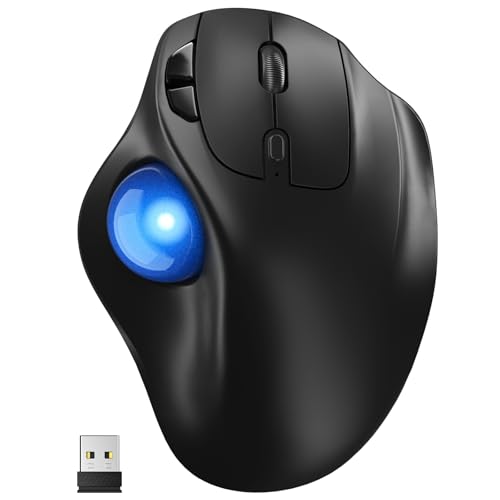
- Connects to three devices via Bluetooth and 2.4G
- Five DPI levels from 100 to 1200
- Works on desks and varied surfaces
Best For: Right-handed multi-device users with flexible workspaces
Best Compact Basic Model

- Uses less desk space than a conventional mouse
- Precise tracking with a medium 40mm ball
- Ambidextrous wired design needs no batteries
Best For: Minimalist workstations and straightforward wired use
Best Compact Wireless Pick

- Compact right-handed design with a 34mm-class ball
- Bluetooth and 2.4GHz wireless switching
- Silent buttons and included travel pouch
Best For: Quiet, portable use in small workspaces
Best Low-Profile Wired Pick
Kensington SlimBlade Trackball

- Low-profile shape reduces arm and wrist movement
- Ambidextrous design for shared workstations
- Wired laser tracking needs no battery or pairing
Best For: Stable office setups with limited mouse movement
Best Multi-Device Comfort Pick

- Switches among up to three devices
- Rechargeable battery with included charging cable
- Full-size ergonomic shape with five DPI settings
Best For: Multi-device users with medium or large hands
Best Everyday Thumb-Control Pick – Logitech ERGO M575S
Logitech Ergo M575S Wireless Ergonomic Trackball Mouse, Black/Blue (910-007026)
Check Price On AmazonThe Logitech ERGO M575S is a practical choice for space-saving computer trackballs because its thumb-operated ball lets you control the cursor without moving your hand across the desk. It connects through Bluetooth or the included Logi Bolt receiver and includes an AA battery.
Best For: Small workstations, general office use, and users who want an ergonomic wireless trackball.
Pros:
- Thumb control works without moving the mouse around the desk.
- Bluetooth and Logi Bolt provide flexible wireless connectivity.
- Ergonomic shape supports the hand and forearm.
- Includes three customizable buttons and Smart Actions support.
Cons:
- Uses a replaceable AA battery rather than a rechargeable battery.
- Designed primarily for right-thumb operation.
The M575S balances compact operation, wireless convenience, and ergonomic support, making it a strong everyday option when desk space is limited.
Best Ultra-Compact Wired Option – FRCOLOR Mini 4D Trackball
For especially tight work areas, this FRCOLOR mini trackball provides off-table cursor control in a lightweight body measuring about 3.14 x 2.04 x 1.96 inches. Its wired USB 2.0 connection is designed for straightforward plug-and-play use.
Best For: Travel, shared desks, compact laptop setups, and users who prefer a small wired pointing device.
Pros:
- Mini design requires little desk space and supports off-table operation.
- Lightweight 3.52-ounce body is easy to carry.
- Thumb-operated trackball supports scrolling and cursor movement.
- USB connection is intended for simple setup without software.
Cons:
- Wired USB operation limits placement flexibility.
- Its compact size may be less suitable for extended use.
- Supplied compatibility details focus on older Windows versions.
This is the most portable and space-conscious model in the group, though its basic wired design and limited stated compatibility make it best for simple setups.
Best Low-Profile Premium Pick – Kensington SlimBlade Pro
The Kensington SlimBlade Pro combines a low-profile, ambidextrous design with wireless and wired connection options. Its large 55mm ball and dual sensors support precise tracking while the stationary design helps conserve desk space.
Best For: Left- or right-handed users who want a versatile, rechargeable trackball for extended desktop use.
Pros:
- Low-profile body uses less operating space than a conventional mouse.
- Supports Bluetooth, 2.4GHz wireless, and wired USB connections.
- Rechargeable battery provides up to four months per charge.
- Large 55mm ball and programmable controls support accurate operation.
Cons:
- Its 0.48 kg weight is less travel-friendly than a mini model.
- Advanced button customization requires downloadable KensingtonWorks software.
The SlimBlade Pro is a well-equipped space-saving choice for shared or permanent workstations, especially when ambidextrous use and connection flexibility matter.
Best Ergonomic Upgrade – Logitech MX Ergo S
The Logitech MX Ergo S is a feature-rich option among space-saving computer trackballs, using thumb control to reduce hand movement while adding a 20-degree tilt for forearm support. It offers Bluetooth or Logi Bolt connectivity, quiet clicks, and USB-C charging.
Best For: Medium- to large-handed right-handed users who want ergonomic support and productivity-focused customization.
Pros:
- Trackball control reduces the movement needed to navigate.
- 20-degree tilt and contoured grip support a more comfortable posture.
- Rechargeable battery offers up to 120 days of use on a full charge.
- Six customizable buttons and speed/precision switching support productivity.
Cons:
- Right-hand orientation limits suitability for left-handed users.
- Charging cable is not included.
- Its ergonomic design is intended for medium- to large-sized hands.
The MX Ergo S is the strongest productivity and comfort option here, provided its right-handed fit and larger ergonomic profile suit your workspace.
Best Overall Wired Pick – Kensington Orbit with Scroll Ring
The Kensington Orbit is a practical choice for anyone seeking space-saving computer trackballs with precise optical tracking and simple wired USB connectivity. Its ambidextrous layout, scroll ring, and included wrist rest make it well suited to everyday browsing and extended desk work.
Best For: Shared workstations and users who want scrolling, wrist support, and left- or right-hand flexibility.
Pros:
- Optical tracking supports precise cursor movement with less hand movement.
- Unique scroll ring makes navigating pages and documents easy.
- Ambidextrous design and detachable wrist rest support flexible, comfortable use.
- Two programmable buttons and adjustable cursor and scrolling speeds.
Cons:
- Wired USB connectivity limits placement flexibility.
- Only two buttons are included.
Choose this model when reliable wired performance and convenient scrolling matter more than wireless portability. The compact trackball layout can help conserve desk space while the wrist rest adds comfort for longer sessions.
Best Wireless Flexibility – Yadkbo Ergonomic Wireless Trackball
This Yadkbo model is designed for space-saving computer trackballs in busy or compact work areas. Thumb control, wireless connectivity for up to three devices, adjustable DPI, and operation on varied surfaces make it a flexible option for desks, sofas, or other setups.
Best For: Right-handed users with medium-to-large hands who need wireless multi-device switching and flexible placement.
Pros:
- Connects to three devices through two Bluetooth channels and 2.4G wireless.
- Thumb-operated design and 30-degree tilt aim to reduce wrist and arm strain.
- Five DPI settings range from 100 to 1200 for adjustable cursor control.
- Works on flat surfaces as well as legs, sofas, beds, and carpets.
Cons:
- Requires two AAA batteries, which are not included.
- Right-handed design does not suit left-handed users.
- Its larger 5.5-by-4.1-by-2-inch form may not suit small hands.
This is the most flexible option of the three for wireless workflows and nontraditional surfaces. Allow time to adjust to the thumb-controlled design, particularly if you are new to ergonomic trackballs.
Best Compact Basic Model – Kensington Orbit Trackball
The Kensington Orbit is a straightforward option for space-saving computer trackballs, using a medium 40mm ball and wired USB connection for simple setup. Its ambidextrous design takes less desk space than a conventional mouse and supports both Windows and macOS use.
Best For: Users who want a basic, compact wired trackball without a scroll ring or battery changes.
Pros:
- Compact trackball design uses less desk space than a mouse.
- Internal red optics provide precise tracking of the 40mm ball.
- Ambidextrous shape accommodates right- and left-handed users.
- Wired USB setup requires no batteries and is quick to install.
Cons:
- Does not include a scroll ring.
- Wired connectivity limits wireless placement options.
- Only two buttons are available.
This model is a sensible fit for a minimalist workstation where dependable tracking and low-maintenance operation are priorities. Pick the scroll-ring version instead if convenient page navigation is important to your workflow.
Best Compact Wireless Pick – ELECOM BITRA Trackball
The ELECOM BITRA is a practical choice for anyone seeking space-saving computer trackballs with flexible wireless connectivity. Its compact right-handed design, silent buttons, and built-in receiver storage make it especially convenient for small desks, shared workspaces, and travel.
Best For: Right-handed users who want a compact, quiet trackball for desktops, laptops, and travel.
Pros:
- Bluetooth and 2.4GHz wireless connections can be switched without re-pairing.
- Compact body and included storage pouch suit travel and limited desk space.
- Silent buttons, customizable controls, and receiver storage add everyday convenience.
Cons:
- Right-handed design does not suit left-handed users.
- Runs on one AAA battery rather than a rechargeable battery.
- 750 DPI maximum sensitivity may feel limited for some users.
Choose the BITRA when portability and quiet operation matter more than a large palm rest. Its dual wireless modes also make it versatile for switching between compatible devices.
Best Low-Profile Wired Pick – Kensington SlimBlade Trackball
The Kensington SlimBlade is a straightforward option among space-saving computer trackballs for users who prefer a wired connection. Its low-profile shape requires less arm and wrist movement than a traditional mouse while keeping the desktop setup free from battery and pairing concerns.
Best For: Home and office users who want an ambidextrous, wired trackball with a low-profile footprint.
Pros:
- Low-profile design takes up less desk space than a traditional mouse.
- Ambidextrous shape accommodates left- and right-handed users.
- Laser tracking and downloadable KensingtonWorks software support precision and customization.
Cons:
- Wired connectivity limits placement and portability compared with wireless models.
- Its listed 6-by-5-inch dimensions are larger than the most compact travel options.
- Software customization requires a download.
The SlimBlade makes sense for a permanent workstation where dependable wired operation is preferred. Its symmetrical design is particularly useful in shared spaces or households with different users.
Best Multi-Device Comfort Pick – seenda Wireless Trackball
The seenda Wireless Trackball combines a stationary thumb-controlled ball with multi-device wireless support, making it a useful contender among space-saving computer trackballs. Its full-size ergonomic shape is better suited to medium and large hands than compact travel models.
Best For: Medium- to large-handed users who want rechargeable power and easy switching among several devices.
Pros:
- Connects with up to three devices through 2.4GHz USB or Bluetooth.
- Rechargeable battery avoids routine disposable battery replacement.
- Five DPI settings from 200 to 1600 support adjustable cursor control.
- Stationary operation reduces the need to move the mouse across the desk.
Cons:
- Full-size shape may be less suitable for small hands or travel.
- Right-handed thumb-ball layout is not ambidextrous.
- Its ergonomic design may occupy more space than compact trackballs.
The seenda is a strong fit when desk efficiency comes from keeping the mouse in one place rather than carrying the smallest possible device. Its three-device support and rechargeable design add convenience for busy multi-system users.
How We Picked These Space-Saving Computer Trackballs
We focused on models that conserve desk space without sacrificing practical usability. The shortlist covers compact wired and wireless options, portable designs, ergonomic thumb-trackball layouts, and finger-controlled models with different approaches to scrolling and precision.
Our evaluation criteria include the trackball’s overall footprint, control layout, connection methods, power requirements, scrolling options, button access, and suitability for extended computer use. Products with Bluetooth, 2.4GHz wireless, USB connectivity, or device switching can be especially useful in flexible workspaces.
Quick Comparison
| Best for | Look for | Typical advantage |
|---|---|---|
| Small fixed desk | Compact body and minimal cable clutter | More usable surface around the keyboard |
| Travel and mobile work | Portable shape, Bluetooth, and efficient power use | Reliable pointing without a mouse pad |
| Long work sessions | Ergonomic shell and accessible buttons | Less repeated arm movement |
| Creative or precision work | Large ball and adjustable pointer speed | Finer cursor control |
| Multiple computers | Bluetooth, 2.4GHz, or multi-device switching | Convenient movement between systems |
Key Buying Factors for Space-Saving Computer Trackballs
Size and Hand Position
Measure the available area, but also consider how the trackball fits your hand. A very small unit is easier to carry but may feel cramped for all-day use. Thumb-operated designs generally resemble a conventional mouse, while larger finger-operated balls can offer more direct control with less thumb strain.
Connection and Power
Wired models avoid charging and pairing, making them dependable for a permanent workstation. Bluetooth is convenient for laptops and tablets, while a 2.4GHz receiver can offer straightforward plug-and-play use. Rechargeable batteries reduce disposable battery use, but check charging-port access and expected battery life.
Scrolling, Buttons, and Sensitivity
A dedicated scroll ring or wheel can make document navigation easier. Adjustable DPI or pointer-speed settings are useful when switching between detailed work and broad cursor movement. Also check whether the button arrangement supports your operating system and the shortcuts you use most.
Noise and Surface Requirements
Trackballs work on small surfaces and do not need the open movement area required by mice. Silent-click switches may be preferable in shared offices, libraries, or bedrooms. Keep the ball and sensor area clean so tracking remains smooth.
Who Should Buy Which Space-Saving Computer Trackballs?
Choose a small wireless model if your desk is crowded or you frequently move between work areas. Pick a portable Bluetooth design for laptop bags and travel. For long office sessions, prioritize an ergonomic shape that supports your preferred hand position over the absolute smallest footprint.
A finger-controlled model is worth considering if you want precise movement from a central or larger ball. A wired Kensington-style option suits a fixed desk where reliability matters more than portability. If you regularly use two or more computers, favor a model with multiple connection modes or device switching. Finally, shoppers who are unsure about trackballs should compare button placement and hand comfort first; specifications matter, but a natural grip determines whether the device becomes a daily improvement.