Space-saving OLED gaming monitors deliver the deep contrast, fast response times, and vibrant color gamers want without taking over your desk.
Whether you need a compact 27-inch display or a portable option for tight setups, the best picks balance size, performance, and flexibility.
Best 10 Space-Saving OLED Gaming Monitors Picks for 2026
High-Speed 27-Inch Choice
Samsung Odyssey OLED G6 QD-OLED Gaming Monitor

- 27-inch QD-OLED with QHD 1440p resolution
- 240Hz refresh rate and 0.03ms response
- Glare Free screen with adjustable ergonomic stand
Best For: Competitive players who want a fast 27-inch OLED monitor
Ultra-Fast 27-Inch Pick
LG 27GX704A-B 27" QHD OLED 240Hz

- 27-inch QHD OLED with a compact footprint
- 240Hz and 0.03ms for fast, smooth play
- HDMI 2.1, DP, G-SYNC Compatible, FreeSync Premium Pro
Best For: Competitive gamers wanting a smaller OLED monitor
Dual-Mode Performance Choice
Samsung Odyssey OLED G7 32" 4K

- 32-inch 4K OLED with a glossy screen
- Dual Mode: 4K 165Hz or Full HD 330Hz
- 0.03ms, G-SYNC compatibility, FreeSync Premium
Best For: Gamers who want one monitor for detail and speed
Compact Speed Pick
MSI MAG 274QP QD-OLED X24 27-Inch WQHD

- 240Hz and 0.03ms for smooth esports motion
- Quantum Dot OLED with 99% DCI-P3 color
- OLED Care 2.0 plus HDMI 2.1 and DP 1.4a
Best For: compact 27-inch OLED gaming with fast motion and accurate color
Balanced All-Rounder
AOC 27" QHD 240Hz QD OLED Q27GAZD

- 240Hz QHD OLED with 0.03ms response
- HDR400 True Black and G-Sync Compatible
- 27-inch size suits smaller gaming setups
Best For: a compact OLED gaming setup with strong contrast and broad compatibility
Borderless Desk Saver
GIGABYTE GO27Q24G 27" W-OLED 240Hz
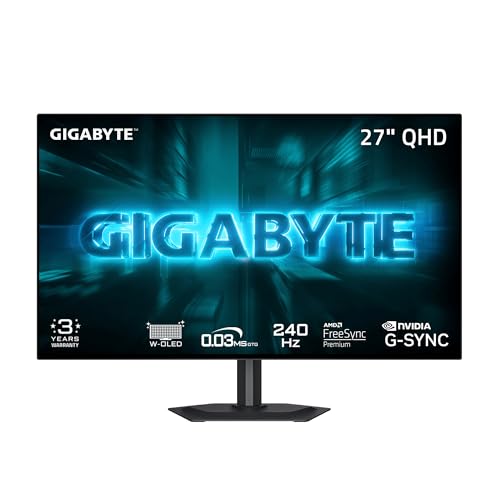
- 4-sided borderless 27-inch design saves visual space
- MLA+ WOLED with up to 1300 nits peak brightness
- 240Hz and 0.03ms with AI-based OLED Care
Best For: a clean, compact OLED setup with strong brightness and a borderless look
Compact Desktop Pick – Samsung 27" Odyssey OLED G5 QHD Gaming Monitor
If you want a space-saving OLED gaming monitor for a desk setup, the Samsung 27-inch Odyssey OLED G5 keeps things simple: a 27-inch QD-OLED panel, QHD resolution, and a matte finish that helps cut distractions. It’s built for fast play first, but the size and desk-mount design also make it easy to fit into a more compact gaming area.
Best For: Players who want a 27-inch OLED gaming display with strong color, fast response, and a relatively compact footprint.
Pros:
- QD-OLED panel with QHD 2560 x 1440 resolution for sharp detail and strong color accuracy
- 180Hz refresh rate and 0.03ms response time for fast-paced gaming
- Glare Free screen and OLED Safeguard thermal modulation help keep the image clear and the panel protected
- Pantone Validated with HDR10, plus G-Sync and FreeSync compatibility
Cons:
- At 27 inches, it is compact for a desktop monitor but not as portable as smaller travel displays
- Only one HDMI port is listed
Overall, the G5 is a practical pick if you want a mainstream-sized OLED gaming monitor that balances speed, image quality, and a clean desktop footprint. Its feature set is geared toward serious gaming without adding unnecessary bulk.
Portable Touch Option – UPERFECT 14" 3K OLED Touchscreen Monitor
The UPERFECT 14-inch OLED portable monitor is a space-saving OLED gaming monitor for people who need a display that can move with them. Its 0.12-inch thin metal build, 1.3-pound weight, and 14-inch size make it easy to slot into a laptop bag or small desk setup, while the 3K OLED panel adds the contrast and clarity you’d expect from a premium screen.
Best For: Portable gaming, editing, and touch-friendly setups where desk space is limited.
Pros:
- 14-inch 2880 x 1800 OLED panel with true blacks and rich contrast
- 120Hz refresh rate and 0.1ms response time for smooth motion
- Pixel-accurate touchscreen with zero offset for tapping, swiping, and drawing
- Ultra-slim 0.12-inch metal body and VESA support make it easy to carry and position
Cons:
- Full 120Hz is available through Type-C; HDMI is limited to 100Hz at 3K
- Brightness and color specs are strong, but this is still a smaller portable display rather than a full desktop replacement
For a compact secondary screen or travel-friendly OLED setup, this model stands out because it combines portability with genuinely high-end visuals. It is especially appealing if touch input matters as much as gaming performance.
High-Speed 27-Inch Choice – Samsung Odyssey OLED G6 QD-OLED Gaming Monitor
If you want a space-saving OLED gaming monitor that still delivers top-tier speed, the Samsung 27-inch Odyssey OLED G6 is built around a QD-OLED QHD panel with a slim desktop-friendly size. It keeps the same 27-inch footprint as many standard monitors, but adds a 240Hz refresh rate and 0.03ms response time for a much faster gaming experience.
Best For: Competitive gamers who want a 27-inch OLED monitor with very high refresh speed and a compact desk footprint.
Pros:
- 27-inch QD-OLED panel with QHD 2560 x 1440 resolution
- 240Hz refresh rate and 0.03ms response time for ultra-smooth gameplay
- Glare Free screen and OLED Safeguard thermal modulation help reduce distractions and protect the panel
- Height-adjustable ergonomic stand with pivot, tilt, and swivel support
Cons:
- Like most premium OLED gaming monitors, it is focused on performance rather than budget value
- Only one HDMI port is listed in the supplied details
The G6 is the better fit if speed is the priority and you still want a monitor that fits neatly on a normal gaming desk. It combines the familiar 27-inch size with faster refresh performance than the G5.
Ultra-Portable OLED Pick – UPERFECT 14" 3K Portable Gaming Monitor
The UPERFECT 14-inch portable OLED monitor is a practical space-saving OLED gaming monitor when you need strong image quality without taking over your desk. Its 0.12-inch ultra-slim metal design and 1.29-pound weight make it easy to move around, while the 3K OLED panel and high contrast ratio give it the visual punch expected from OLED.
Best For: Travelers, laptop gamers, and creators who need a slim OLED display with premium contrast.
Pros:
- 14-inch 2880 x 1800 OLED screen with true blacks and a 5,000,000:1 contrast ratio
- 120Hz refresh rate and 0.1ms response time for fluid motion
- 120% DCI-P3 gamut and 500 nits brightness for vivid, usable image quality
- Ultra-slim 0.12-inch full-metal design with a built-in 90-degree adjustable stand and dual VESA mounting holes
Cons:
- HDMI mode caps 2880 x 1800 at 100Hz, while full 120Hz requires Type-C
- As a 14-inch portable monitor, it is better as a secondary display than a main desktop screen
For a minimal setup, this monitor offers one of the easiest ways to add OLED quality without sacrificing space. It is especially strong if you want portability, deep contrast, and a display that can adapt to different mounting needs.
Ultra-Fast 27-Inch Pick – LG 27GX704A-B 27" QHD OLED 240Hz
If you want space-saving OLED gaming monitors that still feel premium, this 27-inch LG UltraGear is built for fast, focused play. It pairs a QHD OLED panel with a 240Hz refresh rate and 0.03ms response time, making it a strong fit for players who want speed, clarity, and a smaller desk footprint.
Best For: Competitive PC and console gamers who want a compact OLED with very high refresh rates.
Pros:
- 27-inch QHD OLED panel keeps the footprint compact while preserving sharp detail.
- 240Hz refresh rate and 0.03ms response time support very smooth, responsive gameplay.
- HDMI 2.1, DisplayPort, G-SYNC Compatible, and FreeSync Premium Pro make it easy to connect and sync.
- Adjustable stand and virtually borderless design help it fit neatly on a smaller setup.
Cons:
- Smaller screen size may not suit buyers who want a more immersive large-format display.
- Brightness is strong for OLED, but it is still a 27-inch monitor rather than a high-luminance LCD.
This is a clean choice if you want an OLED gaming monitor that saves desk space without giving up speed. It is especially appealing for players who care more about fast motion handling and crisp contrast than big-screen size.
Dual-Mode Performance Choice – Samsung Odyssey OLED G7 32" 4K
For shoppers comparing space-saving OLED gaming monitors but still wanting a bigger canvas, this 32-inch Samsung Odyssey OLED G7 brings 4K clarity and fast gaming features in one screen. Its dual-mode setup lets you switch between 4K at 165Hz and Full HD at 330Hz, so you can choose detail or speed depending on the game.
Best For: Players who want a larger OLED monitor with flexible performance modes for both visuals and high-speed gaming.
Pros:
- 32-inch 4K OLED panel delivers sharp visuals with a glossy screen finish.
- Dual Mode supports 4K 165Hz or Full HD 330Hz for different gaming priorities.
- 0.03ms response time, G-SYNC compatibility, and FreeSync Premium help keep motion smooth.
- Height-adjustable stand with pivot, tilt, and swivel adds ergonomic flexibility.
Cons:
- 32 inches takes up more desk space than a 27-inch option.
- 4K gaming can demand more from your GPU if you want to use the higher-resolution mode.
This monitor makes sense if you want a single OLED display that can shift between cinematic 4K and rapid competitive play. It is not the smallest option here, but it does give you a versatile mix of size, resolution, and speed.
Curved Smart Space Saver – LG 34GX90SA-W 34" Curved OLED
If you want space-saving OLED gaming monitors that still feel immersive, this 34-inch curved LG UltraGear is a strong all-in-one option. Its 800R curve, 240Hz refresh rate, and webOS smart features make it useful for gaming, streaming, and cloud play from a single display.
Best For: Gamers who want an ultrawide OLED with built-in streaming and cloud-gaming features.
Pros:
- 34-inch WQHD curved OLED screen provides an immersive ultrawide layout without going to a huge flat panel.
- 240Hz refresh rate and 0.03ms response time are built for fast gameplay.
- webOS24 adds built-in streaming apps and cloud gaming support without needing a PC or console.
- USB-C with 65W power delivery plus HDMI 2.1 and DisplayPort improve connectivity.
Cons:
- The 34-inch ultrawide format still needs more desk width than a 27-inch monitor.
- Its steep 800R curve may not suit every desk setup or preference.
This is the most feature-rich pick if you want your monitor to do more than just game. It combines OLED speed and contrast with smart TV-style convenience, which can reduce clutter by replacing extra streaming hardware.
Compact Speed Pick – MSI MAG 274QP QD-OLED X24 27-Inch WQHD
If you want a space-saving OLED gaming monitor that still delivers premium motion clarity, the MSI MAG 274QP QD-OLED X24 is a strong 27-inch WQHD option. It pairs a 240Hz refresh rate with 0.03ms response time, plus Quantum Dot OLED color and adaptive-sync support for smooth, vivid gameplay in a relatively compact footprint.
Best For: Players who want a compact 27-inch OLED with fast response, strong color accuracy, and flexible console or PC connectivity.
Pros:
- 240Hz refresh rate and 0.03ms response time for fast competitive play
- Quantum Dot OLED panel with 99% DCI-P3 and Delta E ≤ 2 color accuracy
- Fanless graphene heatsink and OLED Care 2.0 for panel protection
- HDMI 2.1, DisplayPort 1.4a, and 4-way adjustable stand
Cons:
- 27-inch size may still be more monitor than some ultra-tight desks want
- Peak brightness tops out at up to 400 nits in the supplied notes
- Focus is gaming-first, so it’s less about extra workspace than panel speed
This is a practical pick if you want a space-efficient OLED display that prioritizes speed, sharpness, and burn-in care without adding desk clutter.
Balanced All-Rounder – AOC 27" QHD 240Hz QD OLED Q27GAZD
The AOC 27-inch QD OLED monitor fits well into a space-saving OLED gaming monitors shortlist because it keeps the format compact while still pushing 240Hz and 0.03ms response. With QHD resolution, HDR400 True Black, and Adaptive-Sync, it aims to give you a clean, responsive gaming setup without needing a large desk footprint.
Best For: Gamers who want a compact 27-inch OLED with strong contrast, fast refresh, and broad device compatibility.
Pros:
- 240Hz refresh rate and 0.03ms response time for fluid gameplay
- QD OLED panel with HDR400 True Black for deep blacks and vivid visuals
- Adaptive-Sync and G-Sync Compatible support for smoother frames
- Includes HDMI cable and supports desktop, console, laptop, and more
Cons:
- Only one HDMI port is listed in the supplied details
- Glossy screen finish may reflect more light than matte alternatives
- Weight and dimensions suggest a full-featured 27-inch monitor, not an ultra-minimal one
Overall, this AOC is a straightforward choice if you want OLED contrast and esports-level speed in a desk-friendly 27-inch size.
Borderless Desk Saver – GIGABYTE GO27Q24G 27" W-OLED 240Hz
The GIGABYTE GO27Q24G is built for gamers who want a space-saving OLED gaming monitor with a cleaner, more open-looking desk presence. Its 4-sided borderless design helps maximize screen real estate, while the 27-inch WOLED panel, 240Hz refresh rate, and 0.03ms response keep it firmly in performance territory.
Best For: Players who want a borderless 27-inch OLED with strong brightness, fast motion handling, and burn-in protection tools.
Pros:
- 4-sided borderless design is ideal for tighter, multi-monitor desk layouts
- WOLED panel with MLA+ and up to 1300 nits peak brightness
- 240Hz refresh rate and 0.03ms response time for fast action
- GIGABYTE OLED Care uses AI-based protection to reduce burn-in risk
Cons:
- The notes emphasize panel tech more than stand adjustability or connectivity extras
- Glossy RealBlack finish may still be sensitive to bright-room reflections
- Designed to be compact visually, but still a standard 27-inch monitor physically
If your priority is a tidy, immersive setup, this GIGABYTE stands out for its borderless look and strong OLED performance in a desk-friendly size.
How We Picked the Best Space-Saving OLED Gaming Monitors
We focused on models that make sense for smaller desks, dual-use setups, and portable gaming. Priority went to compact screen sizes, slim stands or portable designs, strong OLED panel quality, and gaming specs that actually matter: high refresh rates, low response times, and adaptive sync support.
We also considered practical factors like connectivity, VESA mounting, panel type, and whether the monitor fits a lean setup without forcing compromises in image quality or motion clarity.
Quick Comparison
Most buyers will be choosing between three categories: 27-inch desktop models, ultrawide 34-inch options for a more immersive but still desk-friendly footprint, and 14-inch portable monitors for travel or secondary-screen use. If your priority is pure desk efficiency, 27-inch models are usually the sweet spot. If you want maximum portability, the 14-inch OLED portables are the clear winners.
Key Buying Factors for Space-Saving OLED Gaming Monitors
Screen Size and Footprint
Smaller does not always mean less immersive. A 27-inch OLED monitor is often the best balance of viewing comfort and desk space, while 34-inch ultrawides can still fit well if your desk is wide enough. Portable monitors are best for ultra-tight spaces, dorm rooms, and travel.
Resolution and Refresh Rate
For most gamers, QHD at 240Hz is the ideal mix of sharpness and speed. Portable models may use 3K resolution, which helps preserve detail on smaller panels. If you play competitive shooters, prioritize refresh rate and response time first. If you prefer cinematic games, resolution and panel quality matter more.
Panel Type and Image Quality
OLED and QD-OLED panels deliver excellent black levels, color saturation, and motion handling. That makes them especially appealing in Space-Saving OLED Gaming Monitors, where you want a smaller screen to still feel premium and immersive.
Stand, Mounting, and Connectivity
Look for slim stands, VESA support, HDMI 2.1, DisplayPort, and USB-C where needed. These features can make a big difference in how easily the monitor fits into a compact setup or a multi-device workspace.
Who Should Buy Which Space-Saving OLED Gaming Monitors?
If you want the best all-around desktop gaming setup, choose a 27-inch QD-OLED or W-OLED model with 240Hz. If you want more horizontal workspace for gaming and multitasking, a 34-inch ultrawide is worth considering. If portability is the main goal, a 14-inch OLED monitor is the most space-efficient choice and ideal as a second screen or travel display.
In short, the best option depends on how much desk space you have, how you play, and whether your monitor needs to stay at home or move with you.