Choosing the right desk matters more when your setup includes one or more large monitors, a heavy arm mount, and plenty of accessories. The best options combine size, stability, lifting strength, and smart cable control.
This roundup highlights standing desks for heavy monitor setups that are built to handle real-world home office and creative workstation demands without wobble or clutter.
Best 10 Standing Desks for Heavy Monitor Setups Picks for 2026
Extra-Wide Stability Pick
FEZIBO 83 x 37" Dual-Beam Desk

- 83 x 37 inch top for multi-screen layouts
- 220 lb capacity with dual crossbeam frame
- 1-inch thick top works with monitor arms
Best For: Large multi-monitor workstations that need maximum space and steadiness
Deep Top Value
VIVO 83 x 30" Electric Standing Desk

- 83 x 30 inch top adds useful depth for monitors
- 220 lb all-steel frame support
- 4 memory presets with 29.2 to 48.4 inch range
Best For: Heavy home-office setups that need depth, presets, and solid support
Compact Heavy-Lift Pick
DeskShow 60 x 28" Double-Beam Desk

- Double-beam frame supports up to 220 lbs
- 1-inch thick top helps steady monitor setups
- Quiet lift and quick 30-minute setup
Best For: Smaller rooms that still need strong support for heavier monitor rigs
Seamless Desktop Value
FLEXISPOT EN1 55"x28" One-Piece Standing Desk

- One-piece desktop aims for better stability
- 1-inch thick top helps resist sagging
- 28-inch depth works well for dual monitors
Best For: Smaller home offices needing a sturdy, simpler standing desk
Compact Stability Pick
ErGear 63 x 28 Electric Standing Desk

- 63 x 28-inch top suits dual-screen workspaces
- 4 memory presets for quick height changes
- Steel frame tested for 100,000 lift cycles
Best For: Users who want a stable, compact electric desk for multi-monitor setups
Heavy-Duty Wide Workspace
HUANUO 71 x 30 Large Electric Standing Desk
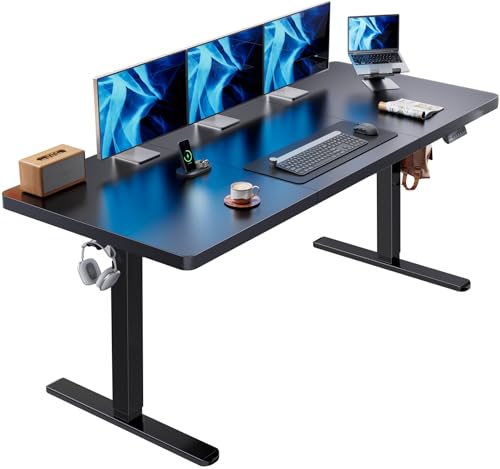
- 71 x 30-inch desktop fits multiple monitors easily
- 220 lb capacity for heavier equipment
- Cable tray and dual hooks help manage clutter
Best For: Users with large, heavy monitor setups who want maximum workspace and capacity
Extra-Deep Ergonomic Choice
Grandder 55x32 Electric Standing Desk

- 31.5-inch depth helps position ultrawide monitors properly
- 176 lb capacity with stable T-shaped steel frame
- Anti-collision system adds safety during height changes
Best For: Ultrawide and dual-monitor setups that need deeper desktop spacing
Extra-Wide Stability Pick – FEZIBO 83 x 37" Dual-Beam Desk
If you need standing desks for heavy monitor setups, this FEZIBO model is built for large layouts first and foremost. The 83 x 37 inch top gives you generous room for multiple screens, a PC tower, and accessories, while the reinforced dual-beam frame is aimed at reducing wobble when the desk is raised.
Best For: Users who want a very large, stable standing desk for multi-monitor workstations or gaming setups.
Pros:
- 83 x 37 inch desktop creates deep, organized zones for monitors and gear
- Supports up to 220 lbs with a dual crossbeam heavy-duty steel frame
- 1-inch thick tabletop is monitor arm-friendly and made from FSC-certified wood
- Memory controller saves up to 3 height presets and includes an 18W USB-C port
Cons:
- Large footprint may be too big for compact rooms
- Desktop and frame ship in separate packages
The standout here is scale plus stability: it is one of the strongest matches if your setup includes multiple displays and heavier accessories. If desk space and load support matter more than a compact footprint, this is an easy model to shortlist.
Deep Top Value – VIVO 83 x 30" Electric Standing Desk
For standing desks for heavy monitor setups, this VIVO option focuses on a wide, extra-deep surface and solid weight support. The 83 x 30 inch top gives you room for monitors and supplies, and the all-steel frame is rated to hold up to 220 lbs for a sturdier everyday workstation.
Best For: Buyers who want a deep, large electric desk with memory presets for a heavy home-office or dual-monitor setup.
Pros:
- 83 x 30 inch desktop offers extra depth for monitor setups
- All-steel frame supports up to 220 lbs
- Electric height adjustment ranges from 29.2 to 48.4 inches
- 4 memory presets make it easy to return to preferred heights
Cons:
- Particle board desktop may not feel as premium as thicker wood tops
- Assembly is recommended for 2 people
This desk is a practical pick if you want a broad, deep workspace without moving into ultra-premium sizing. It balances capacity, height range, and preset convenience well for a busy monitor-heavy desk.
Dual-Motor Heavy-Duty Pick – FLEXISPOT 79 x 32" Dual Motor Desk
If you are shopping standing desks for heavy monitor setups, this FLEXISPOT model stands out for its dual-motor lift system and 198 lb capacity. The 79 x 32 inch surface gives you a wide, workable layout for multiple devices, while the steel frame is meant to keep the desk steady through daily height changes.
Best For: Creators, professionals, or gamers who want a smooth dual-motor desk with a large desktop for multiple monitors.
Pros:
- Dual motors are designed for smooth, stable lifting
- 79 x 32 inch surface provides generous room for multiple devices
- Steel frame supports up to 198 lbs
- Memory controller offers 4 preset heights for quick switching
Cons:
- 198 lb capacity is slightly lower than some competing heavy-duty desks
- 0.63-inch tabletop is thinner than 1-inch heavy-top options
This is a strong fit if you want an easier, quieter lift experience more than the absolute highest weight rating. The size is well suited to multitasking setups, and the dual motors are the main appeal for frequent sit-stand use.
Compact Heavy-Lift Pick – DeskShow 60 x 28" Double-Beam Desk
For standing desks for heavy monitor setups in a smaller footprint, this DeskShow model is built around a reinforced double-beam frame and a 1-inch thick top. Even with the more compact 60 x 28 inch surface, it still supports up to 220 lbs and is meant to handle office or gaming equipment reliably.
Best For: Buyers who want a smaller electric standing desk that still offers strong load support and stable monitor placement.
Pros:
- Double-beam steel frame is rated for up to 220 lbs
- 1-inch thick desktop adds stability for monitors and equipment
- Quiet motor operates at less than 45dB
- Pre-drilled, pre-labeled parts are designed for a fast 30-minute setup
Cons:
- 60 x 28 inch surface is smaller than other heavy-monitor options
- Only 3 memory presets, fewer than some competitors
This desk makes sense if your room is tighter but you still need sturdy support for a monitor-heavy setup. It gives up some desktop real estate, but keeps the frame strength and simple setup that matter most.
Heavy-Duty Multi-Monitor Pick – FLEXISPOT 63"x28" Dual Motor Standing Desk
If you’re comparing standing desks for heavy monitor setups, this FLEXISPOT model is built around space and stability. The 63″ x 28″ desktop gives you room for multiple screens, a laptop, and accessories, while the dual-motor lift system is designed for smooth, quiet height changes during long work sessions.
Best For: Creators, remote workers, and gamers who need a roomy desk with solid support for multi-monitor setups.
Pros:
- 63″ x 28″ desktop leaves ample room for dual monitors and other gear
- Dual motors provide smooth, quiet height adjustment
- Steel frame supports up to 198 lbs for heavier workstation builds
- Modern black finish fits home offices, studios, and gaming rooms
Cons:
- Maximum capacity is strong, but lower than some heavier-duty rivals
- Large footprint may be too wide for compact rooms
For users who want a practical sit-stand desk with real room for multiple displays, this one balances workspace, lift performance, and everyday usability well.
Best Power Hub Desk – Huuger 71" x 30" Standing Desk
Among standing desks for heavy monitor setups, this Huuger model stands out for size and built-in convenience. The extra-wide 71″ x 30″ top gives you generous room for monitors and peripherals, while the reinforced steel frame and 220 lb rating are aimed at keeping larger workstations steady.
Best For: Users who want a wide standing desk with built-in power outlets for a busy monitor-and-accessory setup.
Pros:
- Large 71″ x 30″ surface offers plenty of room for multiple devices
- Built-in charging station includes 4 AC outlets, USB, and USB-C
- Reinforced steel frame and T-structure support up to 220 lbs
- Four memory presets and quiet motor make adjustments easy
Cons:
- Large size may require a generous floor space
- No drawer included for hidden storage
If you want a desk that can anchor a large monitor setup and also reduce outlet clutter, this Huuger is especially practical for high-use home offices and gaming spaces.
Seamless Desktop Value – FLEXISPOT EN1 55"x28" One-Piece Standing Desk
If you want standing desks for heavy monitor setups without moving to a huge footprint, this FLEXISPOT EN1 is a strong middle-ground option. Its one-piece 1-inch desktop is built for a more rigid feel, and the 28-inch depth gives you useful room for dual screens or other work tools.
Best For: Home office users and creators who want a sturdy, seamless desktop for dual monitors in a smaller space.
Pros:
- One-piece desktop is designed for a more stable, zero-wobble feel
- 1-inch thick top is made to resist sagging under heavier gear
- 28-inch depth gives extra room compared with shallower desks
- Four memory presets and electric adjustment improve daily comfort
Cons:
- 176 lb weight capacity is lower than some larger heavy-duty desks
- 55-inch width is less expansive than bigger multi-monitor models
This desk makes sense if you value a solid desktop and easier setup more than maximum size. It should suit a focused dual-monitor workstation well.
Compact Stability Pick – ErGear 63 x 28 Electric Standing Desk
If you want standing desks for heavy monitor setups without giving up a manageable footprint, this ErGear model is a solid fit. The 63 x 28-inch top gives you room for a dual-monitor workstation or gaming rig, while the steel frame and aerospace-grade lifting columns are built for steadier use at higher positions.
Best For: Home office or gaming users who want a stable electric desk with memory presets in a more compact size.
Pros:
- Electric height adjustment from 28.35″ to 46.46″ for easy sit-to-stand changes.
- Memory presets let you save up to 4 preferred heights.
- Heavy-duty alloy steel frame is tested for 100,000 lift cycles.
- Low-VOC materials and simplified assembly make setup easier.
Cons:
- 28-inch depth is less roomy than extra-deep desks for very large monitor arms or accessories.
- Maximum weight recommendation is 176 pounds, so ultra-heavy setups may need a larger-capacity option.
Overall, this is a practical choice if you need reliable electric adjustment and stable support, but do not need the widest desktop available. It is especially appealing for everyday workspaces that still need to handle multiple screens comfortably.
Heavy-Duty Wide Workspace – HUANUO 71 x 30 Large Electric Standing Desk
For standing desks for heavy monitor setups, the HUANUO stands out with a very wide 71 x 30-inch desktop and a frame rated to support up to 220 pounds. That combination gives you more surface area for multiple monitors, a laptop, and accessories, while the brushless motor keeps adjustments quick and quiet.
Best For: Large home office or gaming setups that need extra width, deeper desktop space, and higher weight capacity.
Pros:
- 71 x 30-inch desktop leaves plenty of room for multiple monitors and work essentials.
- 220 lb capacity and reinforced steel frame are designed for heavier equipment.
- Brushless motor lifts faster while staying under 55 dB.
- Includes a cable tray and two hooks for better organization.
Cons:
- Ships in 2 packages, so delivery may arrive separately.
- Large size may be more desk than smaller rooms need.
This is the most convincing option in the group if your priority is supporting a big monitor array with room to spare. It combines size, capacity, and useful accessories in a package aimed at heavier daily use.
Extra-Deep Ergonomic Choice – Grandder 55×32 Electric Standing Desk
If your heavy monitor setup needs better viewing distance more than sheer width, this Grandder desk is built around that problem. Its extra-deep 31.5-inch desktop is specifically designed to place a 49-inch ultrawide monitor correctly while still leaving room for a keyboard, mouse, and speakers.
Best For: Ultrawide or dual-monitor users who want a deeper desktop for more ergonomic spacing.
Pros:
- 31.5-inch depth provides more room than standard 55-inch desks.
- Designed to fit a 49-inch ultrawide monitor at a better viewing distance.
- Supports up to 176 pounds with a stable T-shaped steel frame.
- Quiet electric lift includes 2 memory presets and anti-collision protection.
Cons:
- Only 2 memory presets, which is fewer than some other options.
- Weight capacity is lower than heavier-duty desks like 220 lb models.
This desk makes the most sense when your setup feels cramped front-to-back rather than side-to-side. For ultrawide displays and ergonomics-focused workstations, the extra depth is the main advantage.
How We Picked the Best Standing Desks for Heavy Monitor Setups
For Standing Desks for Heavy Monitor Setups, we focused on the features that affect everyday stability and usability: weight capacity, desktop size and depth, frame strength, motor quality, memory presets, and cable management. We also favored models with enough surface area for dual monitors, ultrawide displays, and laptop-plus-monitor layouts.
We gave extra attention to desks with thicker tops, dual-motor or reinforced lift systems, and wider bases that help reduce sway at standing height. If you use monitor arms, audio gear, or a PC tower on the desktop, those details matter more than cosmetic extras.
Quick Comparison
Broadly, the larger 71- to 83-inch desks are the best fit for expansive multi-monitor workstations. Mid-size models around 60 to 63 inches can still work well if you have two monitors or a single ultrawide and want a more compact footprint. Smaller desks are better suited to lighter setups or rooms where space is limited.
Capacity is equally important. A higher weight rating does not just support the monitors themselves; it also helps the desk remain steady when raised, lowered, or adjusted throughout the day.
Key Buying Factors for Standing Desks for Heavy Monitor Setups
Desktop Size and Depth
A deeper desktop improves viewing distance and gives monitor arms, speakers, and peripherals more usable space. For heavier setups, look for at least 30 inches of depth if possible.
Weight Capacity and Frame Stability
Choose a desk with enough headroom above your current equipment load. Extra capacity helps preserve stability and reduces strain on the lifting system over time.
Motor and Lift Design
Dual motors generally provide smoother, more balanced lifting for larger desktop loads. Reinforced crossbars or dual-beam frames can also improve rigidity during height changes.
Surface Layout and Cable Management
Integrated cable trays, grommets, or built-in power options make a noticeable difference on busy desks. Cleaner routing reduces tugging on monitor arms and keeps the workspace safer and easier to adjust.
Who Should Buy Which Standing Desks for Heavy Monitor Setups?
If you run dual monitors, a monitor arm, and several accessories, prioritize the largest, most stable desks in the roundup. If your setup includes one ultrawide display or a moderate multi-device workstation, a mid-size model with strong capacity may be the better balance of space and value.
For users who want a clean desk with charging built in, choose a model with outlets or USB-C. If your room is smaller, a compact but sturdy desk with a thick top and solid frame will usually be the most practical option.
In short, the best pick depends on how much gear you place on the desktop and how much room you need to work comfortably at both sitting and standing heights.