When you’re building a heavy-duty PC setup, the case you choose can make all the difference. A sturdy steel frame not only protects your components but also adds a touch of style to your workspace. With so many options available, it’s essential to find a case that balances durability, airflow, and aesthetics. Let’s explore some of the top choices that cater to high-performance builds and keep your system cool and organized.
CORSAIR 4000D RS Frame Modular High Airflow Mid-Tower PC Case

If you’re a PC enthusiast seeking a blend of performance and customization, the CORSAIR 4000D RS Frame Modular High Airflow Mid-Tower PC Case is an excellent choice. This case features a FRAME Modular Case System that allows extensive upgrades to the motherboard tray and front I/O panel, making personalization nearly limitless. Equipped with three high-performance CORSAIR RS PWM Fans, it guarantees superior cooling, and the unique InfiniRail Fan Mounting System offers unmatched flexibility in fan configuration. The 3D Y-Pattern Airflow Panel enhances airflow, while compatibility with various cooling setups solidifies its status as a top-tier option for your build.
Best For: PC enthusiasts looking for a highly customizable and efficient cooling solution for their builds.
Pros:
- Extensive customization options with the FRAME Modular Case System for personalized upgrades.
- High-performance cooling provided by three CORSAIR RS PWM Fans, ensuring optimal airflow and temperature management.
- Flexible fan mounting configurations with the InfiniRail Fan Mounting System, allowing for targeted and efficient airflow.
Cons:
- Limited space for larger components if not carefully planned, particularly with larger GPUs or additional cooling solutions.
- Potential for increased noise levels if fans are run at higher RPMs under load, despite the Zero RPM mode for quieter operation at low loads.
- Requires some technical knowledge for optimal setup and customization, which may not be ideal for beginners.
E02 DIY Computer Case PC Frame Desktop Chassis

The E02 DIY Computer Case PC Frame Desktop Chassis is perfect for enthusiasts who love flexibility in their builds. It fits ATX, MATX, and EATX motherboards, making it versatile for various setups. You can stack it horizontally or vertically, accommodating up to ten layers. With impressive cooling support, you can install eight 120mm fans or multiple radiators, ensuring maximum temperatures. Storage isn’t an issue, with space for two HDDs and four SSDs. Additional features, like a power switch and motherboard spacer wrench, enhance usability. Plus, it supports CPU coolers up to 165mm tall, making it an ideal choice for heavy-duty builds.
Best For: DIY computer builders and enthusiasts looking for a flexible, stackable chassis for their setups.
Pros:
- Versatile compatibility with ATX, MATX, and EATX motherboards.
- Excellent cooling options with support for multiple fans and radiators.
- Ample storage capacity for both HDDs and SSDs.
Cons:
- Open air design may expose components to dust and debris.
- Stacking may require additional space, limiting placement options.
- Assembly may be complex for beginners unfamiliar with DIY builds.
HAVN BF 360 Flow High Airflow ATX Mid Tower PC Case
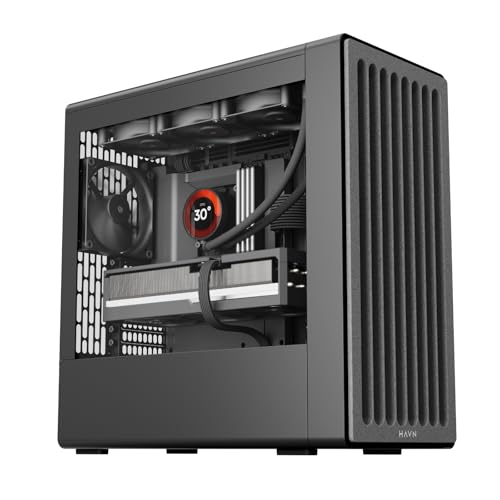
For gamers seeking top-tier cooling performance, the HAVN BF 360 Flow High Airflow ATX Mid Tower PC Case stands out with its exceptional airflow design. Equipped with two 180mm and one 140mm fan, it delivers an impressive 160CFM airflow at low RPM. Its 135° angled air duct efficiently directs airflow to the GPU, keeping your system cool during intense gaming sessions. The durable SGCC steel frame offers robust structural integrity, while the user-friendly cable management system guarantees a tidy build. Plus, the noise-reduction features assure a quieter experience, making it an ideal choice for high-performance setups.
Best For: Gamers and PC enthusiasts seeking superior airflow and cooling performance in their builds.
Pros:
- Exceptional airflow with 160CFM from included fans, enhancing cooling for high-load gaming.
- Durable construction with SGCC steel and a reinforced structure for long-term reliability.
- User-friendly cable management system for a clean and organized build.
Cons:
- The semi-open frame design may not appeal to users preferring a fully enclosed case.
- Limited space for additional storage options may be a drawback for users with extensive hardware needs.
- Potentially higher noise levels if additional fans are installed beyond the included ones.
Kingwin Miner Rig Case Frame for 12 GPUs

Designed specifically for cryptocurrency miners, the Kingwin Miner Rig Case Frame accommodates up to 12 GPUs, making it an ideal choice for anyone looking to optimize their mining setup. Its premium build quality guarantees robust support and stability, promoting reliable long-term performance. You’ll appreciate the space-efficient design that maximizes capabilities without cluttering your area. The open-air design enhances airflow, effectively dissipating heat during extended sessions. Plus, its versatile compatibility with various GPU models makes integration seamless. With tool-less assembly, you can quickly set up your rig and focus on what matters—boosting your mining operations efficiently.
Best For: Cryptocurrency miners looking for a reliable and efficient setup to accommodate multiple GPUs.
Pros:
- Premium Build Quality: Ensures robust support and stability for long-term performance.
- Efficient Cooling: Open-air design promotes airflow, keeping GPUs at optimal temperatures.
- Easy Assembly: Tool-less setup allows for quick rig construction and optimization.
Cons:
- Limited GPU Capacity: Designed for up to 12 GPUs, which may not meet the needs of larger mining operations.
- Open-Air Design: While beneficial for cooling, it may expose components to dust and debris.
- Space Requirement: Despite being space-efficient, the footprint might still be considerable for smaller setups.
Stackable Open Air Computer Case Rack for ATX/MATX/ITX Motherboards
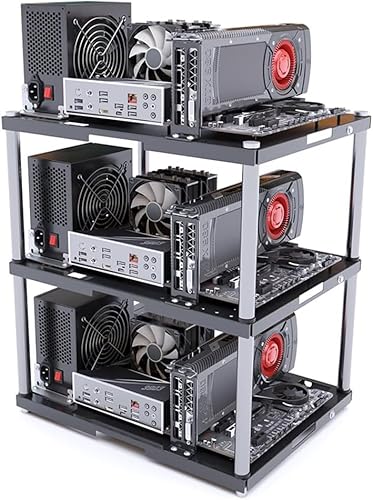
Looking for a flexible solution that accommodates various motherboard sizes? The Stackable Open Air Computer Case Rack is perfect for you. Designed for ATX, MATX, and ITX motherboards, it’s ideal for studio setups, mining rigs, or DIY builds. With a stackable design, you can save space and expand your rig up to ten layers. Its open frame promotes excellent airflow, keeping your hardware cool during intense workloads. Constructed from heavy-duty metal, each layer supports up to 20kg, ensuring durability. Easy assembly includes all necessary accessories, making it suitable for beginners and pros alike. Enjoy versatility and reliability in one stylish package!
Best For: The Stackable Open Air Computer Case Rack is best for tech enthusiasts and DIY builders looking for a versatile and expandable solution for their ATX, MATX, or ITX motherboard setups.
Pros:
- Versatile design accommodates multiple motherboard sizes, making it suitable for various builds.
- Excellent airflow due to the open frame design, promoting cooling and enhancing hardware performance.
- Heavy-duty construction supports up to 20kg per layer, ensuring durability for intensive applications.
Cons:
- Additional layers sold separately, which can increase the overall cost for larger setups.
- Open-air design may expose components to dust and debris, requiring more maintenance.
- Assembly required, which might be challenging for beginners without prior experience.
CORSAIR 4000D RS Frame Modular Mid-Tower PC Case

The CORSAIR 4000D RS Frame Modular Mid-Tower PC Case stands out with its exceptional airflow design, making it an ideal choice for gamers and PC enthusiasts who demand peak cooling performance. With its high airflow front panel and pre-installed CORSAIR RS PWM fans, you’ll enjoy efficient cooling even during intense gaming sessions. The FRAME Modular Case System allows for easy upgrades, letting you customize your setup with options like an aluminum motherboard tray and extra USB ports. Plus, the InfiniRail Fan Mounting System offers flexible fan placement, ensuring your build remains stylish and functional while keeping temperatures in check.
Best For: Gamers and PC enthusiasts seeking high airflow and customization options for their builds.
Pros:
- High airflow design ensures optimal cooling performance during intense gaming sessions.
- Modular customization features allow for easy upgrades and personalization of the PC case.
- Flexible fan mounting options provide versatility in airflow management and aesthetics.
Cons:
- Limited color options, as it is available only in white.
- Size may not suit compact builds, as it’s a mid-tower case.
- Installation of additional components could be complex for beginners due to modular design.
DIY Computer Case PC Frame Desktop Chassis Stackable Rack Stand

For those who prioritize versatility and mobility in their PC builds, the DIY Computer Case PC Frame Desktop Chassis Stackable Rack Stand offers an ideal solution. This open air testbench fits various motherboard sizes, including ATX, ITX, and E-ATX, ensuring you have flexibility. With dimensions of 435mm by 340mm, it’s compact yet spacious for components. You can easily stack it or place it flat, enhancing portability. Cooling options are impressive, supporting multiple fans and large radiators. Plus, it accommodates up to four mechanical hard drives and three SSDs, making it perfect for heavy builds.
Best For: PC builders who need a versatile, portable, and efficient solution for testing and assembling their systems.
Pros:
- Excellent compatibility with various motherboard sizes (ATX, ITX, E-ATX).
- Impressive cooling support with options for multiple fans and large water cooling radiators.
- Stackable design allows for easy organization and mobility.
Cons:
- Open air design may expose components to dust and debris.
- Limited built-in storage options compared to traditional cases.
- May require additional accessories for optimal cable management.
DIY Computer Motherboard Case Rack, ATX/M-ATX/ITX Open Air Frame Chassis

If you’re a DIY enthusiast searching for a versatile case for your motherboard, the DIY Computer Motherboard Case Rack stands out as an ideal choice. Supporting ATX, M-ATX, and ITX motherboards, this open air frame chassis promotes vertical overclocking. Its lightweight, compact design measures 12.40 x 9.69 x 13.9 inches, making it easy to assemble and disassemble. Constructed from durable 20×20 aluminum profiles, it guarantees stability while allowing excellent heat dissipation. Plus, maintaining the acrylic panels keeps them bright and clear. With a focus on safety and reliable after-sales support, this rack enhances your DIY experience effortlessly.
Best For: DIY enthusiasts looking for a versatile and customizable motherboard case for ATX, M-ATX, or ITX configurations.
Pros:
- Supports multiple motherboard sizes (ATX, M-ATX, ITX) for versatility in builds.
- Open air design ensures excellent heat dissipation, promoting better performance and reliability.
- Lightweight and compact construction makes it easy to assemble, disassemble, and transport.
Cons:
- Requires DIY assembly, which may not be suitable for users seeking a plug-and-play solution.
- Lacks a traditional closed case design, which may not appeal to those preferring aesthetics and dust protection.
- Regular maintenance of acrylic panels is necessary to maintain clarity and brightness.
Rosewill 4U Server Chassis (RSV-R4000U)
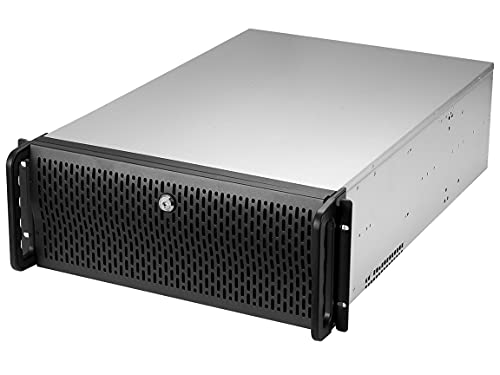
Need a reliable server chassis that can handle demanding workloads? The Rosewill 4U Server Chassis (RSV-R4000U) is perfect for you. With 11 bays, including 8 internal 3.5” HDD bays and 3 additional 5.25” device bays, you’ll have plenty of space for your components. It supports ATX and CEB motherboards, and you can expand with 7 PCI slots. Equipped with 4 pre-installed fans, it guarantees excellent airflow while keeping noise to a minimum. Plus, the front panel lock adds security, and the LED indicators help you monitor power, HDD, and LAN status easily.
Best For: Those seeking a robust and secure server chassis capable of accommodating multiple drives and ensuring efficient cooling for demanding workloads.
Pros:
- Ample Storage: Features 11 bays, including 8 internal 3.5” HDD bays, providing plenty of space for expansion.
- Effective Cooling: Comes with 4 pre-installed fans that maintain excellent airflow while minimizing noise levels.
- Enhanced Security: Equipped with a front panel lock to protect against unauthorized access to server components.
Cons:
- Size: The 4U form factor may be too large for some setups, requiring sufficient rack space.
- Limited USB Ports: Only 2 x USB 3.0 ports may not be sufficient for users needing multiple external connections.
- Weight: The chassis may be heavy, making it less portable for users who need to move their server frequently.
VEVOR PC Gaming Case with High-Airflow Tempered Glass Panel

The VEVOR PC Gaming Case with High-Airflow Tempered Glass Panel is a perfect choice for content creators who require ample storage and cooling efficiency. It supports ATX motherboards and accommodates up to 16 hard disks, making it ideal for managing large datasets. With four pre-installed 120mm fans and the option for even more, you’ll enjoy excellent cooling during intense tasks. Built from durable SPCC steel and tempered glass, it reduces vibrations while ensuring stability. The convenient I/O interface provides easy access to essential ports, and built-in dust filters keep your hardware clean and performing at its best.
Best For: Content creators and gamers who need ample storage and efficient cooling for their high-performance hardware.
Pros:
- Spacious storage options supporting up to 16 hard disks for large datasets and files.
- Excellent cooling efficiency with multiple fan configurations to maintain optimal temperatures.
- Durable construction using SPCC steel and tempered glass, effectively reducing vibrations.
Cons:
- Limited pre-installed fans may require additional purchases for maximum cooling setup.
- Heavier design due to the materials used, making it less portable.
- Potentially complicated cable management due to the spacious layout and numerous components.
Factors to Consider When Choosing Steel Frame PC Cases for Heavy Builds
When you’re picking a steel frame PC case for heavy builds, several key factors can make a big difference. You’ll want to contemplate build quality, cooling efficiency, and how well it accommodates your components. Don’t forget about cable management and how easy it is to assemble and maintain your setup.
Build Quality and Durability
While choosing a steel frame PC case for heavy builds, it is essential to prioritize build quality and durability. Steel cases offer superior structural integrity, making them perfect for supporting high-performance components. Look for SGCC steel, as it enhances resistance to bending and deformation, ensuring your setup lasts. Premium cases often come with reinforced structures, which not only improve stability but also reduce vibrations—important for maintaining performance in heavy configurations. Additionally, steel’s heat-dissipating properties can handle higher temperatures better than plastic, protecting your sensitive components. Finally, the weight of steel frames contributes to a lower center of gravity, helping maintain balance, especially in setups with multiple heavy GPUs or cooling systems.
Cooling System Efficiency
Choosing the right cooling system is essential for maintaining ideal performance in your heavy build, especially in a steel frame PC case. Look for cases with multiple fan mounting options so you can customize airflow with various fan sizes. High airflow designs featuring perforated panels improve air intake, markedly enhancing cooling performance during intensive tasks. Consider cases that support large, high-performance fans (like 180mm or 200mm) for better airflow at lower RPMs, which reduces noise. Additionally, effective cooling systems often accommodate liquid cooling solutions, such as multiple radiators, for superior heat dissipation. Finally, prioritize cable management features that promote organized airflow, ensuring cool air reaches critical components while efficiently expelling hot air.
Compatibility With Components
Compatibility is vital in ensuring your heavy build functions smoothly within a steel frame PC case. First, check that the case supports your motherboard size, whether it’s ATX, MATX, or ITX, to guarantee a proper fit. Next, confirm the maximum GPU length and height to accommodate high-end graphics cards, which are essential for heavy builds. Don’t forget to verify compatibility with CPU coolers, paying attention to height limitations for effective heat dissipation. You’ll also want to examine the number and types of drive bays available for storage, ensuring you have enough space for multiple hard drives and SSDs. Finally, assess the case’s cooling potential, including fan mount locations and radiator support, to maintain ideal temperatures during intensive tasks.
Cable Management Features
Effective cable management is essential for your heavy build, as it not only keeps your setup looking neat but also enhances airflow, reducing the risk of overheating. When choosing a steel frame PC case, look for integrated channels and Velcro straps that allow for tidy cable routing behind the motherboard tray. Cases with ample space, typically 25 to 30mm, make it easier to manage cables while minimizing clutter. Removable side panels are a fantastic feature, providing easy access for adjustments while keeping cables hidden. Additionally, some cases come with dedicated cable management trays or brackets, helping secure and organize cables, preventing tangling, and streamlining your build process. Prioritize these features for a cleaner, cooler system.
Assembly and Maintenance Ease
A well-organized setup not only looks great but also makes assembly and maintenance simpler. When choosing a steel frame PC case, look for tool-less assembly options to speed up the setup and maintenance process. Integrated cable management systems are essential, as they streamline cable organization and enhance airflow. You’ll appreciate modular designs that provide easy access to components, making upgrades and repairs hassle-free. Cases with removable panels or trays allow you to clean and maintain internal components without the need for full disassembly. Finally, evaluate cases that come with clear instructions or visual aids, ensuring a smoother building experience, especially if you’re a beginner. These features collectively ease the assembly and upkeep of your heavy build.
Airflow Design Optimization
How essential is airflow design when selecting a steel frame PC case for heavy builds? It’s vital for maintaining ideal temperatures. Look for cases that feature a 3D Y-Pattern Airflow Panel, which minimizes resistance and enhances cool air intake. Perforated steel front panels are another must-have, as they greatly improve airflow and thermal performance. Opt for high-performance fans, like 180mm models, that can push up to 160CFM while keeping noise levels low. Multi-point fan mounting systems let you position fans strategically to target critical components such as the GPU and VRMs. Finally, consider open-air frame designs that promote superior heat dissipation, ensuring your setup stays cool even during intense gaming or heavy workloads.
Size and Space Considerations
Choosing the right size and space for your steel frame PC case is important, especially for heavy builds. First, check that the case dimensions accommodate your motherboard type—whether it’s ATX, MATX, or EATX. You’ll need enough internal space for your graphics cards, cooling systems, and storage drives, so look for cases designed for larger builds. Height and width are significant too; verify they can hold larger CPU coolers and GPUs. Opt for cases that allow multiple fan and radiator configurations to improve airflow, which is essential for managing heat. Finally, make sure there are ample mounting points and cable management options to keep everything organized and efficient in your complex setup.
Expandability and Modularity Options
When selecting a steel frame PC case for heavy builds, expandability and modularity are crucial factors to take into account. Look for cases with modular designs that allow you to customize layouts and upgrade components like motherboard trays and front I/O panels as your needs evolve. Consider models that offer multiple fan mounting options, including room for fans up to 200mm to improve airflow and cooling efficiency. Evaluate the stackability of cases for extra space to accommodate additional components or cooling solutions. Confirm compatibility with various motherboard sizes (ATX, MATX, E-ATX) for future upgrades. Finally, assess cooling options, including the ability to install large radiators or fan configurations to maintain ideal temperatures during intense usage.