When you’re in the market for a dual system workstation case, blending performance with style is essential. You want a setup that not only keeps your components cool but also complements your workspace. From robust cooling solutions to elegant designs, the right case can make all the difference. Let’s explore some of the top options that promise to enhance both functionality and aesthetics for your dual system needs.
Thermaltake Core W200 Super Tower Computer Case
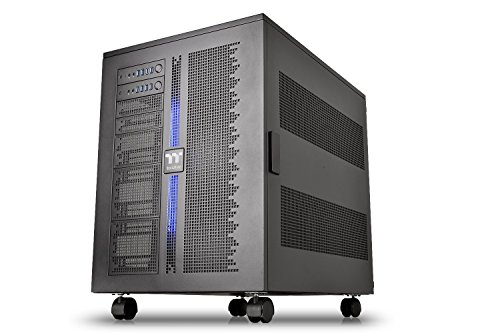
If you’re a serious PC enthusiast looking to build a powerful dual system workstation, the Thermaltake Core W200 Super Tower Computer Case is an excellent choice. This case supports two separate systems, accommodating various motherboard sizes from Mini ITX to XL-ATX in a back-to-back configuration. Its fully modular design allows you to customize and reconfigure as needed. With support for dual 600mm radiators, extreme water cooling is at your fingertips. Plus, the large acrylic window showcases your build while providing excellent airflow. With a three-year warranty, you can trust its durability and performance for your high-end setup.
Best For: Serious PC enthusiasts looking to build powerful dual system workstations with extreme water cooling capabilities.
Pros:
- Fully modular design allows for extensive customization and easy reconfiguration.
- Supports dual 600mm radiator applications for optimal liquid cooling performance.
- Large acrylic window enhances aesthetics while providing good airflow.
Cons:
- The size may be too large for smaller spaces or for users who prefer compact builds.
- Dual system capability may require additional components, increasing overall cost.
- Assembly may be complex for beginners unfamiliar with dual system setups.
ASUS ProArt PA602 E-ATX PC Case

The ASUS ProArt PA602 E-ATX PC Case is a standout choice for creative professionals and content creators seeking a robust workstation. This case supports massive 420mm radiators and features dual 200mm built-in fans for superior cooling. You’ll appreciate the front panel IR dust indicator and power lock latch, ensuring your system stays clean and secure. Enjoy easy tool-less mounting for your graphics card and an integrated holder for stability. With 20Gbps USB-C front I/O and a sleek design, it’s perfect for both performance and aesthetics. Weighing 35.5 pounds, it’s easy to transport thanks to built-in wheels.
Best For: The ASUS ProArt PA602 E-ATX PC Case is best for creative professionals and content creators seeking a high-performance and aesthetically pleasing workstation.
Pros:
- Superior cooling capabilities with dual 200mm fans and support for large radiators.
- Tool-less mounting for graphics cards and integrated holder for added stability.
- Sleek design with built-in wheels for easy transport and a professional look.
Cons:
- Weighing 35.5 pounds, it may be cumbersome for some users to move frequently.
- The size may not be suitable for compact spaces or smaller setups.
- Limited number of USB ports compared to some other cases on the market.
Thermaltake Core W200 Dual System Computer Case Bundle
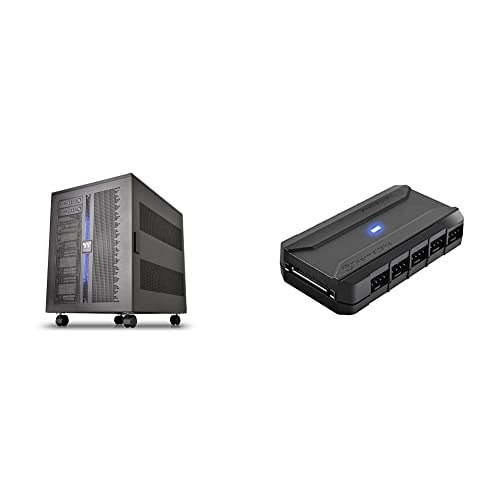
For enthusiasts and professionals seeking a powerful setup, the Thermaltake Core W200 Dual System Computer Case Bundle stands out with its unique ability to house two separate systems in a back-to-back configuration. This fully modular case allows for easy breakdown and customization, supporting up to two 600mm radiators for extensive liquid cooling. You can enhance your cooling strategy with the Commander FP hub, which powers up to ten PWM fans simultaneously. Plus, the included cable management features, like reusable ties and Velcro tabs, keep your build organized and tidy. It’s designed for peak performance and efficiency in dual system setups.
Best For: Enthusiasts and professionals looking for a powerful dual system setup with extensive cooling options and customization flexibility.
Pros:
- Fully modular design allows for easy customization and breakdown of the case.
- Supports dual systems with back-to-back configuration, accommodating two motherboards and power supplies.
- Enhanced cooling capability with support for up to 10 PWM fans and dual 600mm radiators.
Cons:
- Large size may require significant space and may not fit in smaller environments.
- Complexity of setup might be overwhelming for novice builders.
- Higher price point compared to single system cases.
Thermaltake Tower 300 Black Micro-ATX Case (CA-1Y4-00S1WN-AZ)

Designed with flexibility in mind, the Thermaltake Tower 300 Black Micro-ATX Case (CA-1Y4-00S1WN-AZ) is an ideal choice for enthusiasts who require a compact yet powerful workstation. This case supports M-ATX motherboards and features an octagonal tower design. It accommodates up to a 420mm radiator and allows for up to three additional fans, ensuring peak cooling with its two included 140mm CT fans. You can enhance your setup with an optional chassis stand kit for horizontal display or an LCD screen kit for added flair. With a three-year warranty, it’s built to last while delivering style and performance.
Best For: Enthusiasts seeking a compact and stylish Micro-ATX case that supports advanced cooling options and customization.
Pros:
- Supports M-ATX motherboards for versatile build options.
- Includes two 140mm CT fans for effective cooling right out of the box.
- Optional accessories like a chassis stand kit and LCD screen kit allow for enhanced display and personalization.
Cons:
- Limited fan support with a maximum of three additional fans.
- Chassis Stand Kit and LCD Screen Kit are sold separately, adding to the overall cost.
- Octagonal design may not appeal to all aesthetic preferences.
2U Rackmount Case for Dual Mini-ITX MB 14″ Deep

A compact yet powerful option, the 2U Rackmount Case for Dual Mini-ITX Motherboards is perfect for professionals seeking to maximize server efficiency in limited spaces. This case supports two mini-ITX motherboards, offering 2 PCI slots via a riser card. You’ll find ample storage with four internal drive bays for 3.5-inch drives and convenient front access with four USB 3.0 ports. Designed for optimal cooling, it features four 80mm fans along with a dust filter. Plus, enhanced security is guaranteed with a keylock door and efficient power management through dual 1U Flex PSUs, making it an ideal choice for your setup.
Best For: Professionals seeking to maximize server efficiency in limited spaces with dual mini-ITX motherboards.
Pros:
- Compact design fits into 2U rackmount spaces, ideal for environments with limited room.
- Ample storage with four internal drive bays for 3.5-inch drives and multiple USB ports for easy connectivity.
- Enhanced security features such as a keylock door and efficient power management with dual 1U Flex PSUs.
Cons:
- Requires a riser card for PCI/PCIE cards, which may add to the overall cost.
- Limited to mini-ITX motherboards, restricting motherboard options for users.
- May require additional maintenance due to dust filter and fan upkeep.
AsiaHorse ATX PC Case with Tempered Glass and Type-C Port
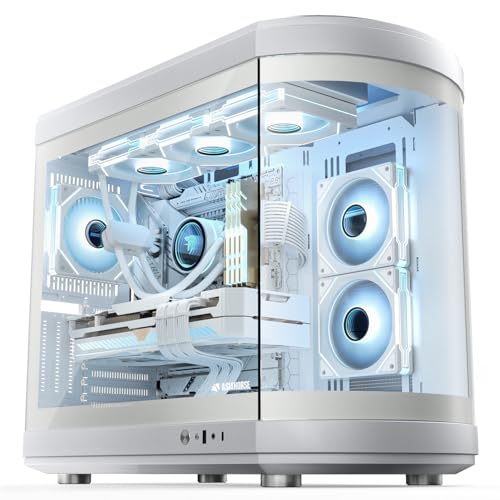
The AsiaHorse ATX PC Case with Tempered Glass and Type-C Port stands out as an excellent choice for gamers and content creators seeking a sleek, high-performance workstation. With its innovative bullet-head aquarium design and 180° panoramic glass window, it showcases your build beautifully. The case supports various motherboard sizes and offers ample space for customization, including room for up to nine fans. You’ll appreciate the ideal airflow and cooling efficiency, ensuring your components stay cool during intense sessions. Plus, the durable SPCC steel and tempered glass construction guarantees stability and longevity, making it a reliable option for ambitious builds.
Best For: Gamers and content creators looking for a stylish and customizable PC case that offers excellent airflow and cooling efficiency.
Pros:
- Supports a variety of motherboard sizes and offers expansive interior space for customization.
- Features a striking 180° panoramic glass window that showcases your components beautifully.
- Durable construction with SPCC steel and tempered glass ensures stability and long-lasting use.
Cons:
- The large size may not fit in smaller workspaces or setups.
- Limited to specific fan sizes which could limit cooling options for some users.
- Installation can be complex for those unfamiliar with building PCs.
SAMA NEVIEW 4503 Mid Tower PC Case with Dual Tempered Glass Panels

For gamers and creators seeking a stunning visual display, the SAMA NEVIEW 4503 Mid Tower PC Case with Dual Tempered Glass Panels stands out with its premium glass showcase. Its sleek industrial design, combined with a durable steel construction, appeals to enthusiasts. You’ll enjoy strong cooling with four pre-installed ARGB fans and support for extensive fan configurations, ensuring your high-end components stay cool. The case offers wide compatibility for various motherboards and GPUs, plus tool-free panels for easy upgrades. With optimized airflow and clean cable management, it’s the perfect blend of style and performance for your ultimate rig.
Best For: Gamers and creators looking for a visually stunning and high-performance PC case that supports advanced cooling and easy upgrades.
Pros:
- Premium dual tempered glass panels provide an impressive showcase for RGB components.
- Strong cooling capabilities with four pre-installed ARGB fans and support for multiple fan configurations.
- Tool-free panels and ample cable management options simplify building and maintenance.
Cons:
- Limited space for larger power supplies and CPU coolers may restrict some high-end builds.
- The focus on aesthetics may not appeal to users who prefer a more minimalistic design.
- Potential for dust accumulation on glass panels, requiring regular cleaning to maintain appearance.
Thermaltake AX700 Snow TG Super Tower Case
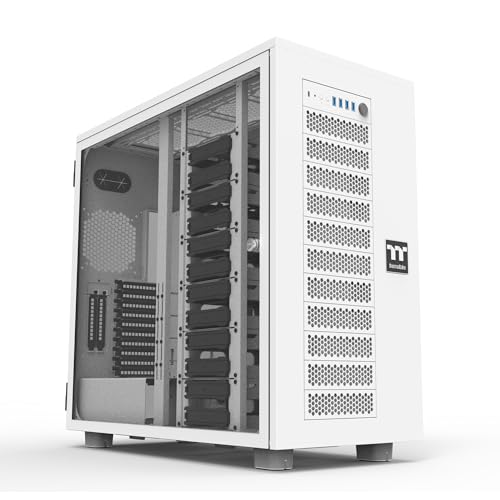
Boasting exceptional compatibility, the Thermaltake AX700 Snow TG Super Tower Case is perfect for tech enthusiasts and professionals looking to build a powerful dual system workstation. It supports various board types, including SSI-CEB and E-ATX, giving you versatile build options. With ample cooling support for up to 18 fans and massive radiator compatibility, overheating won’t be an issue. You can expand your setup easily with 8+2 PCIe slots for multi-GPU configurations and enjoy up to 18 HDD trays for storage. Plus, the included GPU brace guarantees stability for your graphics cards, making it an excellent choice for high-performance builds.
Best For: Tech enthusiasts and professionals looking to build a powerful dual system workstation with extensive cooling and storage options.
Pros:
- Exceptional compatibility with various motherboard types, including SSI-CEB, E-ATX, and others.
- Ample cooling support for up to 18 fans and large radiator compatibility, ensuring efficient thermal management.
- Generous storage capacity with up to 18 HDD trays and multi-GPU support for high-performance configurations.
Cons:
- The size of the super tower may require ample space and may not fit in smaller setups.
- The additional AX100 Pedestal for expanded storage and cooling is sold separately, increasing overall costs.
- Installation of multiple components may be complex, requiring more time and effort for assembly.
MUSETEX ATX Mid Tower Computer Case with ARGB Fans

Designed with gamers in mind, the MUSETEX ATX Mid Tower Computer Case stands out for its six pre-installed PWM ARGB fans that not only provide exceptional cooling but also create a stunning visual experience. This sleek black case features dual tempered glass panels, enhancing its aesthetic appeal. With its innovative airflow design and anti-vortex blades, you’ll enjoy superior cooling performance, extending your hardware’s lifespan. The MUSETEX K2 supports a wide range of components, making installation easy and efficient. Plus, the upgraded I/O panel includes USB 3.0 and Type-C ports for modern connectivity, catering to all your gaming and office needs.
Best For: Gamers seeking a high-performance, visually appealing PC case with excellent cooling capabilities.
Pros:
- Exceptional Cooling: Equipped with six PWM ARGB fans and an innovative airflow design for superior heat dissipation.
- Aesthetic Appeal: Dual tempered glass panels enhance the visual experience and showcase your build.
- Versatile Compatibility: Supports a wide range of hardware configurations for easy installation and upgrades.
Cons:
- Size: The mid-tower design may not accommodate larger or specialized components.
- Limited Dust Filtering: While magnetic dust filters are included, they may require regular maintenance to ensure optimal airflow.
- Price Point: Higher initial investment compared to some basic cases on the market.
Thermaltake View 270 Plus TG ARGB Mid Tower E-ATX Case

The Thermaltake View 270 Plus TG ARGB Mid Tower E-ATX Case stands out for its full view tempered glass design, making it an ideal choice for gamers and content creators who want to showcase their builds. With dual tempered glass panels, it enhances aesthetics while providing a stunning view of your components. The case comes equipped with three 120mm ARGB fans for maximum cooling, and it supports radiator installations up to 360mm at the top. You’ll also appreciate the USB 3.2 Type-C port and ample VGA length compatibility of 420mm, ensuring your setup remains powerful and stylish.
Best For: Gamers and content creators looking for a visually striking case that showcases their components while providing efficient cooling solutions.
Pros:
- Dual tempered glass panels enhance aesthetics and offer a clear view of internal components.
- Includes three 120mm ARGB fans for effective cooling and customizable lighting effects.
- Supports radiator installation up to 360mm, allowing for advanced cooling configurations.
Cons:
- Limited airflow options due to the design, which may affect cooling performance in high-temperature environments.
- Glass panels may require frequent cleaning to maintain a clear view of components.
- Potentially restrictive space for larger builds, especially with certain motherboard configurations.
Factors to Consider When Choosing Dual System Workstation Cases
When you’re choosing a dual system workstation case, several key factors come into play. You’ll want to contemplate cooling capacity, space, build quality, cable management, and how the case fits with your aesthetic preferences. Each of these aspects can markedly impact your overall setup and performance.
Cooling Capacity Requirements
Choosing a dual system workstation case means you’ll need to prioritize cooling capacity to handle the heat generated by two systems running simultaneously. Look for cases that support multiple cooling solutions, including dual radiators exceeding 600mm, to effectively manage this heat. Effective airflow is essential, so opt for cases designed to accommodate 6 to 18 fan slots for ideal thermal management. Check for advanced cooling capabilities, like compatibility with custom liquid cooling loops, which outperform traditional air cooling. Pay attention to the size and number of pre-installed fans; powerful fans (like 200mm or 140mm) enhance air intake and exhaust efficiency. Finally, verify the layout promotes airflow, featuring perforated panels or fan deflectors to direct cool air toward critical components.
Space and Configuration Options
While selecting a dual system workstation case, it’s essential to evaluate space and configuration options that best suit your needs. Dual system cases usually accommodate two motherboards, allowing for flexible setups like back-to-back arrangements, which can maximize both space and functionality. You’ll find that many of these cases support various motherboard sizes, from Mini ITX to XL-ATX, giving you the freedom to choose your hardware layout.
Additionally, the modular design lets you customize the internal configuration, making it easier to manage components and optimize airflow. Don’t overlook the importance of cooling solutions; some cases can support large radiators up to 600mm. Finally, features like hidden cable management systems help maintain a clean, organized workspace while accommodating dual setups.
Build Quality and Durability
Build quality and durability are essential factors that can greatly impact the performance and longevity of your dual system workstation case. When choosing a case, prioritize models made from high-quality materials like steel and tempered glass, which enhance stability and longevity. Look for fully modular designs that allow easy customization and maintenance. Ascertain the case can support the weight and size of your dual systems, providing sufficient structural integrity to prevent deformation. Heavier cases often offer better protection for internal components and minimize vibrations during operation. While you’re considering durability, also think about features that promote effective cable management, as these can help maintain an organized internal layout and contribute to the overall lifespan of your workstation.
Cable Management Solutions
Effective cable management solutions are essential for achieving ideal performance in dual system workstation cases. By minimizing clutter and obstruction, you can maintain airflow and prevent overheating. Look for cases that offer built-in cable routing options, like grommets and channels, which help guide cables neatly. Using reusable cable ties and velcro straps keeps everything organized while allowing for easy adjustments as needed. Consider modular designs that simplify disassembly, making cable management easier during upgrades or maintenance. A well-designed cable management system not only enhances functionality but also showcases your components clearly, avoiding messy wiring that could detract from your setup’s overall appeal. Prioritize these features to optimize your workstation’s performance and aesthetics.
Aesthetic Appeal and Design
When choosing a dual system workstation case, you can’t underestimate the importance of aesthetic appeal and design. The right case not only houses your components but also showcases them. Look for tempered glass panels that offer a panoramic view and highlight vibrant RGB lighting effects. Innovative designs, like pillarless structures and customizable interiors, let you create a sleek and personalized setup. Modular designs allow for flexibility in configurations, enhancing your workspace’s visual appeal. Additionally, materials like SPCC steel and acrylic provide durability while ensuring a premium look. Finally, consider color options and LED lighting systems to craft a cohesive theme that reflects your personal style and complements your work environment.
Compatibility With Components
Choosing the right dual system workstation case requires careful consideration of compatibility with your components, especially since you’ll be housing two separate systems. First, make sure the case accommodates two motherboards, ranging from Mini ITX to XL-ATX, for versatile configurations. Next, check for sufficient power supply support; dual systems need separate power supplies, so adequate space and mounting options are essential. Review the cooling capabilities, confirming the case supports multiple radiator sizes and fan configurations to manage heat effectively. Don’t forget to verify that there are ample PCIe slots for multiple GPUs, enhancing your graphics processing power. Finally, consider cable management features, as good organization is crucial for maintaining airflow and accessibility in your complex setup.