Better PC audio can make game cues easier to place and movies more engaging—but not every system labeled “surround” gives you separate rear speakers. The right choice depends on your space, your PC’s audio outputs, and how much setup you’re willing to do.
These five picks span dedicated 5.1 speaker packages and more compact soundbar options. Use the guide below to narrow down the format and connections that make sense for your setup.
Best 5 Surround Sound Systems for PC Picks for 2026
Home Theater Power
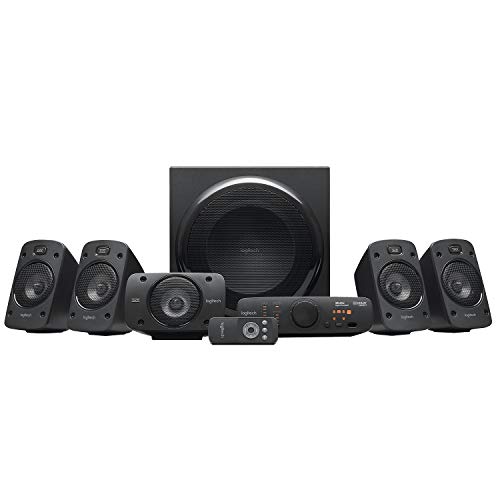
- True 5.1 with THX certification
- 500 watts continuous output
- Inputs for up to six devices
Best For: Powerful wired PC surround and multi-device setups
Gaming Desk Immersion

- True 5.1 over one PC USB connection
- Wireless rear-to-subwoofer connection
- Reactive RGB and desktop control pod
Best For: USB surround gaming with reactive lighting
Compact Soundbar Option
Saiyin Sound Bar with Subwoofer

- Stereo soundbar with dedicated subwoofer
- Bluetooth, aux, and optical inputs
- Three EQ modes
Best For: Simple PC or TV audio with added bass
Best Flexible Layout
INFITBO Detachable 2.1 Soundbar

- Bar, wired towers, or wall-mounted layout
- USB audio for compatible PCs and PS5
- 2.1 stereo, not discrete surround
Best For: Flexible PC desk and TV placement
Best True 5.1 Option
Acoustic Audio AA5170 Speaker System

- Five wired satellites and powered subwoofer
- Six RCA inputs for compatible 5.1 sources
- Longer cables included for rear speakers
Best For: PC setups with room for wired rear speakers
Home Theater Power – Logitech Z906 5.1
Among surround sound systems for PC, the Logitech Z906 is a strong fit if you want a traditional 5.1 speaker layout with room-filling output. Its THX certification and Dolby Digital and DTS support also make it useful for movies and console gaming.
Best For: PC users who want powerful, wired 5.1 sound and connections for several devices.
Pros:
- Four wall-mountable satellites and a dedicated subwoofer create a true 5.1 setup.
- Delivers 500 watts of continuous power, including a 165-watt subwoofer.
- Accepts up to six devices through inputs including six-channel direct, optical, and coaxial.
- Control console and wireless remote make switching sources convenient.
Cons:
- Wired speakers take more planning to position around a desk or room.
- No USB audio input is listed; check that your PC has a compatible output.
The Z906 makes the most sense when output power, surround placement, and multi-device flexibility matter more than a minimal desktop footprint.
The SteelSeries Arena 9 is one of the more PC-focused surround sound systems for PC gaming: a single USB connection delivers true 5.1 audio through front, rear, and center speakers plus a subwoofer. Reactive lighting adds another dimension to a gaming desk.
Best For: Gamers who want USB 5.1 audio, reactive RGB lighting, and fewer cables running to the rear speakers.
Pros:
- Wireless rear speakers connect to the subwoofer and can be wall-mounted.
- Front-speaker LEDs react to on-screen events and music.
- Control pod provides access to volume, 5.1 upmix, headset switching, and audio settings.
- USB, Bluetooth, optical, and auxiliary connections support multiple devices.
Cons:
- The full 5.1 arrangement still needs space for six speaker components.
- Rear speakers connect wirelessly to the subwoofer, but the system still requires AC power.
Choose the Arena 9 if you want a gaming-oriented surround layout and lighting without routing audio cables across the room to the rear speakers.
If you are comparing surround sound systems for PC but prefer a soundbar-style setup, this Saiyin model pairs a compact bar with a dedicated subwoofer. It offers a simpler alternative to placing separate speakers around your room, though its listed audio output is stereo rather than discrete 5.1.
Best For: PC or TV users who want a soundbar and extra bass without arranging rear speakers.
Pros:
- Dedicated subwoofer adds bass to the compact soundbar setup.
- Bluetooth, auxiliary, and optical inputs provide several connection choices; auxiliary and optical cables are included.
- Three EQ modes cover news, movies, and music.
- LED indicators show the selected input mode.
Cons:
- Stereo output cannot provide the discrete rear-channel positioning of a true 5.1 system.
- The subwoofer must be connected to the soundbar’s SUB OUT port, not its similar-looking AUX IN port.
This is a practical pick for straightforward PC and TV audio with added bass, provided you do not need speakers behind your listening position.
Best Flexible Layout – INFITBO Detachable 2.1 Soundbar
If you’re comparing surround sound systems for PC, the INFITBO offers a flexible desktop setup, though it is a 2.1-channel stereo system rather than true surround. Join its speaker sections into a 32-inch bar, split them into two wired towers, or wall-mount the bar.
Best For: PC desks and TV setups that need flexible speaker placement and a wired subwoofer.
Pros:
- USB digital audio connects directly to a compatible PC or PS5.
- Five input options include HD-ARC, optical, AUX, USB audio, and Bluetooth 5.4.
- Three EQ modes plus separate bass and treble controls help tailor the sound.
Cons:
- Its 2.1-channel stereo output does not provide discrete rear surround channels.
- The speaker sections and subwoofer require wired connections; Dolby decoding is not supported.
This is the more adaptable pick if placement and straightforward PC connectivity matter more than true surround. Check your available space, cable reach, and source audio output before buying.
Best True 5.1 Option – Acoustic Audio AA5170 Speaker System
Acoustic Audio AA5170 Home Theater 5.1 Bluetooth Speaker System 700W with Powered Sub
Check Price On AmazonFor shoppers seeking surround sound systems for PC with physical rear speakers, the Acoustic Audio AA5170 includes five wired satellites and a powered subwoofer. Its six independent RCA inputs can accept a compatible PC’s 5.1-channel analog output; stereo sources can use its Pro Surround conversion instead.
Best For: PC or home-theater setups with room for five wired satellites and a compatible audio output.
Pros:
- Six independent RCA inputs support true 5.1 playback from a compatible source.
- Includes 15-foot front and center speaker cables and 25-foot rear speaker cables.
- Optical and stereo inputs, Bluetooth streaming, and a remote add source flexibility.
Cons:
- Five wired satellites take more space and cable routing than a desktop soundbar.
- Stereo-to-5.1 Pro Surround conversion is not the same as a discrete 5.1 source.
Choose this system if separate rear speakers are a priority, and confirm your PC’s available outputs before buying. The included longer rear cables help with placement, but this remains a wired speaker setup.
How We Picked the Best Surround Sound Systems for PC
We selected five systems that cover different PC setups rather than treating every “surround” label as equivalent. The list includes dedicated 5.1 speaker packages for buyers who can place speakers around a room, a desktop-focused gaming system, and soundbar-style options for simpler layouts. We prioritized the questions that matter before purchase: speaker placement, PC compatibility, desk space, and the difference between discrete surround channels and surround effects. Product specifications can vary by connection and configuration, so confirm the current listing and your computer’s outputs before ordering.
Quick Comparison
For a traditional multi-speaker setup, start with the Logitech Z906, SteelSeries Arena 9, or Acoustic Audio AA5170. They suit buyers willing to accommodate a subwoofer and position additional speakers. The Arena 9 is the most explicitly desktop-gaming-focused choice in this group. The Saiyin soundbar and INFITBO detachable soundbar are better starting points when you want fewer separate pieces near the PC; check their speaker layouts carefully rather than assuming their surround modes provide discrete rear channels.
Key Buying Factors for Surround Sound Systems for PC
Real 5.1 Versus Surround Effects
A discrete 5.1 setup uses front-left, front-right, center, surround-left, and surround-right channels plus a subwoofer. It needs appropriate speaker placement and a compatible audio signal to deliver directional effects as intended. A soundbar can make audio feel wider or simulate surround, but that is not necessarily the same experience as speakers placed behind you. If positional game audio is your priority, verify both the physical channel layout and how your PC will feed it.
Connections and Format Support
Check the ports on your desktop, laptop, monitor, or audio interface against the system’s supported inputs. A headphone jack alone does not guarantee discrete 5.1 output. USB, multichannel analog, and digital connections can behave differently, and support for Dolby or DTS depends on the source, connection, and decoding hardware—not just a logo on the speaker box. Bluetooth is convenient for casual listening, but confirm its channel behavior and potential latency before relying on it for gaming.
Space, Wiring, and Everyday Controls
Rear speakers are useful only if you can position and connect them sensibly. Measure the desk and floor space available for the subwoofer, check cable lengths and power requirements, and consider where volume and input controls will sit. In a small desk setup, a compact bar may be more practical than a full speaker array you cannot place properly.
Who Should Buy Which Surround Sound Systems for PC?
Choose a dedicated 5.1 package if you have room for rear speakers and can confirm compatible PC output. Look at the SteelSeries Arena 9 if a gaming-oriented desktop arrangement is the main goal; compare the Logitech Z906 and Acoustic Audio AA5170 if you want a room-style speaker layout. Choose the Saiyin or INFITBO soundbar if simpler placement matters more than discrete surround, with the INFITBO worth considering when its detachable arrangement fits your space. Whichever format you prefer, verify the exact inputs, included cables, and speaker configuration before buying.