As you gear up for your streaming projects in 2025, choosing the right webcam is essential for achieving crystal clear quality. With options that boast 4K resolution, exceptional low-light performance, and built-in noise-canceling mics, you’ll want to know which models stand out. From gamers to professionals, these webcams cater to all. But which ones truly offer the best features for your needs? Let’s explore the top contenders.
Logitech Brio 101 Full HD 1080p Webcam

If you’re looking for a high-quality webcam for video calls, the Logitech Brio 101 Full HD 1080p Webcam is an excellent choice. This compact device, measuring just 1.26 x 2.87 x 2.62 inches and weighing only 5 ounces, delivers stunning video quality. With its Full HD 1080p resolution and RightLight technology, you’ll experience enhanced brightness and reduced shadows. Plus, the built-in microphone guarantees your audio is crystal clear. The integrated privacy shutter adds peace of mind when you’re not in use. Compatible with major platforms like Zoom and Microsoft Teams, this webcam’s design also incorporates eco-friendly materials.
Best For: Those seeking a reliable and high-quality webcam for professional video calls and online meetings.
Pros:
- Full HD 1080p resolution offers clear and sharp video quality.
- RightLight technology enhances brightness, making you look good in various lighting conditions.
- Built-in microphone ensures clear audio, eliminating the need for an external mic.
Cons:
- Limited to USB-A connectivity, which may require adapters for newer devices.
- Compact size might not suit users looking for a more robust camera setup.
- Some users may prefer additional features like auto-focus or 4K resolution.
Logitech C920x HD Pro Webcam

The Logitech C920x HD Pro Webcam stands out as an ideal choice for anyone seeking high-quality streaming and video conferencing. With its Full HD 1080p resolution and 30 fps frame rate, your videos will look crisp and vibrant. It’s compatible with major platforms like Skype and Zoom, making it versatile for any setup. The automatic lighting adjustment guarantees great visuals even in low light, while dual microphones capture natural sound. Plus, the included XSplit VCam license allows for easy background control. Users appreciate its simple installation and reliable performance, making it a top pick for professionals and content creators alike.
Best For: Professionals and content creators looking for a high-quality webcam for streaming and video conferencing.
Pros:
- High-quality Full HD 1080p resolution and 30 fps frame rate for crisp visuals.
- Automatic lighting adjustment and dual microphones enhance video and audio quality.
- Easy installation and compatibility with major platforms like Skype and Zoom.
Cons:
- Some users report occasional autofocus issues.
- The included XSplit VCam license is limited to three months.
- May not be suitable for very low-light environments despite lighting adjustments.
EMEET S600 4K Webcam for Streaming

For content creators seeking exceptional streaming quality, the EMEET S600 4K Webcam stands out with its impressive Sony 1/2.5 sensor and PDAF autofocus technology. You’ll appreciate the choice between 4K at 30FPS or 1080P at 60FPS, delivering crystal-clear images. The dual noise reduction microphones guarantee your audio is just as sharp. With a 73° field of view, it captures more of your space without distortion, while the built-in privacy cover keeps your streaming secure. Plus, its easy plug-and-play setup and compatibility with various software make it a hassle-free addition to your streaming arsenal.
Best For: Content creators, streamers, and gamers looking for high-quality video and audio performance in their broadcasts.
Pros:
- High-resolution options with 4K at 30FPS or 1080P at 60FPS for superior image quality.
- Dual noise reduction microphones enhance audio clarity for a professional sound experience.
- Easy plug-and-play setup compatible with most operating systems, making it user-friendly.
Cons:
- Maximum field of view is fixed at 73° in 4K, which may limit the capture area for some users.
- Requires compatible software to fully utilize its features, which could be a barrier for some users.
- Slightly heavier than some competitors, which may affect portability for on-the-go setups.
EMEET NOVA 4K Webcam for PC

Designed with professionals in mind, the EMEET NOVA 4K Webcam elevates virtual communication by delivering stunning ultra 4K HD visuals at 30FPS. Its fast autofocus and automatic light adjustments guarantee sharp images, even in motion. You can easily switch between 1080P and 4K resolutions using built-in software. With dual noise-cancelling microphones, your audio remains crystal clear, making it perfect for meetings or streaming. Plug-and-play connectivity means you’ll be ready to go in seconds, while the privacy cover offers peace of mind. Plus, its adjustable design provides stability and versatility for any setup. Experience professional-grade streaming with the EMEET NOVA!
Best For: Professionals seeking high-quality video and audio for business meetings, online education, and personal streaming.
Pros:
- Ultra 4K HD visuals at 30FPS for stunning image quality.
- Fast autofocus and automatic light adjustments ensure sharp images in various lighting conditions.
- Plug-and-play connectivity with a privacy cover for immediate setup and enhanced security.
Cons:
- Limited to a maximum resolution of 4K at 30FPS, which may not meet the needs of all users.
- The fixed cable may restrict mobility and placement options.
- Compatibility primarily with specific operating systems and applications, which may limit its use with other software.
NBPOWER 1080P Streaming Camera Webcam with Microphone

Offering Full HD 1080p resolution at 60FPS, the NBPOWER 1080P Streaming Camera Webcam with Microphone is perfect for content creators and professionals seeking high-quality video and audio. Its built-in microphone features noise-canceling technology, ensuring crystal-clear sound. You’ll appreciate the fast autofocus, keeping your face sharp even during movement. Plus, with superior low light performance, you can stream confidently in various lighting conditions. The webcam’s plug-and-play setup makes it easy to connect via USB, compatible with platforms like Zoom, YouTube, and Microsoft Teams. Weighing just 7.4 ounces, it’s portable and user-friendly, making it a top choice for your streaming needs.
Best For: Content creators and professionals looking for high-quality video and audio streaming.
Pros:
- Superior low light performance allows for clear video in various lighting conditions.
- Fast autofocus ensures sharp focus on faces even during movement.
- Plug-and-play setup makes it easy to use with a variety of platforms without needing drivers.
Cons:
- Limited compatibility with older operating systems, as it may not work with versions prior to Windows 9.
- Microphone quality may not meet the expectations of users requiring professional-grade audio.
- Cable length of 1.7 meters may be insufficient for some setups requiring more distance from the computer.
NexiGo N60 1080P Webcam with Microphone

The NexiGo N60 1080P Webcam with Microphone stands out as an excellent choice for anyone needing high-quality video for remote work or online learning. With a two-MP CMOS sensor, it delivers sharp 1920 x 1080 video at 30fps. Its 110° wide-angle lens captures more of your surroundings, while the built-in noise-canceling microphone guarantees clear audio. You’ll appreciate the privacy cover for added security when not in use. Plus, setup is a breeze—just plug it into a USB port. Compatible with multiple operating systems, the NexiGo N60 is perfect for Zoom, Facetime, or any streaming application you choose.
Best For: The NexiGo N60 1080P Webcam is best for professionals, students, and content creators looking for high-quality video and audio for remote communication and streaming.
Pros:
- High-Definition Video: Delivers crisp 1080P video at 30fps for clear and detailed streaming.
- Wide-Angle Lens: Captures a broad 110° field of view, perfect for group calls or showcasing your surroundings.
- Easy Setup: Simple plug-and-play installation with no additional drivers needed across multiple operating systems.
Cons:
- Limited Compatibility: Not compatible with gaming consoles like XBOX or PS4/PS5.
- Fixed Focal Length: May not suit users who require adjustable focus for varying distances.
- Software Dependency: Some features, like digital zoom, require the manufacturer’s software for full functionality.
Full HD Webcam with Built-in Microphone and Tripod

If you’re looking for a reliable webcam that provides high-quality video for online meetings or streaming, the Full HD Webcam with Built-in Microphone and Tripod is an excellent choice. With 1080P resolution at 30 frames per second, you’ll enjoy crystal-clear visuals. Its built-in microphone features noise-canceling technology, ensuring your voice comes through clearly. The detachable, rotatable tripod allows for flexible positioning, while automatic light correction adapts to your surroundings for ideal video quality. Plus, it’s plug-and-play compatible with multiple devices and operating systems. With a 4.3 out of 5-star rating, it’s a popular choice among users.
Best For: Those seeking a high-quality webcam for online meetings, streaming, or video calls in various lighting conditions.
Pros:
- Built-in noise-canceling microphone enhances audio clarity during calls and recordings.
- Automatic light correction ensures optimal video quality, even in low-light environments.
- Plug-and-play compatibility with multiple devices and operating systems makes setup effortless.
Cons:
- Some users may experience average performance in specific applications.
- The tripod may not be as sturdy as dedicated camera tripods for extensive use.
- Limited advanced features compared to higher-end webcams on the market.
EMEET C960 4K Webcam for PC

For professionals seeking unparalleled video clarity in remote meetings, the EMEET C960 4K Webcam is an exceptional choice. With a 4K UHD Sony sensor, it delivers true 4K quality, perfect for business calls. The PDAF automatic focusing guarantees you’re always in sharp focus, while auto light correction adapts to any lighting conditions. You’ll appreciate the dual AI noise-cancelling microphones that enhance audio clarity, creating an immersive experience. Plus, its plug-and-play functionality makes setup a breeze. Compatible with major platforms and equipped with a privacy cover, the EMEET C960 is designed for both ease and security, making it ideal for your streaming needs.
Best For: Professionals and educators seeking high-quality video and audio clarity for remote meetings and online teaching.
Pros:
- True 4K video quality with a Sony sensor enhances clarity for professional use.
- Dual AI noise-cancelling microphones improve audio quality, creating an immersive meeting experience.
- Plug-and-play functionality ensures easy setup without the need for additional drivers or software.
Cons:
- Default video resolution is 1080P, requiring manual switching for 4K.
- Limited field of view at 73°, which may not capture larger groups effectively.
- Some users may prefer additional features like built-in lighting or advanced software controls.
GUSGU G910 2K Quad HD Webcam for PC

Perfect for content creators and remote workers, the GUSGU G910 2K Quad HD Webcam delivers stunning 2560x1440P video quality. With a 5-megapixel sensor, this webcam guarantees crisp visuals during your streams or video calls. The built-in ring light enhances your appearance in low-light settings, while the CVC microphone captures clear audio, minimizing background noise. You’ll appreciate the easy plug-and-play setup, making it compatible with PCs, laptops, and MacBooks. Plus, the sleek design won’t clutter your workspace. With excellent customer feedback and a 3-year warranty, the G910 is a reliable choice for anyone needing exceptional video performance.
Best For: Content creators, remote workers, and anyone needing high-quality video for streaming or video calls.
Pros:
- Crisp 2560x1440P video quality enhances clarity for streaming and video calls.
- Built-in adjustable ring light improves visibility in low-light environments.
- Easy plug-and-play setup makes it compatible with various devices without the need for drivers.
Cons:
- Limited to USB connection, which may not be suitable for all setups.
- Ring light may not provide adequate lighting for very dark environments.
- Compact design may limit some advanced features found in larger, professional webcams.
EMEET C950 4K Webcam for PC
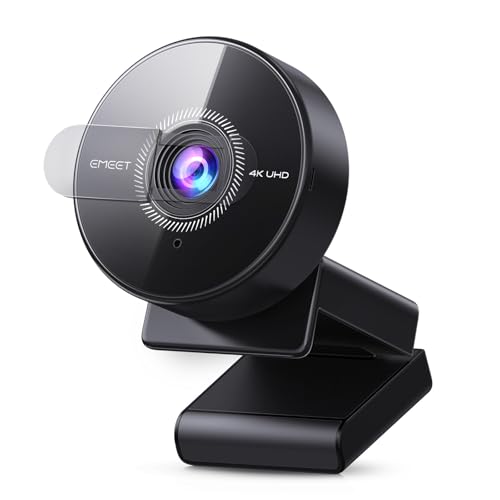
The EMEET C950 4K Webcam stands out as an exceptional choice for professionals seeking high-quality video conferencing. With its 8-megapixel 4K UHD resolution, you can enjoy crisp visuals at 30FPS, or 1080P at 60FPS. The built-in noise-canceling microphone captures clear audio up to six feet away, while its flexible bracket design allows you to adjust the angle effortlessly. Plus, the USB 2.0 plug-and-play feature makes setup a breeze. Compatible with major platforms like Zoom and Teams, it offers privacy protection with a physical lens cover. Users rate it 4.3 out of 5 stars, making it a reliable choice for your streaming needs.
Best For: Professionals and remote workers seeking high-quality video conferencing solutions with excellent audio clarity and easy setup.
Pros:
- Built-in noise-canceling microphone ensures clear audio even in noisy environments.
- Flexible bracket design allows for easy adjustment of viewing angles.
- USB 2.0 plug-and-play functionality simplifies the connection process.
Cons:
- Limited to USB 2.0, which may affect data transfer speeds compared to USB 3.0.
- No wireless connectivity options like Bluetooth or WiFi.
- Actual video resolution may vary depending on the software used.
Factors to Consider When Choosing Streaming Webcams for PC
When you’re selecting a streaming webcam for your PC, there are several key factors to keep in mind. You’ll want to contemplate resolution and frame rate for the best visual quality, as well as microphone quality for clear audio. Don’t forget about compatibility with your platforms, autofocus features, and how portable the design is for your needs.
Resolution and Frame Rate
Choosing the right resolution and frame rate for your streaming webcam can make a significant difference in your overall streaming experience. A higher resolution, like 4K (3840 x 2160), delivers outstanding image clarity, perfect for professional streaming or video calls. For casual use, 1080p (1920 x 1080) usually suffices. Frame rate is equally important; 60 frames per second (FPS) offers a smoother experience than the standard 30 FPS, especially during fast-paced scenes. Many webcams let you switch between 4K at 30 FPS and 1080p at 60 FPS, helping you optimize performance based on your needs and bandwidth. Advanced features, such as auto light correction, can also enhance video quality in low-light situations.
Microphone Quality
High-quality video streaming isn’t just about crisp visuals; audio plays an essential role too. When choosing a streaming webcam, pay attention to the microphone quality. Built-in microphones can greatly enhance your audio experience, especially those with noise-canceling technology that improves clarity and minimizes background sounds. Opt for webcams with dual microphones to capture natural sound, creating a more immersive environment for your streams. Consider microphone sensitivity and range; some models pick up clear audio from up to 8 feet away, making them versatile for different settings. Advanced features like AI noise cancellation guarantee your voice remains clear, even in busy environments. Finally, check user ratings to gauge satisfaction with microphone performance, as quality audio is vital for effective communication.
Autofocus Features
Autofocus features in streaming webcams can make a noticeable difference in your video quality, keeping you sharp and in focus as you move. Advanced webcams often use Phase Detection Autofocus (PDAF), which provides faster and more accurate focusing than traditional methods. This technology guarantees your image remains clear, even during dynamic presentations. When choosing a webcam, consider its autofocus range, as some models effectively maintain focus from just a few inches to several feet away. Additionally, lighting conditions can impact autofocus performance, so look for webcams with automatic light adjustment capabilities to optimize clarity in low-light environments. With the right autofocus features, your streaming experience can be greatly enhanced.
Compatibility With Platforms
When considering a streaming webcam for your PC, it’s essential to verify compatibility with the platforms you’ll be using, like Zoom or Microsoft Teams. Ascertain the webcam supports operating systems such as Windows and macOS, as compatibility can vary markedly. Opt for webcams that offer plug-and-play functionality, allowing for a hassle-free setup without additional drivers. This can save you time and frustration during your streaming sessions. If you’re into gaming, look for models that are compatible with consoles like the Nintendo Switch, expanding your usage scenarios. Finally, check that the webcam supports various video resolutions and frame rates to meet the requirements of your chosen platforms, guaranteeing a smooth streaming experience every time.
Design and Portability
Choosing a streaming webcam for your PC involves more than just specs; design and portability play essential roles too. Lightweight models like the EMEET S600, weighing only 3.52 ounces, make transporting your gear a breeze. Compact dimensions, such as 2.8 x 2.95 x 2.05 inches, also facilitate easy travel. Look for flexible designs with adjustable stands or built-in tripods, allowing you to position the camera perfectly for different streaming setups. Many webcams now include privacy covers, enhancing security without sacrificing aesthetics. Additionally, consider eco-friendly materials, like the Logitech Brio 101, which uses post-consumer recycled plastic. A sleek, compact design not only saves desk space but also keeps your streaming area organized and efficient.