If you’re looking to enhance your flight simulation experience, the right controls can make all the difference. With so many options available, it’s essential to find a controller that fits your needs and budget. From joystick setups to thorough yoke systems, each choice offers unique features. Explore the top contenders and see which ones can truly elevate your virtual flying adventures. The right gear might just transform your gameplay.
Thrustmaster T-Flight Hotas X (Compatible with PC)

If you’re looking for a flight simulator control system that combines comfort and precision, the Thrustmaster T-Flight Hotas X is an excellent choice for PC gamers. Its wide hand-rest guarantees ideal comfort during long gaming sessions, while the detachable throttle control enhances ergonomics. With 12 fully programmable buttons and 5 axes, you can customize your setup to suit your playstyle, and the internal memory retains your settings even when disconnected. The dual-system aerodynamic control gives you versatility, whether you prefer a rotating handle or a progressive tilting lever. Experience high-precision control with adjustable resistance for a truly immersive flight experience.
Best For: The Thrustmaster T-Flight Hotas X is best for PC gamers seeking a comfortable and customizable flight simulator control system.
Pros:
- Wide hand-rest provides optimal comfort for extended gaming sessions.
- Fully programmable buttons and axes allow for personalized control setups.
- High-precision joystick with adjustable resistance enhances the immersive experience.
Cons:
- Limited compatibility as it is only designed for PC use.
- Potential learning curve for users new to flight simulation controls.
- Size and setup may be cumbersome for those with limited desk space.
Thrustmaster T-Flight Hotas One for Microsoft Flight Sim 2024

The Thrustmaster T-Flight Hotas One for Microsoft Flight Sim 2024 is an excellent choice for both newcomers and seasoned flight simulation enthusiasts, thanks to its official Microsoft Flight Simulator license and user-friendly plug-and-play setup. Weighing 4.5 pounds and measuring 9.53 x 10.43 x 10.39 inches, it features 14 buttons, a rapid trigger, and a detachable throttle. You’ll enjoy adjustable joystick resistance and dual rudder maneuverability. With high customization options and positive user feedback, it greatly enhances your flying experience compared to standard controllers. Overall, it’s a fantastic entry-level HOTAS setup that’ll elevate your gaming sessions.
Best For: The Thrustmaster T-Flight Hotas One is best for both newcomers and seasoned flight simulation enthusiasts looking for an immersive and customizable flying experience.
Pros:
- Official Microsoft Flight Simulator license ensures compatibility and optimized performance.
- User-friendly plug-and-play setup for quick installation on PC and Xbox Series X|S.
- High level of customization with 14 buttons and adjustable joystick resistance enhances gameplay.
Cons:
- Users may need to manually calibrate after driver updates for optimal performance.
- Some reported throttle responsiveness issues following updates.
- Limited compatibility with other rudder systems unless paired with Thrustmaster TFRP rudder (sold separately).
Turtle Beach VelocityOne Flight Universal Control System for Xbox and Windows PCs

For those seeking an immersive flight simulation experience, the Turtle Beach VelocityOne Flight Universal Control System stands out as an excellent choice for both Xbox and Windows PC users. This all-in-one control system features a yoke handle, throttle quadrant, and trim wheel, making it perfect for titles like Microsoft Flight Simulator 2020 and X-Plane. With 12 analog axes and 18 assignable buttons, you’ll enjoy thorough navigation. The 180° yoke rotation ensures smooth control, while the built-in headset port enhances your audio experience. Plus, its simple USB setup means you can jump into your flight adventure quickly and easily.
Best For: Flight simulation enthusiasts on Xbox and Windows PCs looking for a comprehensive and immersive control system.
Pros:
- Universal all-in-one design that includes yoke handle, throttle quadrant, and trim wheel for enhanced realism.
- Intuitive controls suitable for all experience levels, making it accessible for beginners and advanced users alike.
- Integrated headset port allows for immersive audio while flying, enhancing the overall experience.
Cons:
- Some users have reported issues with product durability, which may affect long-term use.
- Customer feedback indicates mixed experiences with support, with some users facing challenges in resolving issues.
- The complexity of features may overwhelm new users who are not familiar with flight simulation controls.
Logitech G X56 H.O.T.A.S Flight Simulator Game Controller
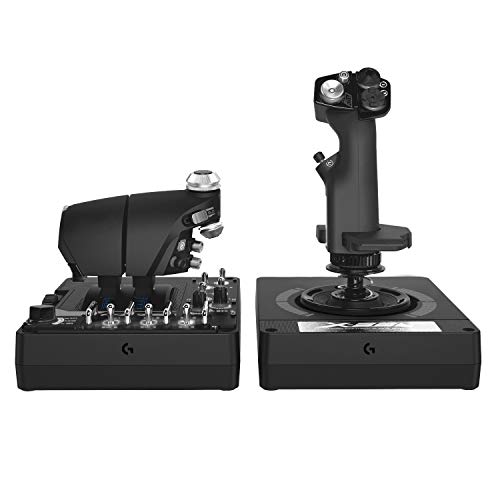
Designed for flight simulation enthusiasts and aspiring pilots alike, the Logitech G X56 H.O.T.A.S Flight Simulator Game Controller delivers military-grade precision that enhances your gaming experience. With customizable features, including four spring options and 189 programmable controls, it adapts to your playstyle. The mini analog sticks allow for precise pitch, roll, and yaw control. Its RGB backlighting can match your gaming rig, while the layout is perfect for VR navigation. Enjoy true 6 degrees of freedom with high-accuracy sensors and adjustable response curves, ensuring every flight feels realistic and engaging. Elevate your simulation journey with this powerful controller!
Best For: Flight simulation enthusiasts and aspiring pilots seeking a highly customizable and immersive gaming experience.
Pros:
- Highly customizable with 189 programmable controls and four spring options to suit individual playstyles.
- Features mini analog sticks for precise control of pitch, roll, yaw, and gimballed weapons, enhancing realism.
- RGB backlighting can be tailored to match your gaming setup, adding a personalized touch.
Cons:
- Requires a powerful PC with specific system requirements, limiting accessibility for some users.
- The weight of 6.92 pounds may make it less portable for users who want to take it on the go.
- Some users may find the learning curve steep for fully utilizing its advanced features and settings.
Logitech G PRO Flight Yoke System for PC

Ideal for both new and experienced pilots, the Logitech G PRO Flight Yoke System elevates your flight simulation experience with its robust stainless steel yoke shaft that provides smooth and accurate control. Featuring 75 programmable controls, including a POV hat and 14 buttons, it’s designed for customization. You’ll appreciate the included throttle quadrant and desk clamps, ensuring stability during intense flights. Compatible with Windows 11/10/8.1/7, it enhances popular simulators like Microsoft Flight Simulator and X-Plane. With a customer rating of 4.2 stars, users praise its realistic feel, making it a solid choice for anyone serious about flight simulation.
Best For: Flight simulation enthusiasts looking for a reliable and customizable control system to enhance their flying experience.
Pros:
- Robust stainless steel yoke shaft ensures smooth and accurate control.
- Offers 75 programmable controls for a personalized flying experience.
- Positive user feedback highlights the realistic feel and build quality.
Cons:
- Some users report issues with spring tension affecting control smoothness.
- Plastic mounts and hardware quality may not meet everyone’s expectations.
- Requires software download for full compatibility with flight simulators.
PXN Flight Simulator Joystick Controls for PC
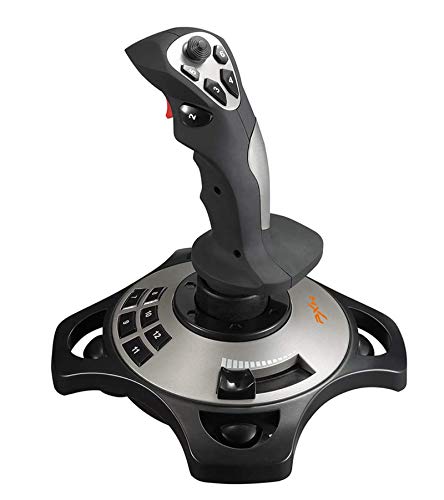
The PXN Flight Simulator Controls 2113 joystick stands out as a top choice for flight simulation enthusiasts seeking an immersive experience on PC. This wired joystick, compatible with Windows XP through 10, features a vibration function and throttle controls for enhanced gameplay. With dimensions of 10 x 8.82 x 7.6 inches and a weight of 1.6 pounds, it’s designed for comfort during long sessions. You’ll appreciate its four axes, 12 programmable buttons, and an eight-way hat switch. While it excels with popular titles like Microsoft Flight Simulator 2020, some users report minor stability issues that can be resolved with adjustments.
Best For: Flight simulation enthusiasts looking for an affordable and feature-rich joystick that enhances their gaming experience on PC.
Pros:
- Vibration function adds realism and immersion to gameplay, adjustable for various game scenes.
- Programmable buttons and customization options allow for tailored controls to suit individual preferences.
- Ergonomic design ensures comfort during extended gaming sessions without causing fatigue.
Cons:
- Some users experience stability issues with suction cup placement on surfaces, affecting joystick stability.
- Stiffness in stick movement can hinder responsiveness, requiring adjustments for smoother operation.
- Drift problems may arise, necessitating dead zone adjustments for optimal performance.
Thrustmaster T16000M FCS Flight Pack (Compatible with PC)

For those who crave precision in their flight simulation experience, the Thrustmaster T16000M FCS Flight Pack stands out as an excellent choice. This pack connects easily to your PC via USB, supporting both 32-bit and 64-bit systems. Thanks to H.E.A.R.T technology, you’ll enjoy consistent precision that won’t fade over time. Its fully ambidextrous joystick features 16 action buttons with “braille”-style identification, an 8-way Point of View hat switch, and four independent axes, including a twist rudder. Plus, the T.A.R.G.E.T software lets you customize mapping profiles for each game, enhancing your overall flight experience.
Best For: Flight simulation enthusiasts seeking a high-precision joystick with customizable features for an immersive experience.
Pros:
- Superior precision thanks to H.E.A.R.T technology, ensuring consistent performance over time.
- Fully ambidextrous design allows for comfortable use by both left-handed and right-handed individuals.
- Extensive customization options through T.A.R.G.E.T software for tailored game profiles.
Cons:
- Limited compatibility as it is only compatible with PC via USB.
- May have a learning curve for users new to flight simulation equipment.
- No built-in wireless option, requiring a constant wired connection to the PC.
Logitech G X52 Flight Control System – Standard Packaging
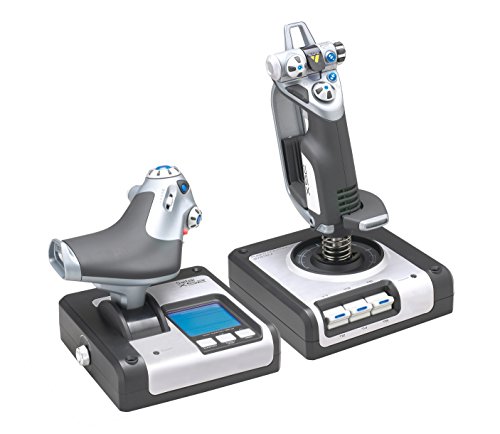
With its advanced Multi-Function Display (MFD), the Logitech G X52 Flight Control System stands out as an excellent choice for serious flight simulation enthusiasts. Weighing in at 4.85 pounds, this system offers a precision joystick with non-contact technology, ensuring smooth movements. The throttle features a progressive design with tension adjustment, giving you control over your aircraft like never before. While it’s compatible with popular simulation software and Windows operating systems, some users find the setup challenging due to cable length. Overall, its sturdy build and programmability make it a worthwhile investment for enhancing your flight experience.
Best For: Serious flight simulation enthusiasts looking for a high-quality control system with advanced features and programmability.
Pros:
- Sturdy construction and attractive design enhance durability and aesthetics.
- Multi-Function Display (MFD) provides real-time game data for a more immersive experience.
- Extensive compatibility with major simulation software and Windows operating systems ensures versatility.
Cons:
- Initial setup can be challenging due to USB cable length and positioning.
- Requires ample desk space or mounting brackets, making it less suitable for smaller setups.
- Some users have reported software glitches and issues with throttle movement adjustment.
Honeycomb Bravo Throttle Quadrant for Flight Simulator Controls

Looking to elevate your flight simulation experience? The Honeycomb Bravo Throttle Quadrant is your all-in-one cockpit solution, designed to provide precise control for everything from single-engine planes to large commercial jets. Its realistic components, including an autopilot panel and multiple levers, enhance immersion and adaptability across various aircraft types. You can customize the controls with seven programmable keys and switches, tailoring the setup to fit your preferences. Built with aerospace-grade materials, it guarantees durability and seamless compatibility with popular flight simulators like Microsoft Flight Simulator and X-Plane. Get ready to take your flights to new heights with this exceptional throttle quadrant!
Best For: Flight simulation enthusiasts looking for a versatile and realistic throttle control system for various aircraft types.
Pros:
- Fully configurable throttle setup suitable for a wide range of aircraft, enhancing realism.
- Customizable controls with seven programmable keys and multiple switches for personalized setups.
- Durable construction with aerospace-grade components ensures long-term reliability and performance.
Cons:
- Higher price point compared to basic throttle quadrants may not suit budget-conscious users.
- Learning curve may be required for beginners to fully utilize the advanced features.
- Limited to compatibility with specific flight simulation software; may not support all programs.
Thrustmaster Sol-R2 HOSAS for Space Flight Simulation (Compatible with PC)

Designed specifically for space flight simulation enthusiasts, the Thrustmaster Sol-R2 HOSAS offers an unparalleled level of control with its 88 action buttons and dual ambidextrous grips. Each flightstick features 21 buttons, ensuring you have all the necessary controls at your fingertips. With H.E.A.R.T. technology, you’ll experience 16-bit accuracy across multiple axes, enhancing your precision. The iconic design not only looks great but also prioritizes comfort with interchangeable wrist rests. While setup requires some attention, most controls are easily mappable. At around $200, it’s a solid investment for elevating your space simulation experience on PC.
Best For: Space flight simulation enthusiasts looking for high precision and extensive control options on PC.
Pros:
- Dual ambidextrous grips with a total of 88 action buttons for customizable gameplay.
- H.E.A.R.T. technology provides 16-bit accuracy across multiple axes for enhanced control.
- Comfortable design with interchangeable wrist rests and a solid base for stability during use.
Cons:
- Initial assembly may require careful attention to setup.
- Some users report issues with button mapping and compatibility with non-Windows systems.
- Customer ratings indicate mixed experiences, particularly regarding performance with specific games.
Factors to Consider When Choosing Flight Simulator Controls for PC
When choosing flight simulator controls for your PC, you should consider several key factors. Think about compatibility with your simulation software, as well as ergonomics and comfort features to enhance your experience. Don’t overlook programmability, control precision, and build quality, which all play a significant role in your overall satisfaction.
Compatibility With Simulation Software
Choosing the right flight simulator controls for PC is crucial, especially since compatibility with your preferred simulation software can greatly impact your gaming experience. Make certain the controls work seamlessly with popular titles like Microsoft Flight Simulator and X-Plane. Check if they’re designed for specific operating systems—some might only support Windows while others cater to multiple platforms. Look for plug-and-play functionality for easy setup and recognition by the software. It’s also advantageous if the controls allow you to customize mappings and profiles for different games, enhancing your experience. Finally, research user feedback on compatibility issues; some controls may need manual calibration or adjustments after software updates to guarantee peak performance.
Ergonomics and Comfort Features
Since comfort plays a significant role in your flight simulation experience, it’s vital to take into account ergonomics when selecting controls for your PC. Look for ergonomic designs that feature wide hand-rests and adjustable joystick resistance, which can help reduce fatigue during those long sessions. Detachable throttle controls are also a great option, letting you position them on your lap or desk for added comfort. Pay attention to user-friendly button layouts and easy-to-reach controls, as they facilitate quick access to essential functions while flying. Additionally, adjustable controls like customizable lever handles can provide a tailored fit to your preferences. Finally, make certain you have a stable setup with robust clamping systems to keep everything secure during operation.
Programmability and Customization Options
Programmability and customization options are essential for enhancing your flight simulation experience, as they allow you to tailor controls to your specific needs. Many flight controllers offer numerous programmable buttons—some even feature up to 18 assignable buttons for thorough navigation. You can adjust response curves and dead zones, improving control precision and comfort during flight. Some controllers come with dedicated software, letting you create specific mapping profiles for different games, ensuring peak performance. If you’re a serious enthusiast, high-end controllers may provide hundreds of programmable controls, enabling you to replicate the cockpit of various aircraft types. This level of customization caters to both casual gamers and dedicated simulation fans, enhancing your overall experience.
Control Precision and Accuracy
Control precision and accuracy are essential for an immersive flight simulation experience. When choosing your flight simulator controls, look for options that offer high precision, measured in bits. A joystick with 10-bit precision can enhance your movement control, while advanced models featuring HallEffect AccuRate Technology provide 16-bit accuracy, guaranteeing responsive and stable maneuvering. Adjustable resistance in joysticks lets you personalize sensitivity, tailoring your experience to your flying style. Consider dual-system control options, like rotating handles or progressive levers, which deliver varied feedback. Finally, verify your controls are programmable, allowing you to fine-tune response curves and dead zones for peak performance in specific flight scenarios. Your choice of controls greatly impacts your overall simulation enjoyment.
Build Quality and Durability
When selecting flight simulator controls for PC, build quality and durability are essential factors to contemplate. Look for controls made with robust materials like aerospace-grade components and stainless steel, as these enhance strength and reliability. Heavier models often provide a more stable feel during operation, reducing unwanted movement and improving your overall experience. Features like adjustable tension and customizable components can considerably extend the product’s lifespan, ensuring you won’t face performance degradation over time. Additionally, high-quality controls typically undergo rigorous testing for longevity and wear resistance, so you can trust they’ll retain functionality through countless flight simulation sessions. Prioritizing these aspects will help you invest in controls that can withstand the demands of your virtual flying adventures.
Price and Budget Considerations
As you navigate the world of flight simulator controls for PC, price and budget considerations play a crucial role in your decision-making process. Flight simulator controls can range from around $50 for entry-level options to over $300 for high-end setups. When budgeting, consider the total cost of ownership, including accessories like throttles and rudder pedals that enhance your experience. Assess the value of features such as programmability, build quality, and user experience to make certain they align with your budget constraints. Additionally, explore warranties and return policies that provide protection against defects. Researching customer reviews and ratings can also help you determine if a controller’s price reflects its performance and durability, guaranteeing better value for your investment.