If you need fast, expandable storage for video, photo, backup, or shared project files, a Thunderbolt 5 RAID storage enclosure can be a major upgrade over a standard external drive.
This roundup focuses on enclosures that balance performance, bay count, RAID flexibility, and compatibility so you can choose the right fit without overbuying.
Best 10 Thunderbolt 5 Raid Storage Enclosure Picks for 2026
Best Hybrid HDD + NVMe

- Two SATA bays plus two NVMe bays in one unit
- RAID 1 HDD mirroring and RAID 0 NVMe performance
- USB4 40Gbps support for Thunderbolt 3/4/5 systems
Best For: Creators who want one enclosure for backups, mirroring, and fast SSD projects.
Best for Capacity
ORICO 5-Bay RAID HDD Enclosure

- 8 RAID modes for flexible backup and storage setups
- Up to 110TB total capacity with 3.5-inch SATA drives
- Cooling fan, vents, and locking drive bays aid reliability
Best For: Users who need a high-capacity desktop RAID enclosure for backup and archiving.
Best High-Speed Pick

- 80Gbps Thunderbolt 5-ready performance
- LCD temperature and fan-status display
- Active cooling for large NVMe workloads
Best For: Power users who want maximum external NVMe speed with cooling and status monitoring.
Best for Quiet Multi-Drive RAID
OWC ThunderBay 4 40Gb/s Enclosure

- Four-bay enclosure with 3.5-inch and 2.5-inch drive support
- RAID 0/1/4/5/1+0 options for flexible setups
- Quiet aluminum chassis with strong sustained throughput
Best For: Users who want a quiet, flexible four-bay RAID enclosure for creative or pro workloads.
Best for Power Users
HyperDrive Next Thunderbolt 5 Dock

- 120Gbps Thunderbolt 5 with built-in M.2 SSD slot
- Triple 4K display support on Windows systems
- Thunderbolt Share and 2.5GbE for pro workflows
Best For: Creative pros and hybrid workers who need a high-bandwidth dock with SSD expansion and multi-display support.
Best for Multi-Bay RAID
JEYI 4-Bay NVMe RAID Enclosure

- 40Gbps USB4/Thunderbolt 3/4 support
- RAID 0/1/JBOD and RAID 5 on Windows
- Turbo fan cooling for 4x NVMe drives
Best For: Mac and Windows users needing a fast 4-bay NVMe RAID enclosure for large-capacity storage.
Best for RAID Flexibility
Yottamaster 5-Bay RAID Enclosure

- 5-bay SATA enclosure with RAID 0/1/3/5/10/JBOD/Clone
- Up to 110TB total capacity for large media libraries
- Aluminum body and 80mm fan help keep drives cool
Best For: Teams and creators who want configurable RAID storage with high capacity.
Best with Extra Features
OWC ThunderBay 4 4-Bay Thunderbolt RAID Enclosure
- RAID 0/1/4/5/10 support
- Up to 1527MB/s sustained speeds
- SoftRAID Premium included for 3 years
Best For: Creators and pros who need a flexible four-bay RAID enclosure with strong software control.
Best Hardware RAID Tower
TERRAMASTER D8-332 8-Bay Thunderbolt 3
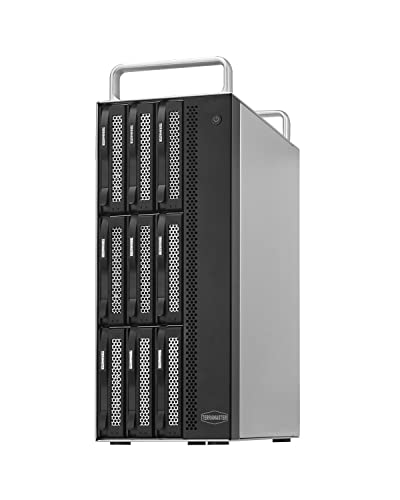
- Dedicated hardware RAID controller
- Up to 1600MB/s in RAID 0
- 8-bay compact metal tower
Best For: Video editors and power users who need a fast, compact RAID enclosure for large media projects.
Best High-Capacity 8-Bay Pick
OWC ThunderBay 8 RAID Enclosure

- Eight-bay design with universal SSD/HDD support
- SoftRAID Premium includes RAID 0/1/4/5/10
- Dual Thunderbolt ports for daisy chaining
Best For: Creators and power users who need a large Thunderbolt RAID enclosure for expandable desktop storage.
Best Hybrid HDD + NVMe – ACASIS 4-Bay RAID Enclosure
If you want a thunderbolt 5 raid storage enclosure that can cover both archival storage and fast project drives, this ACASIS 4-bay hybrid dock is a practical all-in-one option. It mixes dual 3.5/2.5-inch SATA bays with dual NVMe bays, so you can keep bulk backups on HDDs while reserving SSD performance for editing, gaming, and active work.
Best For: Creators and power users who need one enclosure for both high-capacity HDD storage and faster NVMe RAID workflows.
Pros:
- Hybrid design combines two SATA bays and two NVMe bays in one enclosure
- Supports RAID 1 for mirrored HDD storage and RAID 0 for faster NVMe performance
- USB4 40Gbps connection works with Thunderbolt 3/4/5 and USB4 systems
- Active cooling, aluminum build, and 96W power supply help keep drives stable
Cons:
- Full 40Gbps speeds depend on compatible ports and RAID mode
- Performance varies based on the drives you install
- Higher complexity than a simple single-bay external drive dock
For buyers comparing a thunderbolt 5 raid storage enclosure, the ACASIS stands out for versatility rather than pure speed alone. It is a strong fit if you want one enclosure to handle backups, mirrored data, and fast SSD workloads without buying separate devices.
Best for Capacity – ORICO 5-Bay RAID HDD Enclosure
If you need a thunderbolt 5 raid storage enclosure alternative for large-capacity local storage, the ORICO 5-bay enclosure is built around flexible RAID options, straightforward push-pull drive mounting, and a practical 110TB ceiling. It is a strong fit for backups, media libraries, and project archives where speed is less important than dependable, high-volume storage.
Best For: Users who want a roomy multi-bay RAID enclosure for backup, archiving, and shared file storage.
Pros:
- Supports 8 RAID modes, including RAID 0, 1, 3, 5, 10, JBOD, CLONE, and CLEAR
- Holds up to 110TB total with 22TB per 3.5-inch SATA drive
- 80mm cooling fan, front/rear vents, and a locking design help protect drives
- USB 3.0 connectivity and 150W power are suitable for everyday storage workflows
Cons:
- USB 3.0 is much slower than Thunderbolt-class enclosures
- Bulky desktop design is not ideal for portable use
- Mode switching requires care and prior backups
Overall, this is more of a capacity-first RAID enclosure than a high-speed thunderbolt 5 raid storage enclosure, but it makes sense if your priority is flexible disk management, solid cooling, and a lot of local storage for the money.
Best High-Speed Pick – MOKiN 80Gbps NVMe Enclosure
If you want a thunderbolt 5 raid storage enclosure-style setup for fast external NVMe storage, this MOKiN enclosure is built around speed, cooling, and live status monitoring. It is a strong fit for moving huge files, editing media directly from a portable drive, or keeping a high-capacity backup SSD running efficiently.
Best For: Power users who want maximum Thunderbolt 5 speed in a single-drive NVMe enclosure with active cooling and clear temperature monitoring.
Pros:
- Up to 80Gbps performance with a Thunderbolt 5 connection and cable included
- LCD display shows temperature and fan status at a glance
- Built-in active cooling helps reduce thermal throttling during heavy transfers
- Supports NVMe SSDs up to 8TB across 2280/2260/2242/2230 sizes
Cons:
- Full 80Gbps speeds require a Thunderbolt 5 port and compatible cable
- Not compatible with SATA M.2 SSDs
- Single-drive design is not a true RAID enclosure
For shoppers comparing a thunderbolt 5 raid storage enclosure, this is better understood as a fast, well-cooled single NVMe enclosure rather than a multi-bay RAID unit. It makes the most sense if your priority is top-end portable speed and dependable thermal control over RAID flexibility.
Best for Quiet Multi-Drive RAID – OWC ThunderBay 4 40Gb/s Enclosure
If you want a practical thunderbolt 5 raid storage enclosure-style setup today, the OWC ThunderBay 4 is a strong pick for users who need fast, flexible multi-drive storage with a quiet footprint. It supports 3.5-inch or 2.5-inch drives, offers user-configurable RAID modes, and delivers up to 1527MB/s sustained performance.
Best For: Content creators, editors, and power users who want a quiet four-bay RAID enclosure with flexible drive support and strong Thunderbolt performance.
Pros:
- Four-bay design with flexible 3.5-inch or 2.5-inch drive support
- User-configurable RAID 0/1/4/5/1+0 for performance or redundancy
- Up to 1527MB/s sustained throughput for demanding workflows
- Aluminum chassis helps dissipate heat while staying quiet
Cons:
- Drives are not included, so total cost can rise quickly
- Thunderbolt 3 ports are older than current Thunderbolt 5 hardware
For buyers comparing a thunderbolt 5 raid storage enclosure, this model makes sense if you care more about proven multi-drive RAID flexibility and quiet operation than having the newest port standard. It is a reliable workstation-style enclosure for storage-heavy setups.
Best for Power Users – HyperDrive Next Thunderbolt 5 Dock
If you want a thunderbolt 5 raid storage enclosure-style dock that can handle storage, displays, and expansion through one cable, the HyperDrive Next is built for demanding workflows. Its built-in M.2 PCIe Gen4 slot, 120Gbps Thunderbolt 5 bandwidth, and triple 4K support make it a strong fit for editors and creators who need fast, flexible desktop connectivity.
Best For: Creative pros and hybrid workers who need a high-bandwidth dock with SSD expansion, multi-display support, and plenty of ports.
Pros:
- 120Gbps Thunderbolt 5 connectivity with built-in M.2 SSD enclosure
- Supports up to three 4K 60Hz displays on Windows, with strong macOS compatibility
- Includes Thunderbolt Share for direct PC-to-PC file and device sharing
- Useful port mix: USB-A, 2.5GbE, audio, and downstream Thunderbolt ports
Cons:
- Premium-feature dock may be overkill if you only need basic storage expansion
- Mac and Chrome OS users get fewer extended displays than Windows users
- Not a dedicated RAID box, so it’s more of a dock-plus-enclosure than a pure storage appliance
For buyers comparing a thunderbolt 5 raid storage enclosure to a more versatile desktop dock, this HyperDrive model stands out by combining high-speed SSD expansion with serious monitor support and connectivity. It’s a better fit if you want one hub to replace several accessories rather than a single-purpose storage unit.
Best for Multi-Bay RAID – JEYI 4-Bay NVMe RAID Enclosure
If you want a compact thunderbolt 5 raid storage enclosure-style setup for fast NVMe expansion, the JEYI 4-bay enclosure is built around 40Gbps USB4/Thunderbolt 3/4 connectivity, flexible RAID options, and active cooling for sustained transfers.
Best For: Mac and Windows users who want a high-capacity 4-bay NVMe RAID enclosure for fast project storage, backups, or scratch-disk use.
Pros:
- 40Gbps USB4/Thunderbolt support with an ASM2464PDX controller for fast, responsive transfers
- RAID 0, RAID 1, JBOD, and RAID 5 support depending on system and connection type
- Turbo fan, aluminum body, and thermal pads help keep four drives stable under load
- Up to 32TB total capacity makes it suitable for large media and data-heavy workflows
Cons:
- RAID setup requires a USB4 or Thunderbolt connection, not standard USB
- Some AMD systems may have compatibility quirks with USB4/Thunderbolt modes
- Enclosure only; you’ll need to buy NVMe SSDs separately
Overall, this JEYI unit is a strong pick if you need a thunderbolt 5 raid storage enclosure alternative with serious four-drive flexibility, but it makes the most sense for buyers who can use its Thunderbolt/USB4 RAID features.
Best for RAID Flexibility – Yottamaster 5-Bay RAID Enclosure
If you want a practical thunderbolt 5 raid storage enclosure alternative for large local backups and editing workflows, this Yottamaster 5-bay enclosure is built around flexible RAID options rather than top-end speed. It supports up to 110TB across 2.5-inch or 3.5-inch SATA drives, making it a solid fit for users who need scalable capacity, redundancy, and simple direct-attached storage.
Best For: Video editors, photographers, and small teams that need configurable RAID storage with lots of capacity.
Pros:
- Supports RAID 0/1/3/5/10/JBOD/Clone for custom data protection and performance setups
- Up to 110TB total capacity with 5 hot-swap style removable drive trays
- Aluminum shell plus 80mm temperature-controlled fan for better cooling
- Works with 2.5-inch and 3.5-inch SATA HDDs and SSDs on Windows, Mac, and Linux
Cons:
- USB 3.1 5Gbps limits speed compared with faster Thunderbolt-based enclosures
- New drives may require formatting and setup before use
- High-power drives may need extra attention to total power draw limits
Overall, this enclosure makes more sense for capacity, RAID control, and dependable storage than raw transfer speed. If you’re shopping for a thunderbolt 5 raid storage enclosure but can work within USB-based performance, it offers a strong feature set for the price.
Best with Extra Features – OWC ThunderBay 4 4-Bay Thunderbolt RAID Enclosure
If you want a thunderbolt 5 raid storage enclosure-style workflow today, the OWC ThunderBay 4 is a strong pick for users who care more about RAID options and sustained transfer rates than about a newer connector label. It delivers a four-bay design, dual Thunderbolt ports, and the flexibility to build the array you need for media, backups, or active project storage.
Best For: Editors, creators, and power users who need a configurable multi-drive RAID enclosure with enterprise-grade management software.
Pros:
- Supports RAID 0/1/4/5/10 for flexible performance and redundancy
- Up to 1527MB/s sustained performance for demanding workflows
- Works with both 3.5-inch and 2.5-inch drives without adapters
- Includes a 3-year SoftRAID Premium subscription for RAID management
Cons:
- Drive-less enclosure, so you still need to buy storage separately
- Thunderbolt 3-era hardware, not a native Thunderbolt 5 enclosure
This is a practical choice if you want a dependable, configurable RAID box rather than chasing the newest port standard. For buyers comparing a thunderbolt 5 raid storage enclosure, the ThunderBay 4 stands out for proven RAID software, solid speed, and broad drive compatibility.
Best Hardware RAID Tower – TERRAMASTER D8-332 8-Bay Thunderbolt 3
If you want a thunderbolt 5 raid storage enclosure-style workflow with true hardware RAID performance, the TERRAMASTER D8-332 is built for fast, high-capacity editing and backup tasks. Its dedicated RAID chip, dual Thunderbolt 3 ports, and 8-bay design make it a practical fit for demanding media workstations that need speed, redundancy, and expansion.
Best For: Video editors, post-production teams, and power users who need a compact 8-bay RAID enclosure for large media libraries and fast Thunderbolt transfers.
Pros:
- Dedicated hardware RAID controller for stable RAID 0/1/5/10/JBOD operation
- Fast Thunderbolt 3 performance with up to 1600MB/s in RAID 0
- Compact metal tower with 8 bays and temperature-controlled fans
- Supports daisy-chaining and multi-display workflows via Thunderbolt/DP
Cons:
- Thunderbolt 3 only; it does not support USB connections
- Diskless enclosure, so drives must be purchased separately
- Requires a compatible Thunderbolt 3 or 4 computer to get full use
For buyers who care more about dependable RAID handling than raw novelty, this TERRAMASTER enclosure is a strong fit. It is not a native thunderbolt 5 raid storage enclosure, but it delivers the kind of high-throughput, professional storage behavior many creative pros are looking for.
Best High-Capacity 8-Bay Pick – OWC ThunderBay 8 RAID Enclosure
If you need a thunderbolt 5 raid storage enclosure alternative built for serious desktop storage expansion, the OWC ThunderBay 8 is a strong choice. It gives you eight universal drive bays, dual Thunderbolt ports for daisy chaining, and SoftRAID Premium for flexible RAID setup, making it well suited to large media libraries, backups, and pro workflows.
Best For: Creators, editors, and power users who want a high-capacity Thunderbolt RAID enclosure with lots of expansion headroom.
Pros:
- Eight hot-swappable bays support 2.5-inch SSDs and 3.5-inch HDDs
- SoftRAID Premium adds RAID 0/1/4/5/10 flexibility
- Dual Thunderbolt ports make daisy chaining easy
- Works with Mac and Windows with no drivers required
Cons:
- Drive-less enclosure, so total cost rises once you add disks
- Thunderbolt 3 generation hardware, not native Thunderbolt 5
- Large chassis is better suited to a desk than a mobile setup
For buyers comparing a thunderbolt 5 raid storage enclosure, this model stands out for capacity, expandability, and RAID tooling rather than cutting-edge interface speed. It is a practical pick when storage density and flexibility matter more than chasing the newest Thunderbolt version.
How We Picked the Best Thunderbolt 5 Raid Storage Enclosure
We looked for enclosures that make sense for real-world storage workflows: strong transfer speed potential, multiple drive bays, sensible RAID support, cooling that can handle sustained use, and broad compatibility across Mac and Windows systems. We also considered whether a model offers enough headroom for today’s large media files and tomorrow’s growth.
Quick Comparison
When comparing a Thunderbolt 5 Raid Storage Enclosure, the biggest differences usually come down to bay count, drive type support, and how much control you want over redundancy versus speed. Two-bay units are more compact and affordable, while four- and eight-bay models are better for larger libraries, shared work, and RAID 5/6-style resilience.
Key Buying Factors for a Thunderbolt 5 Raid Storage Enclosure
Capacity and Bay Count
Choose the number of bays based on your current storage needs and future expansion. Fewer bays are easier to manage, but larger enclosures give you more usable capacity and stronger RAID options.
RAID Modes and Data Protection
Not every enclosure handles RAID the same way. Some emphasize individual drives and JBOD-style flexibility, while others support hardware-managed RAID for better redundancy or performance. If uptime matters, prioritize RAID 1, 5, or other protected configurations.
Drive Type and Compatibility
Make sure the enclosure supports the drive type you plan to use, whether that is 3.5-inch HDDs, 2.5-inch SATA SSDs, or M.2 NVMe SSDs. Mixed-format support can be useful, but only if it fits your workflow and budget.
Cooling and Noise
Multi-drive storage can run hot. Look for active cooling, thoughtful ventilation, and any included thermal monitoring features. Better cooling usually means steadier performance and longer drive life.
Host Connection and Workflow Fit
Thunderbolt 5 offers a lot of bandwidth, but the enclosure should still match your computer ports and use case. If you edit directly from the array, sync large backups, or move huge project files, prioritize the fastest and most stable connection your system supports.
Who Should Buy Which Thunderbolt 5 Raid Storage Enclosure?
If you want a compact setup for fast scratch storage or a small media workflow, a two-bay or NVMe-focused model is usually enough. If you need a shared library, video archive, or reliable backup target, a four-bay Thunderbolt 5 Raid Storage Enclosure is often the sweet spot. If you are building a serious studio or long-term archive, an eight-bay enclosure offers the most flexibility, but it also costs more and takes more desk space.
In short, buy for your workflow first, then match the enclosure to your preferred balance of speed, redundancy, noise, and future expansion.