A Thunderbolt 5 enclosure can turn an M.2 NVMe SSD into fast, portable storage for large projects and backups. But an 80Gbps label alone does not tell you how fast a drive will run on your computer—or how well the enclosure handles heat.
These 10 options span fanless designs, actively cooled models, and PCIe 5.0-ready choices. Here is what to check before pairing one with your SSD.
Best 10 Thunderbolt 5 SSD Enclosures Picks for 2026
Top Speed Pick
TESmart TBE-X5Pro 80Gbps Enclosure

- Up to 7,000 MB/s advertised
- PCIe Gen5 and Gen4 NVMe support
- Fan-assisted aluminum cooling
Best For: High-speed creative workflows
Easy-Install Pick
ACASIS TB501Pro 80Gbps Enclosure

- Tool-free SSD installation
- Automatic or manual fan control
- Up to 6,000 MB/s advertised
Best For: Simple setup with active cooling
Passive-Cooling Pick
UGREEN 80Gbps Finned Enclosure

- Double-sided aluminum cooling fins
- Up to 7,000 MB/s advertised
- Fits four listed M.2 NVMe lengths
Best For: Finned cooling without a listed fan
Status-Monitoring Pick

- LCD shows temperature and fan status
- Three-speed fan starts at 40°C
- Supports NVMe SSDs up to 8TB
Best For: Monitoring heat during transfers
Fastest Claimed Read

- Up to 7,061 MB/s reads in specified testing
- Fanless, dual-fin aluminum cooling
- Up to 8TB NVMe 2280 support
Best For: Quiet, high-speed editing setups
Flexible SSD Fit

- Fits 2230 through 2280 NVMe drives
- Reported 6,300+ MB/s sequential writes
- Includes certified Thunderbolt 5 cable
Best For: Reusing different-length NVMe SSDs
Easiest SSD Swaps
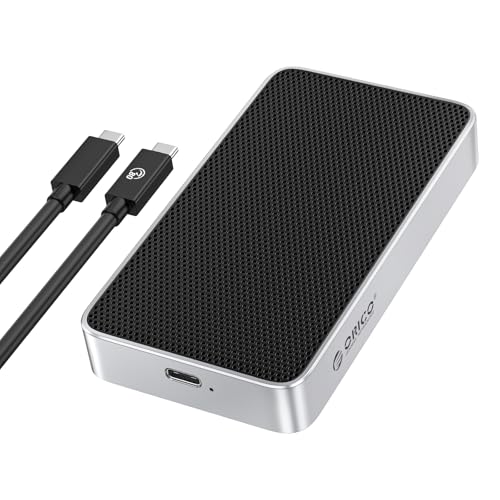
- Tool-free drive installation
- Fanless aluminum cooling
- Up to 8TB PCIe 4.0 NVMe 2280 support
Best For: Frequent PCIe 4.0 SSD swaps
Best for Tool-Free Setup
ICY BOX 80Gbps Fan-Cooled Enclosure

- Tool-free SSD installation
- Fan and aluminum housing
- Supports 2230–2280 NVMe drives up to 8TB
Best For: Frequent SSD swaps and long transfers
Best Fanless Option
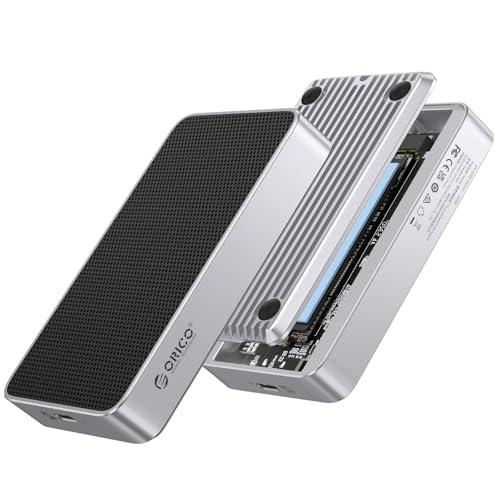
- Silent passive cooling
- PCIe Gen 5 and Gen 4 NVMe support
- M.2 2280 drives up to 8TB
Best For: Quiet desktop storage with a 2280 NVMe SSD
Best for Mixed Computer Ports

- Thunderbolt/USB4 and USB-C 3.2 computer support
- PCIe Gen 5 NVMe support
- Temperature-controlled cooling fan
Best For: Sharing storage across computers with different USB-C ports
Top Speed Pick – TESmart TBE-X5Pro 80Gbps Enclosure
Among thunderbolt 5 ssd enclosures, the TESmart TBE-X5Pro targets demanding workflows with a JHL9480 controller, support for PCIe Gen5 and Gen4 NVMe drives, and advertised sequential speeds up to 7,000 MB/s.
Best For: Creators seeking high advertised transfer speeds and active cooling for large projects.
Pros:
- Supports NVMe SSDs up to 8TB.
- Combines a fan, heatsink, thermal pad, and aluminum shell for cooling.
- Includes an 80Gbps cable, two thermal pads, and an installation screwdriver.
Cons:
- The stated 7,000 MB/s figure is an up-to claim; actual speed depends on the SSD and host.
- The supplied operating-system requirements differ by host and Thunderbolt generation, so check compatibility before buying.
This is a strong fit if you plan to pair a fast NVMe drive with a compatible host and want cooling built around sustained workloads.
Easy-Install Pick – ACASIS TB501Pro 80Gbps Enclosure
If you want straightforward drive installation, the ACASIS TB501Pro stands out among thunderbolt 5 ssd enclosures for its tool-free design. Its JHL9480-based enclosure supports PCIe 5.0 SSDs and advertises read and write speeds up to 6,000 MB/s.
Best For: Buyers who want tool-free setup and a fan with automatic and manual controls.
Pros:
- Fan automatically starts at 55°C and stops at 40°C, with a manual-on option.
- Includes an 80Gbps cable, thermal pads, and an SSD size adapter.
- Backward compatible with 40Gbps USB4 and listed USB 3.x connections.
Cons:
- The product notes explicitly say it is not compatible with Thunderbolt 3 devices.
- ACASIS recommends a PCIe 4.0 x4 NVMe 1.4 or newer SSD to exceed 3,000 MB/s.
Choose this model for convenient setup and controllable cooling, but confirm your host connection before ordering—especially if you rely on Thunderbolt 3.
Passive-Cooling Pick – UGREEN 80Gbps Finned Enclosure
For shoppers comparing thunderbolt 5 ssd enclosures without a listed fan, UGREEN’s model uses double-sided aluminum fins to dissipate heat. Its JHL9480 and JMS583 dual-chip design advertises speeds up to 7,000 MB/s; the SSD is sold separately.
Best For: Buyers who prefer a finned aluminum enclosure for an existing NVMe drive.
Pros:
- Supports M.2 NVMe sizes 2230, 2242, 2260, and 2280, up to 8TB.
- Double-sided aluminum fins provide passive heat dissipation.
- Includes a USB-C to USB-C cable.
Cons:
- Does not support SATA or mSATA SSDs, or drives with pre-installed heatsinks.
- Some thicker SSDs may require a thinner thermal pad to fit.
This is worth considering if you want a finned enclosure rather than a listed fan, provided your chosen SSD fits its physical and interface requirements.
Status-Monitoring Pick – MOKiN 80Gbps LCD Enclosure
The MOKiN model adds an at-a-glance LCD to the thunderbolt 5 ssd enclosures lineup. Its screen shows temperature status and fan speed, while an internal fan starts at 40°C and adjusts across three speed levels.
Best For: Users who want visible temperature and fan status during large transfers.
Pros:
- LCD displays temperature status, fan speed, and fan or overheating alerts.
- Supports PCIe Gen5 NVMe SSDs in 2230, 2242, 2260, and 2280 lengths, up to 8TB.
- Includes a Thunderbolt 5 cable and lists compatibility with Thunderbolt 5/4/3 and USB4 ports.
Cons:
- Does not support SATA M.2 SSDs.
- Reaching 80Gbps requires a Thunderbolt 5 port and cable; actual speed varies with the host and SSD.
Pick this enclosure if live thermal feedback matters more to you than a plain case, and match it with a compatible NVMe drive and host.
Fastest Claimed Read – TERRAMASTER D1 SSD Pro
Among thunderbolt 5 ssd enclosures, the diskless TERRAMASTER D1 SSD Pro is a strong fit for demanding editing workflows. TERRAMASTER reports up to 7,061 MB/s reads in a specific Mac M4 Pro and Samsung 990 PRO 4TB test; your results will depend on the host and SSD.
Best For: Editors who want high reported read speed and silent, passive cooling.
Pros:
- Supports Thunderbolt 5/4/3 and USB4, with an included 80Gbps USB-C cable.
- Fanless aluminum body uses preinstalled heatsinks and a dual-fin design.
- Accepts up to 8TB M.2 NVMe 2280 SSDs and includes a protective case.
Cons:
- SSD is not included.
- The advertised top read speed comes from a specific test setup, not a guaranteed speed on every system.
The D1 SSD Pro makes the most sense if you already have a compatible 2280 drive and value quiet operation. Its speed-indicating LED is also useful for spotting when a connection has fallen back to standard USB.
The Qwiizlab ES41TR stands out among thunderbolt 5 ssd enclosures for accepting several M.2 NVMe lengths, from 2230 to 2280. Qwiizlab reports over 6,300 MB/s sequential writes and 5,900 MB/s reads via Thunderbolt 5, though actual performance depends on the setup.
Best For: Buyers reusing an NVMe drive that may not be the standard 2280 length.
Pros:
- Supports 2230, 2242, 2260, and 2280 PCIe Gen 4 or Gen 5 NVMe SSDs up to 8TB.
- Grooved aluminum chassis and internal copper plate provide fanless cooling.
- Includes an Intel-certified Thunderbolt 5 cable and SSD installation supplies.
Cons:
- SSD must be purchased separately.
- Installation requires the included screw and screwdriver rather than being tool-free.
Choose this enclosure when drive-size flexibility and an included certified cable matter more than tool-free swaps. Its Thunderbolt 4/3 and USB4 backward compatibility also makes it useful across different host generations.
For shoppers comparing thunderbolt 5 ssd enclosures with quick drive changes in mind, the ORICO X50 offers tool-free installation in a portable aluminum body. ORICO advertises up to 6,000 MB/s, with 80Gbps operation requiring a Thunderbolt 5 host and cable.
Best For: Creators who frequently install or swap PCIe 4.0 NVMe drives.
Pros:
- Tool-free design simplifies SSD installation and changes.
- Fanless, finned aluminum chassis is designed for quiet cooling.
- Supports up to 8TB M.2 NVMe 2280 SSDs and works with Windows, macOS, and Linux.
Cons:
- Does not support M.2 SATA or PCIe 5.0 SSDs.
- ORICO warns that Thunderbolt 3 systems may default to approximately 10Gbps USB speeds.
The X50 is the practical pick if easy access to a 2280 PCIe 4.0 drive is your priority. Check your host and cable before buying for speed: compatibility with an older port does not mean it will deliver 80Gbps.
Best for Tool-Free Setup – ICY BOX 80Gbps Fan-Cooled Enclosure
Among thunderbolt 5 ssd enclosures, this ICY BOX model stands out for its tool-free SSD installation and built-in cooling fan. It supports M.2 NVMe drives in sizes 2230 through 2280, up to 8TB.
Best For: Buyers who swap SSDs regularly and want active cooling for long transfers.
Pros:
- Tool-free, screwless SSD installation.
- Aluminum housing and built-in fan help dissipate heat.
- Supports multiple M.2 sizes and includes a USB-C/USB-A cable.
Cons:
- Its stated 80Gbps capability requires a compatible high-speed host.
- Fan operation may not suit a strictly fanless setup.
This is a practical pick when easy drive changes matter as much as cooling. Check your host connection before buying for 80Gbps use.
Best Fanless Option – ORICO X50PRO 80Gbps Enclosure
If you want thunderbolt 5 ssd enclosures without a cooling fan, the ORICO X50PRO uses an aluminum shell, cooling film, and an air-duct design for passive heat dissipation. It supports PCIe Gen 5 and Gen 4 NVMe SSDs in the 2280 size, up to 8TB.
Best For: Desktop users who want a silent, fanless enclosure for an M.2 2280 NVMe drive.
Pros:
- Fanless design avoids fan noise.
- Supports PCIe Gen 5 and Gen 4 NVMe drives.
- Includes an 80Gbps cable and thermal pad.
Cons:
- Listed SSD support is limited to the 2280 size.
- 80Gbps operation requires a compatible host and cable; Thunderbolt 3 systems may fall back to USB speeds up to 10Gbps.
Choose this model for quiet operation rather than drive-size flexibility. Confirm that your computer can provide the connection speed you expect.
Best for Mixed Computer Ports – GLOTRENDS EM6002
The GLOTRENDS EM6002 is one of the thunderbolt 5 ssd enclosures designed to work with both Thunderbolt/USB4 computers and ordinary USB-C 3.2 computer ports. Its dual-controller design switches connections automatically, with stated links of 80Gbps on supported high-speed hosts and 10Gbps on USB-C 3.2.
Best For: Computer users moving one M.2 2280 NVMe drive between Thunderbolt or USB4 systems and standard USB-C PCs.
Pros:
- Works on ordinary USB-C 3.2 computer ports as well as supported Thunderbolt and USB4 hosts.
- Supports PCIe Gen 5, Gen 4, and Gen 3 NVMe drives up to 8TB.
- PWM fan provides active cooling when temperatures rise.
Cons:
- Does not support smartphones or phone-based backups.
- Ordinary USB-C 3.2 connections are limited to a 10Gbps link.
- The listed manufacturer-defect warranty is 30 days.
This model makes sense if port flexibility across computers is the priority. Check the host port and, for Thunderbolt 3 on a Mac, the stated macOS 15.2-or-later requirement.
How We Picked the Best Thunderbolt 5 SSD Enclosures
We focused on 80Gbps M.2 NVMe enclosures with different approaches to cooling, SSD support, and portability. The selection includes fanless aluminum designs, models with fans, and an option with an LCD display. We also considered stated support for older Thunderbolt and USB hosts. Listings can omit important details, so confirm the exact interface, supported drive sizes, and included cable before buying. This comparison does not assume that every enclosure reaches the same sustained transfer speed.
Quick Comparison: Which Style Fits?
For a compact, quiet setup, start with fanless options such as Qwiizlab’s aluminum enclosure or ORICO’s silent fanless PCIe 5.0 model. If you expect long, demanding transfers, compare the cooling approaches of the ICY BOX fan-equipped model, TESmart’s smart-cooling design, and the other actively managed options. MOKiN adds an LCD display if you want information visible on the enclosure. TERRAMASTER D1 SSD Pro is a diskless option; like the other diskless listings, it requires a separate SSD. Treat these as feature-based starting points, not a speed ranking.
Key Buying Factors for Thunderbolt 5 SSD Enclosures
Host Connection and Real-World Speed
Check that your computer actually has a Thunderbolt 5 port if 80Gbps-class connectivity is your goal. A Thunderbolt 4, Thunderbolt 3, or USB4 port may work with a compatible enclosure, but it will not provide a Thunderbolt 5 connection. USB 3.x fallback is more limited and varies by model. Confirm your host’s specifications and use a cable rated for the connection you intend to use. Also remember that 80Gbps describes the interface, not guaranteed file-copy speed.
SSD Fit and Heat
Most listings target M.2 NVMe drives, but supported lengths, key types, and PCIe generations can differ. A PCIe 5.0-ready enclosure can be useful if you already own a Gen5 SSD; it cannot make an older drive faster. Check the manufacturer’s supported SSD list or specifications before ordering. Fast NVMe drives generate heat, so compare heatsinks, thermal pads, airflow, and fan noise—especially for repeated large transfers. A fanless case trades moving parts and noise for greater dependence on its chassis and contact with the SSD.
Total Cost and Setup
Budget for the SSD if the enclosure is sold without one. Check whether the package includes a suitable cable, thermal pads, and tools, and whether assembly allows the pads to contact your particular drive properly. For travel, consider enclosure size and whether a fan opening will be exposed to dust.
Who Should Buy Which Thunderbolt 5 SSD Enclosures?
Choose a fanless design if quiet operation and a simple portable setup matter most. Consider an actively cooled model for frequent, sustained writes, while recognizing that its fan may be audible. Look at PCIe 5.0-ready models if you need to house a compatible Gen5 SSD, and prioritize clearly documented fallback modes if you switch between newer and older computers. The best Thunderbolt 5 SSD Enclosures are the ones that match your host, SSD, and workload—not merely the highest number on the box.