If you spend hours at a desk, the right trackball can reduce hand movement, improve comfort, and help keep your workflow steady.
This 2026 roundup focuses on trackball mice for PC productivity, with options for multi-device work, wired reliability, and precision control.
Best 10 Trackball Mice for PC Productivity Picks for 2026
Best for Comfort-First Productivity
Logitech MX Ergo S Wireless Trackball

- 20-degree tilt supports a more natural wrist and forearm position
- Thumb trackball keeps cursor control precise with less arm movement
- Six programmable buttons help speed up common PC tasks
Best For: Comfort-focused PC users who want a customizable trackball for long work sessions.
Best for Precision Scrolling
Kensington Expert Wired Trackball Mouse
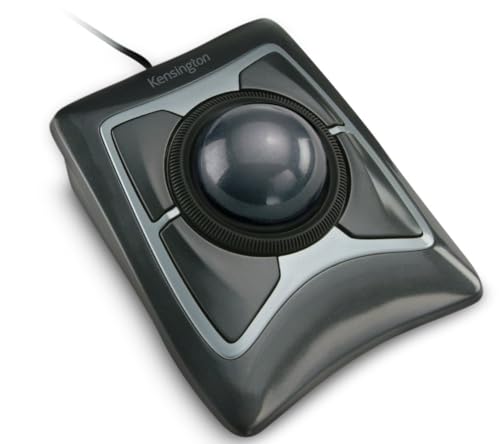
- 55mm ball with DiamondEye tracking for precise control
- Scroll ring speeds through long documents and web pages
- Detachable wrist rest and customizable buttons improve comfort
Best For: Desk users who want accurate tracking and fast scrolling in a wired trackball.
Best for Multi-Device Switching
Nulea M501 Wireless Trackball Mouse

- Connects to up to 3 devices via Bluetooth or USB receiver
- Thumb-control design reduces wrist movement for longer sessions
- Rechargeable battery and back/forward buttons boost convenience
Best For: Multi-device workers who want a comfortable thumb trackball with simple switching.
Best for Scroll Navigation
Kensington Orbit Trackball Mouse with Scroll Ring

- Scroll ring speeds through pages and documents
- Optical tracking supports precise cursor control
- Ambidextrous design with detachable wrist rest
Best For: People who want an ergonomic, scroll-friendly trackball for everyday PC work.
Best for Multi-Device Workflows
SABLUTE MAM1 Pro Ergonomic Trackball Mouse

- Adjustable 0°/18° tilt for a more natural wrist angle
- Thumb trackball control saves desk space and arm movement
- Connects to 3 devices with Bluetooth and 2.4G receiver
Best For: Workers who switch between multiple devices and want a quiet, ergonomic trackball for everyday productivity.
Best for Wireless Flexibility
Kensington Orbit Wireless Trackball with Scroll Ring

- Dual wireless support with Bluetooth LE and 2.4 GHz
- Scroll ring simplifies document and page navigation
- Adjustable DPI and wrist rest improve comfort and control
Best For: People who want a comfortable, wireless trackball for everyday office productivity.
Best for Easy Wired Setup
Nulea M509 Wired Thumb Trackball Mouse

- Wired connection for stable, no-battery operation
- Thumb trackball for precise productivity control
- Type A and Type C interface for broad compatibility
Best For: Desk workers who want a simple wired trackball mouse for everyday productivity.
Best for Multi-Device Workspaces
TECKNET Pro Wireless Trackball Mouse

- Thumb trackball reduces movement in tight desk setups
- Pairs with up to 3 devices over Bluetooth or 2.4G
- USB-C rechargeable with adjustable DPI and silent clicks
Best For: Multi-device users who want a comfortable trackball for everyday office productivity.
Best Heavy-Duty Pick
Nulea M511 Wireless Trackball Mouse

- Pairs with up to 3 devices via Bluetooth or USB receiver
- Thumb trackball reduces hand and arm movement
- Tilt stand and silent controls improve desk comfort
Best For: People who switch between multiple devices and want a quiet, ergonomic thumb trackball.
Best Simple Pick
Nulea M501 Wireless Trackball Mouse

- Thumb trackball reduces wrist and arm movement
- Connects to 3 devices via Bluetooth or USB receiver
- Rechargeable battery and adjustable DPI support daily productivity
Best For: People who work across multiple devices and want an ergonomic thumb trackball.
Best for Comfort-First Productivity – Logitech MX Ergo S Wireless Trackball
If you want one of the most ergonomic trackball mice for pc productivity, the Logitech MX Ergo S is built to reduce hand and forearm movement while keeping precision high. Its thumb-controlled trackball, adjustable tilt, and customizable buttons make it a strong fit for long work sessions, especially if you spend your day switching between documents, spreadsheets, and browser tabs.
Best For: Users who want a comfortable, highly customizable trackball mouse for all-day PC work.
Pros:
- 20-degree tilt helps improve posture and reduce strain during extended use
- Thumb trackball control offers precise cursor movement with less arm motion
- Six programmable buttons and Logi Options+ support productivity shortcuts
- USB-C rechargeable with Bluetooth and Logi Bolt connectivity options
Cons:
- May take time to adjust if you are new to trackball mice
- Best suited for medium to large hands
- More expensive than basic productivity mice
For buyers comparing trackball mice for pc productivity, the MX Ergo S stands out for comfort, quiet operation, and customization rather than raw simplicity. It is a smart pick if you want to cut down on wrist movement and build a more efficient desktop setup.
Best for Precision Scrolling – Kensington Expert Wired Trackball Mouse
Kensington Expert Trackball Mouse (K64325), Black Silver, 5"W x 5-3/4"D x 2-1/2"H
Check Price On AmazonIf you want one of the most established trackball mice for pc productivity, the Kensington Expert Trackball Mouse is built for accurate cursor control, fast document navigation, and all-day desk use. Its large ball, scroll ring, and customizable buttons make it a strong fit for users who spend hours in spreadsheets, editing, or browsing long pages.
Best For: Desk workers who want a wired trackball with excellent scrolling, precise control, and a comfortable ambidextrous layout.
Pros:
- Large 55mm ball with DiamondEye optical tracking for smooth, precise cursor movement
- Scroll ring makes it easy to move through long documents and web pages
- Detachable wrist rest adds comfort for extended use
- Four customizable buttons and adjustable speed settings through Kensington software
Cons:
- Wired USB-A connection may not suit users who want a wireless setup
- KensingtonKonnect customization support is limited on some platforms
- Learning curve can be steep for first-time trackball users
For buyers comparing trackball mice for pc productivity, this model stands out for its proven design and productivity-first controls rather than flashy extras. It is a dependable choice if you value precision, comfort, and quick scrolling over portability.
Best for Multi-Device Switching – Nulea M501 Wireless Trackball Mouse
If you want one of the more flexible trackball mice for pc productivity, the Nulea M501 is a practical pick thanks to its thumb-controlled design, rechargeable battery, and support for up to three devices. It keeps your hand in a natural position while giving you precise cursor control on cramped desks or any surface where a regular mouse feels awkward.
Best For: People who work across multiple computers and want a comfortable thumb trackball with easy device switching.
Pros:
- Connects to up to 3 devices via Bluetooth or 2.4G USB receiver
- Ergonomic thumb control helps reduce wrist and arm movement
- Rechargeable battery removes the need for disposable cells
- Back and forward buttons add convenience for everyday navigation
Cons:
- Buttons are not programmable
- Best experience may require an initial full charge
- Fast chargers are not recommended
Overall, the M501 is a solid fit for trackball mice for pc productivity if you value comfort, accurate pointer control, and quick switching between work devices more than advanced customization.
“summary_card”:{“label”:”Best for Multi-Device Switching”,”short_title”:”Nulea M501 Wireless Trackball Mouse”,”bullets”:[“Connects to up to 3 devices via Bluetooth or USB receiver”,”Thumb-control design reduces wrist movement for longer sessions”,”Rechargeable battery and back/forward buttons boost convenience”],”best_for”:”Multi-device workers who want a comfortable thumb trackball with simple switching.”}}}▼of sure? to=roundup_product_section aced it to=commentary ાત્રassistant to=commentary 菲律宾申博analysis to=final ाठassistant to=final स्थिति 北京赛车微信 to=final াদেশ to=final {Best for Scroll Navigation – Kensington Orbit Trackball Mouse with Scroll Ring
If you want trackball mice for pc productivity that make long sessions feel easier, the Kensington Orbit Trackball Mouse with Scroll Ring is a smart pick. Its stationary design reduces hand movement, while the scroll ring helps you move through documents and web pages quickly and comfortably.
Best For: Users who spend a lot of time scrolling, editing documents, or working in tight desk setups and want an ambidextrous trackball with ergonomic support.
Pros:
- Scroll ring makes page navigation faster and more natural than side buttons alone
- Optical tracking delivers precise cursor control with minimal hand movement
- Ambidextrous layout works well for both right- and left-handed users
- Detachable wrist rest adds comfort for extended productivity use
Cons:
- Only two buttons may feel limited for power users
- Trackball control can take some time to learn if you are new to it
- Not the most feature-rich option for advanced customization
For buyers comparing trackball mice for pc productivity, this model stands out for simple comfort and efficient scrolling rather than flashy extras. It is especially appealing if you want a dependable office-friendly trackball that keeps desktop work moving smoothly.
Best for Multi-Device Workflows – SABLUTE MAM1 Pro Ergonomic Trackball Mouse
If you want one of the more versatile trackball mice for pc productivity, the SABLUTE MAM1 Pro is built around comfort, quiet use, and easy switching between devices. Its adjustable 0°/18° tilt and thumb-controlled ball aim to reduce strain during long work sessions, while the wireless setup keeps your desk cleaner and more portable.
Best For: People who move between a PC, laptop, and tablet and want a comfortable thumb trackball for all-day office work.
Pros:
- Adjustable 0° and 18° ergonomic angle helps support a more natural wrist position
- Thumb trackball design reduces arm movement, which is useful on small desks and in tight spaces
- Connects to up to 3 devices with Bluetooth and a 2.4G USB receiver
- Quiet clicks and 5 DPI levels make it easier to tailor for shared workspaces and different tasks
Cons:
- Trackball control has a learning curve for first-time users
- Mac driver support is limited for customization
For buyers comparing trackball mice for pc productivity, this model stands out for multi-device convenience and ergonomic flexibility more than raw performance. It makes the most sense if you want a quiet, space-saving pointer that can follow you across a busy work setup.
Best for Wireless Flexibility – Kensington Orbit Wireless Trackball with Scroll Ring
If you want one of the more adaptable trackball mice for pc productivity, the Kensington Orbit Wireless Trackball with Scroll Ring stands out for its dual wireless connection, adjustable DPI, and easy scrolling. It’s a solid fit for desk setups where you want less hand movement, more comfort, and dependable pointer control.
Best For: Users who want a wireless, ambidextrous trackball with strong productivity features and ergonomic comfort.
Pros:
- 2.4 GHz and Bluetooth LE connectivity gives you flexible wireless setup options.
- Scroll ring makes long documents and web pages easier to navigate without repeated dragging.
- Four DPI settings help you switch between precision work and faster everyday browsing.
- Detachable wrist rest and ambidextrous design add comfort for extended sessions.
Cons:
- Windows ARM-based computers are not currently supported.
- Trackball control can take some adjustment if you are new to this style of mouse.
For buyers comparing trackball mice for pc productivity, this model offers a practical balance of comfort, scroll control, and customization. It’s especially appealing if you want a wireless option that helps reduce wrist movement while still staying efficient for everyday office tasks.
Best for Easy Wired Setup – Nulea M509 Wired Thumb Trackball Mouse
If you want one of the more straightforward trackball mice for pc productivity, the Nulea M509 keeps the focus on comfort and control without adding extra setup hassle. The wired connection is ideal for a desk-based workflow, while the thumb-driven trackball helps reduce repeated wrist movement during long work sessions.
Best For: Users who want a simple wired trackball mouse for everyday office work, long spreadsheet sessions, and stationary desk setups.
Pros:
- Wired design avoids battery changes and connection dropouts
- Thumb control supports precise cursor movement for productivity tasks
- 2-in-1 Type A and Type C interface adds flexibility across devices
- Ergonomic shape is built for more comfortable all-day use
Cons:
- Not as travel-friendly as a wireless model
- Thumb-ball control can take some adjustment if you’re new to trackballs
Overall, the Nulea M509 is a practical pick for trackball mice for pc productivity if you value steady wired performance, easy compatibility, and a familiar ergonomic layout over premium extras.
Best for Multi-Device Workspaces – TECKNET Pro Wireless Trackball Mouse
If you want a compact control option for trackball mice for pc productivity, this TECKNET Pro is built around thumb navigation, adjustable DPI, and easy switching between multiple devices. It’s a practical fit for desks where space is tight and you want less hand movement without giving up precision.
Best For: People who work across a PC, Mac, or laptop and want a comfortable trackball with quick device switching.
Pros:
- Thumb trackball design helps reduce arm movement in cramped workspaces
- Connects to up to 3 devices via Bluetooth or 2.4G
- Adjustable DPI and silent operation support precise, distraction-free work
- USB-C rechargeable battery is convenient for daily productivity use
Cons:
- May take time to get used to if you’re new to trackballs
- Best suited to medium and large hands
- RGB lighting may be unnecessary for some office setups
Overall, this is a strong productivity-first pick for buyers who want one trackball to handle multiple devices and reduce wrist strain. Among trackball mice for pc productivity, it stands out more for flexibility and comfort than for a minimalist office look.
Best Heavy-Duty Pick – Nulea M511 Wireless Trackball Mouse
If you want one of the more flexible trackball mice for pc productivity, the Nulea M511 is built for moving between devices without interrupting your flow. Its thumb-controlled trackball reduces hand movement, while the tilt stand and silent clicks make it a practical fit for long office sessions, shared desks, and focused work.
Best For: Workers who regularly switch between a PC, laptop, tablet, or phone and want a comfortable thumb trackball for everyday productivity.
Pros:
- Connects to up to 3 devices via Bluetooth or USB receiver
- Thumb trackball design helps reduce arm and wrist movement
- 21.7° tilt stand supports a more natural hand position
- Silent buttons and scroll wheel suit quiet workspaces
Cons:
- Trackball mice have a learning curve if you are new to them
- Thumb-only control may not suit users who prefer a centered ball
For trackball mice for pc productivity, the M511 stands out most for multi-device convenience and low-distraction comfort rather than raw specialty features. It is a smart pick if you want a simple, ergonomic trackball that can keep up with a mixed-device workflow.
Best Simple Pick – Nulea M501 Wireless Trackball Mouse
If you want one of the more flexible trackball mice for pc productivity, the Nulea M501 is a strong fit thanks to its thumb-driven control, rechargeable battery, and support for up to three devices. It is built for people who work across a laptop, desktop, or tablet-style setup and want to keep cursor movement smooth without constant wrist motion.
Best For: Multi-device users who want an ergonomic thumb trackball for everyday office work, especially in tight desks or mixed-device setups.
Pros:
- Thumb trackball design reduces wrist and arm movement for more comfortable long sessions
- Connects to up to 3 devices via Bluetooth or USB receiver, making switching quick and practical
- Adjustable DPI and precise tracking help with accurate cursor control on almost any surface
- Rechargeable battery removes the need to keep replacing disposable cells
Cons:
- Buttons are not programmable
- Thumb-trackball controls may take a short adjustment period if you are new to trackballs
- Fast chargers are not recommended for charging
The Nulea M501 stands out if you want trackball mice for pc productivity that prioritize comfort, simplicity, and device flexibility over advanced customization. It is a sensible pick for compact desks and users who bounce between multiple computers during the day.
How We Picked These Trackball Mice for PC Productivity
We focused on models that support long work sessions, accurate cursor control, and practical features that matter in real office use. Priority went to ergonomic shapes, dependable connectivity, rechargeable or wired power options, and controls that make it easier to navigate spreadsheets, design tools, and browser-heavy workflows.
Because Trackball Mice for PC Productivity are often used for many hours at a time, we also looked for comfort-focused designs such as thumb-operated layouts, scroll rings, adjustable angles, and multi-device switching.
Quick Comparison
Thumb-control trackballs are usually the easiest transition for most users and tend to suit general office work. Finger-operated models can feel more precise for users who want a larger stationary base and minimal thumb movement. Wired models are best when you want zero charging concerns, while wireless and Bluetooth options are better for cleaner desks and laptop-to-desktop flexibility.
Key Buying Factors for Trackball Mice for PC Productivity
Ergonomics and Hand Fit
Comfort matters more than raw speed for most productivity buyers. Look for a shape that supports your palm naturally and keeps your wrist in a neutral position. If you work all day, adjustable tilt or angle options can make a noticeable difference.
Control Style and Learning Curve
Thumb-control trackballs are familiar to many mouse users and are usually quicker to learn. Finger-control designs can offer very fine pointer movement but may take longer to adapt to. Choose the style that matches how you already work.
Connectivity and Device Switching
For modern office setups, Bluetooth plus a USB dongle is especially useful. Multi-device pairing is valuable if you move between a desktop, laptop, and tablet. Wired USB-C or dual-interface models are a smart choice for stable, plug-and-play use.
Productivity Extras
Scroll rings, customizable buttons, quiet clicks, and adjustable DPI can all improve efficiency. These features matter most if you spend time in spreadsheets, editing software, or multitasking across windows.
Who Should Buy Which Trackball Mice for PC Productivity?
If you want the easiest all-around upgrade, choose a thumb-trackball with wireless connectivity and multi-device support. If comfort is your top concern, look for an ergonomic model with angle adjustment or a more sculpted hand rest. If you prefer dependable performance without batteries, a wired trackball is the most straightforward option. For users who handle detailed work or want a more premium desktop feel, a larger precision trackball with advanced controls is often the best fit.
In short, the best Trackball Mice for PC Productivity balance comfort, control, and connection options so you can work longer with less strain.