A vertical gaming mouse can put your hand in a more upright position while keeping extra controls within reach. But shape alone does not make a mouse comfortable—or well suited to the games you play.
These eight options span wired and wireless designs, joystick-style rockers, and programmable buttons. Here is how to narrow the field by grip, controls, and connection rather than DPI claims alone.
Best 8 Vertical Gaming Mice for PC Picks for 2026
Best Wired Thumb Controls

- Five-direction thumb rocker
- 11 programmable buttons with onboard memory
- Five DPI levels up to 10,000
Best For: Right-handed gamers who want wired thumb controls
Best Connection Flexibility
TRELC Wireless 5D Rocker Mouse

- Bluetooth, 2.4 GHz, or wired USB
- Five-direction rocker and 11 programmable buttons
- Five DPI levels up to 24,000
Best For: Gamers switching between two devices
Best WASD-Style Joystick
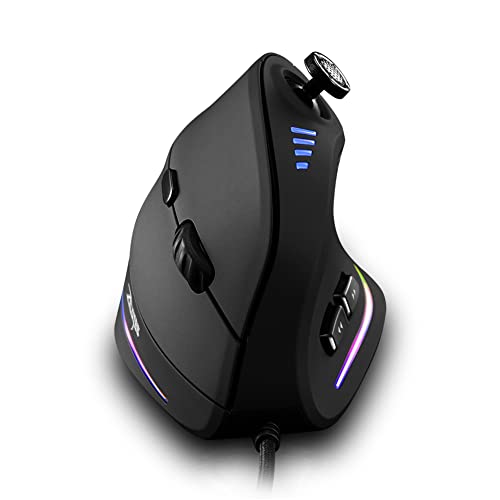
- Joystick defaults to W/S/A/D and spacebar
- 11 software-customizable buttons
- Five DPI settings up to 10,000
Best For: Gamers who want keyboard-style thumb inputs
Best Quiet Controls
MOJO Silent Vertical Gaming Mouse
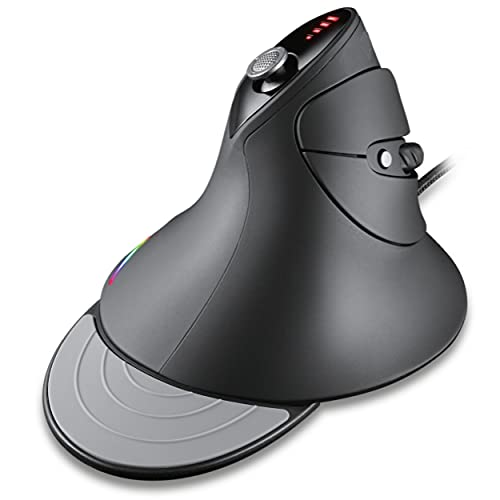
- Silent buttons for shared spaces
- Software profiles and macros
- DPI presets up to 10,000
Best For: Gamers who want quieter, configurable clicks
Most Versatile Connection Options
Attoe F-18 Wireless Vertical Gaming Mouse

- Bluetooth, 2.4GHz, and USB-C wired
- 12 programmable buttons with onboard storage
- Five-direction thumb rocker
Best For: Right-handed players using multiple connection types
Wired Joystick Pick
ZEER RGB Vertical Gaming Mouse

- Five-way thumb joystick
- 11 programmable buttons
- Five DPI steps up to 10,000
Best For: Wired players who want joystick-style thumb controls
Dual-Wireless Pick
TKMARS Rechargeable Vertical Gaming Mouse
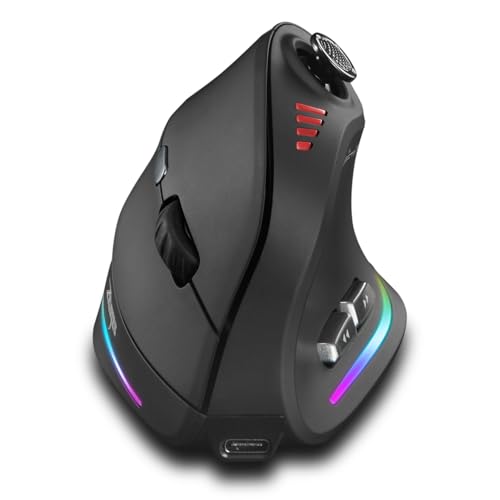
- Bluetooth and 2.4GHz device switching
- 12 programmable buttons and five-way joystick
- 800mAh rechargeable battery
Best For: Right-handed users switching between two devices
Right-Handed Wired Pick
Attoe ATC18 Vertical Gaming Mouse
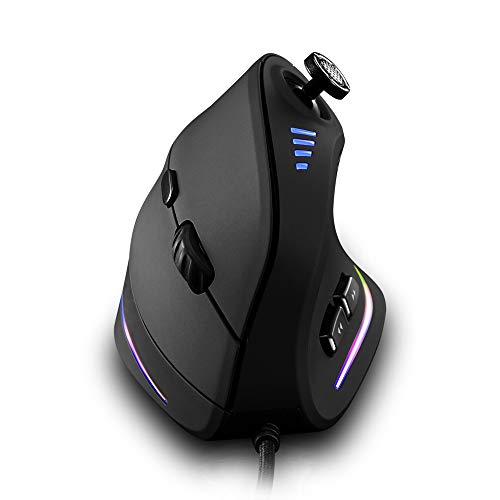
- USB wired connection
- 11 programmable buttons
- Five-direction rocker and 10,000 DPI maximum
Best For: Right-handed gamers who prefer a wired mouse
Best Wired Thumb Controls – TRELC 5D Rocker Gaming Mouse
Among vertical gaming mice for PC, this wired TRELC model is a practical pick if you want several commands under your thumb. Its five-direction rocker and 11 programmable buttons offer plenty of mapping options without changing mice between games.
Best For: Right-handed PC gamers who want a wired vertical mouse with customizable thumb controls.
Pros:
- Five-direction thumb rocker can handle five separate inputs.
- 11 programmable buttons, with settings saved to onboard memory.
- Five DPI levels from 1,500 to 10,000 and selectable side-lighting effects.
Cons:
- USB cable limits placement compared with a wireless mouse.
- Right-handed shape is not suited to left-handed use.
The rocker is the reason to choose this model: it puts extra actions within thumb reach. If you do not need those inputs, its wired, button-heavy design may be more than you need.
Best Connection Flexibility – TRELC Wireless 5D Rocker Mouse
If you are comparing vertical gaming mice for PC but do not want to commit to a cable, this TRELC model supports Bluetooth 5.0, 2.4 GHz wireless, and wired USB. It pairs that flexibility with a five-direction thumb rocker and 11 programmable buttons.
Best For: Right-handed gamers who switch between two devices and want wireless or wired connection options.
Pros:
- Bluetooth, 2.4 GHz receiver, and wired USB connection modes.
- Five-direction thumb rocker and 11 programmable buttons with onboard memory.
- Five DPI levels ranging from 1,600 to 24,000.
Cons:
- Can switch between two devices, but cannot control both simultaneously.
- Right-handed design excludes left-handed use.
This is the more adaptable TRELC choice when your setup includes two computers or you occasionally want a cable. Buy it for the connection choices and extra thumb inputs, rather than for simultaneous multi-device control.
Best WASD-Style Joystick – zelotes C-18 Vertical Mouse
This zelotes C-18 stands out among vertical gaming mice for PC because its thumb joystick defaults to W, S, A, D, and the spacebar. Those inputs are customizable, making it worth a look if you prefer joystick-style controls alongside a conventional wired mouse connection.
Best For: Right-handed gamers who want a thumb joystick with familiar keyboard-style defaults.
Pros:
- Five-direction joystick defaults to W/S/A/D and spacebar inputs.
- 11 buttons can be customized through software.
- Five selectable DPI settings from 1,500 to 10,000.
Cons:
- Programming software is not fully available for Mac.
- Wired USB connection and right-handed shape limit setup options.
The default joystick mapping gives this mouse a clear use case, but check software support before buying for a Mac. It makes the most sense when you will actually customize or use the extra thumb inputs.
Best Quiet Controls – MOJO Silent Vertical Gaming Mouse
For shared spaces, this MOJO is one of the vertical gaming mice for PC to consider: its buttons are described as silent, and its custom software supports profiles and macros. It also includes four directional joystick buttons for extra inputs.
Best For: Right-handed gamers who want quieter clicks and configurable controls in a wired mouse.
Pros:
- Silent buttons are intended to reduce click noise around others.
- Custom software supports profiles, macros, and settings changes.
- Five DPI presets from 1,000 to 10,000 and adjustable 125–1,000 Hz refresh rate.
Cons:
- Wired USB connection offers no wireless mode.
- Supplied information lists 12 customizable buttons in the description but nine buttons in the details, so confirm the layout if button count matters.
Its quiet-button design is the clearest reason to pick it over another feature-heavy vertical mouse. The conflicting button counts make it especially important to check the control layout before relying on a specific number of bindings.
Most Versatile Connection Options – Attoe F-18 Wireless Vertical Gaming Mouse
Among vertical gaming mice for PC, the Attoe F-18 stands out for its Bluetooth, 2.4GHz wireless, and USB-C wired connections. Its right-handed vertical shape and thumb-operated five-direction rocker pair ergonomic positioning with extra game controls.
Best For: Right-handed players who want programmable controls and multiple ways to connect.
Pros:
- 12 programmable buttons with onboard storage for saved settings.
- Five-direction thumb rocker adds compact control options.
- Five DPI presets reach a stated maximum of 24,000 DPI.
Cons:
- Right-handed design is not suited to left-handed use.
- Button customization requires the supplied configuration software.
The connection choices make this a flexible pick for switching between setups. If macros matter to you, plan to install the software before you play.
Wired Joystick Pick – ZEER RGB Vertical Gaming Mouse
If you prefer a wired setup, this ZEER model brings joystick-style thumb control to vertical gaming mice for PC. It combines a five-way rocker, RGB lighting, and 11 programmable buttons in a contoured design.
Best For: Players who want a wired vertical mouse with a thumb joystick and customizable buttons.
Pros:
- Five-way joystick provides directional and press inputs.
- 11 buttons support customization and macro editing through software.
- Five DPI steps range from 1,500 to 10,000 DPI, with indicator lights.
Cons:
- Wired connection offers no wireless option.
- The supplied specifications conflict on hand orientation, so confirm the grip before buying.
Its control layout is the main draw for games that benefit from extra thumb inputs. The conflicting hand-orientation information is worth resolving before checkout.
Dual-Wireless Pick – TKMARS Rechargeable Vertical Gaming Mouse
The TKMARS is one of the vertical gaming mice for PC that offers both Bluetooth 5.0 and 2.4GHz wireless connectivity. Its right-handed design also includes a five-way joystick, rechargeable battery, and USB-C cable connection.
Best For: Right-handed users who switch between two devices and want wireless play with extra thumb controls.
Pros:
- Bluetooth and 2.4GHz modes support switching between two connected devices.
- 12 programmable buttons and a five-way joystick expand control options.
- Adjustable sensitivity reaches a stated maximum of 24,000 DPI.
Cons:
- Right-handed shape is unsuitable for left-handed users.
- The notes do not specify an expected runtime for the 800mAh battery.
This is a practical option when you want to move between a PC and another computer without giving up a thumb joystick. Battery capacity is listed, but check runtime details if charging frequency is a priority.
Right-Handed Wired Pick – Attoe ATC18 Vertical Gaming Mouse
The Attoe ATC18 keeps things wired while adding the controls many shoppers seek in vertical gaming mice for PC. Its right-handed ergonomic shape houses an 11-button layout and a five-direction thumb rocker.
Best For: Right-handed PC gamers who prefer USB connectivity and want extra programmable inputs.
Pros:
- Five-direction thumb rocker offers directional and press inputs.
- 11 programmable buttons support macro editing through software.
- PAW3325 sensor has a stated maximum of 10,000 DPI.
Cons:
- USB wired connection limits placement compared with wireless models.
- Right-handed design does not accommodate left-handed use.
Choose this model if a straightforward wired connection matters more than device-switching flexibility. Its rocker and programmable buttons are the reasons to consider it over a basic vertical mouse.
How We Picked the Best Vertical Gaming Mice for PC
We focused on the features most useful for comparing Vertical Gaming Mice for PC: connection type, stated DPI range, programmable button count, joystick or rocker layout, and available customization. The selected models include wired and wireless options, with several offering 5D rockers or directional joysticks. Listed specifications are a starting point, not proof of tracking quality or comfort. If possible, check current software compatibility, dimensions, return terms, and recent owner feedback before buying.
Quick Comparison
For a wired setup: The TRELC wired, zelotes, ZEER, and generic wired 5D-rocker models list up to 10,000 DPI and 11 programmable buttons. The MOJO wired model also lists a 10,000 DPI ceiling and emphasizes silent operation.
For a wireless setup: The TRELC wireless and generic wireless 5D-rocker mice list up to 24,000 DPI. TKMARS lists Bluetooth and 2.4 GHz connections, 12 programmable buttons, and up to 24,000 DPI. Confirm which features work over each connection before choosing.
Key Buying Factors for Vertical Gaming Mice for PC
Fit Comes First
Vertical shells vary in height, width, and thumb support. A mouse that is too large can make its top buttons hard to reach; one that is too small may leave your fingers cramped. Compare dimensions with a mouse you already own, and consider whether you use a palm or fingertip-heavy grip. An upright shape may feel better to some users, but it is not a guaranteed fix for discomfort.
Controls and Software
A 5D rocker or directional joystick can put shortcuts under your thumb, which may help in MMOs, strategy games, or productivity work. Check whether its directions can be reassigned individually and whether profiles can be saved. Also verify that the configuration software supports your version of Windows or other intended PC operating system; a high button count is less useful without dependable mapping.
Connection and Sensor Claims
Wired mice avoid charging and connection-mode decisions. For wireless models, look for battery-life details, charging method, and whether a USB receiver is included. Bluetooth is convenient for switching devices, while a 2.4 GHz receiver may be preferable when responsive play is the priority. Maximum DPI measures sensitivity range, not accuracy or latency; prioritize adjustable steps and consistent tracking over the largest advertised number.
Who Should Buy Which Vertical Gaming Mice for PC?
Choose a wired 11-button model if you want straightforward connectivity and plenty of shortcuts. Consider the MOJO if quiet clicks matter in a shared space, but confirm its controls meet your needs. Look at TRELC or the other wireless 5D-rocker option if you want cable-free play with thumb-accessible commands. TKMARS is worth considering if you need both Bluetooth and 2.4 GHz. Whichever you choose, favor a comfortable fit and usable button placement over headline DPI.