When you’re building a silent PC, choosing the right fans can make all the difference. You want components that deliver efficient cooling without the annoying noise. The market offers several options, but not all fans are created equal. In this guide, we’ll explore the top 10 ultra-quiet PC fans that promise peak performance without the sound. You might be surprised by what these expert picks can do for your setup.
be quiet! Pure Wings 3 120mm Quiet PWM Case Fan

If you’re seeking a whisper-quiet cooling solution for your desktop, the be quiet! Pure Wings 3 120mm Quiet PWM Case Fan is an excellent choice. With a maximum speed of 1600 RPM and an airflow capacity of 49.9 CFM, it efficiently cools your system while maintaining a noise level of just 25.5 dB. Its German engineering promises quality and longevity, featuring a long-life rifle bearing with an 80,000-hour lifespan. Plus, the optimized frame and seven airflow-optimized blades minimize noise without sacrificing performance, making it perfect for silent builds. Enjoy a cooler, quieter workspace with this top-rated fan.
Best For: Those looking for a high-performance, quiet cooling solution for their desktop systems.
Pros:
- Whisper-quiet operation with a noise level of just 25.5 dB, ideal for silent builds.
- Long lifespan with an operating lifetime of 80,000 hours due to the durable rifle bearing.
- Optimized design featuring seven airflow-optimized blades for efficient cooling and reduced noise.
Cons:
- Limited to 120mm size, which may not fit all cases or cooling setups.
- Maximum RPM of 1600 may not be sufficient for high-performance gaming rigs under heavy load.
- Requires a 4-pin connector, which may not be compatible with all motherboard headers.
be quiet! Silent Wings Pro 4 120mm PWM Cooling Fan

Silent Wings Pro 4 120mm PWM Cooling Fan is designed for peak performance and minimal noise. Operating at a maximum speed of 3000 RPM, it delivers an impressive airflow capacity of 83.9 CFM while maintaining a noise level of just 36.9 decibels. You can easily adjust the speed settings to medium, high, or ultra, ensuring flexibility for your cooling needs. Its enhanced fan blades and funnel-shaped air outlet improve air pressure, while the fluid-dynamic bearing reduces vibration. Whether it’s for your desktop or server, this fan is a top choice for silent builds.
Best For: Those seeking a high-performance cooling solution with minimal noise for desktops, servers, or other electronic enclosures.
Pros:
- Optimized for Performance: Enhanced fan blades and funnel-shaped air outlet provide excellent airflow and pressure.
- Adjustable Speed Settings: Offers flexibility with three speed options (medium, high, ultra) for varying cooling needs.
- Low Noise Levels: Operates at a quiet 36.9 decibels, making it ideal for silent builds.
Cons:
- Limited Warranty: Comes with only a 1-year warranty, which may be shorter compared to competitors.
- Weight: At 310 grams, it may be heavier than some alternative cooling fans, potentially affecting installation in compact cases.
- Price Consideration: May be priced higher than basic fans, which could be a drawback for budget-conscious consumers.
GDSTIME Ultra Thin 12V Brushless DC Cooling Fan for PC
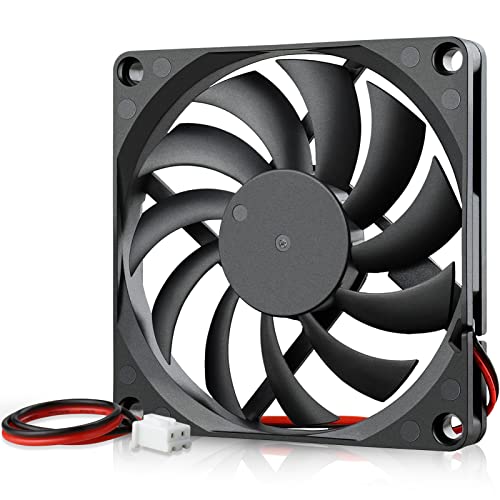
For those seeking a space-saving cooling solution, the GDSTIME Ultra Thin 12V Brushless DC Cooling Fan is an excellent choice. Measuring just 80 x 80 x 10.7 mm, it fits perfectly in tight spots within your PC. With a noise level of only 25.6 dBA, it guarantees quiet operation while delivering an airflow of 18.9 CFM at 2500 RPM. Its slim design makes it compatible with various devices like 3D printers and laptop coolers. Plus, the one-year warranty gives you peace of mind. Installation is a breeze with included mounting screws and a 2-pin connector.
Best For: Those looking for a compact and quiet cooling solution for tight spaces in PCs, 3D printers, and laptop coolers.
Pros:
- Ultra-thin design allows for easy installation in small PC cases and tight spaces.
- Quiet operation at only 25.6 dBA ensures minimal noise disruption.
- Versatile compatibility with various devices, including 3D printers and external hard drive enclosures.
Cons:
- Limited airflow of 18.9 CFM may not be sufficient for high-performance systems.
- 2-pin connector may not be compatible with all motherboards without adapters.
- Higher RPM might lead to a shorter lifespan under continuous heavy use.
Thermalright TL-8015 CPU Fan (80mm Slimline)

Looking for a slimline cooling solution that won’t disturb your peace? The Thermalright TL-8015 CPU Fan is your answer. With dimensions of 80x80x15mm, it fits snugly in tight spaces while delivering impressive cooling performance. The 4-pin PWM connector allows for automatic speed control, reaching a maximum of 2200RPM and an airflow of 28.4CFM. Its noise level stays below 23.3dBA, thanks to four vibration damping pads that minimize friction. Featuring durable S-FDB V2 bearings, this fan promises longevity and stability. Whether for cases or CPU coolers, it maximizes heat dissipation without the noise.
Best For: Users seeking a compact and quiet cooling solution for tight spaces in cases or CPU coolers.
Pros:
- Automatic speed control via 4-pin PWM connector for optimized cooling performance.
- Low noise operation with a maximum noise level of ≤23.3dBA, ideal for quiet environments.
- Durable construction featuring S-FDB V2 bearings for enhanced lifespan and stability.
Cons:
- Limited airflow compared to larger fans, which may affect cooling efficiency in high-performance setups.
- Slim design may not be suitable for all CPU cooler configurations or high heat dissipation needs.
- Requires a compatible 4-pin PWM header on the motherboard for full functionality.
Noctua NF-R8 redux-1200 Ultra Quiet Silent Fan
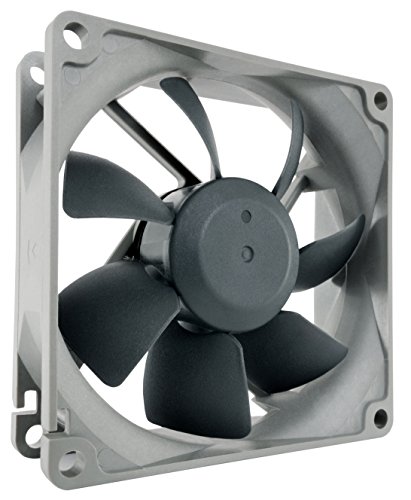
In environments where silence is golden, the Noctua NF-R8 redux-1200 Ultra Quiet Silent Fan stands out as a top choice for those seeking exceptional cooling without the distracting noise. With a noise level of just 9.1 dB(A) and an optimized low-noise design, this fan guarantees quiet operation while providing high static pressure and airflow. Its 80x80x25 mm size makes it perfect for chassis ventilation or replacing fans in NAS devices. Plus, it boasts an impressive MTTF of over 150,000 hours. You can also use optional speed control adaptors for even quieter performance, making it a versatile addition to your setup.
Best For: Users looking for a quiet and efficient cooling solution for their computer or NAS devices.
Pros:
- Ultra Quiet Operation: With a noise level of just 9.1 dB(A), it ensures a peaceful environment.
- High Durability: An impressive MTTF of over 150,000 hours offers long-lasting performance.
- Versatile Compatibility: Ideal for chassis ventilation and fan replacement in various devices.
Cons:
- Limited RPM: Maximum speed of 1200 RPM may not suffice for high-performance cooling needs.
- 3-Pin Connector: Lacks the more modern PWM control for dynamic speed adjustment.
- No Included Accessories: Speed control adaptors and other accessories are sold separately.
Noctua NF-P12 redux-1700 PWM Cooling Fan (120mm)

The Noctua NF-P12 redux-1700 PWM Cooling Fan is an ideal choice for enthusiasts who demand high performance without the noise. With a maximum speed of 1700 RPM and a noise level of just 25.1 dB(A), it strikes a perfect balance between cooling efficiency and quiet operation. Its pressure-optimized blade design guarantees excellent static pressure, making it perfect for CPU coolers and radiators. Plus, the fan’s impressive MTTF of over 150,000 hours assures longevity. You’ll appreciate the streamlined redux edition, which offers renowned Noctua quality at an attractive price, along with a variety of optional accessories for easy installation.
Best For: Enthusiasts seeking a high-performance cooling solution that operates quietly while maintaining excellent airflow and pressure.
Pros:
- High static pressure design enhances cooling efficiency for CPU coolers and water radiators.
- Quiet operation with a maximum noise level of only 25.1 dB(A) at full speed.
- Long lifespan with a mean time to failure (MTTF) of over 150,000 hours ensures durability.
Cons:
- Higher price point compared to some standard fans in the market.
- Limited RGB lighting options, which may be a drawback for users wanting aesthetic customization.
- Requires a 4-pin PWM connector, which may not be compatible with all motherboards or setups.
be quiet! Pure Wings 3 120mm PWM Fan Triple Pack

For gamers and PC enthusiasts seeking a blend of performance and tranquility, the be quiet! Pure Wings 3 120mm PWM Fan Triple Pack is a top choice. These fans deliver high-end speeds while maintaining low RPM, ensuring a quiet operation. The newly designed fan frame minimizes air leaks, boosting radiator performance, while the optimized fan blades enhance airflow and pressure. With seven airflow-optimized blades, they reduce noise-generating turbulence effectively. Built with reliable rifle bearing technology, you can expect an impressive lifespan of 80,000 hours. Plus, their elegant design makes them a perfect fit for any gaming setup.
Best For: Gamers and PC enthusiasts looking for high-performance cooling solutions with low noise levels.
Pros:
- Quiet Operation: Designed for low RPM while maintaining high airflow, minimizing noise during use.
- Enhanced Performance: Optimized fan blades and frame design improve radiator efficiency and airflow pressure.
- Long Lifespan: Built with durable rifle bearing technology, offering an average lifespan of 80,000 hours.
Cons:
- Price Point: May be more expensive compared to standard fans on the market.
- Size Limitation: At 120mm, they may not fit in all case configurations, limiting compatibility for some users.
- Limited RGB Options: Lacks customizable RGB lighting, which may be a drawback for users wanting aesthetic flair.
Noctua NF-A8 PWM, Premium Quiet Fan, 4-Pin (80mm, Brown)

Designed for those seeking exceptional quietness in their PC builds, the Noctua NF-A8 PWM is an outstanding choice. This 80mm fan operates at a maximum noise level of just 17.7 dB(A), making it ideal for compact cases like HTPCs and ITX setups. With a speed range of 450 to 2200 RPM, it offers flexibility for both intake and exhaust applications. The fan’s advanced acoustic optimization frame and flow acceleration channels enhance cooling performance while minimizing noise. Plus, it comes with anti-vibration mounts and a low-noise adaptor, ensuring a seamless, silent experience in your system.
Best For: Those seeking a premium, quiet cooling solution for compact PC builds like HTPCs and ITX systems.
Pros:
- Advanced acoustic optimization frame minimizes noise for a quiet operation.
- Versatile speed range (450-2200 RPM) allows for customized cooling performance.
- Long lifespan with an MTTF of over 150,000 hours ensures durability.
Cons:
- Limited to an 80mm size, which may not fit all case designs.
- Maximum RPM may not provide sufficient airflow for high-performance builds.
- Slightly higher price point compared to standard fans in the market.
be quiet! Silent Wings Pro 4 140mm PWM High Speed Cooling Fan

If you’re seeking a high-performance cooling solution that operates quietly, the be quiet! Silent Wings Pro 4 140mm PWM High Speed Cooling Fan is an excellent choice. With a maximum speed of up to 2400 RPM and an impressive airflow capacity of 97.4 CFM, it effectively cools your system while maintaining a noise level of just 36.8 decibels. The fan’s optimized blade design and funnel-shaped outlet enhance air pressure, ensuring efficient cooling. Plus, its fluid-dynamic bearing and 6-pole motor minimize vibrations. Weighing 310 grams, this fan is a reliable and efficient addition to any silent build.
Best For: Users looking for a high-performance, low-noise cooling solution for their computer systems.
Pros:
- High airflow capacity of 97.4 CFM, providing effective cooling.
- Operates quietly at only 36.8 decibels, making it ideal for silent builds.
- Optimized blade and frame design enhances air pressure and efficiency.
Cons:
- Weight of 310 grams may be heavier compared to other fans.
- Limited warranty period of just 1 year may not be sufficient for long-term use.
- Higher price point compared to standard cooling fans on the market.
ASUS ROG Strix XF120 Whisper-Quiet 4-pin PWM Fan for PC Cases

The ASUS ROG Strix XF120 Whisper-Quiet 4-pin PWM Fan is perfect for PC enthusiasts who prioritize both performance and silence in their builds. With a lifespan of up to 400,000 hours, this 120mm fan delivers superior airflow and static pressure, ensuring versatile use for cases, radiators, or CPU cooling. Operating at a whisper-quiet 22.5 dB(A), it keeps noise levels low while running between 250 and 1800 RPM. Its Magnetic-Levitation bearing reduces friction, enhancing longevity, while the aerodynamic design minimizes turbulence. Plus, anti-vibration pads prevent rattling, making this fan a reliable choice for your noise-free setup.
Best For: PC enthusiasts who seek a balance of performance and whisper-quiet operation in their builds.
Pros:
- Excellent lifespan of up to 400,000 hours ensures long-term reliability.
- Whisper-quiet operation at 22.5 dB(A) makes it ideal for noise-sensitive environments.
- Magnetic-Levitation bearing technology reduces friction, enhancing performance and longevity.
Cons:
- Higher price point compared to standard fans may not fit all budgets.
- Limited RGB lighting options may not appeal to users seeking flashy aesthetics.
- Maximum RPM of 1800 may not be sufficient for extreme cooling scenarios.
Factors to Consider When Choosing Ultra Quiet PC Fans for Silent Builds
When you’re choosing ultra quiet PC fans for your silent build, you need to contemplate several key factors. Noise level measurement, airflow capacity, and bearing types all play an essential role in performance. Plus, don’t forget about RPM variability and ensuring the fans fit your case properly.
Noise Level Measurement
Choosing ultra quiet PC fans for your silent build involves careful consideration of various noise level measurements. Noise levels are measured in decibels (dB), with lower values indicating quieter operation; aim for fans around 25 dB(A) for ideal silence. Fans can range from as low as 9.1 dB(A) to over 36 dB, with anything above 30 dB(A) likely noticeable in quiet spaces. Focus on modern fans designed to operate quietly at low RPMs while still providing adequate airflow. The fan’s design—like blade shape and bearing type—affects noise output considerably; optimized blades can minimize turbulence. Finally, consider speed control settings to balance noise levels and cooling performance effectively while keeping your build serene.
Airflow Capacity Importance
While prioritizing a silent PC build, airflow capacity plays an essential role in ensuring your components stay cool without generating unnecessary noise. Measured in cubic feet per minute (CFM), airflow capacity determines how much air the fan can move, impacting cooling efficiency. For ideal performance, choose fans with higher CFM ratings, especially if your system needs effective heat dissipation from CPUs and GPUs. Look for fans designed for low noise operation, which often feature airflow-optimized blades to minimize turbulence while maintaining sufficient airflow. Remember, finding the right balance between airflow capacity and noise level is vital; fans around 50 to 90 CFM typically provide adequate cooling in a well-ventilated case without compromising the silence you desire.
Bearing Types Explained
Bearings play a pivotal role in determining the noise levels of PC fans, and understanding the different types can help you make an informed choice for your silent build. Fluid-dynamic bearings are ideal for quiet operation, utilizing a thin oil layer to minimize friction and extend lifespan beyond 150,000 hours. Rifle bearings enhance stability and reduce vibration, contributing to both lower noise and increased durability. For top performance, magnetic-levitation bearings stand out, offering lifespans up to 400,000 hours with minimal friction for truly silent operation. When selecting fans, consider the bearing type carefully, as it directly impacts not just noise output, but also the longevity of your components in a quiet PC setup.
RPM Variability Considerations
When it comes to selecting ultra-quiet PC fans, understanding RPM variability is essential for achieving the perfect balance between cooling performance and noise levels. Higher RPM can boost airflow but often increases noise, so you’ll want to take into account fans with adjustable RPM settings, like PWM fans. These allow dynamic speed changes, optimizing cooling during low-demand situations while keeping noise to a minimum. Look for fans designed for silent operation, typically with maximum RPMs between 1200-1700. Additionally, the efficiency of the fan blades and their design can impact airflow at a given RPM. Finally, selecting fans with a lower dB rating at max RPM can greatly enhance your silent build, as even minor differences in noise can be noticeable.
Size and Compatibility
Choosing the right size and ensuring compatibility for ultra-quiet PC fans is essential for a successful silent build. PC fan sizes range from 80mm to 140mm, with larger fans typically offering better airflow and reduced noise, as they operate efficiently at lower RPMs. Make sure the fan dimensions fit your case and that there are suitable mounting points available. Most fans use standard 3-pin or 4-pin PWM connectors, so check their compatibility with your motherboard headers and power supply. Additionally, consider the airflow and static pressure ratings, especially in tight spaces or near radiators. Finally, pay attention to noise level specifications, measured in decibels (dB), to maintain the quiet operation you’re aiming for in your build.
Design and Aesthetics
After guaranteeing the right size and compatibility for your ultra-quiet PC fans, it’s time to focus on design and aesthetics. Opt for fans with an enhanced blade design that minimizes air turbulence. This not only reduces noise but also maintains airflow efficiency. Look for sleek, modern frames that enhance your build’s aesthetic while promoting airflow enhancement. Incorporating anti-vibration pads or mounting solutions is crucial, as they decrease vibration and rattling for a truly silent operation. Pay attention to color schemes and finishes that complement your overall theme for a cohesive look. Finally, evaluate the fan’s dimensions and thickness to guarantee a perfect fit in tight spaces while achieving both superior performance and visual appeal.
Lifespan and Durability
While you’re building your ultra-quiet PC, lifespan and durability should be top priorities. Look for fans with a high Mean Time To Failure (MTTF); many quality models exceed 150,000 hours, ensuring they’ll last. Advanced bearing technologies, like fluid-dynamic or magnetic-levitation bearings, enhance durability while reducing noise. If you consider fans with rifle bearings, expect an average lifespan of around 80,000 hours, which is still commendable. Additionally, choose fans designed to minimize vibration and blade wear, as these features can greatly extend their operational life. Finally, pay attention to warranty periods; manufacturers offering up to five years reflect confidence in their products. Making these considerations will help you choose fans that deliver long-lasting, silent performance.
Price vs. Performance
When building your ultra-quiet PC, balancing price and performance is key to getting the most out of your fans. You’ll want to evaluate airflow capacity (CFM) alongside noise levels (dB). Generally, fans with a maximum speed of 1600 RPM provide effective cooling with less noise compared to higher RPM models that can reach 3000 RPM but are louder. Pay attention to fan blade design; airflow-optimized designs usually justify a higher price by enhancing cooling efficiency. Also, consider warranty length—longer warranties often indicate durability, reducing long-term costs. Finally, assess the Mean Time To Failure (MTTF); fans with longer lifespans may seem pricier upfront but can save you money over time.