If you’re looking to enhance your streaming setup, the Elgato Stream Deck XL options in 2026 offer some compelling choices. These devices feature customizable LCD keys that streamline your workflow and improve your live broadcasts. With various models tailored for different needs, you’ll want to evaluate which one aligns best with your streaming style. Let’s explore the top contenders and what makes each option stand out for serious streamers like you.
Elgato Stream Deck XL – Advanced Studio Controller

The Elgato Stream Deck XL is the ideal choice for content creators and streamers who want seamless control over their production environment. With 32 customizable LCD keys, you can easily manage tools like OBS and Twitch. It connects via USB 3.0, ensuring compatibility with both Mac and PC. This advanced studio controller lets you change scenes, launch media, and adjust audio with one touch. Plus, it provides visual feedback, confirming your commands instantly. You can trigger unlimited actions with a single tap, making it a must-have for anyone serious about their streaming setup. The lightweight design adds to its convenience.
Best For: Content creators and streamers looking for efficient, customizable control over their production environment.
Pros:
- 32 customizable LCD keys allow for personalized shortcuts and commands.
- Seamless integration with popular platforms like OBS, Twitch, and YouTube enhances workflow.
- Visual feedback ensures immediate confirmation of actions taken.
Cons:
- Limited to USB 3.0 connectivity, which may not be ideal for all setups.
- Plastic material may not feel as premium as other high-end equipment.
- Requires software installation for full functionality, which may be a barrier for some users.
Elgato Stream Deck + Studio Controller for Post Production
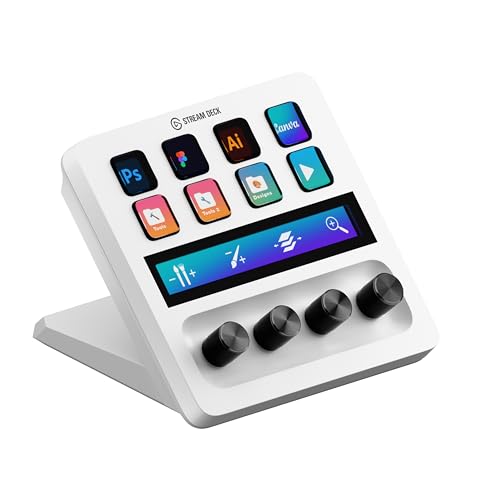
For video editors, designers, and music producers looking to enhance their post-production workflow, the Elgato Stream Deck + stands out with its innovative controls. This studio controller features 8 customizable LCD keys to launch shortcuts and scrub through timelines effortlessly. The 4 dials allow for precise adjustments, whether you’re tweaking layers in Photoshop or balancing audio levels in Premiere Pro. Plus, the touch strip makes maneuvering through tool panels a breeze. Designed specifically for Adobe applications like Premiere Pro and DaVinci Resolve, it streamlines your editing, retouching, and color grading tasks, making your creative process smoother and more efficient.
Best For: Video editors, designers, and music producers seeking to enhance their post-production workflow with streamlined controls and customizable features.
Pros:
- Customizable LCD keys allow for quick access to shortcuts, enhancing productivity.
- Precise dials provide fine-tuning capabilities for adjustments in various software applications.
- Touch strip enables smooth navigation across tool panels, improving workflow efficiency.
Cons:
- May require a learning curve for users unfamiliar with customizable controllers.
- Limited compatibility outside of Adobe applications and select software.
- Price point may be higher compared to basic input devices.
Elgato HD60 X – Game Capture Device for Streaming and Recording

Streamlining your streaming experience is made easy with the Elgato HD60 X, a game capture device that offers seamless integration for both novice and experienced content creators. With stunning 1080p60 HDR10 or 4K30 capture, you’ll enjoy ultra-low latency and crystal-clear visuals. It’s compatible with popular consoles like PS5 and Xbox Series X/S, plus works flawlessly on PC and Mac. The driverless setup simplifies installation, while its compatibility with OBS and other apps guarantees versatility. There are no watermarks or time limits, allowing you to focus on creating engaging content. With a 4.5-star rating, it’s a reliable choice for any streamer.
Best For: Streamers and content creators looking for a high-quality game capture device that offers low latency and versatility across multiple platforms.
Pros:
- Supports stunning 1080p60 HDR10 and 4K30 capture for exceptional video quality.
- Driverless setup for easy installation on both Windows and Mac.
- Compatible with popular streaming platforms and applications, ensuring flexibility in content creation.
Cons:
- Requires a relatively powerful PC or console for optimal performance.
- HDR capture is only available on Windows, limiting some features for Mac users.
- The warranty period is only 2 years, which may be shorter compared to some competitors.
Elgato Network Dock for Stream Deck
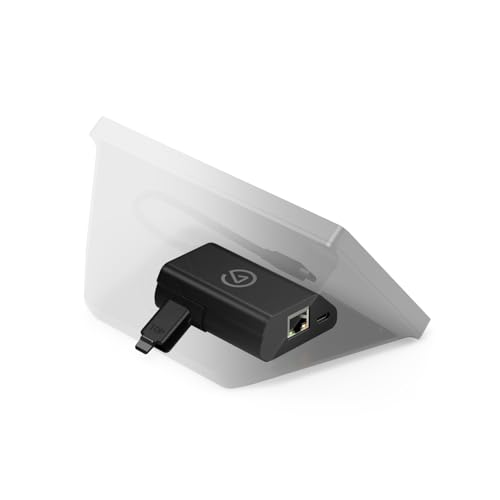
If you’re looking to enhance your streaming setup, the Elgato Network Dock for Stream Deck offers a seamless way to connect via wired Ethernet, ensuring a stable and reliable connection. This dock adds wired Ethernet capabilities to your Stream Deck without the hassle of USB tethering. You can power it using Power over Ethernet (PoE) or USB, making it versatile for any setup. With easy on-device configuration, you can mount it on your desk, wall, or even your Stream Deck XL stand. Weighing only 0.11 kilograms, it’s a compact yet powerful addition to your streaming arsenal.
Best For: Streamers and content creators seeking a reliable wired Ethernet connection for their Stream Deck setup.
Pros:
- Adds wired Ethernet functionality to any Stream Deck for a more stable connection.
- Flexible power options with both Power over Ethernet (PoE) and USB capabilities.
- Easy installation and mounting options for versatile use in various setups.
Cons:
- Limited compatibility as it is specifically designed for Stream Deck users.
- Requires additional setup for those unfamiliar with network configurations.
- Customer reviews are mixed, with an average rating of 3.8 out of 5 stars.
Elgato Stream Deck MK.2 Studio Controller

The Elgato Stream Deck MK.2 Studio Controller is ideal for content creators who want seamless control over their streaming setup. With 15 customizable LCD keys, you can trigger actions in apps like OBS, Twitch, and YouTube with just one touch. Its USB connectivity guarantees compatibility with both Mac and PC, while its compact dimensions (118 x 84 x 25 mm) and lightweight design make it easy to integrate into your workspace. Enjoy powerful plugins for enhanced functionality and visual feedback that lets you know when commands are executed. Streamline your workflow and elevate your content creation experience with this versatile tool.
Best For: Content creators and streamers seeking efficient control over their streaming software and tools.
Pros:
- Customizable Keys: Allows personalized shortcuts for various applications, enhancing workflow efficiency.
- Visual Feedback: Provides immediate confirmation of executed commands, reducing the chance of errors during live sessions.
- Compact Design: Lightweight and small dimensions make it easy to fit into any workspace setup.
Cons:
- Limited Keys: With only 15 keys, users may find it restricting for more complex setups or multiple actions.
- USB Dependency: Requires a USB connection, which may limit portability for some users.
- Learning Curve: New users may need time to fully adapt to customizing and utilizing all features effectively.
Elgato Stream Deck + Audio Mixer and Production Console for Content Creators

For content creators looking to elevate their production quality, the Elgato Stream Deck + serves as a powerful audio mixer and production console. With eight customizable LCD keys and four multifunction dials, you can easily mix audio and control your studio setup. It’s compatible with both Mac and PC, allowing you to tailor it to your workflow. Using multi-actions, you can trigger numerous commands simultaneously or switch profiles for different apps effortlessly. Plus, it supports popular plugins like OBS and Twitch, enhancing your streaming experience. Weighing just 1 lb, it’s a lightweight yet robust tool for any content creator.
Best For: Content creators, streamers, and gamers looking for an efficient audio mixing and production console to enhance their workflow.
Pros:
- Fully customizable with eight LCD keys and four multifunction dials for versatile control.
- Supports popular plugins and applications, streamlining the streaming and production process.
- Lightweight and compact design makes it easy to integrate into any setup.
Cons:
- Limited to compatibility with Windows 10 (64-bit) and macOS 10.13 or newer, which may exclude some users.
- Some users may find the learning curve steep when first setting up and customizing the device.
- The 30-day return policy may not be sufficient for thorough testing before deciding on the purchase.
Elgato XLR Dock MK.2 – Audio Interface Accessory for Stream Deck

Streamers seeking exceptional audio quality will find the Elgato XLR Dock MK.2 an invaluable addition to their setup. This audio interface is compatible with any XLR mic and delivers impressive performance with 80dB gain and phantom power. You’ll appreciate the Clipguard technology that guarantees elite sound quality. The onboard effects, including a voice enhancer, compressor, and EQ, allow for enhanced audio processing tailored to your needs. Plus, the Wave FX Processor lets you run DSP effects and VST Inserts seamlessly. With native integration into the Wave Link App, you’ll enjoy precise routing and monitoring capabilities for a polished streaming experience.
Best For: Streamers and content creators looking for high-quality audio performance and advanced audio processing capabilities.
Pros:
- 80dB gain and phantom power enhance audio quality for professional-grade sound.
- Onboard effects such as voice enhancer, compressor, and EQ provide customizable audio processing.
- Seamless integration with the Wave Link App allows for precise routing and monitoring.
Cons:
- Requires an XLR mic, which may involve additional investment for some users.
- May be overkill for casual streamers or those with simpler audio needs.
- DSP effects and VST Inserts may have a learning curve for beginners in audio production.
Elgato Stream Deck Scissor Keys Workflow Controller

Looking for a way to streamline your workflow during live streams? The Elgato Stream Deck Scissor Keys Workflow Controller is your answer. With customizable macro keys, you can effortlessly control OBS, Discord, and more with just one tap—no alt-tabbing needed. Enjoy the sharper key feel that provides tactile, responsive clicks for fast-paced commands. You can even monitor your system’s performance in real-time by assigning keys to display CPU, GPU, and FPS stats. The LED-lit keys guarantee you’ll react quickly without losing focus, while regular updates keep you connected with new features and community support.
Best For: Streamers and content creators looking for an efficient way to manage multiple applications and commands during live broadcasts.
Pros:
- Customizable macro keys for quick access to essential applications like OBS and Discord.
- Real-time monitoring of system performance metrics helps optimize streaming quality.
- LED-lit keys enhance visibility, allowing for quick reactions without distraction.
Cons:
- May require a learning curve for users unfamiliar with macro key setups.
- Limited compatibility with older operating systems (must have Windows 10 or macOS 13 or later).
- Physical space on a desk may be a concern for users with limited space for additional peripherals.
Elgato Stream Deck MK.2 White Studio Controller

The Elgato Stream Deck MK.2 White Studio Controller is an ideal choice for content creators who crave seamless control over their streaming setup. With 15 customizable LCD keys, you can easily launch apps, adjust audio, and control lighting with just one touch. It’s compatible with both Mac and PC, making it versatile for any setup. The device’s ambidextrous design and compact dimensions (118 x 84 x 25 mm) enhance usability. Plus, powerful plugins for platforms like OBS and Twitch streamline your workflow. With a 4.8-star rating from over 2,200 reviews, it’s clear this controller is a favorite among users.
Best For: Content creators and streamers looking for an efficient way to manage their applications and tools with customizable controls.
Pros:
- Customizable keys allow for personalized control over various applications and tasks.
- Compatible with major platforms like OBS, Twitch, and YouTube, enhancing workflow efficiency.
- Compact and ambidextrous design makes it suitable for any user and easy to fit into different setups.
Cons:
- Limited to 15 keys, which may not be sufficient for users with extensive control needs.
- Single color backlighting may not appeal to users who prefer RGB lighting options.
- USB powered, which may limit mobility compared to wireless options.
Elgato Stream Deck Neo – 8 Customizable Keys for Mac & PC

For those seeking an efficient way to enhance their workflow, the Elgato Stream Deck Neo offers eight customizable keys that streamline your tasks on both Mac and PC. Weighing just 210 grams, it’s compact and easy to place on your desk. With its drag-and-drop setup via the Stream Deck app, you can automate tasks across essential apps like Zoom, Photoshop, and Spotify. The USB Type C connectivity guarantees quick power delivery, while the commitment to sustainability with zero plastic packaging reflects a modern approach. Experience smart control of lights and audio with just a single touch—efficiency has never been this easy!
Best For: Streamers, content creators, and professionals looking to enhance their productivity with customizable task automation.
Pros:
- Customizable Keys: Eight programmable keys allow for personalized shortcuts tailored to individual workflows.
- App Integration: Compatible with a wide range of essential applications, improving efficiency in various tasks.
- Sustainability: Crafted with zero plastic packaging, reflecting an environmentally friendly commitment.
Cons:
- Limited Keys: While eight keys are customizable, some users may find it insufficient for extensive task management.
- USB Dependency: Requires USB power, which may limit placement options compared to wireless alternatives.
- Mechanical Switches: The mechanical switch type may not appeal to everyone, especially those preferring softer tactile feedback.
Factors to Consider When Choosing the Elgato Stream Deck XL
When choosing the Elgato Stream Deck XL, you’ll want to take into account several key factors. Think about the customization options that fit your workflow, how well it integrates with your favorite software, and its connectivity features. Also, pay attention to the user interface design, size, and portability to guarantee it meets your streaming needs.
Key Customization Options
With 32 customizable LCD keys at your fingertips, the Elgato Stream Deck XL offers extensive key personalization options that can greatly enhance your streaming experience. You can assign specific functions or shortcuts to each key, allowing for one-touch operation that streamlines tasks across applications like OBS, Twitch, and YouTube. Plus, you can create unlimited actions, triggering multiple commands with a single tap. For added usability, change the appearance of your keys by uploading unique icons or images, providing visual feedback that makes navigation intuitive. If you’re an advanced user, the Stream Deck SDK lets you develop custom integrations, tailoring the functionality to suit your specific needs and preferences for an even more personalized control setup.
Integration With Software
Choosing the Elgato Stream Deck XL means considering how well it integrates with the software you rely on for streaming and production. It works seamlessly with platforms like OBS, Twitch, YouTube, and Twitter, streamlining your workflow. With unlimited actions, you can trigger multiple commands with a single tap, greatly enhancing your efficiency. You’ll also find a plethora of plugins and custom integrations available through the Stream Deck SDK, allowing you to tailor your setup to fit specific software needs. The customizable LCD keys provide visual feedback, confirming that your commands executed successfully. Plus, its compatibility with popular applications like Spotify and Philips Hue lets you control audio and lighting directly from the Stream Deck XL, making it an essential tool for any streamer.
Connectivity Features
The Elgato Stream Deck XL’s connectivity features play a significant role in its effectiveness for streaming and production. It connects via USB 3.0, ensuring high-speed data transfer for seamless performance. Compatible with both Mac (macOS 10.15 or newer) and PC (Windows 10, 64-bit), it offers flexibility for various setups. With 32 customizable LCD keys, you can assign multiple functions and shortcuts for quick access during live streams. Plus, you can integrate it with platforms like OBS, Twitch, and YouTube, enhancing its connectivity capabilities. The Stream Deck XL supports unlimited actions, allowing you to trigger multiple commands with just one key press, making your streaming experience more efficient and enjoyable.
User Interface Design
When it comes to user interface design, the Elgato Stream Deck XL stands out for its customizable features that cater to your unique streaming needs. With 32 customizable LCD keys, you can easily tailor the interface for quick access to various functions and commands. Each key offers visual feedback, confirming command execution and reducing errors during your streams. Plus, the ability to set unlimited actions allows you to trigger multiple commands with a single tap, greatly streamlining your workflow. Its compatibility with various platforms enables you to use it across different applications seamlessly. The ergonomic design and strategic key layout guarantee you can navigate and execute tasks efficiently, keeping your focus on your content.
Size and Portability
Size and portability are essential factors to keep in mind with the Elgato Stream Deck XL, especially if you’re often on the move. Measuring 182 x 112 x 34 mm, this device is larger than many controllers, which could impact your desk space and transport options. Weighing 410 g (14.46 oz), it’s relatively heavy for a portable device, making it less ideal for mobile setups. While its size accommodates 32 customizable LCD keys, providing ample control, it also means you’ll need a dedicated workspace. The magnetic stand adds stability during use but contributes to the bulk, making it challenging to fit into smaller bags. Consider these points carefully to guarantee it meets your streaming needs.
Price and Value
Investing in the Elgato Stream Deck XL can greatly enhance your streaming experience, especially if you need robust control over multiple applications. Priced higher than smaller models, its cost reflects advanced features and 32 customizable LCD keys, offering extensive functionality that boosts productivity. If you often juggle multiple tasks during live production, this model provides better value. The initial investment is justified by its ability to streamline workflows, saving you time in the long run—particularly beneficial for professional content creators. However, keep in mind the potential costs of additional software integrations and plugins, as these can impact overall value. With an impressive average rating of 4.8 out of 5 stars, many users find the Stream Deck XL worth every penny.
Warranty and Support
Having a solid warranty and support system is just as important as the device’s features and price. The Elgato Stream Deck XL offers a 2-year manufacturer warranty, ensuring you’re covered for any defects or issues during normal use. If you encounter problems, you can easily reach out to customer service for warranty-related inquiries or claims. Additionally, there’s a 30-day return policy that allows you to get a full refund for defective or damaged items. However, be cautious—additional fees may apply for returns due to misuse or misrepresentation. Remember, no returns are accepted after 30 days, so make sure you inspect your product promptly upon delivery to avoid any complications.