If you’re looking to streamline your video editing process, exploring the best stream decks can make a significant difference. These tools can simplify complex tasks and enhance your productivity. With options tailored for both beginners and pros, you’ll find devices that cater to your specific needs. But what features should you prioritize, and which models stand out? Let’s take a closer look at the top contenders that could elevate your editing game.
VSDINSIDE Macro Keypad Stream Controller Deck

If you’re a video editor looking to streamline your workflow, the VSDINSIDE Macro Keypad Stream Controller Deck is a game-changer. With 18 programmable keys, including 15 visual LCDs, you can customize your macros for one-touch operation. Whether you need to execute complex commands or switch scenes in OBS, it’s all at your fingertips. The RGB light ring adds a visual flair, while personalized LCD keys improve recognition. It’s compatible with Windows 11 and macOS, connecting easily via USB-C. Plus, you’ll enjoy 24/7 customer support and free software updates, ensuring your editing experience remains exceptional.
Best For: Video editors and streamers looking for an efficient way to execute macros and streamline their workflow.
Pros:
- Customizable: 18 programmable keys with visual LCDs allow for tailored macro assignments.
- User-friendly: One-touch operation simplifies complex commands and enhances productivity.
- Aesthetic appeal: Surrounding RGB light ring and personalized LCD keys improve both functionality and visual experience.
Cons:
- Limited to specific operating systems: Compatibility only with Windows 11 and macOS 14.0 and above.
- Wired connection: Requires a USB-C connection, which may limit mobility compared to wireless options.
- Learning curve: Users may need time to fully utilize all programming features and macro capabilities.
Elgato Stream Deck + Audio Mixer and Production Console for Content Creators

The Elgato Stream Deck + stands out as an essential tool for content creators, streamers, and gamers who crave seamless audio mixing and production control. With eight customizable LCD keys and four multifunction dials, you can tailor your setup to match your workflow perfectly. The LCD touch panel allows for quick access to your most-used functions, while multi-action capabilities let you trigger multiple tasks simultaneously. Compatible with popular software like OBS and Twitch, it enhances your streaming experience effortlessly. Plus, its compact design and USB-C connectivity guarantee it fits seamlessly into your studio setup. Experience the difference with this powerful console.
Best For: Content creators, streamers, and gamers seeking an efficient and customizable audio mixing and production console.
Pros:
- Fully customizable with 8 LCD keys and 4 multifunction dials for tailored workflows.
- Seamless integration with popular streaming software like OBS, Twitch, and more.
- Compact design with USB-C connectivity, making it easy to incorporate into any studio setup.
Cons:
- Limited to users with Windows 10 (64-bit) or macOS 10.13 and newer.
- No returns accepted after 30 days, which may be a concern for some buyers.
- Some users may find the learning curve steep when setting up multi-actions and plugins.
Macro Pad Streaming Deck Controller for Gamers and Streamers

For gamers and streamers looking to elevate their content creation, the Macro Pad Streaming Deck Controller stands out with its one-touch macro execution. You can launch commands and apps instantly, making your workflow seamless. With customizable hotkeys and multi-step workflows, you won’t need any coding skills to set up complex actions. Its 14 programmable keys integrate effortlessly with platforms like OBS and Discord, while the 500+ plugin ecosystem enhances your experience. Plus, the RGB knobs let you personalize your setup with vibrant colors. Enjoy the ergonomic design and premium build, ensuring comfort during those long streaming sessions.
Best For: Gamers and streamers seeking to enhance their content creation with customizable shortcuts and seamless workflow integration.
Pros:
- One-touch macro execution allows for instant launching of commands and apps.
- Customizable hotkeys and multi-step workflows make complex actions easy to set up without coding.
- Ergonomic design and premium build ensure comfort during prolonged use.
Cons:
- Limited to 14 programmable keys, which may not satisfy users needing more options.
- Requires a corded electric power source, limiting mobility compared to wireless options.
- Compatibility restricted to Mac OS 11 Big Sur and Windows 10, excluding older operating systems.
ActionRing Streaming Macro Keypad

Designed for content creators and video editors, the ActionRing Streaming Macro Keypad offers an intuitive way to streamline your workflow. With six customizable LCD shortcut keys, three buttons, and three dials, you can easily personalize your setup. You’ll appreciate its compatibility with Windows 10 and macOS 14.0. Assign single or multiple actions to keys using drag-and-drop functionality, and enhance your workflow with the Action Flow feature for sequential macros. Plus, it integrates seamlessly with popular software like OBS and Adobe Premiere Pro, making it a powerful addition to your editing toolkit. Enjoy the flexibility and efficiency it brings!
Best For: Content creators, video editors, and streamers looking to enhance their productivity with customizable shortcut keys.
Pros:
- Customizable Actions: Easily assign single or multiple actions to keys with drag-and-drop functionality.
- Software Integration: Works seamlessly with popular applications like OBS, Adobe Premiere Pro, and more.
- User-Friendly Design: Features six LCD shortcut keys, three buttons, and three dials for a personalized workflow.
Cons:
- Limited Key Count: With only six customizable keys, it may not meet the needs of users requiring more shortcuts.
- USB Powered: Requires a USB connection, which may limit portability for some users.
- Compatibility: May not support older operating systems beyond Windows 10 and macOS 14.0.
Macro Pad Streaming Deck Controller for Gamers and Streamers

Gamers and streamers looking to enhance their productivity will find the VSDINSIDE Macro Pad an invaluable tool, thanks to its one-touch macro execution feature. This programmable USB shortcut keyboard lets you launch commands, apps, and GIFs instantly, streamlining your workflow. With customizable layouts and RGB knobs, you can create an immersive experience tailored to your needs. It’s compatible with both Mac and PC, making it versatile for any setup. Plus, with over 500 plugins for seamless integration with popular software like OBS and Discord, you’re equipped to elevate your streaming game effortlessly, all backed by a reliable one-year warranty.
Best For: Gamers and streamers looking to enhance their productivity and streamline their workflows with customizable controls.
Pros:
- One-Touch Macro Execution: Quickly launch commands, apps, and GIFs with a single press, improving efficiency.
- Unlimited Layout Customization: Tailor the device to your specific needs with editable layouts and RGB knobs for a personalized experience.
- Wide Compatibility: Works seamlessly with both Mac and PC, along with over 500 plugins for popular software integration.
Cons:
- Limited to USB-C Connectivity: Requires a corded connection, which may limit mobility compared to wireless options.
- Weight Consideration: At 0.48 kg, it may be heavier than other lightweight alternatives in the market.
- Learning Curve for New Users: Users may need time to fully grasp all features and customization options, which could be overwhelming initially.
TreasLin VSDinside Stream Controller Deck for PC & Mac
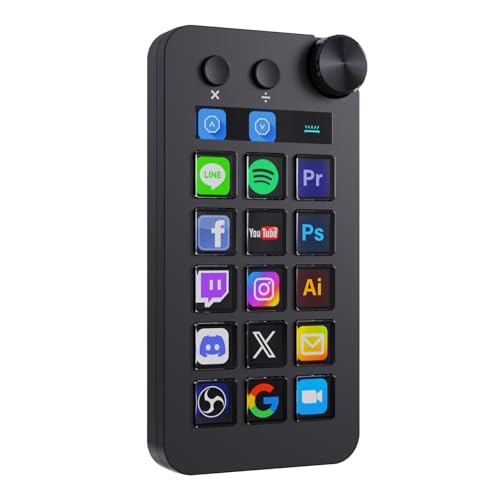
The TreasLin VSDinside Stream Controller Deck stands out as an excellent choice for video editors seeking efficiency and customization. With 18 customizable macro keys, including visual LCD buttons and a rotary knob, you can streamline your workflow effortlessly. It connects via USB-C and works seamlessly with both PC and Mac, along with popular software like OBS Studio. The user-friendly VSD Craft software allows you to assign functions and personalize icons easily. Plus, you’ll enjoy dynamic icons and automatic workflows, enhancing your editing experience. With a solid warranty and responsive support, this deck is a valuable addition to your editing toolkit.
Best For: Video editors and streamers looking for a customizable and efficient macro keypad to enhance their workflow.
Pros:
- 18 customizable macro keys with dynamic icons for a personalized user interface.
- Compatible with both PC and Mac, making it versatile for various users.
- User-friendly VSD Craft software allows easy assignment of functions and icon customization.
Cons:
- Spotify integration requires a Spotify Premium account, limiting some features for free users.
- Limited to USB-C connectivity, which may require adapters for older devices.
- Plastic enclosure material might not feel as premium compared to metal alternatives.
Elgato Stream Deck + Studio Controller for Workflow Automation
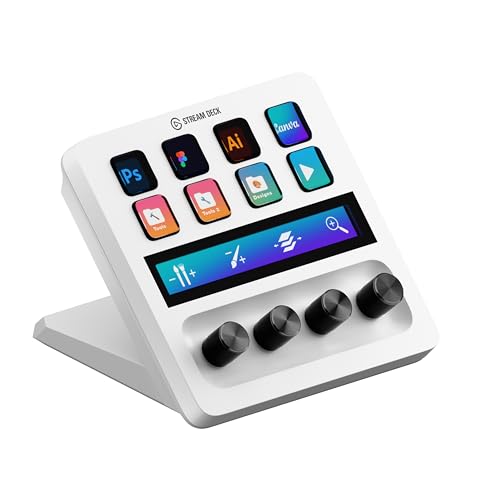
For video editors seeking to enhance their workflow, the Elgato Stream Deck + stands out with its intuitive control features. This studio controller offers 8 LCD keys for launching shortcuts and scrubbing timelines, making it easy to manage your editing tasks. With 4 dials, you can make precise adjustments for color grading and layer tweaks. The touch strip allows for smooth navigation across tool panels. Compatible with popular software like Adobe Premiere Pro and Photoshop, it’s an ideal tool for video editors, designers, and music producers looking to streamline their creative processes. Release your editing potential with this powerful automation tool.
Best For: Video editors, designers, and music producers looking to streamline their creative workflows and enhance productivity.
Pros:
- Easy to use with customizable LCD keys for shortcut launching and timeline scrubbing.
- Provides precise control with dials for color grading and layer adjustments.
- Compatible with major software like Adobe Premiere Pro, Photoshop, and DaVinci Resolve.
Cons:
- May require a learning curve for new users unfamiliar with workflow automation tools.
- Limited to specific Adobe applications, which may not suit all creative professionals.
- Higher price point compared to traditional input devices like keyboards and mice.
Elgato Stream Deck Mini for Mac and PC

Designed for busy professionals and content creators, the Elgato Stream Deck Mini streamlines your workflow by allowing you to control essential applications like Zoom and PowerPoint with ease. With its customizable LCD keys, you can assign complex keyboard shortcuts to one key, making activation effortless and error-free. Whether you’re executing multiple actions or precise sequences, the Mini supports seamless integration with software like Teams, Excel, and Adobe Creative Apps. Its user-friendly software simplifies setup, helping you work smarter by reducing reliance on hard-to-memorize shortcuts. Elevate your productivity and enhance your editing process with this compact powerhouse.
Best For: Busy professionals and content creators seeking to enhance their productivity and streamline workflows with customizable application controls.
Pros:
- Customizable LCD keys allow for easy activation of complex shortcuts.
- Seamless integration with essential software like Zoom, Teams, and Adobe Creative Apps.
- User-friendly software simplifies setup and reduces the need for memorizing shortcuts.
Cons:
- Limited number of keys compared to larger models, which may restrict functionality.
- May require initial time investment to set up and customize effectively.
- Some users may find it lacking in advanced features compared to more expensive alternatives.
TreasLin Stream Controller Deck with 12 Customizable Macro Keypad for Content Creators

Content creators, gamers, and streamers will appreciate the TreasLin N3 Stream Controller Deck, which boasts 12 customizable macro keys tailored for quick access to essential functions. With 6 visual LCD buttons, 3 tap buttons, and 3 rotary buttons, you can trigger unlimited actions seamlessly. Whether you need to launch macros, switch OBS scenes, or control media, it’s all just a button press away. Compatible with PC, Windows, and macOS, this deck supports popular software like OBS Studio and Discord. Plus, the dynamic animated icons and VSDinside marketplace offer endless customization to enhance your creative workflow effortlessly.
Best For: Content creators, gamers, and streamers seeking quick access to customizable functions for enhanced productivity.
Pros:
- Customizable macro keys streamline various tasks, improving workflow efficiency.
- Compatible with multiple operating systems and popular software, ensuring versatility.
- Access to a marketplace with thousands of animated icons and plugins for enhanced customization.
Cons:
- Spotify integration requires a premium account, limiting some users’ access.
- The learning curve for setting up and customizing may be steep for beginners.
- Primarily designed for digital content-related tasks, which may not suit all user needs.
Elgato Stream Deck Neo – Customizable Keys for Mac & PC

The Elgato Stream Deck Neo is a game-changer for video editors seeking efficiency and customization. With eight customizable LCD keys, you can easily automate tasks and streamline your workflow. Its drag-and-drop setup using the Stream Deck app makes personalization a breeze. Compatible with essential apps like Photoshop, Excel, and Adobe Creative Suite, it enhances your editing process. Plus, you can manage smart devices with a single button press. Weighing just 0.46 lb and powered via USB-C, it’s portable and versatile. Embrace sustainability, too, as it’s made without plastic packaging. Elevate your editing game with the Neo!
Best For: The Elgato Stream Deck Neo is best for video editors and content creators looking to enhance their workflow through customizable shortcuts and smart device management.
Pros:
- Customization: Eight programmable keys allow for efficient task automation and personalized workflow.
- App Integration: Seamlessly compatible with popular applications such as Photoshop, Excel, and the entire Adobe Creative Suite.
- Sustainable Design: Crafted with zero plastic packaging, reflecting a commitment to environmental sustainability.
Cons:
- Limited Keys: Only eight keys may not be sufficient for users with extensive shortcut needs.
- USB-C Dependency: Requires a USB-C connection, which might necessitate adapters for older devices.
- Learning Curve: Initial setup and customization may take time for users unfamiliar with the interface.
Factors to Consider When Choosing Stream Decks for Video Editing
When you’re choosing a stream deck for video editing, several key factors come into play. You’ll want to take into account customization options, software compatibility, and how many programmable keys you’ll need. Don’t forget to check the build quality and user interface design to make sure it fits your editing style.
Key Customization Options
Choosing the right stream deck for video editing hinges on key customization options that can greatly enhance your workflow. Look for devices with customizable keys, allowing you to assign specific functions, commands, or macros to each key. This boosts efficiency and saves time. It’s also beneficial to upload custom icons or images, which improve visual recognition during editing tasks. Additionally, consider stream decks that support multi-action commands, enabling you to execute several actions with a single key press. Dynamic key customization, like animated icons or color-changing keys, can create a more engaging user experience. These features combined will guarantee your stream deck aligns perfectly with your video editing needs.
Software Compatibility Requirements
Finding the right stream deck for video editing involves more than just customization options; software compatibility plays a key role in guaranteeing a smooth editing experience. Make certain the stream deck you choose works seamlessly with popular editing software like Adobe Premiere Pro, Final Cut Pro, and DaVinci Resolve. Look for devices that integrate well with other creative applications, such as Photoshop and After Effects, to enhance your workflow. Check the minimum operating system requirements, as some stream decks may only function with specific versions of Windows or macOS. Additionally, consider the availability of plugins and software marketplaces that boost the functionality of the deck within your editing software. Finally, ascertain it offers customizable keys or dials tailored to your editing preferences.
Build Quality and Durability
While considering a stream deck for video editing, you can’t overlook the importance of build quality and durability. High-grade materials often indicate better longevity, resisting wear and tear during your intense editing sessions. Look for a robust design, featuring carbon-fiber-like overlays and ergonomic stands, which enhance your experience while protecting against physical damage. Stream decks with thorough quality control during production typically guarantee reliable performance over time. Don’t forget about weight and stability; a heavier stream deck provides a stable base, preventing accidental movement. Additionally, customizable and replaceable components can extend your device’s lifespan, allowing you to upgrade or replace parts as needed without the expense of buying a new unit. Choose wisely to enhance your video editing workflow!
Number of Programmable Keys
When it comes to stream decks for video editing, the number of programmable keys plays an essential role in enhancing your workflow efficiency. A higher key count, like 18 or more, offers greater flexibility, allowing you to manage software functions and frequently used tasks quickly without switching profiles. On the other hand, stream decks with fewer keys might limit your ability to execute complex sequences, potentially slowing down your editing process. Customizing each key enhances usability, letting you prioritize functions that align with your editing style. Additionally, consider the versatility of the keys; the ability to create multiple layouts for different applications can greatly adapt to various editing scenarios, further streamlining your workflow.
User Interface and Design
Selecting the right stream deck for video editing goes beyond just the number of programmable keys; the user interface and design are pivotal in enhancing your editing experience. A user-friendly interface allows for easy navigation and quick access to essential functions, preventing overwhelm during busy sessions. Look for clear labeling and customizable icons on keys, as these features boost recognition and speed up your workflow. Ergonomic design matters too; a well-arranged layout minimizes strain during long editing stints. Additionally, a visually appealing design, with options like RGB lighting or dynamic animations, can make your workspace more engaging. Finally, touch-sensitive controls such as dials and sliders provide precise adjustments, streamlining your editing process considerably.
Connectivity Options Available
Choosing the right connectivity options can greatly impact your video editing efficiency. Stream decks typically connect via USB-C or USB 2.0, guaranteeing compatibility with both modern and older computers. This flexibility makes it easy for you to integrate the device into your existing setup. Many models come with corded electric power sources, providing consistent power without the hassle of batteries. Plus, USB connectivity offers plug-and-play functionality, allowing for a quick setup without extensive installation. Some stream decks even include additional USB hubs, enabling you to connect multiple devices simultaneously. Finally, verify your chosen model is compatible with both Windows and macOS, so you can operate seamlessly across different operating systems, enhancing your overall workflow.
Price and Budget Considerations
While stream decks can greatly enhance your video editing workflow, understanding the price range and budget considerations is essential. Prices typically range from $50 to over $200, so it’s important to set a budget that aligns with your needs. Consider how many customizable keys and functionalities you require; advanced models with extra features often come at a higher cost. Don’t forget to check for warranties and customer support, as investing in a quality product can save you money on repairs or replacements. Also, be aware of ongoing costs like additional plugins or software, which can add to your overall expense. Research customer reviews to find models that offer good value based on features, durability, and satisfaction.
Additional Features and Plugins
When considering a stream deck for video editing, it’s crucial to evaluate the additional features and plugins that can enhance your workflow. Many stream decks boast extensive plugin ecosystems, letting you integrate with software like OBS, Discord, and Spotify, which expands functionality beyond basic commands. Look for customization options that allow you to assign dynamic animated icons to keys, providing both visual recognition and a personalized touch. Multi-action capabilities are also a game-changer, enabling you to trigger multiple commands at once, streamlining your processes. Additionally, features like RGB lighting and customizable key layouts not only improve aesthetics but also usability. Don’t overlook specialized plugins for tasks like reminders and weather updates, as they can boost your productivity considerably.