If you’re looking to enhance your workflow in 2026, stream decks could be your solution. These versatile tools offer customizable controls tailored to various tasks, whether you’re creating content, gaming, or managing professional projects. With options from compact models to advanced controllers, the right device can greatly streamline your productivity. Curious about which models stand out and how they can transform your daily tasks? Let’s explore the top contenders.
Elgato Stream Deck Mini for Mac and PC

If you’re looking to streamline your workflow, the Elgato Stream Deck Mini is an ideal choice for both Mac and PC users. It lets you control apps like Zoom, Teams, and PowerPoint, enhancing your productivity effortlessly. With customizable LCD keys, you can assign complex keyboard shortcuts to a single key, making it easy to activate commands without mistakes. You can execute multiple actions at once or in a specified order, optimizing your tasks. Plus, its user-friendly software simplifies setup, helping you ditch those hard-to-memorize shortcuts and work smarter, not harder. Elevate your productivity with this powerful tool!
Best For: The Elgato Stream Deck Mini is best for professionals and content creators who frequently use applications like Zoom, Teams, and PowerPoint and seek to enhance their productivity through customizable controls.
Pros:
- Customizable LCD keys allow for easy personalization and instant command activation.
- User-friendly software simplifies setup and reduces the learning curve for new users.
- Compatibility with a wide range of applications makes it a versatile tool for various workflows.
Cons:
- Limited number of keys compared to larger models may restrict some users’ needs.
- Dependence on software may require regular updates and maintenance for optimal performance.
- Learning curve for advanced features might be challenging for less tech-savvy users.
Elgato Stream Deck MK.2 Studio Controller

The Elgato Stream Deck MK.2 Studio Controller is a game-changer for content creators seeking to streamline their workflows. With 15 customizable LCD keys, you can control apps like OBS and YouTube with just one touch. Its USB connectivity makes it compatible with both Mac and PC, ensuring flexibility in your setup. Weighing only 145 g, it’s lightweight and portable. The MK.2 also offers powerful plugins for various applications, from music production to photography. Plus, its visual feedback confirms command execution, enhancing your efficiency. Overall, this tool can considerably boost your productivity, making it a must-have for creators.
Best For: Content creators looking to enhance their workflow and streamline their creative processes with customizable controls.
Pros:
- Customizable Keys: Tailor the 15 LCD keys to suit specific applications and workflows, making it easy to switch tasks.
- Wide Compatibility: Works seamlessly with popular software like OBS, Twitch, and YouTube, as well as various plugins for different creative needs.
- Portable Design: Lightweight and USB-powered, making it easy to transport and use in different setups.
Cons:
- Limited to USB Connectivity: Requires a USB connection, which may limit placement options for some users.
- Learning Curve: New users may need time to configure and adapt to using the Stream Deck effectively.
- Price Point: May be considered expensive for casual users who do not require all its functionalities.
Elgato Stream Deck Neo – 8 Customizable Keys for Mac & PC

For busy professionals and content creators, the Elgato Stream Deck Neo stands out with its eight customizable keys, allowing you to streamline your workflow effortlessly. This compact device, measuring just 107 x 26 x 78 mm, connects seamlessly via USB-C, making it compatible with both Mac and PC. You can easily set up shortcuts for essential apps like Zoom, Photoshop, and Google Suite using the intuitive drag-and-drop Stream Deck app. Plus, its sustainable design and zero plastic packaging reflect a commitment to the environment. With the Neo, managing your tasks and smart devices has never been easier or more efficient.
Best For: Busy professionals and content creators looking to streamline their workflow with customizable shortcuts.
Pros:
- Customization: Eight customizable LCD keys allow for tailored shortcuts to enhance productivity.
- App Integration: Compatible with a wide range of essential applications, making it versatile for various tasks.
- Sustainable Design: Crafted with zero plastic packaging, reflecting a commitment to environmental sustainability.
Cons:
- Limited Keys: Only 8 keys may not be sufficient for users with extensive shortcut needs.
- USB Powered: Requires a USB connection, limiting portability compared to battery-operated options.
- Mechanical Switches: Some users may prefer different switch types for their personal comfort.
VSDINSIDE Macro Keypad Stream Controller Deck

Looking to boost your productivity in gaming, video editing, or music production? The VSDINSIDE Macro Keypad Stream Controller Deck is your go-to tool. With 18 programmable keys, including 15 visual LCDs, you can customize macros effortlessly. One-touch operation lets you execute commands like opening files or switching scenes in OBS with a single click. Plus, the RGB light ring adds a vibrant touch to your workspace. It’s compatible with Windows 11 and macOS 14.0 and above, ensuring easy setup. Built from premium materials, it offers durability and a range of plugins to keep you organized, all backed by 24/7 customer support.
Best For: The VSDINSIDE Macro Keypad Stream Controller Deck is best for gamers, video editors, and music producers looking to enhance their workflow with customizable shortcuts.
Pros:
- 18 programmable keys allow for extensive customization to suit individual needs.
- One-touch operation simplifies executing complex commands, saving time and effort.
- RGB light ring adds aesthetic appeal to your workspace while providing visual feedback.
Cons:
- May have a learning curve for new users unfamiliar with macro setups.
- Limited compatibility with older operating systems could exclude some potential users.
- Physical size may not fit comfortably on all desk setups, depending on space constraints.
Elgato Stream Deck XL – Advanced Studio Controller

Elgato Stream Deck XL stands out as the ultimate companion for content creators and professionals seeking to elevate their production workflow. With 32 customizable LCD keys, you can manage tools like OBS, Twitch, and YouTube effortlessly. One-touch operation allows you to change scenes, launch media, and control lighting instantly. Plus, visual feedback confirms your commands, ensuring smooth execution. It integrates seamlessly with various platforms and supports custom development through the Stream Deck SDK. Weighing just 410 g and connecting via USB 3.0, this advanced studio controller is both portable and powerful, making it a must-have for boosting productivity.
Best For: Content creators and professionals looking to streamline their production workflow with customizable controls.
Pros:
- Highly customizable: 32 LCD keys allow for personalized setups tailored to individual workflow needs.
- Seamless integration: Compatible with popular platforms like OBS, Twitch, and YouTube, enhancing production capabilities.
- Visual feedback: Provides instant confirmation of executed commands, reducing errors during live production.
Cons:
- Limited compatibility: Requires macOS 10.15 or newer or Windows 10 (64-bit), which may exclude some users.
- Price point: May be considered expensive for casual users or beginners in content creation.
- Learning curve: Users may need time to fully understand and utilize all features effectively.
Elgato Stream Deck + Audio Mixer and Studio Controller for Content Creators

Content creators seeking a seamless way to manage their productions will find the Elgato Stream Deck + an indispensable tool. With its eight customizable LCD keys and four multifunction dials, you can easily control audio mixing and studio tasks. The LCD touch panel enhances your workflow, allowing for quick adjustments. You can trigger multiple actions simultaneously or sequentially, making it perfect for live streaming. Compatible with both Mac and PC, it supports popular plugins like OBS and Twitch. Weighing just 1 lb and powered via USB-C, it’s compact yet powerful, making it a must-have for serious content creators.
Best For: Content creators, streamers, and gamers looking for a versatile audio mixer and studio controller to enhance their production workflow.
Pros:
- Fully customizable controls for audio mixing and production tasks.
- Compact design with a lightweight build, making it easy to transport.
- Supports a wide range of plugins for popular streaming and production software.
Cons:
- Limited to USB-C connectivity, which may require additional adapters for older devices.
- Some users may find the learning curve steep when initially setting up custom actions.
- Price point may be higher compared to simpler audio mixers without advanced features.
Macro Pad Streaming Deck Controller for Gamers and Streamers

For gamers and streamers seeking to enhance their live broadcasts, the Macro Pad Streaming Deck Controller stands out with its one-touch macro execution feature. You can launch commands, apps, or GIFs instantly, elevating your streaming experience. With 14 programmable keys, you’ll enjoy custom hotkeys and multi-step workflows without any coding hassle. The 500+ plugin ecosystem integrates seamlessly with OBS, Discord, and Spotify, making it versatile for any setup. Plus, the ergonomic design and RGB-knobs not only look great but also create an immersive ambiance. Whether you’re gaming or mixing audio, this controller is a must-have for productivity.
Best For: Gamers and streamers looking to enhance their live broadcasts and improve productivity with customizable shortcuts.
Pros:
- One-touch macro execution allows for instant launching of commands, apps, and GIFs, streamlining workflows.
- Versatile compatibility with popular platforms like OBS, Discord, and Spotify, enhancing functionality for various tasks.
- Ergonomic design with RGB-knobs creates an immersive ambiance while ensuring comfort during extended use.
Cons:
- Limited to 14 keys, which may not be sufficient for users with extensive macro needs.
- Requires a corded electric power source, which may limit portability compared to wireless options.
- Some users may find the learning curve for setting up custom hotkeys and workflows to be steep.
TreasLin VSDinside Stream Controller Deck for Content Creators
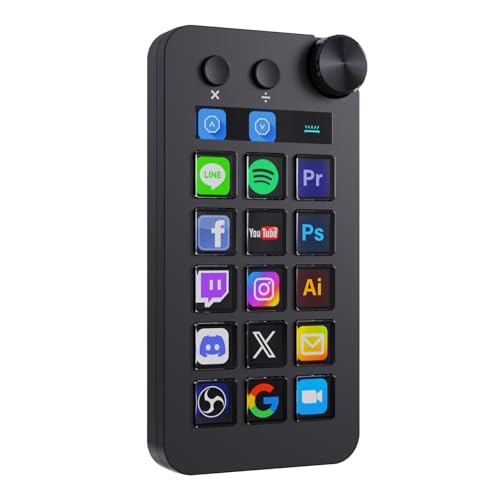
The TreasLin VSDinside Stream Controller Deck is an essential tool for streamers and creators who crave efficiency in their workflows. With 18 customizable macro keys, including dynamic LCD buttons and a rotary knob, you can streamline tasks effortlessly. Its compatibility with Windows and macOS means you can use it across platforms. The VSD Craft Software makes assigning functions easy, and the extensive plugins marketplace enhances your creative capabilities. Plus, its quick USB-C setup guarantees you’re ready in no time. Whether you’re in Work mode or Live mode, this deck helps you stay organized and focused on your content creation.
Best For: The TreasLin VSDinside Stream Controller Deck is best for content creators and streamers seeking to enhance their workflow efficiency and streamline their production processes.
Pros:
- 18 customizable macro keys allow for personalized shortcuts and quick access to essential tools.
- Compatible with both Windows and macOS, making it versatile for various users.
- Extensive plugins marketplace offers numerous options to expand functionality for popular applications.
Cons:
- Requires a USB-C connection, which may necessitate additional adapters for some users.
- Spotify integration requires an active Spotify Premium account, limiting accessibility for some users.
- The plastic enclosure material may not appeal to those preferring more premium materials.
TreasLin Stream Controller Deck with 12 Customizable Macro Keypad for PC & Mac
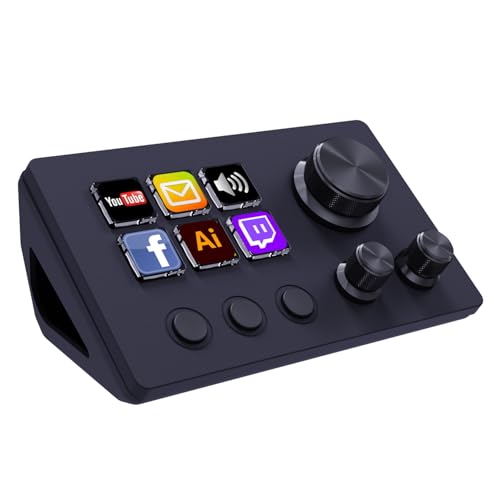
Perfect for gamers and content creators, the TreasLin Stream Controller Deck offers 12 customizable macro keys that make multitasking a breeze. With 6 visual LCD buttons, 3 tap buttons, and 3 rotary buttons, you can intuitively launch macros, control media, and switch OBS scenes—all with one touch. It’s compatible with both PC and Mac, connecting via USB-C for a quick setup. Immerse yourself in the VSDinside marketplace for thousands of free and premium icons and plugins, making customization easy. Need help? Their dedicated engineering team is ready to assist you, ensuring your productivity stays at its peak.
Best For: The TreasLin Stream Controller Deck is best for gamers, content creators, and professionals who need quick access to multiple functions and macros.
Pros:
- Customizable: Offers 12 macro keys with dynamic animated icons for personalized setups.
- Versatile Compatibility: Works seamlessly with popular software like OBS, Spotify, and Discord on both PC and Mac.
- User Support: Dedicated engineering team available for technical assistance and support.
Cons:
- Spotify Premium Requirement: Full functionality with Spotify requires an active Premium account.
- Learning Curve: Users may need time to fully utilize all features and customization options.
- Limited Physical Buttons: Some users might find 12 keys insufficient for extensive macro needs.
Elgato Stream Deck + Studio Controller for Post Production
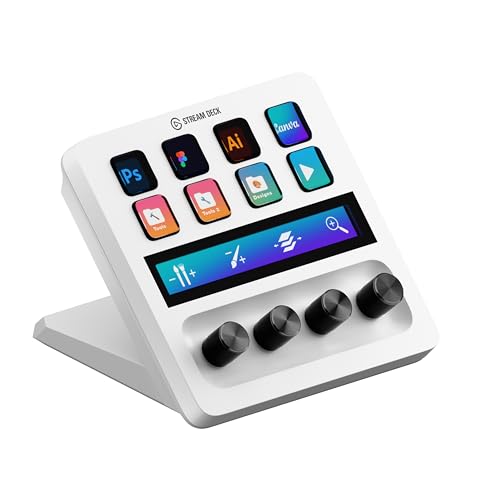
Designed with video editors and designers in mind, the Elgato Stream Deck + Studio Controller greatly enhances post-production workflows. It features 8 LCD keys for launching shortcuts, scrubbing timelines, and tweaking layers or volume, making your editing process seamless. The 4 dials allow for precise adjustments, while the touch strip enables smooth navigation across tool panels and workspace pages. Compatible with Adobe applications like Premiere Pro and Photoshop, it’s the perfect creative workflow tool for video editors, designers, and music producers. Streamline your editing, retouching, and color grading tasks, and boost your productivity considerably with this innovative controller.
Best For: The Elgato Stream Deck + Studio Controller is best for video editors, designers, and music producers looking to enhance their post-production workflows.
Pros:
- Customizable LCD keys for quick access to frequently used shortcuts.
- Precision dials for fine-tuning adjustments in editing and design tasks.
- Touch strip for effortless navigation between tool panels and workspaces.
Cons:
- May have a learning curve for new users unfamiliar with workflow automation tools.
- Limited compatibility with non-Adobe software applications.
- Price point may be high for casual users or hobbyists.
Factors to Consider When Choosing Stream Decks for Productivity
When choosing a stream deck for productivity, you should consider several key factors. Look at customizable key options, software compatibility, and the number of keys, as these features can greatly impact your workflow. Also, think about how well the deck integrates with your applications and its overall ease of use.
Customizable Key Options
Customizable key options are essential features to evaluate when choosing a stream deck for productivity. They let you assign complex macros and shortcuts to single keys, streamlining your workflow. Many stream decks offer customizable LCD keys that display icons and images, making it easy to recognize commands at a glance. You can simply drag and drop actions onto keys, which creates a user-friendly setup and eliminates the need to memorize shortcuts. Some devices even support dynamic icons and animated graphics, enhancing visual recognition during use. With the ability to customize key functions, you can greatly boost your productivity by gaining quick access to frequently used applications and tools, making your work more efficient and enjoyable.
Software Compatibility
Choosing the right stream deck goes beyond just customizable key options; software compatibility plays a crucial role in maximizing your productivity. Make sure the stream deck you select works seamlessly with essential software you use regularly, like Zoom, Microsoft Office, or Adobe Creative Apps. Look for options that integrate with popular applications such as OBS, Twitch, and YouTube to streamline your content creation. Don’t forget to check the operating system requirements to guarantee it functions correctly on your device. A rich ecosystem of plugins and extensions can offer additional functionalities tailored to your workflow. Finally, verify if the stream deck supports multi-action commands, allowing you to execute complex tasks with a single button press, which greatly boosts your efficiency.
Number of Keys
The number of keys on your stream deck can greatly influence how effectively you manage your tasks. With options ranging from 8 to 32 keys, you’ll want to choose based on your specific needs. If you have limited desk space or need something portable, a device with 8 or 12 keys might be ideal. However, if multitasking and handling complex workflows is your goal, consider larger models with 15 to 32 keys. More keys allow for a customized setup, though they may come with a steeper learning curve. Also, think about the layout; larger devices can help you group similar functions or separate tasks to streamline your productivity. Choose wisely to match your workflow style!
Integration With Applications
When selecting a stream deck, it’s important to evaluate how well it integrates with the applications you use daily. Look for options that seamlessly connect with essential tools like Zoom, Microsoft Office, and Adobe Creative Suite. This integration enhances your efficiency by providing quick access to commands and functions. Additionally, many stream decks allow for customizable actions and macros, enabling you to execute multiple commands across different applications with a single press. This feature considerably reduces the time spent on repetitive tasks. You’ll also benefit from the ability to assign complex keyboard shortcuts to single keys, simplifying your workflow. Finally, user-friendly software helps streamline the setup process, catering to your unique needs and preferences.
Ease of Use
Ease of use is essential for maximizing productivity with stream decks. Look for customizable LCD keys that let you easily identify and activate commands without memorizing complex shortcuts. User-friendly software typically comes with these devices, simplifying setup and ensuring seamless integration with various applications. You’ll appreciate drag-and-drop functionality, which allows you to assign actions to keys quickly and intuitively. Visual feedback, like illuminating keys or icon displays, helps confirm your command execution, boosting your confidence during use. Additionally, the ability to execute multiple actions simultaneously or in a specific sequence makes managing your workflow simpler, enabling you to streamline your productivity tasks effectively. Choose a stream deck designed with these user-friendly features to enhance your efficiency.
Build Quality and Design
Choosing a stream deck with solid build quality and thoughtful design can greatly enhance your productivity experience. Look for premium materials that guarantee durability and resist wear over time. An ergonomic layout is essential; it should allow comfortable access to keys without causing strain during long sessions. Customizable key layouts and LCD screens provide visual feedback, making it easier to identify and activate commands quickly. Consider the size and weight, as a compact and lightweight design offers portability for use in different settings. Finally, don’t overlook aesthetics—RGB lighting and customizable icons not only improve the visual appeal but also help in quickly recognizing assigned functions, making your workflow smoother and more efficient.