If you’re an artist or designer looking to elevate your craft in 2026, the right drawing tablet can make all the difference. With 4K displays becoming increasingly popular, you’ll find a range of options that deliver exceptional visuals and precision. From the renowned HUION Kamvas Pro series to the Wacom Cintiq Pro, each model offers unique features tailored to your creative needs. Curious about which tablets stand out this year? Let’s explore the top contenders.
HUION Kamvas Pro 16 Plus 4K UHD Drawing Tablet
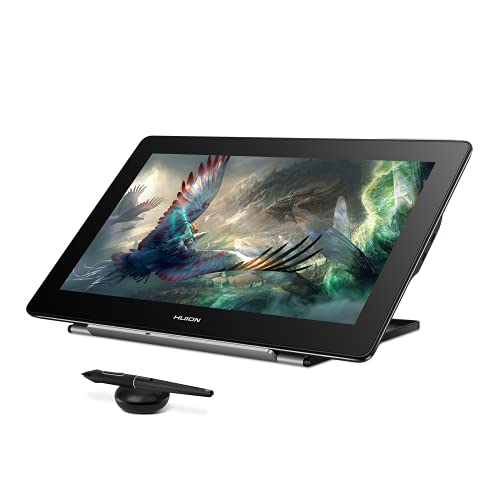
The HUION Kamvas Pro 16 Plus 4K UHD Drawing Tablet is perfect for artists and designers seeking a vibrant, high-resolution display to elevate their creativity. With a stunning 15.6-inch screen boasting 4K UHD resolution, you’ll enjoy incredible detail in every stroke. Its IPS panel and Quantum Dot technology guarantee color accuracy and brilliance. The battery-free Huion PenTech 3.0 offers 8192 levels of pressure sensitivity, making your drawings feel natural. Dual USB-C ports enhance connectivity, and compatibility with various operating systems and software means you can immerse yourself in your projects easily. Plus, it’s highly rated, promising a reliable experience for your art.
Best For: Artists and designers looking for a high-resolution drawing tablet with excellent color accuracy and natural pen performance.
Pros:
- High 4K UHD resolution (3840×2160) for incredible detail in artwork.
- Battery-free pen with 8192 levels of pressure sensitivity provides a natural drawing experience.
- Broad compatibility with various operating systems and popular creative software.
Cons:
- Slightly heavier compared to non-screen tablets, which may affect portability.
- Requires a connection to a power source, limiting where you can use it.
- Some users may find the price point higher compared to entry-level drawing tablets.
HUION KAMVAS Pro 24 (Gen 3) Touch Drawing Tablet

For artists seeking a powerful tool that combines exceptional clarity with advanced features, the HUION KAMVAS Pro 24 (Gen 3) Touch Drawing Tablet stands out as an ideal choice. With a stunning 23.8-inch 4K UHD display, it offers incredible color accuracy, covering 99% of Adobe RGB. The dual 16,384 levels of pen pressure, enhanced by PenTech 4.0, guarantee a responsive drawing experience. Plus, its multi-touch functionality allows you to swipe, zoom, and rotate effortlessly. Lightweight and portable, it’s compatible with various operating systems, making it a versatile addition to your creative toolkit. Experience stunning visuals and precision today!
Best For: Artists and designers seeking a high-resolution drawing tablet with exceptional color accuracy and advanced pen technology.
Pros:
- High-Resolution Display: 23.8-inch 4K UHD screen provides stunning visual clarity and detail.
- Superior Pen Performance: Dual 16,384 levels of pen pressure ensure precise and responsive drawing.
- Multi-Touch Functionality: Allows for intuitive gestures like swiping and zooming for a seamless user experience.
Cons:
- Weight: At 14.03 pounds, it may be less portable compared to lighter alternatives.
- Price Point: The advanced features come at a premium, which may not fit all budgets.
- Setup Complexity: Initial setup and calibration may require time and technical knowledge for optimal performance.
HUION KAMVAS Pro 19 4K UHD Drawing Tablet

With its stunning 4K UHD resolution and exceptional color accuracy, the HUION KAMVAS Pro 19 is a game-changer for digital artists and designers seeking precision in their work. Boasting an 18.4-inch display with 99% sRGB coverage, you’ll experience vibrant colors and incredible detail. The PW600 stylus features 16,384 levels of pressure sensitivity, ensuring your every stroke is captured accurately. Plus, the tablet’s lightweight design and integrated foldable stand enhance portability. With customizable buttons and multi-touch functionality, it adapts to your workflow seamlessly, making it perfect for 3D modelers and professional creatives alike. Elevate your artistry with the HUION KAMVAS Pro 19!
Best For: Digital artists, designers, and professionals in 3D modeling and animation looking for high precision and vibrant color reproduction in their work.
Pros:
- Exceptional 4K UHD resolution for stunning detail and clarity.
- High pressure sensitivity levels and tilt function for accurate and expressive drawing.
- Lightweight design with an integrated stand for enhanced portability and comfort.
Cons:
- May be considered expensive for beginners or casual users.
- Multi-touch functionality is still in beta for macOS, limiting some users’ experience.
- Requires a powerful computer to fully utilize its capabilities, which may not be accessible to all users.
Wacom Cintiq Pro 22 Drawing Tablet with Screen

Offering an impressive 21.5-inch Ultra HD 4K display, the Wacom Cintiq Pro 22 Drawing Tablet is a top choice for professional graphic designers, illustrators, and animators. With its 8192 levels of pressure sensitivity and customizable Pro Pen 3, you can achieve precise control in your artwork. The device supports Windows, macOS, and Linux, making it versatile for various workflows. Plus, the Pantone-validated color accuracy guarantees vivid, true-to-life colors. Ergonomically designed, it features customizable ExpressKeys and an adjustable stand for comfort. With a 120Hz refresh rate and 30-day return policy, it’s a reliable investment for your creative journey.
Best For: Professionals in graphic design, illustration, and animation seeking a high-quality drawing tablet with advanced features and excellent color accuracy.
Pros:
- Exceptional 21.5-inch Ultra HD 4K display with over a billion colors for stunning visuals.
- Highly customizable Pro Pen 3 with 8192 levels of pressure sensitivity for precise control.
- Ergonomic design with customizable ExpressKeys and an adjustable stand for enhanced comfort during long work sessions.
Cons:
- Higher price point compared to standard drawing tablets may be a barrier for some users.
- Requires a powerful computer to fully utilize the tablet’s capabilities, which may entail additional expenses.
- The weight and size of the tablet may not be ideal for users who prefer portability.
HUION Kamvas Pro 24 4K UHD Graphics Drawing Tablet

The HUION Kamvas Pro 24 4K UHD Graphics Drawing Tablet is an ideal choice for professional artists and designers seeking unparalleled detail in their work. With a massive 23.8-inch display and stunning 4K UHD resolution (3840×2160), your creations come to life. The full-laminated screen with anti-glare glass guarantees a clear view from any angle, boasting a 178° viewing angle and 140% sRGB color gamut. Plus, the battery-free stylus offers 8192 levels of pressure sensitivity for precise control. Supporting various connections and software, this tablet meets all your creative needs while delivering vibrant colors through Quantum Dot and HDR technology.
Best For: Professional artists and designers seeking high-resolution and precise drawing capabilities in their digital artwork.
Pros:
- Stunning 4K UHD resolution provides exceptional detail and clarity for intricate designs.
- Battery-free stylus with 8192 levels of pressure sensitivity offers precise control and a natural drawing experience.
- Wide compatibility with various operating systems and software makes it versatile for different users.
Cons:
- Weight of 13.7 pounds may make it less portable for on-the-go use.
- Price point might be higher compared to entry-level drawing tablets, which may not suit every budget.
- Limited warranty of 1 year may raise concerns for long-term durability compared to products with extended warranties.
HUION Kamvas Pro 16 4K UHD Drawing Tablet
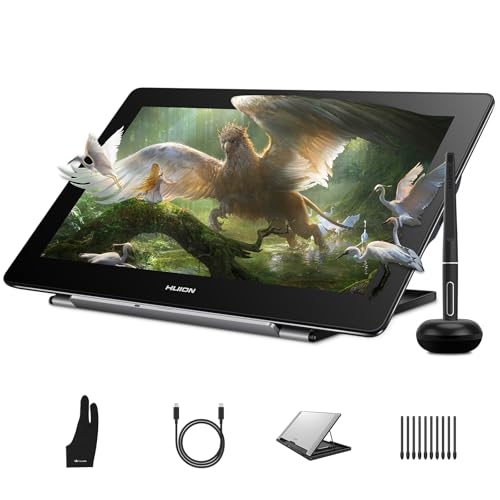
For artists seeking exceptional detail in their digital creations, the HUION Kamvas Pro 16 4K UHD Drawing Tablet stands out with its stunning 16-inch 4K display. With a 120% sRGB color gamut and 16.7 million colors, your artwork will pop with vibrancy. The fully laminated anti-glare screen provides a true “pen-on-paper” feel, reducing eye strain. You’ll appreciate the upgraded PW517 pen, boasting ±0.3mm accuracy and 8192 pressure levels for flawless tracking. Dual USB-C ports guarantee easy connectivity across devices, while the adjustable stand keeps you comfortable during long sessions. It’s perfect for professionals, students, and hobbyists alike.
Best For: Digital artists, designers, and hobbyists looking for high-resolution displays and precise pen technology for their creative work.
Pros:
- Exceptional 4K UHD display with vibrant color accuracy and detail.
- Upgraded stylus with impressive pressure sensitivity and accuracy for a natural drawing experience.
- Dual USB-C ports for easy connectivity with multiple devices.
Cons:
- The tablet is not standalone and requires a connection to a computer or compatible device.
- May be more expensive compared to lower resolution drawing tablets.
- The adjustable stand is an additional accessory and may not be included in the package.
DIGIDRAW 18.4 Inch 4K UHD Pen Display for Digital Art

If you’re an illustrator or digital artist seeking precision in your work, the DIGIDRAW 18.4 Inch 4K UHD Pen Display is a standout choice. With a stunning 3840 x 2160 resolution, it delivers vibrant colors thanks to its 99.8% sRGB and wide Adobe RGB coverage. The 16K pressure-sensitive stylus offers exceptional control, while the anti-glare screen guarantees clear visibility. Weighing only 2 kg and featuring a sleek design, it’s portable and easy to set up via USB-C. Plus, the included remote control enhances your workflow with 11 customizable shortcuts, making it perfect for digital art, photo editing, and graphic design projects.
Best For: Illustrators, designers, and digital artists seeking high precision and vibrant color accuracy in their creative work.
Pros:
- High resolution of 3840 x 2160 (4K UHD) for stunning image clarity.
- 16K pressure-sensitive stylus offers exceptional control and responsiveness.
- Portable and lightweight design (2 kg) with easy USB-C connectivity.
Cons:
- Limited compatibility with operating systems (requires Windows, ChromeOS, or Android 14+).
- Higher price point compared to basic graphic tablets, which may not suit all budgets.
- Requires adequate desk space due to its larger screen size (18.4 inches).
GAOMON Pro 19 Drawing Tablet with Screen

With its stunning 18.4-inch 4K UHD display, the GAOMON Pro 19 Drawing Tablet is perfect for artists seeking a vibrant and precise digital canvas. This fully laminated, anti-glare screen reduces eye strain while covering 99% sRGB and 98% DCI-P3 gamuts for accurate color reproduction. You’ll love the battery-free G-Pro Pen, offering 16,384 pressure levels and ±60° tilt support for effortless strokes. The adjustable stand guarantees comfort during long sessions, while seamless compatibility with major software makes it versatile. Plus, its premium performance at a competitive price point makes it an excellent choice for creators looking to elevate their artistry.
Best For: Artists and designers looking for a high-quality, precise drawing tablet with a vibrant display and extensive color accuracy.
Pros:
- High-resolution 4K UHD display provides a vibrant and clear viewing experience.
- Battery-free G-Pro Pen offers a remarkable 16,384 pressure levels for detailed line control.
- Seamless compatibility with major software like Photoshop and Illustrator enhances creative workflow.
Cons:
- Size may be cumbersome for users with limited desk space.
- Higher price point compared to non-screen drawing tablets might not fit all budgets.
- Initial setup may require multiple cables, which could complicate organization.
HUION KAMVAS Pro 27 4K UHD Drawing Tablet
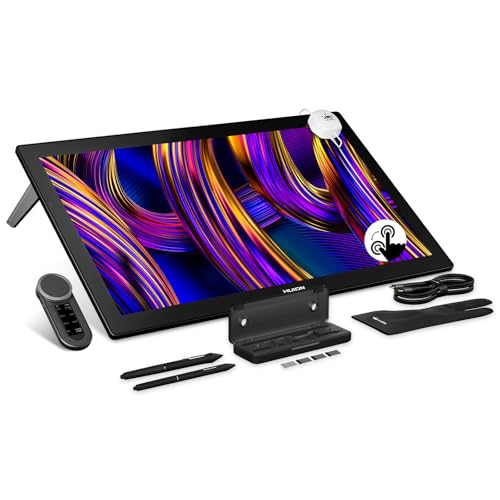
The HUION KAMVAS Pro 27 4K UHD Drawing Tablet stands out as an exceptional choice for professional artists and designers who demand top-tier visual performance. With a stunning 27-inch display at a 3840×2160 resolution and a 144Hz refresh rate, your artwork comes to life with vivid detail. You’ll appreciate the 99% sRGB and 98% Adobe RGB color gamuts, ensuring incredible color accuracy. The PW600 stylus boasts 16,384 pressure levels, giving you precision and control. Plus, with customizable shortcuts via the Keydial Remote and compatibility across various operating systems, this tablet is designed to elevate your creative experience.
Best For: Professional artists and designers seeking high-quality visual performance and precision in their digital artwork.
Pros:
- Exceptional 4K UHD display with vibrant colors and high resolution for detailed artwork.
- High pressure sensitivity of 16,384 levels for precise control and versatility in drawing techniques.
- Customizable shortcuts via the Keydial Remote enhance workflow efficiency.
Cons:
- Heavier than some other drawing tablets, which may affect portability.
- Limited compatibility with older operating systems, potentially excluding some users.
- Higher price point may not be suitable for casual users or hobbyists.
XPPen Artist13.3 Pro Graphics Drawing Tablet

For artists seeking a portable yet powerful drawing solution, the XPPen Artist 13.3 Pro Graphics Drawing Tablet stands out with its impressive 8192 levels of pressure sensitivity. Its 13.3-inch fully-laminated screen delivers a native resolution of 1920×1080, ensuring stunning visuals and a distraction-free workspace. With an ergonomic, battery-free stylus and customizable shortcut keys, you’ll enhance your workflow effortlessly. The tablet’s tilt function supports up to 60 degrees, providing versatility in your drawings. Compatible with major software on various operating systems, it’s a reliable choice for any creative project. Plus, stellar customer reviews reflect its quality and performance.
Best For: Artists and designers looking for a portable, high-performance graphics drawing tablet with advanced features.
Pros:
- High Pressure Sensitivity: 8192 levels of pressure sensitivity allow for precise and nuanced drawing.
- Fully-Laminated Screen: The fully-laminated design reduces parallax, providing a more natural drawing experience.
- Customizable Features: Includes customizable shortcut keys and a Red Dial for improved workflow efficiency.
Cons:
- Weight: At 2 kg, it may be heavier than some portable drawing tablets on the market.
- Screen Size: The 13.3-inch display may feel small for artists who prefer larger canvases.
- Limited Warranty Information: Details about the warranty may not be readily available, requiring further inquiry.
Factors to Consider When Choosing Drawing Tablets With 4K Display
When choosing a drawing tablet with a 4K display, you’ll want to take into account several key factors. Display size, color accuracy, and pen pressure sensitivity can all impact your creative process. Plus, think about connectivity features and software compatibility to guarantee a seamless experience.
Display Size Options
Choosing the right display size for your 4K drawing tablet can greatly enhance your creative process. Tablets typically range from 13.3 inches to 27 inches, catering to both portability and larger workspace needs. If you prefer detailed work, a larger screen—like 23.8 or 27 inches—offers better visibility for intricate designs. On the other hand, a 15.6-inch tablet strikes a balance between compactness and display quality, making it perfect for on-the-go artists. Consider how the display size affects your workflow; larger screens often provide a more immersive experience. Also, think about your physical space and personal comfort for extended drawing sessions. Finding the right size is essential for maximizing your artistic potential.
Color Accuracy Levels
Finding the right display size sets the stage for your creative work, but color accuracy is what truly brings your art to life. When choosing a drawing tablet, pay attention to color gamut coverage percentages—aim for at least 99% sRGB or 98% Adobe RGB to enjoy a broader spectrum of colors. A ΔE value below 1 means excellent color accuracy, ensuring your artwork reflects true colors. Consider tablets with Quantum Dot technology, as they can display over 1 billion colors, enhancing your visual experience. Don’t forget about calibration; professional hardware calibration helps maintain consistent color performance. Finally, an anti-glare coating reduces reflections, allowing for better color representation during those lengthy creative sessions.
Pen Pressure Sensitivity
To achieve a truly immersive drawing experience, pen pressure sensitivity is a critical factor in selecting a drawing tablet with a 4K display. This feature allows your stylus to detect varying levels of pressure, giving you a more natural and nuanced drawing experience. Many modern tablets offer up to 16,384 pressure sensitivity levels, enabling finer control over line thickness and opacity. Higher sensitivity helps you create detailed and dynamic strokes, closely mimicking traditional techniques. Additionally, look for tablets with tilt recognition, as they enhance shading and line variation based on the angle of your stylus. A low initial activation force is also essential, allowing light touches to register without excessive pressure, minimizing hand fatigue during extended use.
Connectivity Features
An immersive drawing experience goes beyond pen pressure sensitivity; connectivity features play an essential role in how you interact with your 4K drawing tablet. Look for tablets that offer multiple connectivity options like USB-C, HDMI, and DisplayPort. This guarantees compatibility with various devices and setups. Dual USB-C ports can enhance usability by allowing simultaneous data transfer and power supply. Make certain the tablet supports the latest USB standards, such as USB 3.1 Gen, for faster data transfer rates. Additionally, check for compatibility with multiple operating systems, including Windows, macOS, Linux, and Android. Some tablets even offer plug-and-play functionality, making it easy to connect without needing extra drivers or software installations.
Compatibility With Software
While exploring drawing tablets with a 4K display, compatibility with software is an important factor that can greatly impact your creative workflow. Make sure the tablet you choose works seamlessly with major programs like Adobe Photoshop, Illustrator, and Clip Studio Paint. Check for compatibility with your operating system—Windows 7 or higher, macOS 10.12 or higher, and Linux are common standards. It’s also vital to verify if the stylus technology matches the software you’re using, as this affects pressure sensitivity and tilt recognition. Some tablets may need specific drivers for peak performance, so confirm the manufacturer’s support. Finally, consider tablets with customizable shortcut keys to boost your productivity in various applications.
Ergonomic Design Elements
Choosing a drawing tablet with a 4K display involves more than just high-resolution graphics; you’ll want to pay close attention to ergonomic design elements that enhance your comfort during long creative sessions. An adjustable stand lets you set the tablet at your preferred angle, reducing strain as you work. Look for lightweight designs, making it easy to transport your tablet between workspaces. A fully laminated display minimizes the gap between the pen tip and cursor, offering a natural drawing experience and less hand fatigue. Multi-touch functionality supports intuitive gestures, cutting down on repetitive strain. Finally, a comfortable stylus grip with tilt sensitivity and low activation force will help reduce wrist and finger fatigue, ensuring you create art effortlessly.
Built-in Accessories Included
When selecting a drawing tablet with a 4K display, consider the variety of built-in accessories that can greatly enhance your creative experience. Many models come with essential items like styluses, pen holders, cleaning cloths, and multiple nibs, making your workflow smoother. Adjustable stands are another great addition, providing ergonomic support and allowing you to customize the screen angle during long sessions. Some tablets even include wireless keydials or remote controls for quick access to shortcuts, boosting your efficiency. Most tablets come equipped with necessary connection cables like USB-C and HDMI, ensuring easy setup. Additionally, a palm rejection glove can prevent unwanted marks, leading to cleaner, more precise artwork. These accessories can make a significant difference in your artistic process.
Warranty and Support
Investing in a drawing tablet with a 4K display means you’ll want to contemplate not just the features and accessories but also the warranty and support that come with it. Look for warranties that last between one to two years; a longer warranty often reflects the manufacturer’s confidence in the product’s durability. Make sure it covers defects in materials and workmanship, safeguarding your investment. Additionally, check if the manufacturer offers customer support services like online resources and troubleshooting guides, which can make a big difference in your experience. Finally, review the return policy; a flexible return option can give you peace of mind, allowing for exchanges or refunds if the tablet doesn’t meet your expectations.