As an artist or designer, finding the right tablet can greatly influence your creative process. With 8192 pressure levels, these devices offer unmatched sensitivity for your intricate designs. You’ll discover options like the Huion H420X and the XPPen Deco Mini7W that cater to various preferences. But before you make a choice, there are several factors to take into account that can enhance your experience and meet your specific needs. Let’s explore these essential aspects.
Huion H420X Graphics Drawing Tablet

If you’re an aspiring artist or designer looking for an affordable yet powerful digital art tablet, the Huion H420X Graphics Drawing Tablet is an excellent choice. With a compact active area of 4.17 x 2.6 inches, it’s easy to carry and set up. The battery-free stylus offers 8192 levels of pressure sensitivity, allowing you to create detailed artwork with precision. Plus, with customizable buttons, you can streamline your workflow. It’s compatible with major software and operating systems, ensuring versatility for any project. Weighing only 167g, this tablet is perfect for drawing, note-taking, or even remote work.
Best For: Aspiring artists and designers seeking an affordable, portable digital art tablet with high pressure sensitivity for detailed artwork.
Pros:
- Battery-free stylus eliminates the need for charging, providing uninterrupted creative sessions.
- Compact and lightweight design makes it easy to carry for on-the-go creativity and remote work.
- High compatibility with various software and operating systems enhances versatility for different artistic projects.
Cons:
- Limited active area may not be suitable for users who prefer larger drawing spaces.
- Not compatible with iOS, restricting use for Apple device users.
- No driver installation required could limit customization options for more advanced users.
XPPen G430S Graphic Drawing Tablet

The XPPen G430S Graphic Drawing Tablet stands out for its impressive 8192 levels of pressure sensitivity, making it an ideal choice for artists and designers who demand precision in their work. With a compact active area of 4 x 3 inches and a featherweight design at just 0.25 pounds, it’s easy to carry around. You’ll love the battery-free PN01 stylus that requires no charging. Compatible with various OS and perfect for both left and right-handed users, it enhances your online teaching, remote work, and creative projects. Plus, enjoy a 12-month warranty and a solid 4.2-star customer rating.
Best For: The XPPen G430S Graphic Drawing Tablet is best for artists, designers, and educators who seek a portable and precise drawing solution.
Pros:
- Impressive pressure sensitivity: With 8192 levels, it allows for detailed and nuanced artwork.
- Lightweight and portable: Weighing only 0.25 pounds, it’s easy to take on the go.
- Battery-free stylus: The included PN01 stylus requires no charging, ensuring uninterrupted creativity.
Cons:
- Limited active area: The 4 x 3 inches size may feel small for some users.
- Not compatible with iOS devices: Users with iPads or iPhones cannot utilize this tablet.
- Requires driver installation: Users may need to uninstall other brand drivers before setup, which can be inconvenient.
XPPen Deco 01 V3 Drawing Tablet

Artists and designers looking for a versatile and user-friendly drawing tablet will find the XPPen Deco 01 V3 to be an excellent choice. With its 10 x 6.25-inch surface, this lightweight tablet is perfect for on-the-go creativity. You’ll appreciate the 16,384 levels of pressure sensitivity and tilt support for smooth lines and shading. It’s compatible with major software and various operating systems, ensuring seamless integration into your workflow. The included accessories, like the battery-free stylus and 10 nibs, enhance your experience. Plus, the 12-month warranty adds peace of mind, making this tablet a reliable companion for your artistic journey.
Best For: Artists and designers seeking a versatile and user-friendly drawing tablet for digital art, teaching, and note-taking.
Pros:
- Large drawing area of 10 x 6.25 inches encourages creativity without limitations.
- 16,384 levels of pressure sensitivity and tilt support provide smooth lines and shading.
- Compatible with major design software and various operating systems for seamless integration.
Cons:
- May require additional adapters for certain devices, depending on connectivity.
- Heavier than some other portable tablets, which might affect portability for some users.
- Limited advanced features compared to higher-end models in the market.
YZ08 Digital Graphic Art Tablet with Battery-Free Stylus

For those diving into the world of digital art, the YZ08 Digital Graphic Art Tablet with Battery-Free Stylus stands out as an exceptional choice. This compact 6 x 4 inch tablet offers 8192 pressure levels, ensuring precise control and a natural pen-on-paper feel. With virtually no lag and a 60° tilt function, you’ll enjoy an advanced drawing experience. Its lightweight design makes it portable, easily fitting in your laptop case. Compatible with popular software like Photoshop and Illustrator, it’s perfect for drawing, animation, and photo editing. Plus, the included accessories and excellent customer support enhance your creative journey.
Best For: Beginners and aspiring digital artists looking for a portable and user-friendly drawing tablet.
Pros:
- Advanced pen performance with 8192 levels of pressure sensitivity for precise control.
- Compact and lightweight design makes it easy to carry and store.
- Compatible with a variety of creative software, enhancing versatility for different applications.
Cons:
- Smaller working area compared to larger tablets, which may limit some users.
- Lacks advanced features found in high-end models, which may be a drawback for professional artists.
- Limited customer reviews may not provide a comprehensive view of long-term performance.
XPPen Deco Mini7W Graphic Tablet
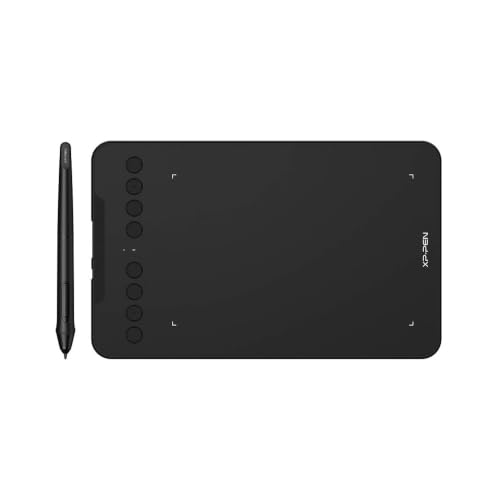
With its impressive 8192 levels of pressure sensitivity, the XPPen Deco Mini7W Graphic Tablet stands out as an excellent choice for digital artists and designers looking for precision and control. This wireless drawing tablet, measuring 7 x 4 inches, offers the freedom of 2.4 GHz wireless technology and supports USB-C connections. Its battery-free stylus features tilt-response capabilities, ensuring smooth tracking without delays. You’ll appreciate the eight customizable press keys that enhance your workflow, making it user-friendly. Plus, it’s compatible with various devices, including Windows, Mac, Android, and Chrome OS, allowing you to create anywhere effortlessly.
Best For: Digital artists and designers seeking precision and control in their drawing experience.
Pros:
- 8192 levels of pressure sensitivity for detailed and dynamic artwork.
- Wireless connectivity offers freedom of movement while drawing.
- Customizable press keys enhance workflow efficiency and convenience.
Cons:
- Size may be limiting for users who prefer larger drawing surfaces.
- Compatibility issues may arise with older operating systems.
- No built-in storage for saving files directly on the tablet.
HUION Inspiroy H1060P Graphics Drawing Tablet

The HUION Inspiroy H1060P Graphics Drawing Tablet stands out for its impressive 8192 levels of pressure sensitivity, making it an excellent choice for both professional artists and enthusiastic beginners. With a sleek 10mm ultra-slim design and a generous active area of 10 x 6 inches, it offers comfort during long sessions. The tablet features 12 programmable press keys and 16 soft keys for easy shortcuts, enhancing your workflow. Plus, the battery-free PW100 stylus means you won’t have to worry about charging. Whether you’re left or right-handed, this versatile tablet adapts to your needs, ensuring a smooth drawing experience.
Best For: Professional artists, beginners, and hobbyists seeking a versatile and responsive drawing tablet.
Pros:
- 8192 levels of pressure sensitivity for precise and nuanced drawing.
- Battery-free stylus eliminates the need for charging, ensuring uninterrupted creativity.
- Customizable keys allow for enhanced workflow and efficiency tailored to individual preferences.
Cons:
- Cursor issues reported with certain SAMSUNG Galaxy S series devices.
- Requires USB adapter for Mac usage, adding an extra accessory to consider.
- Limited compatibility with iPhone/iPad, restricting mobile use for some users.
HUION Inspiroy H640P Drawing Tablet

Artists and designers seeking a versatile tool for their creative process will find the HUION Inspiroy H640P Drawing Tablet an excellent choice. This compact tablet, measuring 6×4 inches, is lightweight at just 1.41 lbs, making it easy to transport. The battery-free PW100 stylus offers 8192 pressure levels, ensuring a natural drawing experience. With six customizable hotkeys, you can streamline your workflow and switch seamlessly between tools. It’s compatible with various operating systems, including Android, and works well with popular software like Photoshop and OneNote. Plus, the one-year warranty provides peace of mind for your investment.
Best For: Beginners in digital art, graphic design, photo editing, and online teaching who seek a user-friendly and portable drawing tablet.
Pros:
- Lightweight and compact design makes it easy to transport, ideal for home, work, or class.
- Battery-free PW100 stylus with 8192 levels of pressure sensitivity offers a natural drawing experience.
- Customizable hotkeys enhance workflow efficiency by allowing quick access to frequently used functions.
Cons:
- Limited compatibility as it does not work with iOS devices.
- Small drawing area (6×4 inches) may not be suitable for users who prefer larger working spaces.
- Learning curve for those new to digital art and graphic design software.
XPPen Artist 13.3 Pro Drawing Tablet with Screen

For designers and illustrators looking for precision and versatility, the XPPen Artist 13.3 Pro Drawing Tablet stands out with its impressive 8192 levels of pressure sensitivity. Its 13.3-inch fully-laminated screen offers a native resolution of 1920×1080, ensuring a vibrant and clear display. You’ll enjoy a lag-free experience with 220 RPS and an ergonomic, battery-free stylus with 8 replacement nibs. With customizable shortcut keys and a Red Dial for quick adjustments, your workflow becomes seamless. Compatible with major software and various operating systems, this tablet is a solid choice for anyone serious about their craft.
Best For: Designers and illustrators seeking a high-quality drawing tablet with precision and versatile features for their creative work.
Pros:
- High Pressure Sensitivity: Offers 8192 levels of pressure sensitivity for detailed and nuanced drawing.
- Full-Laminated Screen: Reduces parallax for a more accurate drawing experience and enhances display clarity.
- Customizable Features: Includes programmable shortcut keys and a Red Dial for efficient workflow adjustments.
Cons:
- Weight: At 2 kg, it may be less portable compared to lighter alternatives.
- Size Limitations: The 13.3-inch screen may not be sufficient for users who prefer larger drawing surfaces.
- Compatibility Issues: While it supports many major software programs, some niche applications may not be compatible.
HUION Inspiroy H950P Drawing Tablet

When you’re looking for a versatile drawing tablet, the HUION Inspiroy H950P stands out with its impressive 8192 levels of pressure sensitivity. This 8×5 inch tablet, weighing just 1.76 lbs, is perfect for artists and designers alike. Its battery-free PW100 stylus offers a lightweight feel and accurate control, complete with side buttons for quick pen-to-eraser switching. With eight customizable shortcut keys, you can streamline your workflow efficiently. Compatible with various operating systems and software like Photoshop and Medibang Paint, it’s an ideal choice for students, teachers, and content creators. Plus, it’s compact enough to take anywhere!
Best For: The HUION Inspiroy H950P is best for art students, teachers, artists, and content creators who seek a portable and versatile drawing tablet for digital art and writing.
Pros:
- High Pressure Sensitivity: Offers 8192 levels of pressure sensitivity for realistic drawing experiences.
- Customizable Shortcuts: Features 8 customizable shortcut keys to enhance workflow efficiency.
- Battery-Free Stylus: The PW100 stylus provides accurate control without the need for charging.
Cons:
- Limited Active Area: The 8×5 inch active surface may feel small for some professional artists.
- USB Connectivity Only: Lacks wireless connectivity options, limiting mobility during use.
- Software Compatibility: While it supports many programs, some niche software may not be fully compatible.
GAOMON M10K Drawing Tablet (10×6 inch)

The GAOMON M10K Drawing Tablet stands out with its impressive 8192 levels of pressure sensitivity, making it an ideal choice for aspiring and professional creators alike. With a spacious 10 x 6.25-inch working area and a papery texture surface, you’ll enjoy a natural drawing experience. The battery-free stylus provides accurate control, while 10 customizable hotkeys and a creative touch ring enhance your workflow. It’s compatible with Windows, macOS, and select Android devices, working seamlessly with popular software like Photoshop and OneNote. Plus, it comes with a 1-year warranty, ensuring your investment is protected.
Best For: Artists, content creators, designers, students, and teachers seeking a reliable and versatile drawing tablet for their creative projects.
Pros:
- 8192 levels of pressure sensitivity for precise control and natural drawing experience.
- Large working area of 10 x 6.25 inches with a papery texture surface simulating pen-on-paper drawing.
- Customizable hotkeys and a creative touch ring streamline workflow and enhance usability.
Cons:
- Requires driver installation which may be cumbersome for some users.
- Limited compatibility with certain older Android devices.
- USB connection only, which may limit portability compared to wireless options.
Factors to Consider When Choosing Tablets With 8192 Pressure Levels
When you’re choosing a tablet with 8192 pressure levels, there are several key factors to think about. Consider the active drawing area size, stylus features, and how well the tablet works with your devices. It’s also important to look at connectivity options and customizable shortcut keys to enhance your workflow.
Active Drawing Area Size
Choosing the right active drawing area size is essential for maximizing your creativity on tablets with 8192 pressure levels. The size you pick directly influences your artwork’s detail and fluidity. Larger areas, like 10 x 6 inches, offer more freedom for intricate details and sweeping strokes, making them perfect for professional artists. On the other hand, smaller sizes, such as 4 x 3 inches, are more portable and fit well in limited spaces, ideal for casual users. Consider your drawing style: if you focus on fine details, a medium-sized tablet might suit you better, while broad sketchers may prefer a larger surface. Matching the active area size to your needs guarantees a balance between usability and portability.
Stylus Features and Design
Stylus features and design play an essential role in enhancing your creative process with tablets boasting 8192 pressure levels. A battery-free stylus eliminates the hassle of charging, allowing you to draw without interruptions. With 8192 levels of pressure sensitivity, you gain precise control over line thickness and opacity, perfect for detailed artwork. Tilt support further enriches your drawing experience, enabling varied line widths and shading techniques that mimic traditional tools. Customizable buttons can streamline your workflow, providing quick access to functions like erasing or right-clicking. Plus, an ergonomic design guarantees comfort during extended use, reducing fatigue and improving your overall experience. Selecting the right stylus can greatly elevate your digital artistry.
Compatibility With Devices
Ensuring your tablet is compatible with your devices is essential for a seamless creative experience. First, check the operating system; many tablets support Windows 7 or later, macOS 10.10 or higher, and specific Android versions, but some may not work with iOS devices. If you’re in the Apple ecosystem, this could limit your options. Additionally, determine if the tablet requires driver installation. Some models are plug-and-play, while others need specific drivers for optimal performance. Consider connectivity methods, too; USB is standard, but wireless options offer added convenience. Finally, verify that the tablet supports the software applications you intend to use, as compatibility can vary greatly between different graphic design and drawing programs.
Connectivity Options Available
When you’re considering a tablet with 8192 pressure levels, connectivity options play an essential role in your overall experience. Many graphic tablets use USB connections, allowing for easy plug-and-play setups, so you won’t deal with complicated installations. Some models offer wireless connectivity, like 2.4 GHz technology, giving you more freedom while you draw. It’s vital to check compatibility with your operating system, whether it’s Windows, macOS, or Android, as this can depend on connection types like USB-A, USB-C, or OTG adapters. Additionally, certain tablets may require driver installations, especially if you’re switching between brands. Make sure the tablet’s connectivity options align with your devices, particularly if you’re working with computers or laptops that have limited ports.
Customizable Shortcut Keys
For artists and designers, customizable shortcut keys on tablets with 8192 pressure levels can greatly enhance your workflow. These keys allow you to assign frequently used functions, cutting down on repetitive actions in your software. Many tablets come with 6 to 12 programmable keys, which you can tailor for tasks like erasing, zooming, or switching tools. The ability to customize keys per application means you can optimize your experience based on the specific software you’re using, boosting your productivity. Shortcut keys speed up your digital creation process, providing quick access to important features without disrupting your creative flow. Some tablets even offer a mix of physical buttons and touch-sensitive areas for added flexibility in interacting with your digital workspace.
Weight and Portability
While choosing a tablet for your artistic endeavors, weight and portability are essential factors that can greatly affect your creative process. Lighter tablets, like the Huion H420X at just 167g, make it easy to carry your creativity wherever you go. Thickness matters too; slimmer models, such as the XPPen G430S at 2mm, fit conveniently in your bag. Aim for a balance between weight and active area size—larger surfaces, like the XPPen Deco 01 V3 at 10 x 6.25 inches, may be heavier but enhance your drawing experience. If you’re after extreme portability, look for options around 0.25 pounds (113g) or less. A lightweight tablet can also reduce strain during longer sessions, making your art journey more enjoyable.