If you want a compact second screen without committing to a full desk setup, this Laptop Screen Extender review covers the main buying questions.
The pitch is straightforward: extra workspace, quick setup, and a design aimed at business travel and home office use.
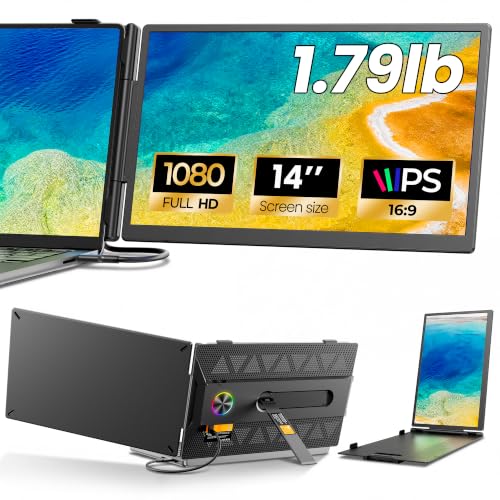
Laptop Screen Extender Review Summary
This Laptop Screen Extender makes the most sense for people who live in browser tabs, dashboards, documents, and side-by-side comparisons.
It is aimed at users who want a portable dual-screen setup that stays simple enough for frequent travel, temporary workstations, or a clutter-free home office.
Verdict: it is best viewed as a productivity accessory, not a creative display.
If you care most about fast deployment, broad laptop compatibility, and a clean extra workspace for reference material, this Laptop Screen Extender looks like a strong fit.
If you need a color-critical panel, a larger desktop-style monitor, or a multi-purpose display for gaming and media, the spec sheet gives less reason to choose it.
Review Scorecard
| Category | Score | Why it matters |
|---|---|---|
| Portability | 9/10 | The 14-inch size and 1.9 lb claim point to an easy carry for travel and mobile work. |
| Setup simplicity | 9/10 | USB-C plug-and-play positioning is ideal when you want less friction and fewer cables. |
| Productivity value | 8/10 | A second 1080p panel is useful for code, documents, dashboards, and comparison work. |
| Image quality | 7/10 | 100% sRGB, 300 nits, IPS, and 1080p are solid for office use, but not premium display territory. |
| Compatibility | 8/10 | The stated 13-17.3 inch laptop support broadens the likely buyer base. |
| Comfort for long sessions | 8/10 | Anti-glare and low blue light claims suit extended workdays better than glossy consumer screens. |
Key Features and Specifications of Laptop Screen Extender
The core appeal is a 14-inch FHD 1080p IPS display built as a laptop-mounted or laptop-adjacent second screen.
The product data points to a compact external monitor meant to extend desktop space rather than replace your main laptop display.
The listed display claims are practical for work: 100% sRGB color coverage, 300 nits brightness, a 60Hz refresh rate, and a 1000:1 contrast ratio.
Those numbers suggest a credible office-grade panel with enough clarity for text, charts, documents, and multitasking, though nothing in the evidence suggests this is meant for specialized photo or video grading.
Compatibility is one of the strongest selling points.
The listing says it supports 13-17.3 inch laptops and works with macOS and Windows through USB-C plug and play.
That matters because the best portable monitor is often the one that reduces setup time enough that you actually use it every day.
Other listed design elements lean into a professional travel workflow:
- Carbon-fiber-inspired finish for a more polished look.
- Integrated LED ambient ring light described as a status indicator.
- Rear hollowed structure for airflow and thermal stability.
- Anti-glare screen and low blue light technology for longer sessions.
- Ultra-thin, 1.9 lb form factor for portable use.
The brand language also emphasizes AI-assisted work, coding, trading, and data analysis.
I would treat that as positioning rather than a special technical feature.
The useful part is still the same: a second screen that helps you separate active work from reference material.
Pros and Cons of Laptop Screen Extender
Pros
- Portable enough for real travel use. The 14-inch size and light claimed weight make it easier to keep in a bag than a full monitor.
- Good fit for office productivity. Side-by-side documents, code, dashboards, and spreadsheets are exactly the kind of tasks that benefit from extra screen area.
- Low-friction setup. USB-C plug-and-play support is the right direction for a work accessory.
- Readable spec mix for business use. 1080p, IPS, 100% sRGB, and 300 nits are sensible rather than flashy.
- Broad laptop support. The stated compatibility range should help if you move between different machines.
Cons
- Not positioned as a premium visual display. The evidence does not suggest it is aimed at creators who need top-tier color precision.
- More accessory than standalone monitor. If you want a general-purpose external display for gaming, media, or a desk that never moves, this is not the obvious choice.
- Marketing claims outpace hard proof. Some language about AI workflows and ambient indicators reads more like branding than functional differentiation.
- The value depends on your workflow. People who rarely need two screens may not get enough benefit from a portable extender.
Who Should Buy Laptop Screen Extender?
This Laptop Screen Extender is best for buyers who already know a second screen changes how they work.
That includes remote workers, analysts, programmers, traders, and anyone who constantly flips between a main task and a reference source.
If your normal routine involves comparisons, monitoring, note-taking, or quick context switching, the productivity case is clear.
It also makes sense for travelers and hybrid workers who do not want to carry a full-size external monitor.
A portable extender is most valuable when you need more workspace in a hotel, coworking space, or temporary office and still want a setup that packs away quickly.
The weaker fit is for buyers who expect a one-device solution for entertainment, color-sensitive work, or a permanent desk display.
If your laptop screen is already enough for your daily workflow, the extra hardware may feel unnecessary.
Workflows That Benefit From Laptop Screen Extender
Coding and Debugging
The listing repeatedly targets developers, and that is believable from a workflow standpoint.
A second vertical or side-by-side workspace is useful for source code, logs, documentation, and test output, even if the panel itself is not specialized for developer-only features.
Data, Trading, and Dashboards
The product copy highlights analysts and traders, which fits the use case better than flashy consumer use.
Extra screen space is valuable when you want one panel for charts or metrics and another for the active spreadsheet or browser tab.
Travel and Shared Desks
This is where the form factor matters most.
A portable second display is easiest to justify when you move often or cannot rely on a fixed office monitor.
The combination of plug-and-play claims, compact size, and lightweight design should reduce setup friction.
Long Work Sessions
The anti-glare and low blue light claims are practical, even if they are not unique.
They matter because portable displays are most useful when you keep them open for hours, not just for occasional reference.
Alternatives to Laptop Screen Extender
If you want a similar portable-monitor path, the most obvious alternatives are established portable display lines from brands like ASUS ZenScreen and ViewSonic portable monitor.
Those are worth checking if you want a more recognizable monitor brand or a broader range of screen sizes and resolutions.
If your priority is more about dual-screen laptop accessories than a separate portable monitor, search for mobile pixel portable monitor or Lenovo portable monitor.
These searches give you a practical comparison set without locking you into this exact model.
For buyers who want a generic but often cheaper class of option, an Amazon search for portable monitor USB-C 14 inch will surface many similar products.
That is useful if you want to compare mount style, brightness claims, and travel friendliness before deciding.
Is Laptop Screen Extender Worth It?
Yes, if your work genuinely improves with a second screen and you want that setup to stay portable.
The evidence points to a sensible productivity-first display with the right basics: 14-inch size, 1080p IPS panel, USB-C plug-and-play positioning, broad laptop support, and enough claimed color and brightness for office work.
It is worth it for mobile productivity users. It is less compelling if you want a desktop monitor replacement, creative-grade color performance, or a screen that earns its keep through entertainment as much as work.
For the right buyer, though, this Laptop Screen Extender looks like a practical way to reclaim workspace without adding much carry weight.