A good mini desktop can free up desk space without making everyday work feel cramped. The right choice depends on more than processor speed: ports, monitor support, memory, and upgrade options can matter just as much.
These 10 picks span new business desktops, general-purpose mini PCs, and renewed systems. Use the buying guide below to narrow the field by workload, setup, and budget.
Best 10 Ultra Small Form Factor PCs Picks for 2026
Best for Office Desks
Lenovo ThinkCentre neo 50q Gen 5

- 1L chassis supports VESA mounting
- Eight-core Intel Core 5 210H
- Windows 11 Pro and discrete TPM 2.0
Best For: Compact, security-focused office setups
Best for Network Projects
GMKtec M5 Ultra Ryzen 7 Mini PC

- Dual 2.5GbE Ethernet ports
- Ryzen 7 7730U with 16GB RAM
- Three-display support
Best For: Compact network workstations and home labs
Best for Business Multitasking

- 64GB installed DDR5 RAM
- 14-core Intel Core Ultra 5 235T
- 1.2L chassis with business security features
Best For: Memory-heavy business workloads
Best for Storage Out of the Box

- 16GB RAM and 1TB SSD included
- Triple-display connectivity
- Two M.2 slots and 2.5GbE Ethernet
Best For: Tiny everyday desktops needing ample included storage
Budget Office Pick
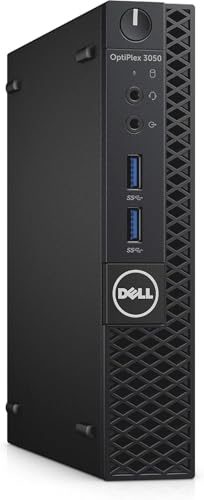
- Renewed compact desktop
- Core i5-7500T, 8GB RAM, 256GB SSD
- Windows 11 Pro; 90-day warranty
Best For: Basic productivity in tight workspaces
Creative Workstation Pick

- Core Ultra 9 185H with NPU
- 24GB LPDDR5 and 500GB SSD
- Dual Ethernet; three-year warranty
Best For: Creative multitasking and local AI experimentation
Modern Business Pick

- Core Ultra 5 235T; Windows 11 Pro
- USB-C, five USB-A ports, dual displays
- Check chosen RAM and SSD configuration
Best For: Compact business desks with multiple peripherals
Best for Multi-Display Workflows

- Supports up to four displays
- Dual USB4 plus dual HDMI 2.0
- 16GB RAM; 256GB NVMe SSD
Best For: Multi-monitor work and specialized business setups
Best Heavy-Duty Pick

- Ryzen 5 5650G with 16GB RAM
- 512GB PCIe SSD
- Dual DisplayPort 1.4 outputs
Best For: Compact dual-monitor office work
Best Renewed Office Option
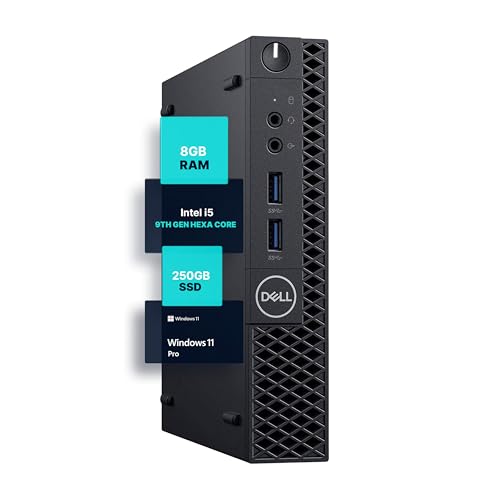
- Six-core Intel Core i5-9500
- 8GB RAM and 250GB SSD
- Windows 11 Pro pre-installed
Best For: Renewed compact PC for everyday productivity
Best for Office Desks – Lenovo ThinkCentre neo 50q Gen 5
Among ultra small form factor pcs, the ThinkCentre neo 50q Gen 5 is a practical choice for a tidy business desk. Its 1L chassis pairs an eight-core Intel Core 5 210H with Windows 11 Pro and can be VESA-mounted behind a monitor.
Best For: Office users who want a compact, security-focused desktop with two display outputs.
Pros:
- Eight-core, 12-thread processor suits everyday multitasking.
- HDMI and DisplayPort support dual 4K displays.
- Includes Wi-Fi 6E, Gigabit Ethernet, a keyboard and a mouse.
- Discrete TPM 2.0 and a Kensington slot add security options.
Cons:
- Included 8GB RAM may be limiting for heavier multitasking.
- 512GB storage may require an external drive for large files.
The strongest reason to choose this model is its combination of small size, business features and ready-to-use peripherals; check whether the included memory meets your workload.
Best for Network Projects – GMKtec M5 Ultra Ryzen 7 Mini PC
The GMKtec M5 Ultra stands out among ultra small form factor pcs for its dual 2.5GbE ports, useful for a compact network workstation or home-lab setup. Its eight-core Ryzen 7 7730U and 16GB RAM also make it a capable everyday productivity machine.
Best For: Buyers who want fast wired networking, three display connections and room to expand storage.
Pros:
- Dual 2.5GbE ports offer flexible wired-network connections.
- Supports three displays through HDMI, DisplayPort and USB-C.
- 16GB RAM can be expanded to 64GB, according to the listing.
- Wi-Fi 6E and Bluetooth 5.2 are included.
Cons:
- The included 256GB SSD is modest for games or large projects.
- RAM comes as one 16GB module; upgrades are not included.
Choose this model for its networking and connectivity rather than the gaming name alone: the listed Radeon graphics are integrated, and storage-heavy buyers should budget for an upgrade.
Best for Business Multitasking – Dell Pro Micro QCM1250
The Dell Pro Micro QCM1250 is one of the ultra small form factor pcs aimed squarely at busy offices. This listing pairs a 1.2L chassis and Windows 11 Pro with a 14-core Intel Core Ultra 5 235T, 64GB DDR5 RAM and business-oriented security features.
Best For: Businesses that need generous installed memory in a compact desktop.
Pros:
- 64GB of installed DDR5 RAM accommodates demanding multitasking.
- Intel Core Ultra 5 235T includes a dedicated 13 TOPS NPU.
- HDMI, DisplayPort, Ethernet, Wi-Fi 6E and Bluetooth provide varied connectivity.
- Chassis intrusion detection and a Kensington lock slot support office security.
Cons:
- Storage is listed as up to 2TB; confirm the selected configuration before buying.
- The optional all-in-one stand is not listed as included.
This is the strongest fit here for memory-heavy office work. Because it is professionally upgraded by PCOnline US, verify the exact SSD configuration and the separate warranty coverage for upgraded parts.
Best for Storage Out of the Box – GMKtec G10 Ryzen 5 Mini PC
If you want ample included storage in an especially small desktop, the GMKtec G10 is worth comparing with other ultra small form factor pcs. Its listed configuration has 16GB RAM and a 1TB SSD in a 4.1-by-3.8-by-1.7-inch case.
Best For: Everyday computing, media use and compact workstations that benefit from a 1TB SSD and three display outputs.
Pros:
- 1TB SSD provides more included storage than the other GMKtec model in this roundup.
- HDMI, DisplayPort and USB-C can connect three displays.
- Two M.2 2280 slots allow additional storage expansion.
- 2.5GbE Ethernet supports a fast wired connection.
Cons:
- Ryzen 5 3500U is a four-core processor, so demanding multitasking may favor a higher-core option.
- Wi-Fi 5 and Bluetooth 5.0 are older wireless standards than those listed for some alternatives here.
The G10 makes sense when included storage and a tiny footprint matter most. Its triple-display capability is useful for productivity, but the integrated Radeon Vega 8 graphics are better matched to casual gaming than demanding titles.
Budget Office Pick – Dell OptiPlex 3050 Micro
Among ultra small form factor pcs, this renewed OptiPlex is a practical choice for basic office work where desk space is tight. Its Core i5-7500T, 8GB of RAM, and 256GB SSD cover everyday documents, browsing, and routine multitasking.
Best For: A compact, ready-to-use desktop for everyday business, school, or home tasks.
Pros:
- Small 7.1 x 1.3 x 7-inch chassis fits discreetly on a desk.
- SSD and 8GB DDR4 memory support responsive everyday use.
- Includes Windows 11 Pro, Wi-Fi, Ethernet, and DisplayPort.
Cons:
- Renewed 2017-era hardware is less suited to demanding workloads.
- Listed warranty is 90 days.
Choose it for straightforward productivity rather than performance-intensive work, and check that its DisplayPort output suits your monitor.
Creative Workstation Pick – GEEKOM IT13 MAX AI Mini PC
The GEEKOM IT13 MAX brings stronger creative-workload specifications to ultra small form factor pcs. Its Core Ultra 9 185H, 24GB of LPDDR5 memory, and 500GB SSD make it a better fit for heavier multitasking and editing than a basic office mini desktop.
Best For: Creators and developers seeking a compact PC for demanding multitasking and local AI experimentation.
Pros:
- Core Ultra 9 185H includes an NPU for supported AI workloads.
- 24GB LPDDR5 memory and a 500GB SSD suit busy workflows.
- Dual Ethernet, support for up to four displays, and a three-year warranty.
Cons:
- 500GB storage may fill quickly with large video or project files.
- On-board LPDDR5 memory limits memory-upgrade flexibility.
It is the performance-oriented option here if your desk is small but your workload is not; verify the exact display connections and operating-system configuration before ordering.
Modern Business Pick – Dell Pro Micro QCM1250
For businesses comparing ultra small form factor pcs, the Dell Pro Micro QCM1250 pairs a compact 2.6-pound design with a Core Ultra 5 235T and Windows 11 Pro. Its range of listed memory and SSD configurations lets buyers match the setup to their workload.
Best For: Space-constrained offices needing a current business desktop with flexible connectivity.
Pros:
- Core Ultra 5 235T and available DDR5 configurations support office multitasking.
- USB-C, five USB-A ports, Ethernet, HDMI, and DisplayPort accommodate common peripherals.
- Wi-Fi 6E, Bluetooth, and dual-display support add deployment flexibility.
Cons:
- Memory and storage vary by configuration, so check the selected listing carefully.
- The new computer is resealed for upgrades and carries a one-year warranty from the upgrading seller.
This is a sensible fit when ports, business features, and a small footprint matter more than getting the lowest-cost mini PC.
Best for Multi-Display Workflows – GEEKOM IT12 Mini PC
Among ultra small form factor pcs, the GEEKOM IT12 stands out for its four-display support and connectivity suited to both office desks and specialized business setups. Its Intel Core i3-12300HE, 16GB RAM, and 256GB NVMe SSD provide the listed starting configuration.
Best For: Multi-monitor office work, digital signage, and business setups needing USB4 or industrial-device expansion.
Pros:
- Dual USB4 and dual HDMI 2.0 support up to four displays.
- 16GB DDR4 RAM is listed as expandable to 96GB.
- 2.5Gbps LAN and RS-232/RS-485 expansion broaden its business uses.
Cons:
- The included 256GB SSD may be limiting if you keep many large files locally.
- Industrial-device connectivity requires expansion rather than being listed as a standard port.
The IT12 is the most flexible connectivity pick here if your small PC must serve more than a single workstation. Check the storage and expansion configuration against your actual setup before buying.
Best Heavy-Duty Pick – HP Elite 805 Mini PC
The HP Elite 805 is a practical choice among ultra small form factor pcs for an office desk that needs Windows 11 Pro and two 4K displays. This configuration lists a Ryzen 5 5650G, 16GB RAM, a 512GB PCIe SSD, and an included keyboard and mouse.
Best For: Everyday office multitasking with dual monitors and a compact desktop footprint.
Pros:
- Two DisplayPort 1.4 outputs support a dual-display setup.
- Front USB-C and multiple USB-A ports make accessories easier to connect.
- 16GB RAM and a 512GB SSD offer a useful starting configuration for office work.
Cons:
- The listed rear display connections are DisplayPort, so HDMI monitors may need adapters.
- No dedicated graphics card is listed.
At 6.96 x 6.88 x 1.33 inches, it fits a tight workspace while retaining a useful selection of ports. It makes the most sense when your monitors and accessories match its listed connections.
Best Renewed Office Option – Dell OptiPlex 3070 Micro
If you are considering renewed ultra small form factor pcs for basic work, the Dell OptiPlex 3070 Micro pairs a six-core Intel Core i5-9500 with Windows 11 Pro. The supplied configuration has 8GB DDR4 RAM, a 250GB SSD, and Wi-Fi and Bluetooth connectivity via an adapter.
Best For: Space-conscious home or office users who want a renewed PC for browsing and everyday productivity.
Pros:
- Six-core i5-9500 is suited to the listed everyday multitasking uses.
- Windows 11 Pro comes pre-installed.
- Compact Micro design helps keep a desk uncluttered.
Cons:
- 8GB RAM and a 250GB SSD are modest starting capacities.
- The listing specifies a 30-day warranty.
This is the straightforward space-saving choice for routine tasks rather than demanding workloads. Because it is renewed, weigh the listed warranty and included configuration before deciding.
How We Picked the Best Ultra Small Form Factor PCs
We focused on the listed processor, memory, storage, connectivity, display claims, and whether each system is sold new or renewed. The selection covers everyday home use, business deployments, multi-monitor desks, and more demanding multitasking. A listing alone cannot establish real-world noise, sustained performance, or long-term reliability, so check independent testing and the exact configuration before buying.
Quick Comparison: Where Each Type Fits
For managed office setups, start with the Lenovo ThinkCentre neo 50q Gen 5, Dell Pro Micro QCM1250 listings, and HP Elite 805 Mini. The two QCM1250 entries appear to describe closely related configurations; compare their actual specifications, seller, warranty, and included operating system rather than treating their names as proof of a performance difference.
The GEEKOM IT13 MAX and IT12, plus the GMKtec M5 Ultra and G10, offer alternatives for home offices and general multitasking. The renewed OptiPlex 3050 Micro and 3070 Micro are worth considering when upfront price matters most, provided their condition and support terms suit you.
Key Buying Factors for Ultra Small Form Factor PCs
Processor and Workload
Match the CPU to what you actually do. Browsing, documents, and video calls need less headroom than heavy spreadsheets, coding, or frequent multitasking. Do not assume that a product name containing “Gaming” or “AI” guarantees strong game performance or particular AI features; check benchmarks and software requirements. Also verify the precise processor in listings that omit a full model number.
Memory, Storage, and Upgrades
For a new general-purpose purchase, 16GB of RAM is a useful starting point; 8GB can be workable for lighter use but leaves less room to grow. A 256GB SSD may fill quickly once applications and files accumulate. Check whether RAM is soldered or replaceable, whether there is a spare storage slot, and what upgrades the seller permits under warranty.
Ports, Displays, and Placement
Count the USB ports you need and confirm the type and version of each display output. Claims such as “dual 4K” or “triple 4K” may depend on specific ports, refresh rates, or adapters. For a wall- or monitor-mounted PC, check VESA compatibility, cable clearance, airflow, and access to the power button. Confirm Wi-Fi, Ethernet speed, and included accessories rather than assuming they are standard.
Renewed Systems and Operating Systems
For renewed Dell models, review the seller’s condition grade, return window, warranty, and whether the pictured configuration matches the shipped unit. Confirm that the installed Windows edition is properly licensed and supported on that exact hardware; a Windows 11 Pro listing by itself does not settle compatibility questions.
Who Should Buy Which Ultra Small Form Factor PCs?
Choose a business-oriented Lenovo, Dell, or HP model if deployment consistency and support are priorities. Consider the GEEKOM or GMKtec options if your main goal is a compact personal PC and their specific ports and upgrade paths meet your needs. Choose a renewed OptiPlex if the lower purchase price outweighs an older platform and potentially shorter support horizon. Before checkout, compare the exact SKU—not just the headline product name—against your monitor, software, and warranty requirements.